
python 多线程糗事百科案例
案例要求参考上一个糗事百科单进程案例
Queue(队列对象)
Queue是python中的标准库,可以直接import Queue引用;队列是线程间最常用的交换数据的形式
python下多线程的思考
对于资源,加锁是个重要的环节。因为python原生的list,dict等,都是not thread safe的。而Queue,是线程安全的,因此在满足使用条件下,建议使用队列
初始化: class Queue.Queue(maxsize) FIFO 先进先出
包中的常用方法:
Queue.qsize() 返回队列的大小
Queue.empty() 如果队列为空,返回True,反之False
Queue.full() 如果队列满了,返回True,反之False
Queue.full 与 maxsize 大小对应
Queue.get([block[, timeout]])获取队列,timeout等待时间
创建一个“队列”对象
- import Queue
- myqueue = Queue.Queue(maxsize = 10)
将一个值放入队列中
- myqueue.put(10)
将一个值从队列中取出
- myqueue.get()
多线程示意图
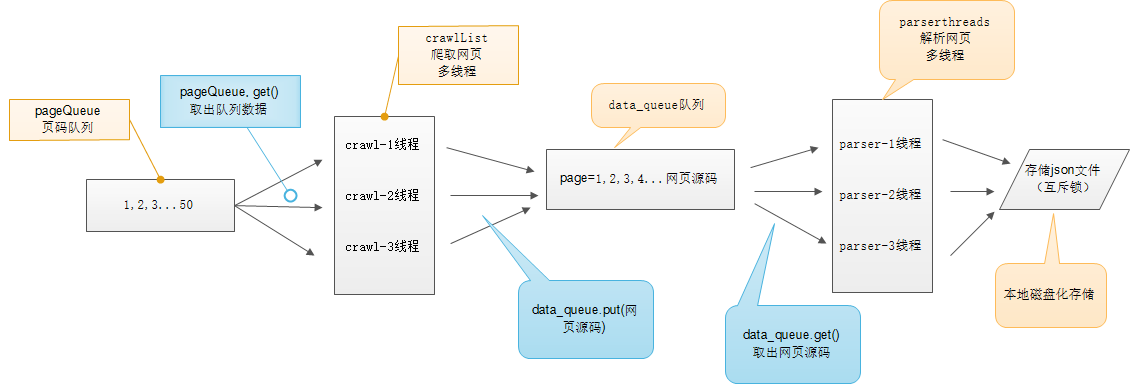
# -*- coding:utf-8 -*-

import requests

from lxml import etree

from Queue import Queue

import threading

import time

import json

class thread_crawl(threading.Thread):

    '''

    抓取线程类

    '''

    def __init__(self, threadID, q):

        threading.Thread.__init__(self)

        self.threadID = threadID

        self.q = q

    def run(self):

        print "Starting " + self.threadID

        self.qiushi_spider()

        print "Exiting ", self.threadID

    def qiushi_spider(self):

        # page = 1

        while True:

            if self.q.empty():

                break

            else:

                page = self.q.get()

                print 'qiushi_spider=', self.threadID, ',page=', str(page)

                url = 'http://www.qiushibaike.com/8hr/page/' + str(page) + '/'

                headers = {

                    'User-Agent': 'Mozilla/5.0 (Windows NT 10.0; WOW64) AppleWebKit/537.36 (KHTML, like Gecko) Chrome/52.0.2743.116 Safari/537.36',

                    'Accept-Language': 'zh-CN,zh;q=0.8'}

                # 多次尝试失败结束、防止死循环

                timeout = 4

                while timeout > 0:

                    timeout -= 1

                    try:

                        content = requests.get(url, headers=headers)

                        data_queue.put(content.text)

                        break

                    except Exception, e:

                        print 'qiushi_spider', e

                if timeout < 0:

                    print 'timeout', url

class Thread_Parser(threading.Thread):

    '''

    页面解析类;

    '''

    def __init__(self, threadID, queue, lock, f):

        threading.Thread.__init__(self)

        self.threadID = threadID

        self.queue = queue

        self.lock = lock

        self.f = f

    def run(self):

        print 'starting ', self.threadID

        global total, exitFlag_Parser

        while not exitFlag_Parser:

            try:

                '''

                调用队列对象的get()方法从队头删除并返回一个项目。可选参数为block,默认为True。

                如果队列为空且block为True,get()就使调用线程暂停,直至有项目可用。

                如果队列为空且block为False,队列将引发Empty异常。

                '''

                item = self.queue.get(False)

                if not item:

                    pass

                self.parse_data(item)

                self.queue.task_done()

                print 'Thread_Parser=', self.threadID, ',total=', total

            except:

                pass

        print 'Exiting ', self.threadID

    def parse_data(self, item):

        '''

        解析网页函数

        :param item: 网页内容

        :return:

        '''

        global total

        try:

            html = etree.HTML(item)

            result = html.xpath('//div[contains(@id,"qiushi_tag")]')

            for site in result:

                try:

                    imgUrl = site.xpath('.//img/@src')[0]

                    title = site.xpath('.//h2')[0].text

                    content = site.xpath('.//div[@class="content"]/span')[0].text.strip()

                    vote = None

                    comments = None

                    try:

                        vote = site.xpath('.//i')[0].text

                        comments = site.xpath('.//i')[1].text

                    except:

                        pass

                    result = {

                        'imgUrl': imgUrl,

                        'title': title,

                        'content': content,

                        'vote': vote,

                        'comments': comments,

                    }

                    with self.lock:

                        # print 'write %s' % json.dumps(result)

                        self.f.write(json.dumps(result, ensure_ascii=False).encode('utf-8') + "\n")

                except Exception, e:

                    print 'site in result', e

        except Exception, e:

            print 'parse_data', e

        with self.lock:

            total += 1

data_queue = Queue()

exitFlag_Parser = False

lock = threading.Lock()

total = 0

def main():

    output = open('qiushibaike.json', 'a')

    #初始化网页页码page从1-10个页面

    pageQueue = Queue(50)

    for page in range(1, 11):

        pageQueue.put(page)

    #初始化采集线程

    crawlthreads = []

    crawlList = ["crawl-1", "crawl-2", "crawl-3"]

    for threadID in crawlList:

        thread = thread_crawl(threadID, pageQueue)

        thread.start()

        crawlthreads.append(thread)

    #初始化解析线程parserList

    parserthreads = []

    parserList = ["parser-1", "parser-2", "parser-3"]

    #分别启动parserList

    for threadID in parserList:

        thread = Thread_Parser(threadID, data_queue, lock, output)

        thread.start()

        parserthreads.append(thread)

    # 等待队列清空

    while not pageQueue.empty():

        pass

    # 等待所有线程完成

    for t in crawlthreads:

        t.join()

    while not data_queue.empty():

        pass

    # 通知线程是时候退出

    global exitFlag_Parser

    exitFlag_Parser = True

    for t in parserthreads:

        t.join()

    print "Exiting Main Thread"

    with lock:

        output.close()

if __name__ == '__main__':

    main()
#!/usr/bin/env python

# -*- coding:utf-8 -*-

# 使用了线程库

import threading

# 队列

from Queue import Queue

# 解析库

from lxml import etree

# 请求处理

import requests

# json处理

import json

import time

class ThreadCrawl(threading.Thread):

    def __init__(self, threadName, pageQueue, dataQueue):

        #threading.Thread.__init__(self)

        # 调用父类初始化方法

        super(ThreadCrawl, self).__init__()

        # 线程名

        self.threadName = threadName

        # 页码队列

        self.pageQueue = pageQueue

        # 数据队列

        self.dataQueue = dataQueue

        # 请求报头

        self.headers = {"User-Agent" : "Mozilla/5.0 (compatible; MSIE 9.0; Windows NT 6.1; Trident/5.0;"}

    def run(self):

        print "启动 " + self.threadName

        while not CRAWL_EXIT:

            try:

                # 取出一个数字,先进先出

                # 可选参数block,默认值为True

                #1. 如果对列为空,block为True的话,不会结束,会进入阻塞状态,直到队列有新的数据

                #2. 如果队列为空,block为False的话,就弹出一个Queue.empty()异常,

                page = self.pageQueue.get(False)

                url = "http://www.qiushibaike.com/8hr/page/" + str(page) +"/"

                #print url

                content = requests.get(url, headers = self.headers).text

                time.sleep(1)

                self.dataQueue.put(content)

                #print len(content)

            except:

                pass

        print "结束 " + self.threadName

class ThreadParse(threading.Thread):

    def __init__(self, threadName, dataQueue, filename, lock):

        super(ThreadParse, self).__init__()

        # 线程名

        self.threadName = threadName

        # 数据队列

        self.dataQueue = dataQueue

        # 保存解析后数据的文件名

        self.filename = filename

        # 锁

        self.lock = lock

    def run(self):

        print "启动" + self.threadName

        while not PARSE_EXIT:

            try:

                html = self.dataQueue.get(False)

                self.parse(html)

            except:

                pass

        print "退出" + self.threadName

    def parse(self, html):

        # 解析为HTML DOM

        html = etree.HTML(html)

        node_list = html.xpath('//div[contains(@id, "qiushi_tag")]')

        for node in node_list:

            # xpath返回的列表,这个列表就这一个参数,用索引方式取出来,用户名

            username = node.xpath('./div/a/@title')[0]

            # 图片连接

            image = node.xpath('.//div[@class="thumb"]//@src')#[0]

            # 取出标签下的内容,段子内容

            content = node.xpath('.//div[@class="content"]/span')[0].text

            # 取出标签里包含的内容,点赞

            zan = node.xpath('.//i')[0].text

            # 评论

            comments = node.xpath('.//i')[1].text

            items = {

                "username" : username,

                "image" : image,

                "content" : content,

                "zan" : zan,

                "comments" : comments

            }

            # with 后面有两个必须执行的操作:__enter__ 和 _exit__

            # 不管里面的操作结果如何,都会执行打开、关闭

            # 打开锁、处理内容、释放锁

            with self.lock:

                # 写入存储的解析后的数据

                self.filename.write(json.dumps(items, ensure_ascii = False).encode("utf-8") + "\n")

CRAWL_EXIT = False

PARSE_EXIT = False

def main():

    # 页码的队列,表示20个页面

    pageQueue = Queue(20)

    # 放入1~10的数字,先进先出

    for i in range(1, 21):

        pageQueue.put(i)

    # 采集结果(每页的HTML源码)的数据队列,参数为空表示不限制

    dataQueue = Queue()

    filename = open("duanzi.json", "a")

    # 创建锁

    lock = threading.Lock()

    # 三个采集线程的名字

    crawlList = ["采集线程1号", "采集线程2号", "采集线程3号"]

    # 存储三个采集线程的列表集合

    threadcrawl = []

    for threadName in crawlList:

        thread = ThreadCrawl(threadName, pageQueue, dataQueue)

        thread.start()

        threadcrawl.append(thread)

    # 三个解析线程的名字

    parseList = ["解析线程1号","解析线程2号","解析线程3号"]

    # 存储三个解析线程

    threadparse = []

    for threadName in parseList:

        thread = ThreadParse(threadName, dataQueue, filename, lock)

        thread.start()

        threadparse.append(thread)

    # 等待pageQueue队列为空,也就是等待之前的操作执行完毕

    while not pageQueue.empty():

        pass

    # 如果pageQueue为空,采集线程退出循环

    global CRAWL_EXIT

    CRAWL_EXIT = True

    print "pageQueue为空"

    for thread in threadcrawl:

        thread.join()

        print "1"

    while not dataQueue.empty():

        pass

    global PARSE_EXIT

    PARSE_EXIT = True

    for thread in threadparse:

        thread.join()

        print "2"

    with lock:

        # 关闭文件

        filename.close()

    print "谢谢使用!"

if __name__ == "__main__":

    main()
python 多线程糗事百科案例的更多相关文章
- Python爬虫(十八)_多线程糗事百科案例
多线程糗事百科案例 案例要求参考上一个糗事百科单进程案例:http://www.cnblogs.com/miqi1992/p/8081929.html Queue(队列对象) Queue是python ...
- Python爬虫(十七)_糗事百科案例
糗事百科实例 爬取糗事百科段子,假设页面的URL是: http://www.qiushibaike.com/8hr/page/1 要求: 使用requests获取页面信息,用XPath/re做数据提取 ...
- python 爬糗事百科
糗事百科网站段子爬取,糗事百科是我见过的最简单的网站了!!! #-*-coding:utf8-*- import requests import re import sys reload(sys) s ...
- Python 之糗事百科多线程爬虫案例
import requests from lxml import etree import json import threading import queue # 采集html类 class Get ...
- (python)查看糗事百科文字 点赞 作者 等级 评论
import requestsimport reheaders = { 'User-Agent':'Mozilla/5.0 (compatible; MSIE 9.0; Windows NT 6.1; ...
- 【Python爬虫实战】多线程爬虫---糗事百科段子爬取
多线程爬虫:即程序中的某些程序段并行执行,合理地设置多线程,可以让爬虫效率更高糗事百科段子普通爬虫和多线程爬虫分析该网址链接得出:https://www.qiushibaike.com/8hr/pag ...
- Python爬虫爬取糗事百科段子内容
参照网上的教程再做修改,抓取糗事百科段子(去除图片),详情见下面源码: #coding=utf-8#!/usr/bin/pythonimport urllibimport urllib2import ...
- 利用python的爬虫技术爬去糗事百科的段子
初次学习爬虫技术,在知乎上看了如何爬去糗事百科的段子,于是打算自己也做一个. 实现目标:1,爬取到糗事百科的段子 2,实现每次爬去一个段子,每按一次回车爬取到下一页 技术实现:基于python的实现, ...
- python 爬取糗事百科 gui小程序
前言:有时候无聊看一些搞笑的段子,糗事百科还是个不错的网站,所以就想用Python来玩一下.也比较简单,就写出来分享一下.嘿嘿 环境:Python 2.7 + win7 现在开始,打开糗事百科网站,先 ...
随机推荐
- chrome浏览器 提示Adobe Flash Player未安装的解决方法
最近遇到了个flash player设置的一个问题,记录一下,可能不同浏览器版本和设置不一样 浏览器版本:版本 61.0.3163.100(正式版本) (64 位) 打开需要flash player的 ...
- Quartz JobStore管理Job
Quartz提供了RAMJobStore和JDBC JobStore两种方式用来Job,RAMJobStore将Job任务存入内存中,速度快:JobStore采用数据库的方式管理中,本文介绍JobSt ...
- 正则表达式:日期,电话,邮箱等常用字符串;js中日期的带下的比较,获取不同格式的日期
一.日期 (1)首先需要验证年份,显然,年份范围为 0001 - 9999,匹配YYYY的正则表达式为: [0-9]{3}[1-9]|[0-9]{2}[1-9][0-9]{1}|[0-9]{1}[1- ...
- Oracle 临时表空间 temp表空间切换
一.TEMP表空间 临时表空间主要用途是在数据库进行排序运算.管理索引.访问视图等操作时提供临时的运算空间,当运算完成之后系统会自动清理.当oracle里需要用到sort的时候,PGA中sort_ar ...
- 常见的web前端性能优化
一. 语义化HTML:语义化HTML的好处是可以使代码简洁清晰.支持不同设备.利于搜索引擎.便于团队开发: 减少DOM节点:加速页面渲染: 给图片加上正确的宽高值:这可以减少页面重绘,同时防止图片缩放 ...
- 移动端(阿里rem)布局
<!DOCTYPE html> <html lang="en"> <head> <meta charset="UTF-8&quo ...
- git push --set-upstream origin
设置本地分支追踪远程分支 之后就可以直接使用git push提交代码
- 《Java并发编程的艺术》读书笔记:等待/通知机制
看这本书之前,对wait和notify认识大概就是,调用wait的线程A堵塞之后,一旦另外有线程调用notify方法.线程A会立马从wait方法处返回.看完这本书后.发现自己的认识实在太肤浅了.... ...
- ASP.NET请求管道、应用程序生命周期、整体运行机制
我们知道在ASP.NET中,若要对ASP.NET应用程序进行 初始化并使它处理请求,必须执行一些处理步骤,熟悉应用程序生命周期非常重要,这样才能在适当的生命周期阶段编写代码,达到预期的效果.永远不要做 ...
- Exception sending context initialized event to listener instance of class ssm.blog.listener.InitBloggerData java.lang.NullPointerException at ssm.blog.listener.InitBloggerData.c
spring注入是分两部分执行的 首先是 先把需要注入的对象加载到spring容器 然后在把对象注入到具体需要注入的对象里面 这种就是配置和注解的注入 getbean方式其 ...