
Linux使用tcpdump命令抓包保存pcap文件wireshark分析
[root@ok Desktop]# yum search tcpdump

Loaded plugins: fastestmirror, refresh-packagekit, security

Loading mirror speeds from cached hostfile

 * base: mirrors.yun-idc.com

 * extras: mirrors.yun-idc.com

 * updates: mirrors.yun-idc.com

======================================================================= N/S Matched: tcpdump ========================================================================

tcpdump.x86_64 : A network traffic monitoring tool

  Name and summary matches only, use "search all" for everything.

[root@ok Desktop]# which tcpdump

/usr/sbin/tcpdump

[root@ok Desktop]# tcpdump -h

tcpdump version 4.1-PRE-CVS_2015_07_23

libpcap version 1.4.

Usage: tcpdump [-aAdDefhIJKlLnNOpqRStuUvxX] [ -B size ] [ -c count ]

        [ -C file_size ] [ -E algo:secret ] [ -F file ] [ -G seconds ]

        [ -i interface ] [ -j tstamptype ] [ -M secret ]

        [ -P in|out|inout ]

        [ -r file ] [ -s snaplen ] [ -T type ] [ -w file ]

        [ -W filecount ] [ -y datalinktype ] [ -z command ]

        [ -Z user ] [ expression ]
[root@ok Desktop]# yum search wireshark

Loaded plugins: fastestmirror, refresh-packagekit, security

Loading mirror speeds from cached hostfile

 * base: mirrors.yun-idc.com

 * extras: mirrors.yun-idc.com

 * updates: mirrors.yun-idc.com

================================================ N/S Matched: wireshark ================================================

wireshark-devel.i686 : Development headers and libraries for wireshark

wireshark-devel.x86_64 : Development headers and libraries for wireshark

wireshark-gnome.x86_64 : Gnome desktop integration for wireshark and wireshark-usermode

wireshark.i686 : Network traffic analyzer

wireshark.x86_64 : Network traffic analyzer

  Name and summary matches only, use "search all" for everything.
安装:
[root@ok Desktop]# yum install wireshark* -y

[root@ok Desktop]# which wireshark

/usr/sbin/wireshark
[root@ok Desktop]# rpm -qa|grep wireshark
wireshark-devel-1.8.10-17.el6.x86_64
wireshark-1.8.10-17.el6.x86_64
wireshark-gnome-1.8.10-17.el6.x86_64
保存tcpdump抓包结果
[root@bass Desktop]# tcpdump -i eth0 -w dump.pcap

-i #是指定要抓取的网卡

-w #指定结果保存的位置

[root@bass Desktop]# tcpdump -i eth0 -w dump.pcap -v

tcpdump: WARNING: eth0: no IPv4 address assigned

tcpdump: listening on eth0, link-type EN10MB (Ethernet), capture size  bytes

^C189 packets captured

 packets received by filter

 packets dropped by kernel

-v#主要是为了得到Got 15这个数,当想要停止的时候,按下ctrl + c

[root@bass Desktop]# ll -h dump.pcap

-rw-r--r--.  tcpdump tcpdump 18K Aug  : dump.pcap
在wireshark中打开:
[root@bass Desktop]# wireshark dump.pcap #linux下查看
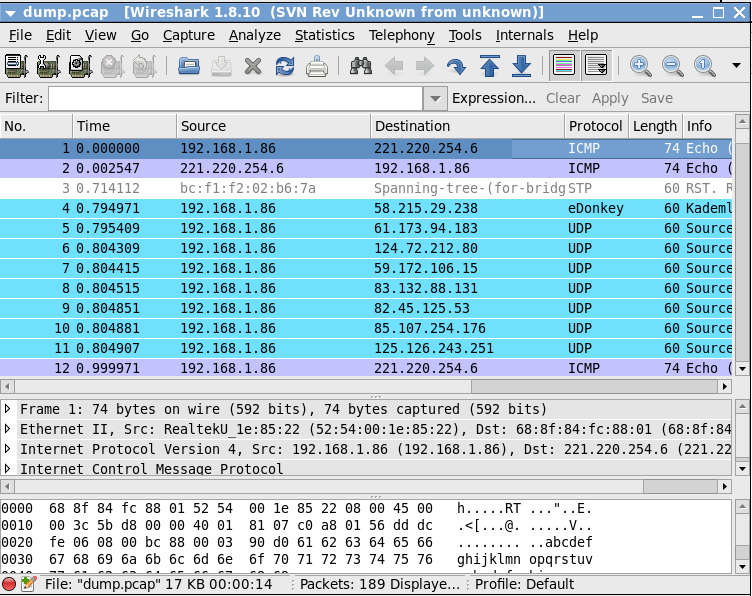
我们用tcpdump抓包的时候,默认是显示这样的:

上图中标出三快区域,红色框内,是用来显示简单的数据包信息,我们用tcpdump抓包如时候,默认情况是显示成这样的;深蓝框内,是用来显示选中的数据包的详细信息,是按照TCP/IP四层结构显示的,第一行是数据链路层的信息,第二行是网络层信息(IP协议),第三行是传输层信息(TCP协议),第四层是应用层信息(HTTP协议),可以展开第一行用来观察具体的内容;最后一个区域淡蓝色框中,是用来显示此数据包的真实面目。(下图列清楚)
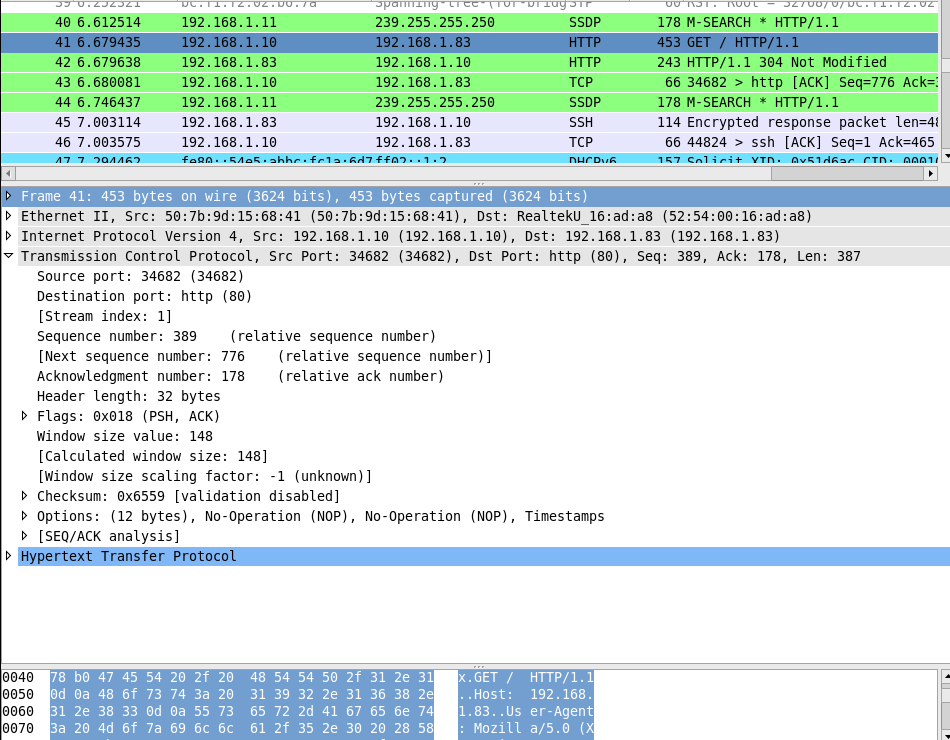
------------------------------------------------------------------------------------------------------------------------------------------------------
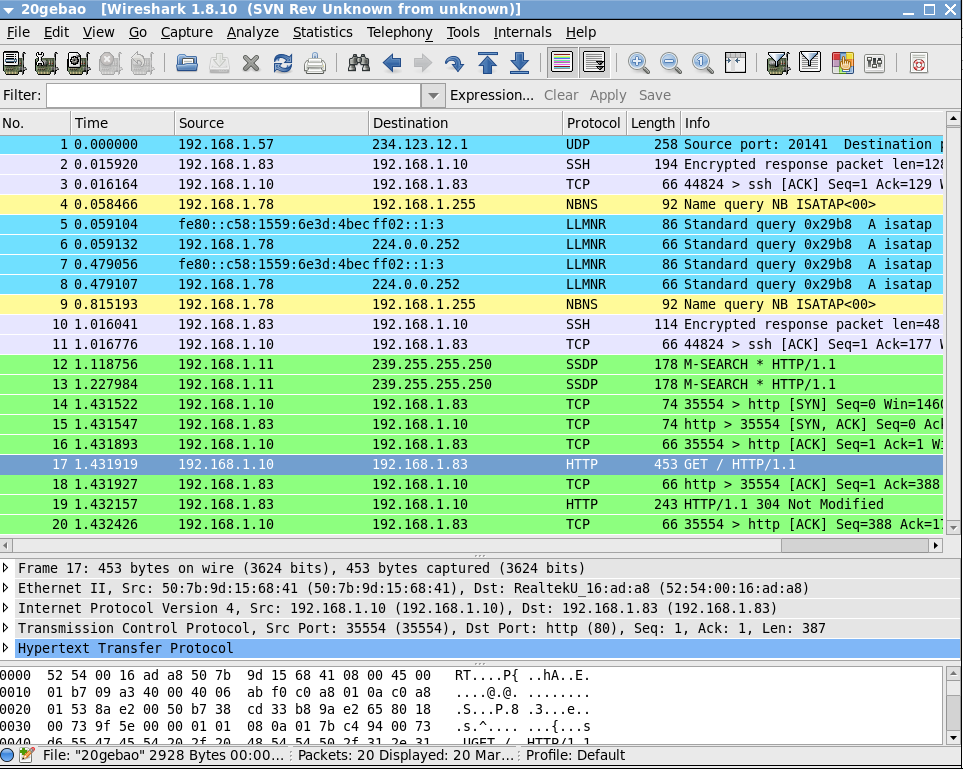
sh-4.1# tcpdump -i eth0 -c  -w 20gebao -v

tcpdump: listening on eth0, link-type EN10MB (Ethernet), capture size  bytes

 packets captured

 packets received by filter

 packets dropped by kernel
使用-c参数指定要监听到的数据包数量
Linux使用tcpdump命令抓包保存pcap文件wireshark分析的更多相关文章
- Linux使用tcpdump命令抓包并使用wireshark分析
Linux使用tcpdump命令抓包并使用wireshark分析 介绍 有时分析客户端和服务器网络交互的问题时,为了查找问题,需要分别在客户端和服务器上抓包,我们的客户端一般是windows上的,抓包 ...
- (转)Linux系统-tcpdump常用抓包命令
序言 单独总结tcpdump抓包的常用命令 主要语法 过滤主机/IP: tcpdump -i eth1 host 172.16.7.206 抓取所有经过网卡1,目的IP为172.16.7.206的网络 ...
- Linux系统-tcpdump常用抓包命令
主要语法 过滤主机/IP: tcpdump -i eth1 host 172.16.7.206 抓取所有经过网卡1,目的IP为172.16.7.206的网络数据 过滤端口: tcpdump -i e ...
- tcpdump命令抓包参数
在 Linux 命令行中使用 tcpdump 抓包 通过实例学习tcpdump命令 聊聊 tcpdump 与 Wireshark 抓包分析 tcpdump常用参数 -n 显示IP地址和端口号 -v 显 ...
- Tcpdump命令抓包详细分析
1 起因 前段时间,一直在调线上的一个问题:线上应用接受POST请求,请求body中的参数获取不全,存在丢失的状况.这个问题是偶发性的,大概发生的几率为5%-10%左右,这个概率已经相当高了.在排查问 ...
- tcpdump后台抓包并输出给wireshark
# 先进到/tmp 目录执行,方便Filezila 传输 # 开启抓包 nohup tcpdump -i eth0 -s0 -nnA 'port 22' -w dump22.pcap & [1 ...
- linux tcpdump命令抓包
tcpdump host 210.27.48.1 and \ (210.27.48.2 or 210.27.48.3 \) 截获主机210.27.48.1 和主机210.27.48.2 或210.27 ...
- 【转载】linux下的usb抓包方法
1 linux下的usb抓包方法 1.配置内核使能usb monitor: make menuconfig Device Drivers --> ...
- linux下的usb抓包方法
1 linux下的usb抓包方法1.配置内核使能usb monitor: make menuconfig Device Drivers --> ...
随机推荐
- 转:Linux集群-----HA浅谈
通过特殊的软件将若干服务器连接在一起并提供故障切换功能的实体我们称之为高可用集群.可用性是指系统的uptime,在7x24x365的工作环境中,99%的可用性指在一年中可以有87小时36分钟的DOWN ...
- 在Eclipse中编写servlet时出现"The import javax.servlet cannot be resolved" 问题解决办法
在Eclipse中,project->properties,选择Java Build Path->Libraries->Add External JARs,找到你计算机中tomcat ...
- Why The Golden Age Of Machine Learning is Just Beginning
Why The Golden Age Of Machine Learning is Just Beginning Even though the buzz around neural networks ...
- iOS 刚刚,几分钟前,几小时前,几天前,几月前,几年前
- (NSString *)compareCurrentTime:(NSDate*) compareDate { NSTimeInterval timeInterval = [compareDate ...
- URLDecoder与URLEncoder
网页中的表单使用POST方法提交时,数据内容的类型是 application/x-www-form-urlencoded,这种类型会: 1.字符"a"-"z", ...
- FCKeditor漏洞利用
FCKeditor漏洞利用 查看编辑器版本 FCKeditor/_whatsnew.html fckeditor/editor/dialog/fck_about.html —————————————— ...
- JS实现上传本地图片前先预览
<style type="text/css"> #preview /*这个就是预览的DIV的ID*/ { filter:progid:DXImageTransform. ...
- spring bean id和bean name的区别
今天在分析问题时发现一个大家平时都不太注意的spring 配置问题,发出来分享下: 首先澄清一个概念: 同名bean:多个bean 有相同的 name 或者 id,称之为同名bean <bean ...
- Robberies
Robberies Time Limit:1000MS Memory Limit:32768KB 64bit IO Format:%I64d & %I64u Submit S ...
- Hadoop 免密码登陆(ssh)
record save here first [root@hadoop .ssh]# ssh-keygen -t rsa -P ''Generating public/private rsa key ...