
update kernel
1,version

2,command
First, verify the current kernel version:
2.6.32-358.el6.x86_64
Before you start, install all necessary prerequisite software for building a kernel:
$ sudo yum install ncurses-devel
Also, install any existing updates on your system:
Now you are ready to upgrade the kernel from 2.6.32 to 3.2.48 LTS.
Download the new kernel source from kernel.org, and install it on your system:
$ sudo tar xvfvJ linux-3.2.48.tar.xz -C /usr/src //no need
$ cd /usr/src/linux-3.2.48
Before compiling a new kernel, you need to generate a kernel configuration.
If you want to generate a kernel configuration via graphical user interface, run:

Alternatively, if you want to use the same kernel configuration as the currently running kernel, run the following command instead. You still need to set any newly added configuration options by manually answering questions. If you do not know the meaning of each option, just press enter to accept a default answer.
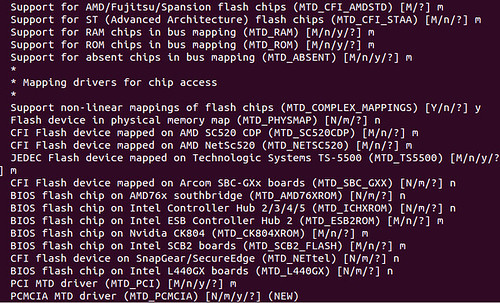
If you want to use the same old kernel configuration, and automatically accept default answers to every question, run the following command instead:
----------------------------------------------------------------
After kernel configuration is done, go ahead and compile a new kernel:
The above step will take 30 minutes or more, depending on your CPU speed. After compilation is completed, go ahead and install the new kernel (and all kernel modules) as follows.
----------------------------------------------------------------
To use the newly built kernel in your system, you need to choose the new kernel on grub menu upon boot-up.
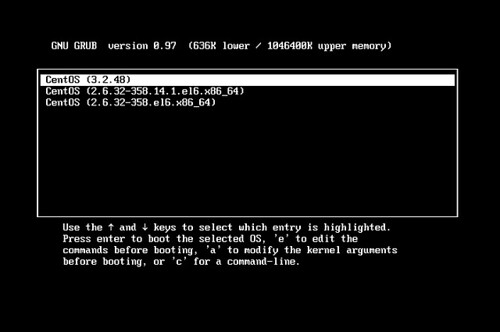
Alternatively, edit /boot/grub/grub.conf to specify the new kernel as the default kernel to load. In /boot/grub/grub.conf, change the "default" number to whichever position your new kernel information is in the kernel list (counting starts at 0).
default=1
update kernel的更多相关文章
- centos yum update kernel
1.查看当前kernel版本 uname -r 2.查看已安装版本 rpm -q kernel 3.查看可升级kernel版本 yum list kernel 4.升级kernel版本 yum upd ...
- update kernel 3.10-3.12
安装包下载以及依赖包安装 1.到www.kernel.org下载3.12.48压缩包 2.tar xvf linux-3.12.48.tar.xz 3.sudo yum install ncurses ...
- Fedora安装VirtualBox时出现错误Kernel driver not installed (rc=-1908)的解决办法
新建虚拟机后启动时出现如下错误: Kernel driver not installed (rc=-1908) The VirtualBox Linux kernel driver (vboxdrv) ...
- 解决centos7安装wmwaretools找不到kernel header
解决centos6安装wmwaretools找不到kernel header http://www.centoscn.com/CentosBug/softbug/2015/0525/5531.html ...
- Kernel parameters for Db2 database server installation (Linux and UNIX)
Db2 11.1 For root installations, the database manager uses a formula to automatically adjust kernel ...
- 关于kernel-devel、kernel-header和kernel src的区别
A kernel-header package would contain 'header files' needed by some applications which would be buil ...
- redhat 6.4 安装VirtualBox自动增强功能功:unable to find the sources of your current Linux kernel
redhat 6.4 安装VirtualBox自动增强功能功能的时候提示: building the main Guest Additions module FAILED unable to find ...
- Linux kernel AESNI缓冲区溢出漏洞
解决办法: CENT OS:升级系统内核. yum update kernel UBUNTU:升级系统内核. #到 Ubuntu网站http://kernel.ubuntu.com/~kernel-p ...
- 转 Comparison of Red Hat and Oracle Linux kernel versions and release strings
Originally derived from Red Hat Enterprise Linux (RHEL), Oracle Linux (OL) contains minor difference ...
随机推荐
- mysql关于字符串字段数据类型
字符串类型 字符串类型指CHAR.VARCHAR.BINARY.VARBINARY.BLOB.TEXT.ENUM和SET.该节描述了这些类型如何工作以及如何在查询中使用这些类型. 类型 大小 用途 C ...
- 我的Ubuntu系统配置所作的备份记录如下
Ubuntu无法关机解决办法 说明:如果不成功请参考一下文章最后的内容,也许会有帮助. 其实不止在ubuntu里面,fedora里面我也遇到了这个问题,就是电脑可以重启,但是不能直接关机,否则就一直停 ...
- 使用PHP编写发红包程序
使用PHP编写发红包程序 http://www.jb51.net/article/69815.htm 投稿:hebedich 字体:[增加 减小] 类型:转载 时间:2015-07-22 微信发红 ...
- p::first-line { text-transform: uppercase }
https://www.w3.org/TR/css3-selectors/ Note that the length of the first line depends on a number of ...
- Universal Serial Bus USB 3.0
Computer Systems A Programmer's Perspective Second Edition A Universal Serial Bus (USB) controller i ...
- Summary of java stream classes
Java’s stream classes are good for streaming sequences of bytes, but they’re not good for streaming ...
- spring容器IOC创建对象<二>
问题?spring是如何创建对象的?什么时候创建对象?有几种创建方式?测试对象是单例的还是多例的 ?对象的初始化和销毁? 下面的四大模块IOC的内容了!需要深刻理解 SpringIOC定义:把对象的创 ...
- SVN提交注意点
一.提交之前先更新 1. SVN更新的原则是要随时更新,随时提交.当完成了一个小功能,能够通过编译并且自己测试之后,谨慎地提交. 2. 如果在修改的期间别人也更改了sv ...
- Google物联网操作系统协同框架Weave深度解析
1. Google Weave框架 在2015年的Google I/O大会上,负责Android业务的桑达.皮查伊(SundarPichai)宣布了Google最新的物联网战略.这包括一个 ...
- win环境下,用虚拟化工具打包Qt动态编译exe的过程(使用Enigma Virtual Box)
原创作品,允许转载,转载时请务必以超链接形式标明文章 原始出处 .作者信息和本声明.否则将追究法律责任.http://goldlion.blog.51cto.com/4127613/834075 引子 ...