
linux实践——ELF分析
一、ELF的部分结构定义
elf header(定义在/usr/include/elf.h)//64位的系统ELF文件头包括以下两个部分
#define EI_NIDENT (16)

typedef struct

{

  	unsigned char	e_ident[EI_NIDENT];/* Magic number 	and other info */

Elf32_Half	e_type;			/* Object file type */

Elf32_Half	e_machine;		/* Architecture */

Elf32_Word	e_version;		/* Object file version */

Elf32_Addr	e_entry;		/* Entry point virtual address */

Elf32_Off	e_phoff;		/* Program header table file offset */

Elf32_Off	e_shoff;		/* Section header table file offset */

Elf32_Word	e_flags;		/* Processor-specific flags */

Elf32_Half	e_ehsize;		/* ELF header size in bytes */

Elf32_Half	e_phentsize;		/* Program header table entry size */

Elf32_Half	e_phnum;		/* Program header table entry count */

Elf32_Half	e_shentsize;		/* Section header table entry size */

Elf32_Half	e_shnum;		/* Section header table entry count */

Elf32_Half	e_shstrndx;		/* Section header string table index */

} 	Elf32_Ehdr;  //32位

typedef struct

{

unsigned char	e_ident[EI_NIDENT];	/* Magic number 	and other info */

Elf64_Half	e_type;			/* Object file type */

Elf64_Half	e_machine;		/* Architecture */

Elf64_Word	e_version;		/* Object file version */

Elf64_Addr	e_entry;		/* Entry point virtual address */

Elf64_Off	e_phoff;		/* Program header table file offset */

Elf64_Off	e_shoff;		/* Section header table file offset */

Elf64_Word	e_flags;		/* Processor-specific flags */

Elf64_Half	e_ehsize;		/* ELF header size in bytes */

Elf64_Half	e_phentsize;		/* Program header 	table entry size */

Elf64_Half	e_phnum;		/* Program header 	table entry count */

Elf64_Half	e_shentsize;		/* Section header 	table entry size */

Elf64_Half	e_shnum;		/* Section header 	table entry count */

Elf64_Half	e_shstrndx;		/* Section header 	string table index */

} Elf64_Ehdr;//64位
section header
typedef struct

{

Elf32_Word	sh_name;		/* Section name (string tbl index) */

Elf32_Word	sh_type;		/* Section type */

Elf32_Word	sh_flags;		/* Section flags */

Elf32_Addr	sh_addr;		/* Section virtual addr at execution */

Elf32_Off	sh_offset;		/* Section file offset */

Elf32_Word	sh_size;		/* Section size in bytes */

Elf32_Word	sh_link;		/* Link to another section */

Elf32_Word	sh_info;		/* Additional section information */

Elf32_Word	sh_addralign;		/* Section alignment */

Elf32_Word	sh_entsize;		/* Entry size if section holds table */

} Elf32_Shdr;

typedef struct

{

Elf64_Word	sh_name;		/* Section name (string tbl index) */

Elf64_Word	sh_type;		/* Section type */

Elf64_Xword	sh_flags;		/* Section flags */

Elf64_Addr	sh_addr;		/* Section virtual addr at execution */

Elf64_Off	sh_offset;		/* Section file offset */

Elf64_Xword	sh_size;		/* Section size in bytes */

Elf64_Word	sh_link;		/* Link to another section */

Elf64_Word	sh_info;		/* Additional section information */

Elf64_Xword	sh_addralign;		/* Section alignment */

Elf64_Xword	sh_entsize;		/* Entry size if section holds table */

} Elf64_Shdr;
二、实践部分
hexdump hello.o
1.64位的文件头是64字节,具体如下
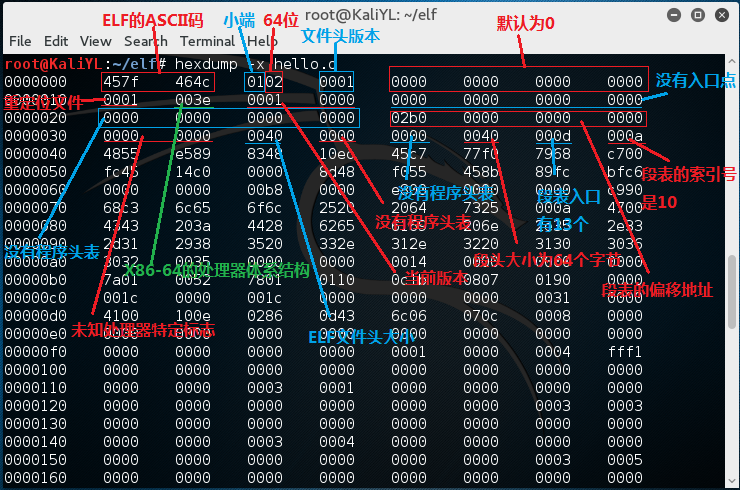
第一行:
(对应e_ident[EI_NIDENT]):实际表示内容为7f45 4c46 0201 0100 0000 0000 0000 0000。

前四个字节7f45 4c46(0x45,0x4c,0x46是’e','l','f'对应的ASCⅡ)是一个魔数(magic number),表示这是一个ELF对象,接下来的一个字节02表示是一个64位对象(32位的对象是01),再接下来的一个字节01表示采用小端法表示,再接下来的一个字节01表示文件头版本,剩下的默认都设置为0。
第二行:
e_type(两个字节)值为0x0001,表示是一个重定位文件。

e_machine(两个字节)值为0x003e,表示是X86-64的处理器体系结构。

e_version(四个字节)值为0x00000001,表示是当前版本。

e_entry(八个字节)值为0x0000000000000000,表示没有入口点。
第三行:
e_phoff(八个字节)值为0x0000000000000000,表示没有程序头表。

e_shoff(八个字节)值为0x00000000000002b0,表示段表的偏移地址。
第四行:
e_flags(四个字节)值为0x00000000,表示未知处理器特定标志(#define EF_SH_UNKNOWN 0x0);

e_ehsize(两个字节)值为0x0040,表示elf文件头大小;

e_phentsize(两个字节)值均为0x0000,因为重定位文件没有程序头表。

e_phnum(两个字节)的值为0x0000,因为重定位文件没有程序头表。

e_ehentsize(两个字节)值为0x0040表示段头大小为64个字节(由这里知道section header table里面每个header的大小)。

e_shnum(两个字节)值为0x000d,表示段表入口有13个(由这里知道段表有13个段)。

e_shstrndx(两个字节)值为0x000a,表示段名串表的在段表中的索引号(由这里知道.shstrtab段(符号表)的信息在段表的索引号是10)。
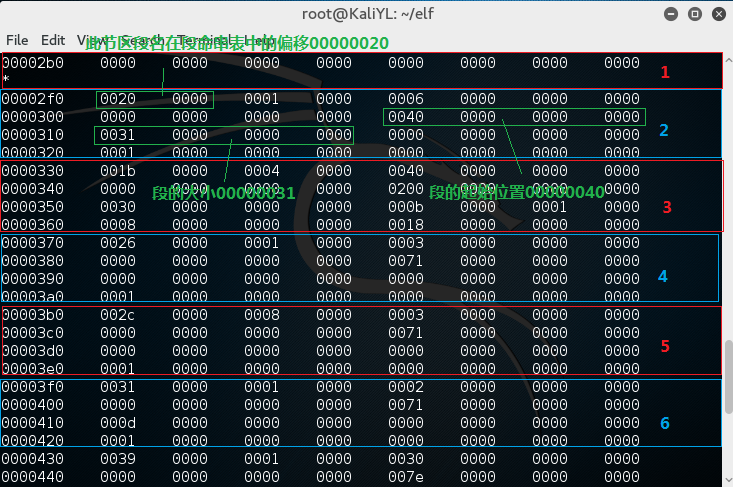
2.由ELF头可知段表从000002b0开始,每个节区大小为0040,共有000d个节区,第000a为段名串表的索引号。
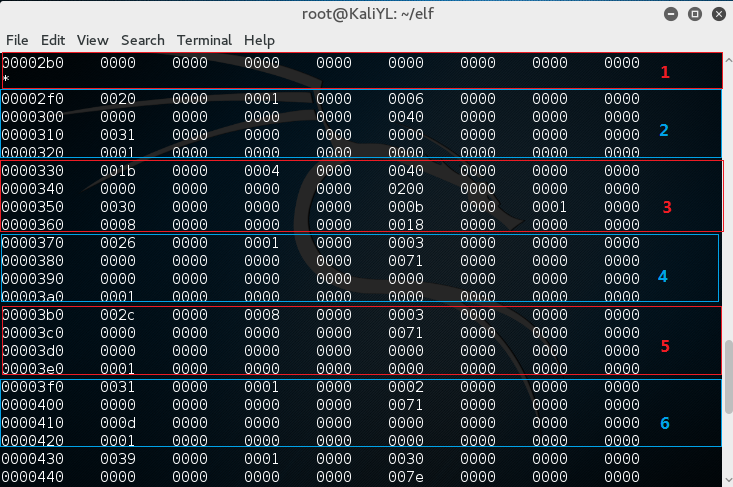
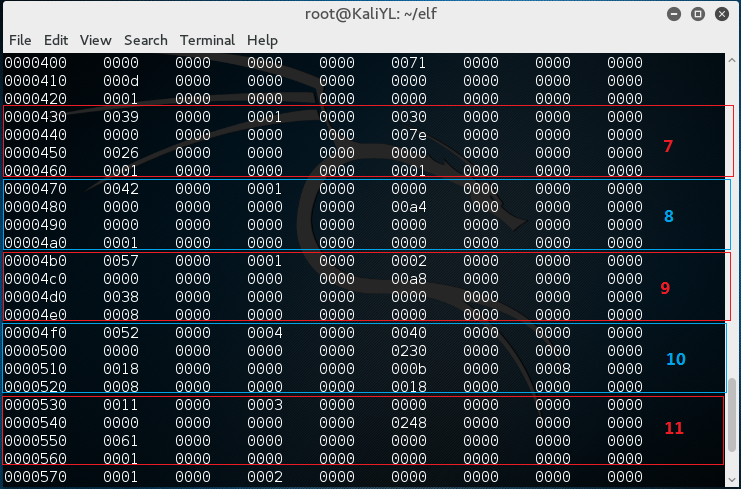
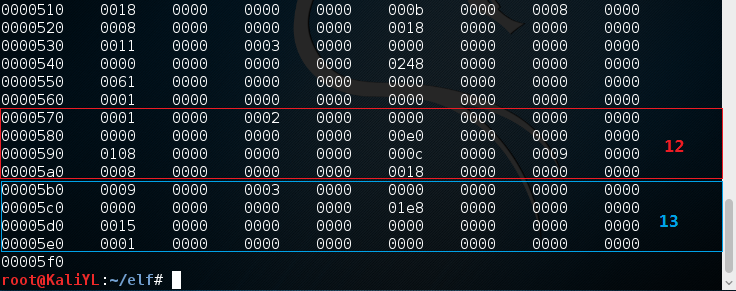
以上就是我们找到的section header table,然后我们再通过其找到各个section。
3.找具体section,如节区(2f0-320)
typedef struct

{

  Elf64_Word	sh_name;		/* Section name (string tbl index) */

  Elf64_Word	sh_type;		/* Section type */

  Elf64_Xword	sh_flags;		/* Section flags */

  Elf64_Addr	sh_addr;		/* Section virtual addr at execution */

  Elf64_Off	sh_offset;		/* Section file offset */

  Elf64_Xword	sh_size;		/* Section size in bytes */

  Elf64_Word	sh_link;		/* Link to another section */

  Elf64_Word	sh_info;		/* Additional section information */

  Elf64_Xword	sh_addralign;		/* Section alignment */

  Elf64_Xword	sh_entsize;		/* Entry size if section holds table */

} Elf64_Shdr;
由Elf64_Word sh_name;得知此节区段名在段命串表中的偏移00000020
Elf64_Off sh_offset;段的起始位置00000040
Elf64_Xword sh_size段的大小00000031
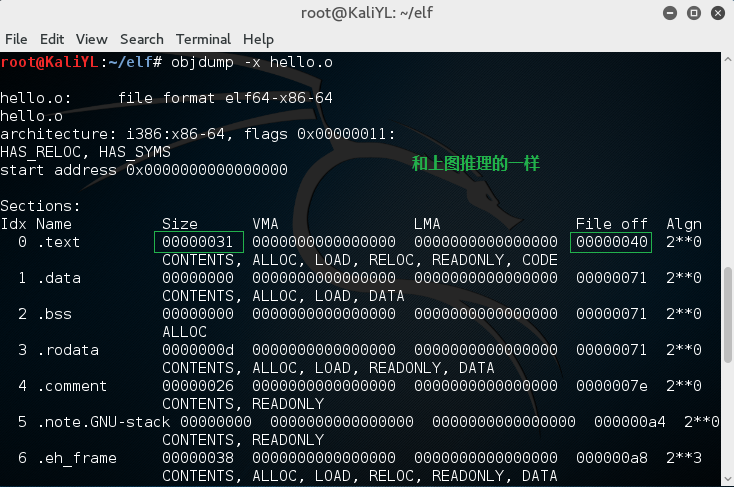
使用objdump -x hello.o检验
4.readelf -h hello.o

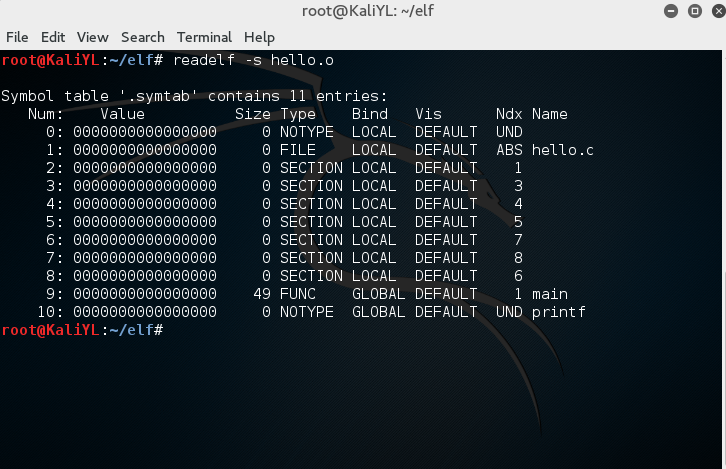
5.readelf -s hello.o
linux实践——ELF分析的更多相关文章
- LINUX实践--ELF分析
一.ELF文件头(定义在/usr/include/elf.h)中 二.实践部分 第一行 对应e_ident[EI_NIDENT]:实际表示内容为7f45 4c46 0101 0100 0000 000 ...
- linux实践之ELF文件分析
linux实践之ELF文件分析 下面开始elf文件的分析. 我们首先编写一个简单的C代码. 编译链接生成可执行文件. 首先,查看scn15elf.o文件的详细信息. 以16进制形式查看scn15elf ...
- linux实践之程序破解
linux实践之程序破解 这次的实践是文件破解,让我们从login可执行文件开始吧! 首先我们执行一下这个可执行程序 ①我们希望在不知道密码的情况下,能够登陆进去.且无论密码是什么,都是提示“on y ...
- 《Unix/Linux网络日志分析与流量监控》获2015年度最受读者喜爱的IT图书奖
<Unix/Linux网络日志分析与流量监控>获2015年度最受读者喜爱的IT图书奖.刊登在<中华读书报>( 2015年01月28日 19 版) 我的2015年新作刊登在< ...
- Linux 可执行文件 ELF结构 及程序载入执行
Linux下ELF文件类型分为以下几种: 1.可重定位文件,比如SimpleSection.o: 2.可运行文件,比如/bin/bash. 3.共享目标文件,比如/lib/libc.so. 在Linu ...
- 01-Coredump核心转存&&Linux程序地址分析【转】
转自:http://www.itwendao.com/article/detail/404132.html 目录(?)[-] 一Core Dump核心转存 二Linux程序地址分析 一Core Dum ...
- Linux内核源代码分析方法
Linux内核源代码分析方法 一.内核源代码之我见 Linux内核代码的庞大令不少人"望而生畏",也正由于如此,使得人们对Linux的了解仅处于泛泛的层次.假设想透析Linux ...
- linux用户进程分析
经过实验3的介绍.我们须要来点实在的.所以将我们理解的流程用于linux系统的分析.换句话说.通过类比的方式去进行描写叙述与理解linux相关的部分. 本节的内容非常详实.并且也分析 ...
- [Linux实践] macOS平台Homebrew更新brew update卡死,完美解决
[Linux实践] macOS 平台 Homebrew 更新 brew update 卡死,完美解决 版本2020.01.05 摘要: 使用brew install [软件包]安装软件包时,卡在Upd ...
随机推荐
- 解决Junit单元测试 找不到类 ----指定Java Build Path
做junit 单元测试时,发现怎么执行都是以前编译过得代码. 最后找到原因了, src/test/java 编译完的.class路径是 Default output folder Default ou ...
- animation of android (2)
android Interpolator 首先是android系统提供的变换方式: 这些方式将转载一篇文章: 转: http://www.cnblogs.com/mengdd/p/3346003.ht ...
- This is usually caused by using Struts tags without the associated filter. Struts tags are only usable when the request has p
2014-09-16 15:47:51.590:WARN:oejs.ErrorPageErrorHandler:EXCEPTION org.apache.jasper.JasperException: ...
- cocos2d-x之单点触碰初试
bool HelloWorld::init() { if ( !Layer::init() ) { return false; } Size size=Director::getInstance()- ...
- linux中如何查看进程对应的cpu使用情况?
使用ps aux | grep <进程名>即可查看指定进程的cpu使用情况.
- nyoj 1029/hdu 3714 Error Curves 三分
题目链接:http://acm.hdu.edu.cn/showproblem.php?pid=3714 懂了三分思想和F(x)函数的单调性质,这题也就是水题了 #include "stdio ...
- struts2 redirect 配置动态传递参数
<action name="actionName" class="com.towerking.TestAction" method="execu ...
- Error during installing HAXM, VT-X not working 在安装HAXM错误,开始不工作
最佳答案 (Best Answer) Some antivirus options prevent Haxm installation. ie: Avast : settings (parametre ...
- 自定义input[type="radio"]的样式
对于表单,input[type="radio"] 的样式总是不那么友好,在不同的浏览器中表现不一. 为了最大程度的显示出它们的差别,并且为了好看,首先定义了一些样式: <fo ...
- selenium处理滚动条
1.用js实现 滚动到底部 String js="document.documentElement.scrollTop=10000"滚动到顶部 String js="do ...