
iOS: 悬浮的条件筛选框使用二
一、介绍:
在前面已经介绍了一种条件悬浮框,使用的是tableView的Plain分组样式实现的,因为这是tableView本身就具备的功能,分组悬浮效果。这次我来介绍第二种更加简单的方法,采用两个ScrollView来实现。
二、实现技术:
(1)两个ScrollView,一个是左右滚动,成为内容视图,另一个是上下滚动,作为容器视图;
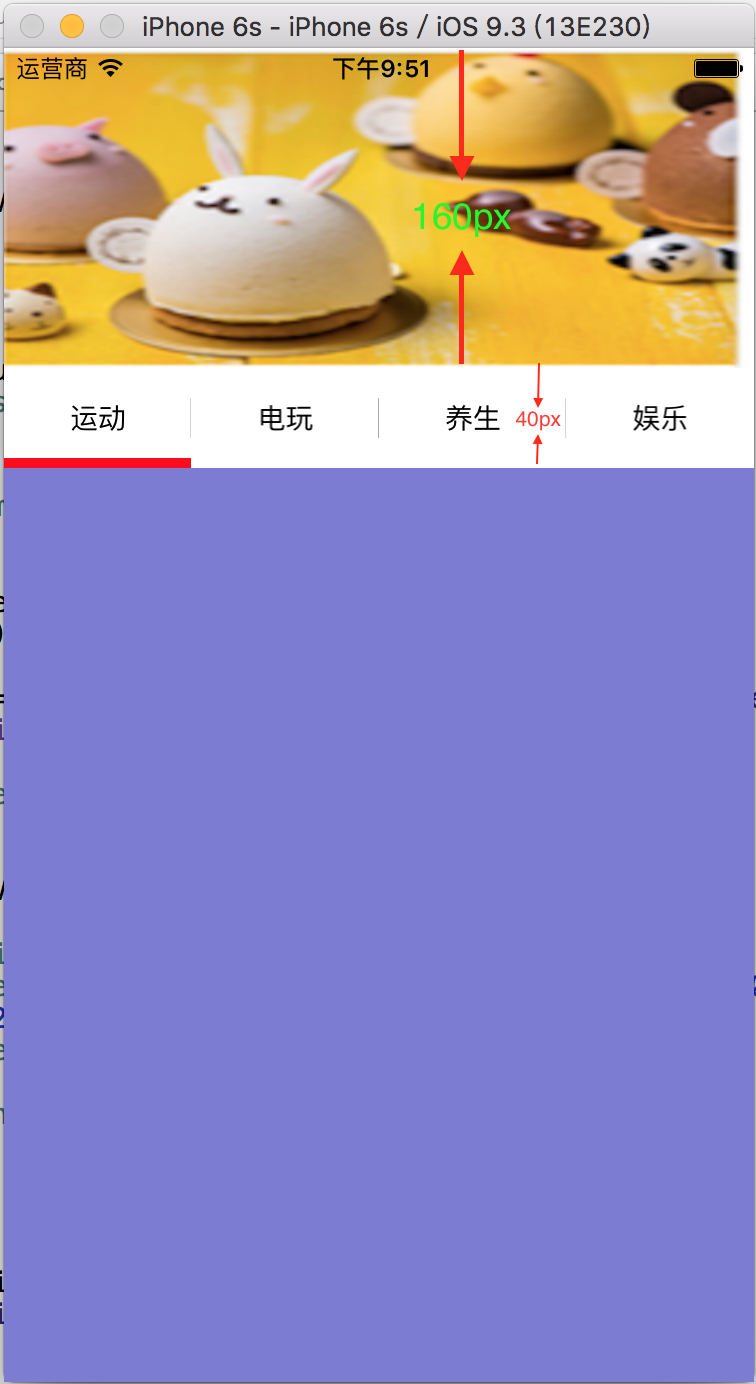
(2) 创建头视图,头视图中有banner图和条件筛选框,标记banner图的高;
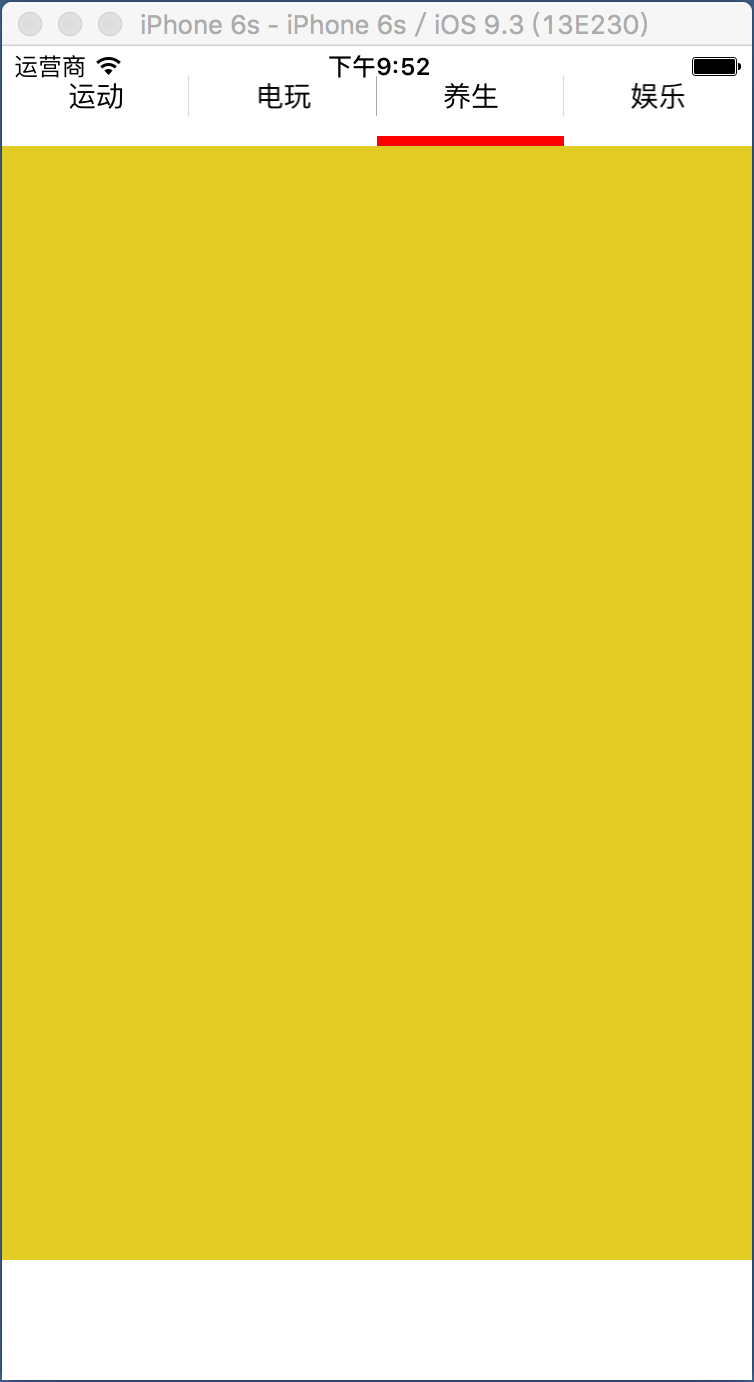
(3)合理设置上下滚动的容器视图的frame,它承载头视图和内容视图,不过需要禁止它的弹簧效果,实现悬浮框功能。
三、代码如下:
HeadView.h
//  HeadView.h

//  SuspensionViewDemo

//

//  Created by 夏远全 on 16/11/25.

//  Copyright © 2016年 广州市东德网络科技有限公司. All rights reserved.

//

#import <UIKit/UIKit.h>

@interface HeadView : UIView

/**

 *  类方法创建头视图

 */

+(instancetype)createHeadView:(CGRect)frame;

@property (strong,nonatomic)UIView *animationView;          //下划线动画视图

@end
HeadView.m
//  HeadView.m

//  SuspensionViewDemo

//

//  Created by 夏远全 on 16/11/25.

//  Copyright © 2016年 广州市东德网络科技有限公司. All rights reserved.

//

#import "HeadView.h"

#import "ViewController.h"

#define padding 10

#define Width       [[UIScreen mainScreen] bounds].size.width

#define Height      [[UIScreen mainScreen] bounds].size.height

@interface HeadView ()

@property (strong,nonatomic)UIImageView  *bannerView;       //banner图

@property (strong,nonatomic)NSMutableArray *buttonNames;    //标题按钮数组

@end

@implementation HeadView

/**

 *  懒加载

 */

-(NSMutableArray *)buttonNames{

    if (!_buttonNames) {

        _buttonNames = [NSMutableArray arrayWithObjects:@"运动",@"电玩",@"养生",@"娱乐",nil];

    }

    return _buttonNames;

}

-(UIImageView *)bannerView{

    if (!_bannerView) {

        _bannerView = [[UIImageView alloc]initWithFrame:CGRectMake(,,Width,)];

        _bannerView.image = [UIImage imageNamed:@"demo"];

    }

    return _bannerView;

}

-(UIView *)animationView{

    if (!_animationView) {

        _animationView = [[UIView alloc]initWithFrame:CGRectMake(, CGRectGetMaxY(self.bannerView.frame)++padding/, Width/, padding/)];

        _animationView.backgroundColor = [UIColor redColor];

    }

    return _animationView;

}

//重写初始化方法

-(instancetype)initWithFrame:(CGRect)frame{

    self = [super initWithFrame:frame];

    if (self) {

        //1.创建轮播图

        [self addSubview:self.bannerView];

        //2.创建标题

        for (int i=; i<; i++) {

            //按钮

            UIButton *btn = [[UIButton alloc]init];

            [btn setTitle:self.buttonNames[i] forState:UIControlStateNormal];

            [btn setTitleColor:[UIColor blackColor] forState:UIControlStateNormal];

            [btn addTarget:self action:@selector(buttonClick:) forControlEvents:UIControlEventTouchUpInside];

            btn.tag = i;

            btn.backgroundColor = [UIColor whiteColor];

            btn.titleLabel.font = [UIFont systemFontOfSize:];

            //分割线

            UILabel *line = [[UILabel alloc]init];

            line.tag = i;

            line.backgroundColor = [UIColor lightGrayColor];

            //添加

            [self addSubview:line];

            [self addSubview:btn];

        }

        //3.创建动画视图

        [self addSubview:self.animationView];

    }

    return self;

}

//类方法

+(instancetype)createHeadView:(CGRect)frame{

    HeadView *headView = [[self alloc]initWithFrame:frame];

    return headView;

}

#pragma mark - 按钮被点击

//点击按钮

-(void)buttonClick:(UIButton *)btn{

    [UIView animateWithDuration:0.2 animations:^{

        //移动动画视图的frame

        CGRect frame = self.animationView.frame;

        frame = CGRectMake(Width/*btn.tag,frame.origin.y,frame.size.width,frame.size.height);

        self.animationView.frame = frame;

        //移动scrollView的偏移位置

        ViewController *currentVC = (ViewController*)[self viewController];

        [currentVC.contentView setContentOffset:CGPointMake(Width*btn.tag, ) animated:NO];

    }];

}

//获取当前视图所在的控制器

- (UIViewController*)viewController {

    for (UIView* next = [self superview]; next; next = next.superview) {

        UIResponder* nextResponder = [next nextResponder];

        if ([nextResponder isKindOfClass:[UIViewController class]]) {

            return (UIViewController*)nextResponder;

        }

    }

    return nil;

}

//设置frame

-(void)layoutSubviews{

    [super layoutSubviews];

    for (UIView *mysubView in self.subviews) {

        if ([mysubView isKindOfClass:[UIButton class]]) {

            //按钮

            UIButton *button = (UIButton *)mysubView;

            CGFloat X = (Width/) * button.tag;

            button.frame = CGRectMake(X, CGRectGetMaxY(self.bannerView.frame)+padding/, (Width/), );

        }

        if ([mysubView isKindOfClass:[UILabel class]]) {

            //分割线

            UILabel *line = (UILabel *)mysubView;

            CGFloat X = (Width/) * line.tag - 0.5;

            line.frame = CGRectMake(X, CGRectGetMaxY(self.bannerView.frame)+1.5*padding,,);

        }

    }

}

@end
ContentView.h
//  ContentView.h

//  SuspensionViewDemo

//

//  Created by 夏远全 on 16/11/25.

//  Copyright © 2016年 广州市东德网络科技有限公司. All rights reserved.

//

#import <UIKit/UIKit.h>

@interface ContentView : UIScrollView

//类方法创建

+(instancetype)shareWithFrame:(CGRect)frame;

@end
ContentView.m
//  ContentView.m

//  SuspensionViewDemo

//

//  Created by 夏远全 on 16/11/25.

//  Copyright © 2016年 广州市东德网络科技有限公司. All rights reserved.

//

#import "ContentView.h"

#define XYQColor(r, g, b)   [UIColor colorWithRed:(r)/255.0 green:(g)/255.0 blue:(b)/255.0 alpha:1.0]

#define XYQRandomColor      XYQColor(arc4random_uniform(256), arc4random_uniform(256), arc4random_uniform(256))

#define SCREEN_W            [[UIScreen mainScreen] bounds].size.width

#define SCREEN_H            [[UIScreen mainScreen] bounds].size.height

@implementation ContentView

//初始化

-(instancetype)initWithFrame:(CGRect)frame{

    self = [super initWithFrame:frame];

    if (self) {

        //放tableView

        for (int i=; i<; i++) {

            UIImageView *imgViw = [[UIImageView alloc]init];

            imgViw.backgroundColor = XYQRandomColor;

            imgViw.frame = CGRectMake(SCREEN_W*i, , SCREEN_W, SCREEN_H-);

            [self addSubview:imgViw];

        }

    }

    return self;

}

//类方法创建

+(instancetype)shareWithFrame:(CGRect)frame{

    ContentView *contentView = [[self alloc]initWithFrame:frame];

    contentView.contentSize = CGSizeMake(SCREEN_W*,frame.size.height);

    contentView.pagingEnabled = YES;

    contentView.bounces = NO;

    return contentView;

}

@end
ViewController.h
//  ViewController.h

//  SuspensionViewDemo

//

//  Created by 夏远全 on 16/11/25.

//  Copyright © 2016年 广州市东德网络科技有限公司. All rights reserved.

//

#import <UIKit/UIKit.h>

#import "ContentView.h"

@interface ViewController : UIViewController

/**

 *  内容视图

 */

@property (strong,nonatomic)ContentView *contentView;

@end
ViewController.m
//  ViewController.m

//  SuspensionViewDemo

//

//  Created by 夏远全 on 16/11/25.

//  Copyright © 2016年 广州市东德网络科技有限公司. All rights reserved.

//

#import "ViewController.h"

#import "HeadView.h"

#define SCREEN_WIDTH  [[UIScreen mainScreen] bounds].size.width

#define SCREEN_HEIGHT [[UIScreen mainScreen] bounds].size.height

@interface ViewController ()<UIScrollViewDelegate>{

    UIScrollView *_containView; //大容器视图(存放头视图和内容视图)

}

/**

 *  头视图

 */

@property (strong,nonatomic)HeadView *headView;

@end

@implementation ViewController

/**

 *  给定头视图的高

 */

static NSInteger const headHeight = ;

- (void)viewDidLoad {

    [super viewDidLoad];

    [self.view setBackgroundColor:[UIColor whiteColor]];

    //创建控件

    [self setupControl];

}

//创建控件

-(void)setupControl{

    //1.设置容器视图

    _containView = [[UIScrollView alloc] initWithFrame:self.view.bounds];

    _containView.tag = -;

    _containView.delegate = self;

    _containView.bounces = NO; //禁止它的弹簧效果

    _containView.contentSize = CGSizeMake(SCREEN_WIDTH, SCREEN_HEIGHT+);

    [self.view addSubview:_containView];

    //2.创建头视图

    _headView = [HeadView createHeadView:CGRectMake(,,SCREEN_WIDTH,headHeight)];

    [_containView addSubview:_headView];

    //3.创建内容视图

    _contentView = [ContentView shareWithFrame:CGRectMake(, headHeight, SCREEN_WIDTH, SCREEN_HEIGHT-)];

    _contentView.tag = -;

    _contentView.delegate = self;

    [_containView addSubview:_contentView];

}

#pragma mark - <UIScrollViewDeleagte>

//设置下划动画视图的frame

-(void)scrollViewDidScroll:(UIScrollView *)scrollView{

    if (scrollView.tag == -) { //横向的滚动内容视图

        NSInteger page = scrollView.contentOffset.x/SCREEN_WIDTH;

        [UIView animateWithDuration:0.2 animations:^{

            CGRect frame = self.headView.animationView.frame;

            frame = CGRectMake(SCREEN_WIDTH/*page,frame.origin.y,frame.size.width,frame.size.height);

            self.headView.animationView.frame = frame;

        }];

    }

}

@end
四、演示截图:(上拉到顶就悬浮了不能在上拉,下拉可以继续),点击按钮来回切换tableView
iOS: 悬浮的条件筛选框使用二的更多相关文章
- iOS: 悬浮的条件筛选下拉框的使用
1.介绍 app中条件筛选视图是很常用的功能,一般它搭配着tableView的表头悬浮滚动使用,点击按钮时,就会弹出下拉框显示条件,选择一个条件后,下拉框自动隐藏. 2.效果图如下 从中间点击弹出,然 ...
- iOS开发-UI 从入门到精通(二)
iOS开发-UI 从入门到精通(二)是对 iOS开发-UI 从入门到精通(一)知识点的巩固,主要以习题练习为主,增强实战经验,为以后做开发打下坚实的基础! ※开发环境和注意事项: 1.前期iOS-UI ...
- 织梦CMS实现多条件筛选功能
用织梦实现筛选的功能,其实主要就是运用到了织梦的高级搜索功能,然后用ajax去post替换掉本来的结果就可以了. 其实筛选的话,主要有两个问题需要解决,一个是前台的筛选实现,一个是后台根据前台的点击, ...
- 记录下url拼接的多条件筛选js
本着为提高工作效率百度或者google这些代码发现拿过来的都不好用,然后自己写了个,写的一般但记录下以后再优化 <html> <head> <script> $(f ...
- python基础一 -------如何在列表字典集合中根据条件筛选数据
如何在列表字典集合中根据条件筛选数据 一:列表 先随机生成一个列表,过滤掉负数 1,普通for循环迭代判断 2,filter()函数判断,filter(函数,list|tuple|string) fi ...
- mxonline实战8,机构列表分页功能,以及按条件筛选功能
对应github地址:列表分页和按条件筛选 一. 列表分页 1. pip install django-pure-pagination 2. settings.py中 install ...
- js前端 多条件筛选查询
一.前言 在做项目中,遇到多条件筛选案例.实现完成以后,我将我做的代码分享在这里,希望可以帮助到其他朋友. 二.效果截图 三.实现代码 首先我先类型.类别.职位分成三块来处理,如果传到服务器端的话,就 ...
- 【疯狂造轮子-iOS】JSON转Model系列之二
[疯狂造轮子-iOS]JSON转Model系列之二 本文转载请注明出处 —— polobymulberry-博客园 1. 前言 上一篇<[疯狂造轮子-iOS]JSON转Model系列之一> ...
- iOS开发UI篇—Quartz2D简单使用(二)
iOS开发UI篇—Quartz2D简单使用(二) 一.画文字 代码: // // YYtextview.m // 04-写文字 // // Created by 孔医己 on 14-6-10. // ...
随机推荐
- java面试题中常见的关于String类问题总结
问题1: String s1 = “abc”;String s2 = “abc”;System.out.println(s1 == s2); 这里的结果是true. 由于字符串是常量(内存中创建对象后 ...
- eclipse远程调试
-Xdebug -Xrunjdwp:transport=dt_socket,address=127.0.0.1:8000Eclipse 菜单上的 Window > Preferences > ...
- jQuery组件系列:封装标签页(Tabs)
我自己封装的组件,你也行,静态链接地址 http://www.cnblogs.com/leee/p/5190489.html 声明.最好,先把代码拷过去运行一下,其实特别丑~再往下看 我没优化,因为我 ...
- avira更新时候安装了launcher
用不上红伞其他的软件,一个登录选择器就显得多余.可能是长时间没用电脑,更新给装上了启动器. 本文以时间顺序而记录 ------------------------------------------- ...
- 小红伞和virtualbox5.0.10冲突
win7 sp1 64bit 旗舰版:virtual box 5.0.10 提示 error in supr3hardNtChildWaitFor……Timed out after 60001 ms ...
- PHP 设计模式 笔记与总结(7)适配器模式
① 适配器模式可以将截然不同的函数接口封装成统一的 API ② 实际应用举例:PHP 的数据库操作有 mysql,mysqli,pdo 三种,可以用适配器模式统一成一致.类似的场景还有 cache 适 ...
- Keil的lib生成个人总结
1. 生成lib 的工程可以没有main函数,可以只有一个.c文件,一个.c文件中可以只有一个函数 2. 需要在lib工程中建立一个.h文件, 必须用extern声明各全局变量和函数. 3. 调用li ...
- iconv vs mb_convert_encoding
iconv 字符串按要求的字符编码来转换 string iconv ( string $in_charset , string $out_charset , string $str ) 将字符串 st ...
- 20145235 《Java程序设计》第4周学习总结
代码托管截图 教材学习内容总结 继承 •继承:继承基本上就是避免多个类间重复定义共同行为. 我理解的就是:在编写程序的过程中可能会出现部分代码重复的现象,把重复的部分单独定义为一类(父类),在其他代码 ...
- 20145317《Java程序设计》实验三
20145317彭垚 实验三<敏捷开发与XP实践> 实验内容 使用 git 上传代码 使用 git 相互更改代码 实现代码的重载 一. 使用git 上传代码 找到Demo1所在文件夹,右键 ...