
Unity 协程与线程
协程是不同步的
协程 不是 线程,协同程序是 不同步 的
一个线程在程序中和其他线程是异步运行的,在多处理器机器中一个线程可以同时与所有其他线程的实时运行其代码,这使得线程编程能够解决很复杂的事情,因为可能在相同的时间里一个线程在改变它而另一个线程正在读取它,这意味着另一个线程实际上可以改变的东西在游戏中处理的中间似乎是你的源代码一行。这是因为你写的代码是由机器变成汇编语言,更是更复杂。正因为如此,你必须通过锁,以确保这种情况不会由任何确保没有共享内存发生。或者通过锁定其他线程使用同一块内存,当他们在读取或更改时。
什么是协程?
协同程序绝对不是一个线程。这意味着在同一时间只有一个协同程序在执行,它会被执行在游戏的主线程上,所以实际上在同一时间游戏的核心只有一个协同程序在运行[这段翻译的不太准确]
你永远不需要担心同步或锁定一个值当你正在编写一个协同程序。你有完全的控制权,直到你的代码执行到 yiedld
因此总结一下协程的定义
协程只是部分执行,并假定在适当的条件得到满足,在未来的某一时刻将被恢复,直到它的工作完成
Unity函数执行图
Unity processes coroutines every frame of the game for every object that has one or more running. The processing occurs after Update and before LateUpdate for most yield statements, but there are special cases:
Unity的流程协同程序在游戏的每一帧每个对象为具有一个或多个正在运行的。Update() 之后,LateUpdate()之前 ,发生的 yield 语句的处理,但也有特殊情况
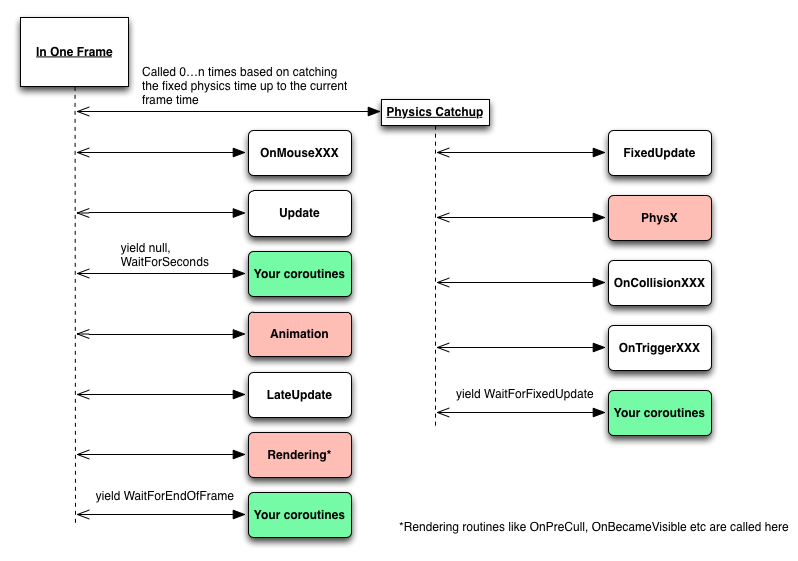
When the coroutine is activated it will execute right up to the next yield statement and then it will pause until it is resumed. You can see where it will resume in the diagram above, based on what you yield.
当协程被激活,它会一直到下一个 yield语句执行,然后它会暂停,直到它恢复。你可以在上图中看到它会恢复,根据你的 yield语句。
简单的协程示例
让我们来看看一个非常简单的协程
IEnumerator TestCoroutine()

{

      while(true)

      {

           Debug.Log(Time.time);

           yield return null;

      }

}
该协程将会永远执行下去。它记录当前的时间,然后yield,当它被恢复,它又进入了这个循环,记录一次时间,遇到 yield 并重复之前的操作
The code inside the loop is exactly like an Update function. It runs once every frame for this object, just after the script's Update routine runs (if it has one).
这代码循环就像 Update() 函数。这个对象在每一帧中运行,脚本的Update 程序运行后(如果有的话)
When you call StartCoroutine(TestCoroutine()) the code executes immediately up to the first time it yields, it will then be resumed when Unity processes coroutines for this object.
当你调用 StartCoroutine(TestCoroutine()) 代码立即第一次得到执行 然后 yield,当Unity 引擎再次处理这个GameObject时,协程会被恢复
If you start a coroutine early in the processing of a game object, like creating one in Start, Update or OnCollisionEnter then that coroutine will immediately run up to the first yield, then it will resume during the same frame if you yield return null .
如果你在早于Unity处理到GameObject就执行一个协程 比如 Start(),Update()或OnCollisionEnter()将会继续执行,当第一次遇到yield,然后同一帧会恢复,如果你yield null。有时候会有奇怪的结果,如果你不考虑它。
是否会无限循环
现在还有一件事,在我们的测试协程显然不是无限循环
下列情况协程将会不再被执行:如果你拨打电话,会停止游戏对象的协同程序,如果它被销毁,它不会再次运行。如果脚本被直接或通过游戏对象上使用SetActive(false),它也不会再执行。
I Yield Sir
Unity processes coroutines every frame of the game for every object that has one or more running.
Unity在处理协程时是 在游戏的每一帧,每一个GameObject上进行的,可以处理1个或多个
你也许也想哦,不,它不需要,如果你使用这样的
yield return new WaitForSeconds(1)then it doesn't process it for another 1 second!"那么它不处理它的另外1秒Well actually Unity does process that coroutine every frame, checking to see if the right amount of time has elapsed - it doesn't process your code, but it does process the coroutine which is the wrapper its made around your script.那么实际上,Unity 会处理协程在每一帧,检查合适的时间是否已经过去,它不会处理你的代码,但是它会处理这个协程,是你的脚本在包装这个协程因此我们知道,我们可以有效的暂停我们的代码通过 yield ,下面是那些你可以Return 的:
- null -协程执行下一次,它是合格的
- WaitForEndOfFrame - 协程的框架上执行,在所有的渲染和图形用户界面完成之后
- WaitForFixedUpdate - 导致此协程在下一次物理学的步骤执行,在所有的物理计算之后
- WaitForSeconds - 使协程并不是一个特定的游戏时间内执行
- WWW - waits for a web request to complete (resumes as if WaitForSeconds or null)
- Another coroutine - in which case the new coroutine will run to completion before the yielder is resumed(在这种情况下,新的协同程序将在这个Yield恢复之前完成)
You can also issue the command yield break; which immediately stops the coroutine.你还可以发出 yield break 命令,去立即停止这个协程Because of WaitForEndOfFrame coroutines can be used to get information from render textures when all cameras have completed rendering and the GUI has been displayed因为 WaitForEndOfFrame 协程可以用于从渲染纹理中获取信息, 当所有的Camera已完成渲染 并且 GUI 已经被显示Using yield return new WaitForSeconds(x) will never resume if the Time.timeScale is set to 0.采用 yield return new WaitForSeconds(x) 将永远不会被恢复,如果 Time.timeScale =0Of course the great thing about all of this is that you can write code that needs to execute over a period of time, or wait for some external event to occur, and keep it all nicely together in a single function making your code far more readable than if you had to write multiple functions or lots of code to keep checking the state of things.当然,关于这一切的伟大的事情是,你可以写需要执行一段时间,或者等待发生一些外部事件,并保持它拥有时尚典雅的一起在一个单一的功能使你的代码更易读的代码比,如果你不得不编写多个函数的代码或地段继续检查事物的状态。这是真正的协同程序的地步。
总结:
- Coroutines are a really good way of making a sequence of operations happen over time or when some external process is completed
- Coroutines are not threads and are not asynchronous
- Nothing else is running when your coroutine is executing
- Your coroutine will resume when the conditions of your yield statement are met
- Coroutines are inactive when the script is disabled or the object is destroyed
- yield return new WaitForSeconds is dependent on game time which is affected by Time.timeScale
译:
- 协程通过按顺序的操作 或一些其实的处理 当它完成时
- 协程并不是线程,它没有同步
- 没有任何 或已经在运行协程
- 你的协程
协程的实际用途
希望我们已经理解了协程是什么,以及它们在运行时。我们的高级教程将研究该技术在它们身后
让我们用协程做一些事情。几个简单的辅助函数,使用协程可以让我们创建易于切割的序列
我们可以写一个协同的移动对象到目标位置和旋转。我们可以写一个协程的等待动画是一个特定的完成百分比。然后利用这两个工具, 我们可以很容易地编写脚本在一个单一的功能,其中它会很容易阅读全切序列
使用协程,通过观看它在移动,为的是要确保不会有其它的协程或Update()函数里更改它的位置在同一时间确保你只有一个协程影响GameObject在同一时间,禁用Update() 函数 移动对象
协程动画示例
这里有一个协同的一个例子等待动画部分完成
//Wait for an animation to be a certain amount complete

IEnumerator WaitForAnimation(string name, float ratio, bool play)

{

    //Get the animation state for the named animation

    var anim = animation[name];

    //Play the animation

    if(play) animation.Play(name);

    //Loop until the normalized time reports a value

    //greater than our ratio.  This method of waiting for

    //an animation accounts for the speed fluctuating as the

    //animation is played.

    while(anim.normalizedTime + float.Epsilon + Time.deltaTime < ratio)

        yield return new WaitForEndOfFrame();

}
You could write a coroutine to wait for an animation like this:
IEnumerator Die()

{

       //Wait for the die animation to be 50% complete

       yield return StartCoroutine(WaitForAnimation("die",0.5f, true));

       //Drop the enemies on dying pickup

       DropPickupItem();

       //Wait for the animation to complete

       yield return StartCoroutine(WaitForAnimation("die",1f, false));

       Destroy(gameObject);

}
资料
英文原文:http://unitygems.com/coroutines/
Unity 协程与线程的更多相关文章
- Unity协程(Coroutine)原理深入剖析
Unity协程(Coroutine)原理深入剖析 By D.S.Qiu 尊重他人的劳动,支持原创,转载请注明出处:http.dsqiu.iteye.com 其实协程并没有那么复杂,网上很多地方都说是多 ...
- Unity 协程Coroutine综合测试
using UnityEngine; using System.Collections; using System.Text; public class rotCube : MonoBehaviour ...
- Unity协程(Coroutine)原理深入剖析(转载)
记得去年6月份刚开始实习的时候,当时要我写网络层的结构,用到了协程,当时有点懵,完全不知道Unity协程的执行机制是怎么样的,只是知道函数的返回值是IEnumerator类型,函数中使用yield r ...
- unity协程coroutine浅析
转载请标明出处:http://www.cnblogs.com/zblade/ 一.序言 在unity的游戏开发中,对于异步操作,有一个避免不了的操作: 协程,以前一直理解的懵懵懂懂,最近认真充电了一下 ...
- 深入浅出!从语义角度分析隐藏在Unity协程背后的原理
Unity的协程使用起来比较方便,但是由于其封装和隐藏了太多细节,使其看起来比较神秘.比如协程是否是真正的异步执行?协程与线程到底是什么关系?本文将从语义角度来分析隐藏在协程背后的原理,并使用C++来 ...
- Unity协程(Coroutine)原理深入剖析再续
Unity协程(Coroutine)原理深入剖析再续 By D.S.Qiu 尊重他人的劳动,支持原创,转载请注明出处:http.dsqiu.iteye.com 前面已经介绍过对协程(Coroutine ...
- 【转】Unity协程(Coroutine)原理深入剖析
Unity协程(Coroutine)原理深入剖析 By D.S.Qiu 尊重他人的劳动,支持原创,转载请注明出处:http.dsqiu.iteye.com 记得去年6月份刚开始实习的时候,当时要我写网 ...
- 聊一聊Unity协程背后的实现原理
Unity开发不可避免的要用到协程(Coroutine),协程同步代码做异步任务的特性使程序员摆脱了曾经异步操作加回调的编码方式,使代码逻辑更加连贯易读.然而在惊讶于协程的好用与神奇的同时,因为不清楚 ...
- Unity协程(Coroutine)管理类——TaskManager工具分享
博客分类: Unity3D插件学习,工具分享 源码分析 Unity协程(Coroutine)管理类——TaskManager工具分享 By D.S.Qiu 尊重他人的劳动,支持原创,转载请注明出处 ...
随机推荐
- 关于IE中通过http-equiv="X-UA-Compatible指定文件兼容性模式
.csharpcode, .csharpcode pre { font-size: small; color: black; font-family: consolas, "Courier ...
- Linux 学习手记(5):使用Vim文本编辑器
Vim是从vi发展而来的文本编辑器.vi是Linux及类Unix系统中主流的命令行文本编辑器,Vim 除了对vi功能上进行了加强,还加入了对GUI的支持.绝大多数的Linux系统上均安装了vim,vi ...
- CSS层次选择器温故-2
1.层次选择器 通过HTML的DOM元素间的层次关系获取元素,层次关系包括后代.父子.相邻兄弟和通用兄弟,通过其中某类关系可以方便快捷地选定需要的元素 2.语法 3.兼容性 IE7以及以上版本 4.后 ...
- SQL学习笔记:选取第N条记录
Northwind数据库,选取价格第二高的产品. 有两种方法,一个是用Row_Number()函数: SELECT productname FROM ( productname, Row_Number ...
- 2015第18本:从0到1,ZERO to ONE, Notes on startups, or how to build the future
<从0到1>中文版的副标题是”开创商业与未来的秘密“,题目大得吓人,英文副标题就谨慎了许多:Notes on startups, or how to build the future. 全 ...
- onWindowFocusChanged
这个onWindowFocusChanged指的是这个Activity得到或者失去焦点的时候 就会call. 也就是说 如果你想要做一个Activity一加载完毕,就触发什么的话 完全可以用这个!!! ...
- 自定义组件 -- android联系人
在android开发中,常常有联系人页面,在这篇和大家分享一下项目中刚刚添加的联系人页面,代码直接从项目中提取出来,没有太多时间修改:使用 StickyListHeaders-master 开源项目及 ...
- 安装VVDocumenter-Xcode-master (Xcode 7.1)的过程
下载地址: http://pan.baidu.com/s/1boxvewB 1.首先下载解压压缩包打开VVDocumenter工程,编译一遍(快捷键com+B) 2.在finder里面的应用程序,找到 ...
- 斯坦福iOS7公开课7-9笔记及演示Demo
这一部分主要介绍了iOS的绘图.手势.协议.block.力学特效动画(包括重力.碰撞.吸附等)以及自动布局的内容. 1.绘图.手势 (1)调用一个自定义的UIView时,可以使用awakeFromNi ...
- LeetCode 8 String to Integer (string转int)
题目来源:https://leetcode.com/problems/string-to-integer-atoi/ Implement atoi to convert a string to an ...