
QCustomplot使用分享(六) 坐标轴和网格线
一、概述
前边已经写了5篇对QCustomPlot的讲解,看过上述的几篇文章后,基本就能做一些简单的使用了,但是如果想要做到高度的控制图表,那么坐标轴将是很重要的一部分,因为坐标轴就是图表的一个参考系,没有了参考系那么一切都是天方夜谭。关于QCustomPlot的坐标轴我还是会按照之前的套路,首先对比1.3.2版本和2.0.0beta版本,然后在深入的去分析坐标轴使用。
二、历史版本对比
首先我需要和大家伙说明下,我个人觉着在QCustomPlot的定制过程中,坐标轴定制算是比较困难的,因为坐标轴如果要定制的话,那就是坐标轴的刻度需要自己计算,如果这个时候相关的业务逻辑也影响坐标轴的计算,那么就更难计算了,呵呵。。。或许大家伙可能也不会遇到这些问题,有兴趣的同学也可以自己思考下。
| 1.3.2版本 | 2.0.0版本 | |
| 坐标轴 |
1、QCPAxis:坐标轴类,所有坐标轴功能都在这一个类总实现,包括:刻度计算和绘制文本 |
1、QCPAxis:坐标轴类,所有坐标轴功能都在这一个类总实现,包括:刻度计算和绘制文本 2、默认刻度自动计算,负责计算大刻度和小刻度 3、如果需要外部计算刻度则处理ticksRequest请求 |
表1 1.3.2版本和2.0.0版本坐标轴比较
下面我将针对2.0.0版本的坐标轴刻度计算来加以解释,为了方便起见,我只解释QCPAxisTicker这个坐标轴刻度计算基类,因为QCPAxis坐标轴默认使用的就是这个类,其余的坐标轴刻度计算类比如QCPAxisTickerDateTime、QCPAxisTickerTime、QCPAxisTickerFixed、QCPAxisTickerText、QCPAxisTickerPi和QCPAxisTickerLog等都是根据不同业务需求,重新实现了vitural相关方法。
三、坐标轴
1、QCPAxis,如下是QCPAxis的头文件,我从中删除了大量不需要注释的部分,但是很是剩下许多,为了写注释方便所以我没有把代码折叠,有兴趣的同学可以阅读下其中的中文注释,其实这个类仅仅是用来连接计算和绘制坐标轴的一个类,也可以说是暴露给使用者的一个导出类。
 class QCP_LIB_DECL QCPAxis : public QCPLayerable

 {

     enum AxisType {//坐标轴类型,在一个坐标轴矩形QCPAxisRect中包含左、上、右和下四条坐标轴

         atLeft = 0x01  ///< <tt>0x01</tt> Axis is vertical and on the left side of the axis rect

         , atRight = 0x02  ///< <tt>0x02</tt> Axis is vertical and on the right side of the axis rect

         , atTop = 0x04  ///< <tt>0x04</tt> Axis is horizontal and on the top side of the axis rect

         , atBottom = 0x08  ///< <tt>0x08</tt> Axis is horizontal and on the bottom side of the axis rect

     };

     enum LabelSide {//坐标轴刻度上的文本的位置,刻度线里or外

         lsInside    ///< Tick labels will be displayed inside the axis rect and clipped to the inner axis rect

         , lsOutside  ///< Tick labels will be displayed outside the axis rect

     };

     enum ScaleType {//坐标轴类型,直线or对数线

         stLinear       ///< Linear scaling

         , stLogarithmic ///< Logarithmic scaling with correspondingly transformed axis coordinates (possibly also \ref setTicker to a \ref QCPAxisTickerLog instance).

     };

     enum SelectablePart {/坐标轴可以被选中的部分

         spNone =       ///< None of the selectable parts

         , spAxis = 0x001  ///< The axis backbone and tick marks

         , spTickLabels = 0x002  ///< Tick labels (numbers) of this axis (as a whole, not individually)

         , spAxisLabel = 0x004  ///< The axis label

     };

     explicit QCPAxis(QCPAxisRect *parent, AxisType type);

     virtual ~QCPAxis();

   //所有的get接口已经被我删除  看到对应的set接口,get接口的含义就不言而喻

     // setters:

     Q_SLOT void setScaleType(QCPAxis::ScaleType type);//设置坐标轴类型  直线or对数

     Q_SLOT void setRange(const QCPRange &range);//设置坐标轴范围

     void setRange(double lower, double upper);      void setTicker(QSharedPointer<QCPAxisTicker> ticker);//设置坐标轴计算刻度类,该参数是一个shared型智能指针,因此可以被多个坐标轴来同时使用

     void setTicks(bool show);//是否显示坐标轴,如果不显示坐标轴,那么网格线也就没有啦,因为没有了坐标轴刻度

     void setTickLabels(bool show);//是否显示坐标轴文本

     void setTickLabelPadding(int padding);//设置坐标走文本距离坐标轴线距离

     void setTickLabelFont(const QFont &font);//设置文本字体

     void setTickLabelColor(const QColor &color);//设置文本颜色

     void setTickLabelRotation(double degrees);//设置文本角度

     void setTickLabelSide(LabelSide side);//设置文本在刻度线里or外

     void setNumberFormat(const QString &formatCode);//设置文本格式

     void setNumberPrecision(int precision);//设置文本精度

     void setTickLength(int inside, int outside = );//设置大刻度高度

     void setTickLengthIn(int inside);//设置大刻度在里边长度

     void setTickLengthOut(int outside);//设置大刻度在外边长度

     void setSubTicks(bool show);//设置是否显示小刻度

     void setSubTickLength(int inside, int outside = );//设置小刻度高度

     void setSubTickLengthIn(int inside);//设置小刻度在坐标轴线里边长度

     void setSubTickLengthOut(int outside);//设置小刻度在坐标轴线外边长度

     void setBasePen(const QPen &pen);//设置基础线画笔  基础线是零线,即可以认为是坐标轴刻度为0的线

     void setTickPen(const QPen &pen);//设置大刻度画笔

     void setSubTickPen(const QPen &pen);//设置小刻度画笔

     void setLabelFont(const QFont &font);//设置坐标轴名称字体画笔

     void setLabelColor(const QColor &color);//设置坐标轴名称字体颜色

     void setLabel(const QString &str);//设置坐标轴名称文本

     void setLabelPadding(int padding);//设置坐标轴名称文本距离坐标轴刻度线距离

     void setPadding(int padding);//设置坐标轴距离边界距离

     void setOffset(int offset);//设置偏移量

     void setSelectedTickLabelFont(const QFont &font);//设置选中刻度文本时字体

     void setSelectedLabelFont(const QFont &font);//设置选中坐标轴名称时字体

     void setSelectedTickLabelColor(const QColor &color);//选中刻度文本时颜色

     void setSelectedLabelColor(const QColor &color);//选中坐标轴名称时颜色

     void setSelectedBasePen(const QPen &pen);//选中基础线时画笔

     void setSelectedTickPen(const QPen &pen);//选中大刻度时画笔

     void setSelectedSubTickPen(const QPen &pen);//选中小刻度时画笔

     Q_SLOT void setSelectableParts(const QCPAxis::SelectableParts &selectableParts);//设置能选中项的类型

     Q_SLOT void setSelectedParts(const QCPAxis::SelectableParts &selectedParts);

     void setLowerEnding(const QCPLineEnding &ending);//设置坐标轴小刻度端样式

     void setUpperEnding(const QCPLineEnding &ending);//坐标轴大刻度端样式 73

     // non-property methods:

     Qt::Orientation orientation() const { return mOrientation; }//坐标轴朝向

     int pixelOrientation() const { return rangeReversed() != (orientation() == Qt::Vertical) ? - : ; }

     void moveRange(double diff);//移动坐标轴

     void scaleRange(double factor);//按比例因子缩放

     void scaleRange(double factor, double center);//按范围缩放 81     void rescale(bool onlyVisiblePlottables = false);//重新适配坐标轴范围

     double pixelToCoord(double value) const;//像素到坐标轴坐标系

     double coordToPixel(double value) const;//坐标轴坐标系到像素 85     QList<QCPAbstractPlottable*> plottables() const;//所有的图

     QList<QCPGraph*> graphs() const;//所有的折线

     QList<QCPAbstractItem*> items() const;//所有的示意项 92

 protected:

     AxisType mAxisType;//坐标轴类型

     QCPAxisRect *mAxisRect;//坐标轴所在矩形116

     // non-property members:

     QCPGrid *mGrid;//网格120     QSharedPointer<QCPAxisTicker> mTicker;//坐标轴刻度计算类

     QVector<double> mTickVector;//大刻度

     QVector<QString> mTickVectorLabels;//大刻度文本

     QVector<double> mSubTickVector;//小刻度

     bool mCachedMarginValid;

     int mCachedMargin;

     // introduced virtual methods:

     virtual int calculateMargin();

     // reimplemented virtual methods:

     virtual void applyDefaultAntialiasingHint(QCPPainter *painter) const Q_DECL_OVERRIDE;//获取缺省的反锯齿属性

     virtual void draw(QCPPainter *painter) Q_DECL_OVERRIDE;//画坐标轴

     virtual QCP::Interaction selectionCategory() const Q_DECL_OVERRIDE;//选择策略137

     // non-virtual methods:

     void setupTickVectors();//计算刻度

     QPen getBasePen() const;//获取基础画笔

     QPen getTickPen() const;//获取大刻度画笔

     QPen getSubTickPen() const;//获取小刻度画笔

     QFont getTickLabelFont() const;//获取刻度文本画笔

     QFont getLabelFont() const;//获取坐标轴名称文本字体

     QColor getTickLabelColor() const;//获取大刻度文本颜色

     QColor getLabelColor() const;..获取坐标轴名称文本颜色

 };
具体的绘制类其实是QCPAxisPainterPrivate类,这是一个私有类,从名字就可以看出,他是一个QCPAxis类的绘制私有类,事实确实如此。刻度计算类是QCPAxisTicker,这是一个刻度计算基类,也是QCPAxis默认使用的刻度计算类,当然了这个类还有一大堆子类,都是专门用于生成指定类型的坐标轴。
2、QCPAxisTicker:刻度计算类,该类完成了大刻度、小刻度和大刻度文本的计算,供QCPAxis来调用绘制,其中generate方法是一个公有的虚方法,既可以被重写,又可以被外部调用,QCPAxis坐标轴就是调用该接口来重新计算刻度。
 class QCP_LIB_DECL QCPAxisTicker

 {

     Q_GADGET

 public:

     enum TickStepStrategy//刻度生成策略

     {

         tssReadability    ///< A nicely readable tick step is prioritized over matching the requested number of ticks (see \ref setTickCount)

         , tssMeetTickCount ///< Less readable tick steps are allowed which in turn facilitates getting closer to the requested tick count

     };

     QCPAxisTicker();

     virtual ~QCPAxisTicker();

     // setters:

     void setTickStepStrategy(TickStepStrategy strategy);//设置刻度生成策略

     void setTickCount(int count);//设置大刻度个数 有可能计算出来的刻度数不完全等于设置的刻度个数,取决于刻度生成策略

     void setTickOrigin(double origin);//设置坐标轴领刻度

     // introduced virtual methods:

     virtual void generate(const QCPRange &range, const QLocale &locale, QChar formatChar, int precision, QVector<double> &ticks, QVector<double> *subTicks, QVector<QString> *tickLabels);

 protected:

     // introduced virtual methods:

     virtual double getTickStep(const QCPRange &range);//根据坐标轴范围计算步长

     virtual int getSubTickCount(double tickStep);//根据步长计算自刻度个数

     virtual QString getTickLabel(double tick, const QLocale &locale, QChar formatChar, int precision);//根据指定语言、文本格式和精度获取文本

     virtual QVector<double> createTickVector(double tickStep, const QCPRange &range);//生成大刻度

     virtual QVector<double> createSubTickVector(int subTickCount, const QVector<double> &ticks);//生成小刻度

     virtual QVector<QString> createLabelVector(const QVector<double> &ticks, const QLocale &locale, QChar formatChar, int precision);//生成刻度文本

     // non-virtual methods:

     void trimTicks(const QCPRange &range, QVector<double> &ticks, bool keepOneOutlier) const;//去除无效的刻度值

     double pickClosest(double target, const QVector<double> &candidates) const;//该函数返回范围内第一个不小于(大于或等于)指定target的值。

 };
四、网格线
QCPGrid网格线,这个算是和QCPAxis坐标轴类似的实现,和其他模块关系基本都不是很大,直接继承自QCPLayerable,头文件格式如下,同样的,我删除了其中无需注释的一部分代码。
在QCustomPlot的源码设计中,一个QCPAxis坐标轴对于一个QCPGrid,这同我之前理解的图表绘制有些不大一样,呵呵呵。。。但是QCustomPlot就是这么干了,如果想对网格线做一些控制,有时候从QCPAxis就可以做到,因为他们直接的数据在使用上还是比较依赖。
 class QCP_LIB_DECL QCPGrid :public QCPLayerable

 {

     QCPGrid(QCPAxis *parentAxis);

     // setters:

     void setSubGridVisible(bool visible);//设置是否显示自网格线

     void setAntialiasedSubGrid(bool enabled);//设置子网格线是否反锯齿

     void setAntialiasedZeroLine(bool enabled);//设置零线(就是刻度值为0的线)是否反锯齿

     void setPen(const QPen &pen);//设置画笔

     void setSubGridPen(const QPen &pen);//设置子网格画笔

     void setZeroLinePen(const QPen &pen);//设置零线画笔

 protected:

     bool mSubGridVisible;//子网格是否显示标记

     bool mAntialiasedSubGrid, mAntialiasedZeroLine;//子网格和零线是否反锯齿标记

     QPen mPen, mSubGridPen, mZeroLinePen;//这个就不用说了

     QCPAxis *mParentAxis;//对于的坐标轴,一个网格线对应一个坐标轴

     virtual void applyDefaultAntialiasingHint(QCPPainter *painter) const;//获取缺省的反锯齿属性

     virtual void draw(QCPPainter *painter);//绘制网格线,内部调用drawGridLines和drawSubGridLines

     // non-virtual methods:

     void drawGridLines(QCPPainter *painter) const;//绘制网格线

     void drawSubGridLines(QCPPainter *painter) const;//绘制子网格线

 };
一般来说,网格线不需要重写,顶多就是设置一个颜色,控制是否显示,网格线的疏密成都市和坐标轴刻度计算有关系的,因此关于网格线的计算我们就不要考虑了,下面我提供一个我自定义的刻度固定像素计算类示例
五、简单的示例
首先来看下效果,如图1所示,当图表放大时,y轴上的刻度间距是保持固定像素的。
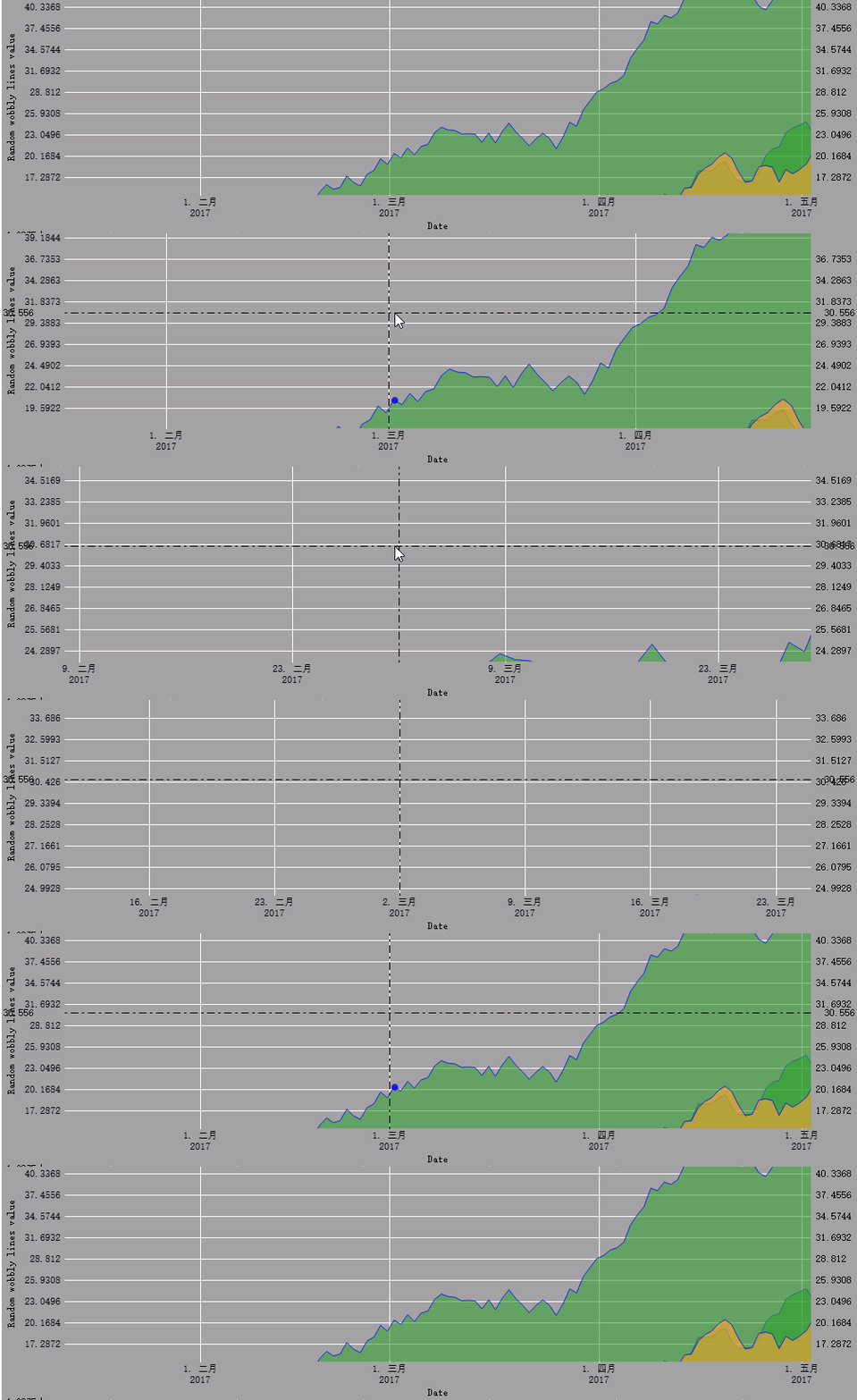
图1 y轴固定像素伸缩
如下是刻度计算类头文件,这个类实现起来还是比较简单的,根据屏幕像素返回步长,每次步长都是按当前像素比例下计算的。
 class AxisFixedPixelTicker : public QCPAxisTicker

 {

 public:

     AxisFixedPixelTicker(QCPAxis * axis);

     ~AxisFixedPixelTicker();

 public:

     void SetTickPixelStep(int pixel);//设置固定像素

     int GetTickPixelStep() const;//获取固定像素大小

 protected:

     //QCPAxisTicker

     virtual double getTickStep(const QCPRange & range) override;//重写父类方法,根据固定像素返回步长值

 private:

     QScopedPointer<AxisFixedPixelTickerPrivate> d_ptr;

 };
下面是重写的父类接口getTickStep方法实现
 double AxisFixedPixelTicker::getTickStep(const QCPRange & range)

 {

     if (d_ptr->m_pDependAxis)

     {

         bool vertical;

         if (d_ptr->m_pDependAxis->axisType() == QCPAxis::atLeft

             || d_ptr->m_pDependAxis->axisType() == QCPAxis::atRight)

         {

             vertical = true;

         }

         else

         {

             vertical = false;

         }

         int screenLength = vertical ? d_ptr->m_pDependAxis->axisRect()->rect().height() : d_ptr->m_pDependAxis->axisRect()->rect().width();

         return d_ptr->m_iPixel * range.size() / screenLength;

     }

     else

     {

         return __super::getTickStep(range);

     }

 }
六、相关文章
QCustomplot使用分享(四) QCPAbstractItem


QCustomplot使用分享(六) 坐标轴和网格线的更多相关文章
- QCustomplot使用分享(七) 层(完结)
一.分层绘制 一直说要讲2.0.0版本,但总是想把1.3.2版本拿出来比较一下,这篇文章也不例外.QCustomPlot2.0.0beta版本比1.3.2release版本有一个很大的改进那就是分层绘 ...
- QCustomplot使用分享(八) 绘制图表-加载cvs文件
目录 一.概述 二.效果图 三.源码讲解 1.源码结构 2.头文件 3.移动游标 4.设置坐标轴矩形个数 5.添加图表数据 6.设置折线图类型 6.其他函数 四.测试方式 1.测试工程 2.测试文件 ...
- QCustomplot使用分享(九) 绘制图表-多功能游标
目录 一.概述 二.效果图 三.源码讲解 1.源码结构 2.头文件 3.添加游标 4.监测移动 5.移动游标 6.其他函数 四.测试方式 1.测试工程 2.测试文件 3.测试代码 五.相关文章 六.总 ...
- QCustomplot使用分享(二) 源码解读
一.头文件概述 从这篇文章开始,我们将正式的进入到QCustomPlot的实践学习中来,首先我们先来学习下QCustomPlot的类图,如果下载了QCustomPlot源码的同学可以自己去QCusto ...
- QCustomplot使用分享(四) QCPAbstractItem
一.是什么 说起图,大家一下就可能想到折线图.柱状图和饼图等,但是除了这些显眼的东西以外其实还有很多东西辅助的存在着,有了这些辅助的东西图才会看起来有意义,或者说更加的真实.有说服力.这些东西都包括那 ...
- QCustomplot使用分享(五) 布局
一.历史对比 关于QCPLayoutElement这个元素的讲解之前,我想先对1.3.2release版本和2.0.0beta版本的该元素做以简单的对比介绍,首先,1.3.2release版本时,鼠标 ...
- QCustomplot使用分享(三) 图
一.可以实现的图 相对于其他绘制图表的第三方库来说,QCustomPlot算是比较轻量的,不仅仅能实现功能,而且二次开发比较容易.下面我们来具体说下他可以实现那些图 QCPGraph:折线图,Line ...
- 分享六个基于Bootstrap的实用开发教程和模板演示
关于Bootstrap,相信大家一定不陌生,它已经成为现在主流产业的一个重要工具,Bootstrap提供了优雅的HTML和CSS规范,它基于jQuery框架开发的,它在jQuery框架的基础上进行了更 ...
- QCustomplot使用分享(一) 能做什么事
一.QCustomPlot简介 之前在Qt之自绘制饼图这篇文章的说明中我简单的描述了下目前依赖于qt的第三方绘图库,此后我会针对自己使用QCustomPlot的情况做一总结,以方便大家参考 QCust ...
随机推荐
- Mysql自动备份工具1.0(2013年11月15日更新)
Mysql自动备份工具1.0 下载地址 2013-11-15 1.解决日历控件在Windows7/8/8.1环境下遮挡按钮问题:2.解决按月备份当月没有该日期问题: 2013-11-13 1.Mysq ...
- ORA-00257: archiver error. Connect internal only, until freed——解决
参考http://www.2cto.com/database/201109/104615.html, 开启归档后,操作一个大表迁移表空间,执行了1个多小时没完成就手动给中断了,但是再次用plsql登陆 ...
- Web开发人员常犯的10个错误
说到开发一个运行在现代网络中的网站:Web开发人员需要选择虚拟主机平台和底层数据存储,准备编写HTML.CSS和JavaScript用的工具,要有设计执行方式,以及一些可用的JavaScript库/框 ...
- Maven - 解决Maven下载依赖包速度慢问题
通常我们会因为下载jar包速度缓慢而苦恼,这十分影响开发效率,以及程序员的心情,在IDE下载jar时,无法对IDE做任何动作,只能大眼对小眼. 下载jar速度慢究其原因就是因为很多资源都是国外的,我们 ...
- SecureCRT的快捷键
快捷键,有时比笨拙的方式,要效率高很多,近期经常和Linux打交道,用到SecureCRT,这里就从网上找到部分快捷方式,作为日后查看,以防经常查找. Alt + Enter -- 全屏Alt + B ...
- Navi.Soft30.框架.WebMVC.开发手册
1概述 1.1应用场景 互联网高速发展,互联网软件也随之越来越多,Web程序越来越被广泛使用.它部署简单,维护方便,深得众多软件公司使用 Bootstrap前端框架,是最近非常流行的框架之一.它简洁, ...
- Android 6.0 源代码编译实践
http://www.judymax.com/archives/1087 Android 6.0 源代码编译实践 https://mirrors.tuna.tsinghua.edu.cn/help/A ...
- android Camera 结构
Java层 :Frameworks\base\core\java\android\hardware\Camera.java JNI: Frameworks\base\core\jni\android_ ...
- CGI、FastCGI 知识总结
@import url(http://i.cnblogs.com/Load.ashx?type=style&file=SyntaxHighlighter.css);@import url(/c ...
- Hadoop2.x源码-编译剖析
1.概述 最近,有小伙伴涉及到源码编译.然而,在编译期间也是遇到各种坑,在求助于搜索引擎,技术博客,也是难以解决自身所遇到的问题.笔者在被询问多次的情况下,今天打算为大家来写一篇文章来剖析下编译的细节 ...