
WPF控件--利用Winform库中的NotifyIcon实现托盘小程序
WPF控件--NotifyIcon
运行界面如下所示:
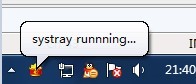

图1 图2
代码很少,如下所示:
 Code highlighting produced by Actipro CodeHighlighter (freeware)http://www.CodeHighlighter.com/-->
 using System;
 using System.Windows;
 using System.Windows.Forms;
 using System.Drawing;

 namespace Royen
 {
     public partial class SysTray : Window
     {
         private NotifyIcon notifyIcon=null;

         public SysTray()
         {
             InitializeComponent();

             InitialTray();
         }

         private void InitialTray()
         {
             //隐藏主窗体
             this.Visibility = Visibility.Hidden;

             //设置托盘的各个属性
             notifyIcon = new NotifyIcon();
             notifyIcon.BalloonTipText = "systray runnning...";
             notifyIcon.Text = "systray";
             notifyIcon.Icon = new System.Drawing.Icon("http://www.cnblogs.com/res/spring.ico");
             notifyIcon.Visible = true;
             notifyIcon.ShowBalloonTip();
             notifyIcon.MouseClick += new System.Windows.Forms.MouseEventHandler(notifyIcon_MouseClick);

             //设置菜单项
             MenuItem setting1 = new MenuItem("setting1");
             MenuItem setting2 = new MenuItem("setting2");
             MenuItem setting = new MenuItem("setting", new MenuItem[]{setting1,setting2});

             //帮助选项
             MenuItem help = new MenuItem("help");

             //关于选项
             MenuItem about = new MenuItem("about");

             //退出菜单项
             MenuItem exit = new MenuItem("exit");
             exit.Click += new EventHandler(exit_Click);

             //关联托盘控件
             MenuItem[] childen = new MenuItem[] {setting,help,about,exit};
             notifyIcon.ContextMenu = new ContextMenu(childen);

             //窗体状态改变时候触发
             this.StateChanged += new EventHandler(SysTray_StateChanged);
         }

         /// <summary>
         /// 鼠标单击
         /// </summary>
         /// <param name="sender"></param>
         /// <param name="e"></param>
         private void notifyIcon_MouseClick(object sender, System.Windows.Forms.MouseEventArgs e)
         {
             //如果鼠标左键单击
             if (e.Button == MouseButtons.Left)
             {
                 if (this.Visibility == Visibility.Visible)
                 {
                     this.Visibility = Visibility.Hidden;
                 }
                 else
                 {
                     this.Visibility = Visibility.Visible;
                     this.Activate();
                 }
             }
         }

         /// <summary>
         /// 窗体状态改变时候触发
         /// </summary>
         /// <param name="sender"></param>
         /// <param name="e"></param>
         private void SysTray_StateChanged(object sender, EventArgs e)
         {
             if (this.WindowState == WindowState.Minimized)
             {
                 this.Visibility = Visibility.Hidden;
             }
         }

         /// <summary>
         /// 退出选项
         /// </summary>
         /// <param name="sender"></param>
         /// <param name="e"></param>
         private void exit_Click(object sender, EventArgs e)
         {
             if (System.Windows.MessageBox.Show("sure to exit?",
                                                "application",
                                                 MessageBoxButton.YesNo,
                                                 MessageBoxImage.Question,
                                                 MessageBoxResult.No) == MessageBoxResult.Yes)
             {
                 System.Windows.Application.Current.Shutdown();
             }
         }
     }
 }
工程源码下载:/Files/royenhome/Royen.rar 。真诚的希望和大家学习交流~
支持正版,版权来自 http://www.cnblogs.com/royenhome/archive/2010/02/02/1662243.html 园主:royen
WPF控件--利用Winform库中的NotifyIcon实现托盘小程序的更多相关文章
- 关于WinForm引用WPF窗体---在Winform窗体中使用WPF控件
项目中有个界面展示用WPF实现起来比较简单,并且能提供更酷炫的效果,但是在WinForm中使用WPF窗体出现了问题,在网上找了一下有些人说Winform不能引用WPF的窗体,我就很纳闷,Win32都能 ...
- 在Winform窗体中使用WPF控件(附源码)
原文:在Winform窗体中使用WPF控件(附源码) 今天是礼拜6,下雨,没有外出,闲暇就写一篇博文讲下如何在Winform中使用WPF控件.原有是我在百度上搜索相关信息无果,遂干脆动手自己实现. W ...
- 反爬虫:利用ASP.NET MVC的Filter和缓存(入坑出坑) C#中缓存的使用 C#操作redis WPF 控件库——可拖动选项卡的TabControl 【Bootstrap系列】详解Bootstrap-table AutoFac event 和delegate的分别 常见的异步方式async 和 await C# Task用法 c#源码的执行过程
反爬虫:利用ASP.NET MVC的Filter和缓存(入坑出坑) 背景介绍: 为了平衡社区成员的贡献和索取,一起帮引入了帮帮币.当用户积分(帮帮点)达到一定数额之后,就会“掉落”一定数量的“帮帮 ...
- 在WinForm应用程序中嵌入WPF控件
我们知道,在WPF界面上添加WinForm的控件需要使用WindowsFormHost类.而在WinForm界面上添加WPF控件该如何做呢?有没有类似的类呢?明显是有的,ElementHost就是为了 ...
- WPF 控件库——仿制Chrome的ColorPicker
WPF 控件库系列博文地址: WPF 控件库——仿制Chrome的ColorPicker WPF 控件库——仿制Windows10的进度条 WPF 控件库——轮播控件 WPF 控件库——带有惯性的Sc ...
- 《Dotnet9》系列-开源C# WPF控件库2《Panuon.UI.Silver》强力推荐
时间如流水,只能流去不流回! 点赞再看,养成习惯,这是您给我创作的动力! 本文 Dotnet9 https://dotnet9.com 已收录,站长乐于分享dotnet相关技术,比如Winform.W ...
- 《Dotnet9》系列-开源C# WPF控件库1《MaterialDesignInXAML》强力推荐
时间如流水,只能流去不流回! 点赞再看,养成习惯,这是您给我创作的动力! 本文 Dotnet9 https://dotnet9.com 已收录,站长乐于分享dotnet相关技术,比如Winform.W ...
- WPF 精修篇 Winform 嵌入WPF控件
原文:WPF 精修篇 Winform 嵌入WPF控件 首先 创建WPF控件库 这样就有了一个WPF界面 在wpf中增加界面等 在winform中增加WPFDLL 重新生成解决方案 在左侧工具栏 出现W ...
- [WPF]是时候将WPF控件库从.Net Framework升级到.NET Core 3.1
1. 升级到Core的好处 去年中我曾考虑将我的控件库项目Kino.Toolkit.Wpf升级到.NET Core,不过很快放弃了,因为当时.NET Core是预览版,编译WPF还需要使用最新的Vis ...
随机推荐
- 这一路走来,冷暖自知 (附算法demos)
最近半年多,除了“一键修图”算法之外我还做了其他什么算法? 1.实时单图HDR算法(颜色矫正,智能曝光) 2.多图曝光融合HDR算法(最高支持八百万像素左右) 3.模拟热能探测算法 4.防伪探测算法 ...
- Django数据库怎么给字段设置主键
id = models.IntegerField(primary_key = True) 附: null :缺省设置为false.通常不将其用于字符型字段上,比如CharField,TextField ...
- Android组件系列----Android Service组件深入解析
[声明] 欢迎转载,但请保留文章原始出处→_→ 生命壹号:http://www.cnblogs.com/smyhvae/ 文章来源:http://www.cnblogs.com/smyhvae/p/4 ...
- phpmyadmin后台拿shell方法总结
方法一: CREATE TABLE `mysql`.`xiaoma` (`xiaoma1` TEXT NOT NULL ); INSERT INTO `mysql`.`xiaoma` (`xiaoma ...
- Lua笔记(1)
今天开始学习Lua,下面把一些重点记下来: 单行注释-- ,多行注释 --[[ ....... --]] Lua中false和nil表示条件判断的假,其余的,包括空字符串,0,都表示真. Lua没 ...
- 使用CuteSlider做网站炫酷的幻灯片
cuteSlider 1.预览 官网:http://www.cuteslider.com/ 应用:http://www.dutphonelab.org/ 2.资料 文档:http://pan.baid ...
- [原创]CI持续集成系统环境---部署Gitlab环境完整记录
Gitlab是一个代码托管平台,在实际工作中,对代码管理十分有用. 废话不多说,下面是对我自己搭建的Gitlab环境做一记录: (1)安装 ------------------------------ ...
- HTML---总结
(1) margin负值能让没有宽度的盒子变大. 对于有宽度的盒子,没有浮动,只有margin-top 和margin-left 有效:如果浮动,margin-浮动方向 有效,-top有效,margi ...
- 在线运行Javascript,Jquery,HTML,CSS代码
<!DOCTYPE html PUBLIC "-//W3C//DTD XHTML 1.0 Transitional//EN" http://www.w3.org/TR/xht ...
- 加密算法使用(二):使用MD5加密字符串(另:byte数组转16进制自动补零方法写法)
public static void main(String args[]) throws NoSuchAlgorithmException { String s = new String(" ...