
WildFly 9.0.2+mod_cluster-1.3.1 集群配置
一、配置背景
最近使用WildFly 9.0.2作为中间件开发系统,给客户部署的时候需要使用集群来进行负载均衡,一开始想到是使用Nginx。但是只通过Nginx使用 ip_hash 模式没有做到session的不丢失(也可能是我对Nginx的理解不够深入)。所以后来google了一下,发现很多Jboss服务器都使用 httpd + mod_cluster 来做集群的搭建,所以就准备使用这种配置来搭建一把。
二、环境准备
WildFly 9.0.2+mod_cluster-1.3.1+Java7+VMware 10:这些都可以去官方下载。
VMware 10 系统配置:本地Win7(192.168.244.1)+Server 2012(192.168.244.132)+Server 2012(192.168.244.133) ,这里的Win7 是本地不需要在虚拟机安装,主要用作 mod_cluster 的集群管理服务器。两台Server 2012需要在在虚拟机中搭建,132作为master,133座位slave。master可以统一管理和部署系统环境。
三、配置过程
1、域管理配置
我们需要配置master和slave主机系统的java环境变量,然后通过 wildfly-9.0.2s\bin\domain.bat 来启动Jboss,如果可以正常启动,并且出现以下如图提示,说明基本的环境配置已经成功。
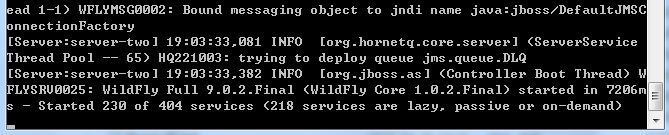
master进行域控制的配置:找到文件 domain/configuration/host.xml 进行修改。
默认的配置为
<interfaces>

    <interface name="management">

        <inet-address value="${jboss.bind.address.management:127.0.0.1}"/>

    </interface>

    <interface name="public">

       <inet-address value="${jboss.bind.address:127.0.0.1}"/>

    </interface>

    <interface name="unsecured">

       <inet-address value="127.0.0.1" />

    </interface>

</interfaces
我们需要去修改管理端口,以至于slave可以连接到master,修改为如下:
<interfaces>

    <interface name="management"

        <inet-address value="${jboss.bind.address.management:192.168.244.132}"/>

    </interface>

    <interface name="public">

       <inet-address value="${jboss.bind.address:192.168.244.132}"/>

    </interface>

    <interface name="unsecured">

       <inet-address value="192.168.244.132" />

    </interface>

</interfaces>
slave的环境配置:为了让slave可以连接到master,同样找到文件 domain/configuration/host.xml
<host name="master" xmlns="urn:jboss:domain:3.0">
修改为
<host name="slave" xmlns="urn:jboss:domain:3.0">
同时修改 domain-controller 以至于slave可以连接到master的管理端口
<domain-controller>

    <remote protocol="remote" host="192.168.244.132" port="9999" username="slave" security-realm="ManagementRealm"/>

</domain-controller>
上面的username="slave" 主要是为安全配置,需要特定的用户来连接master。
接下来修改salve的 interfaces 配置为:
<interfaces>

        <interface name="management">

            <inet-address value="${jboss.bind.address.management:192.168.244.133}"/>

        </interface>

        <interface name="public">

            <inet-address value="${jboss.bind.address:192.168.244.133}"/>

        </interface>

        <interface name="unsecure">

            <!-- Used for IIOP sockets in the standard configuration.

                 To secure JacORB you need to setup SSL -->

            <inet-address value="${jboss.bind.address.unsecure:192.168.244.133}"/>

        </interface>

</interfaces>
如果现在你启动master以后,再去启动slave,会发现如下报错,因为我们还没有配置slave和master之间的认证。
[Host Controller] 20:31:24,575 ERROR [org.jboss.remoting.remote] (Remoting "endpoint" read-1) JBREM000200: Remote connection failed: javax.security.sasl.SaslException: Authentication failed: all available authentication mechanisms failed

[Host Controller] 20:31:24,579 WARN  [org.jboss.as.host.controller] (Controller Boot Thread) JBAS010900: Could not connect to remote domain controller 192.168.244.132:9999

[Host Controller] 20:31:24,582 ERROR [org.jboss.as.host.controller] (Controller Boot Thread) JBAS010901: Could not connect to master. Aborting. Error was: java.lang.IllegalStateException: JBAS010942: Unable to connect due to authentication failure.
此时,我们需要在master中添加2个user,可以通过 wildfly-9.0.2s\bin\add-user.bat 来添加,具体过程在这里不再描述,过程中需要注意一点就是需要记住password的64位加密后的码,人员类型选择 “ManagementRealm”。我在这里添加2个用户 master 和 slave,密码都为123456。
在slave找到刚才编辑过的 host.xml,添加<secret value="MTIzNDU2" /> ,“MTIzNDU2”为123456的64位加密码,配置如下:
     <security-realms>

            <security-realm name="ManagementRealm">

                <server-identities>

                    <secret value="MTIzNDU2" />

                </server-identities>

                <authentication>

                    <local default-user="$local" skip-group-loading="true"/>

                    <properties path="mgmt-users.properties" relative-to="jboss.domain.config.dir"/>

                </authentication>

                <authorization map-groups-to-roles="false">

                    <properties path="mgmt-groups.properties" relative-to="jboss.domain.config.dir"/>

                </authorization>

            </security-realm>

            <security-realm name="ApplicationRealm">

                <server-identities>

                    <secret value="MTIzNDU2" />

                </server-identities>

                <authentication>

                    <local default-user="$local" allowed-users="*" skip-group-loading="true"/>

                    <properties path="application-users.properties" relative-to="jboss.domain.config.dir"/>

                </authentication>

                <authorization>

                    <properties path="application-roles.properties" relative-to="jboss.domain.config.dir"/>

                </authorization>

            </security-realm>

        </security-realms>
进过如上配置我们就可以是的slave和master彼此连接,此时,再去启动slave的服务,在命令行会看到:Registered remote slave host slave。说明我们在域控制模式下已经将2台主机配置成功。
2、部署测试环境
测试项目:http://pan.baidu.com/s/1eSkaeC6 我在这里提供一个可以下载的项目主要为了测试session是否在服务某个节点失败以后,是否会正确转移到另外一个节点。
在master上登陆管理控制台 http://192.168.244.132:9990/console/ ,将master和slave的server-three启动起来。(如果在master中无法启动slave的server,可以将salve上的wildfly重新启动一下) 
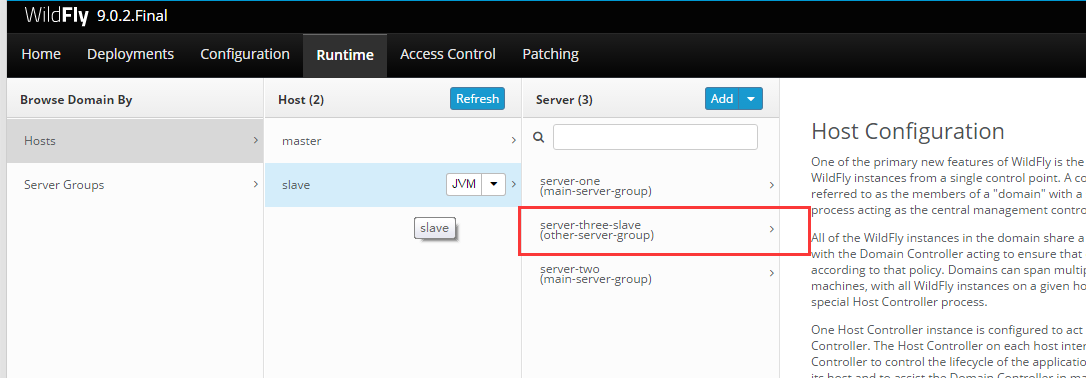
这里的server-three在master和slave上尽量使用不同的名字,官方文档说相同的话在做集群的时候可能会出现冲突。接下来部署我们的war包,进入部署页面,选择Server Groups 页面选择 other-server-group,然后选择add按钮部署项目。

部署完毕以后我们的项目会被同事部署到master和master中,这就是wildfly域控制器的功能所在。此时我们访问以下我们的项目如下,通过如下地址
http://192.168.244.132:8330/cluster-demo/
http://192.168.244.133:8330/cluster-demo/
应该应该可以看到如下界面:

这里我们的访问端口为8330,为什么不是8080?这里因为我们在host.xml里面进行了如下配置:
<server name="server-three" group="other-server-group" auto-start="false">

    <!-- server-three avoids port conflicts by incrementing the ports in

         the default socket-group declared in the server-group -->

    <socket-bindings port-offset="250"/>

</server>

port-offset 是 250, 所以 8080 + 250 = 8330
接下来我们需要停止wildfly服务,我们需要在master和slave编辑host.xml将我们的serevr-three设置为自动启动。同时将slave的server-three修改为server-three-slave,这是因为mod_cluster在注册的时候如果名字相同,可能会注册失败。
master
<server name="server-three" group="other-server-group" auto-start="true">

    <!-- server-three avoids port conflicts by incrementing the ports in

         the default socket-group declared in the server-group -->

    <socket-bindings port-offset="250"/>

</server>
slave
<server name="server-three-slave" group="other-server-group" auto-start="true">

    <!-- server-three avoids port conflicts by incrementing the ports in

         the default socket-group declared in the server-group -->

    <socket-bindings port-offset="250"/>

</server>
完成如上配置以后,接下来我们就需要配置httpd 和 mod_cluster 来完成集群配置。
3、mod_cluster 集群的配置
解压我们下载的mod_cluster安装文件到某个目录,然后执行 D:\httpd-2.4\bininstallconf.bat 命令(这里要注意,需要使用管理员权限启动),然后会发现在目录D:\httpd-2.4\conf 下面会看到httpd.conf 文件,接下来的主要配置就是修改这个文件。然后安装httpd服务:httpd.exe -k install -n httpd2.4(安装的service需要使用管理员启动,默认是本地系统)
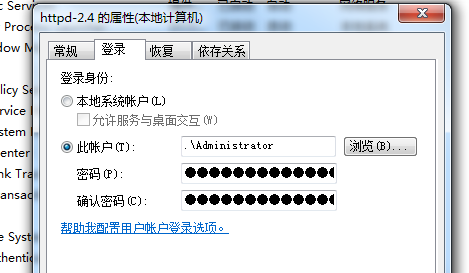
httpd.conf修改的主要内容如下:
Listen 192.168.244.1:80


......

#ServerName 的修改

ServerName 192.168.244.1:80


......

# MOD_CLUSTER_ADDS

# Adjust to you hostname and subnet.

<IfModule manager_module>

  Listen 192.168.244.1:8888

  #ManagerBalancerName mycluster

  <VirtualHost 192.168.244.1:8888>

    # / 标示拦截所有类型的请求 Require ip 192.168.244 标示拦截特定的IP

    <Location />

     Require ip 192.168.244

    </Location>

    KeepAliveTimeout 60

    MaxKeepAliveRequests 0

    EnableMCPMReceive

    # don't use multicast

    ServerAdvertise Off

    #AdvertiseFrequency 5

    #AdvertiseSecurityKey secret

    #AdvertiseGroup 224.0.1.105:23364

    <Location /status>

       SetHandler mod_cluster-manager

       #Require ip 192.168.244

       Order deny,allow

       Deny from all

       Allow from all

       AllowDisplay on

    </Location>

    #设置代理转发,这里为将所有请求类型都转发至mycluster负载均衡器

    #ProxyPass / balancer://mycluster/

  </VirtualHost>

</IfModule>
然后启动service
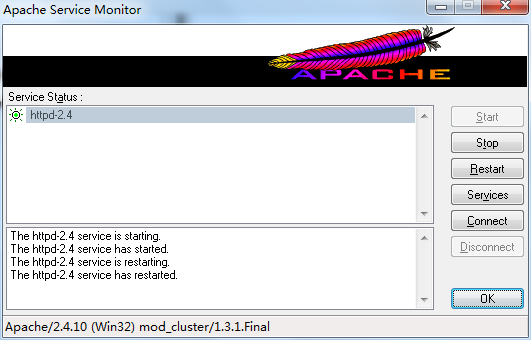
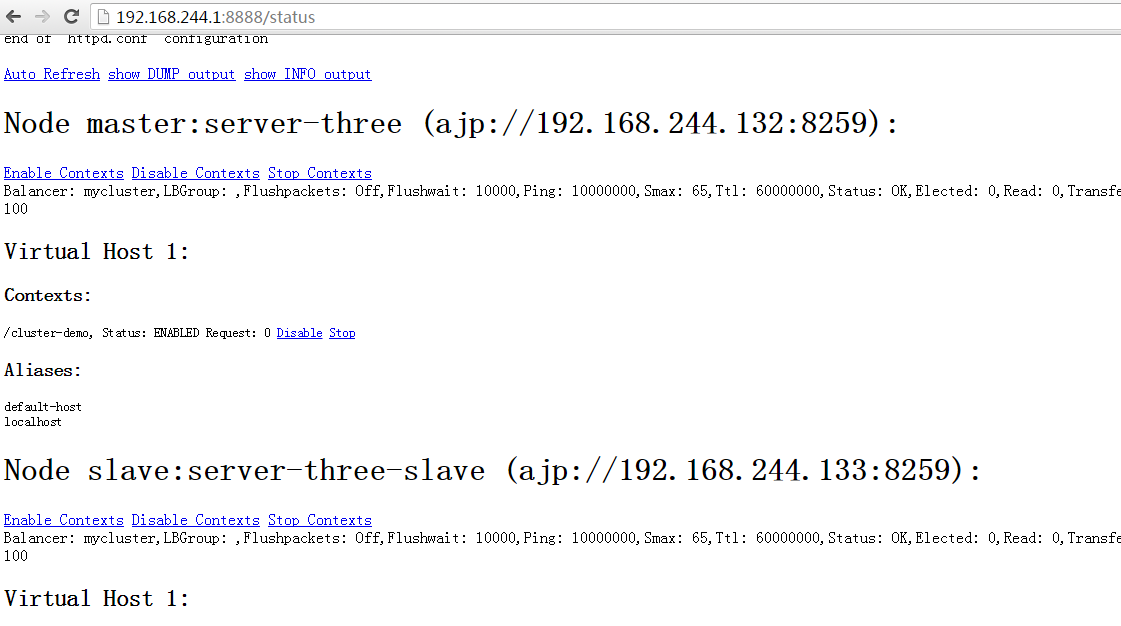
然后访问http://192.168.244.1:8888/status,如果可以正确找到master和slave节点的server说明我的集群配置成功。
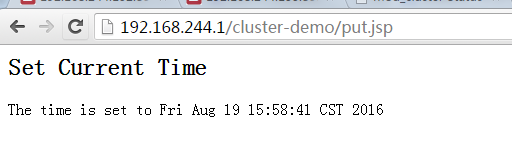
接下来进行集群的测试,此时会用到我们此前部署的项目cluster-demo,首先我们访问:http://192.168.244.1/cluster-demo/put.jsp
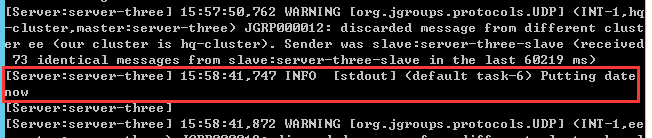
此时我们会在master的后台看到如下信息
然后我们关闭master的服务,然后访问:http://192.168.244.1/cluster-demo/get.jsp
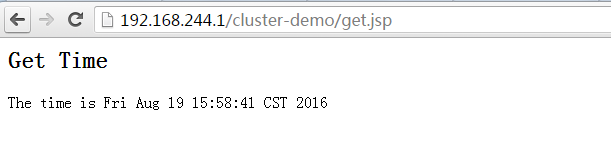
我们发现我们put和get的时间相同,说明我们的session内容没有丢失。到此,我们的集群环境部署完毕。
四、过程总结
整个过程断断续续花了2天,发生问题最多的地方是在httpd.conf配置的地方,因为对这里面的配置的介绍文档比较少。另外如果实在虚拟机做测试最好将虚拟机里面的IP固定一下,有时候虚拟机重启IP会发生变化,启动服务的时候会报错。
五、参考网址
https://docs.jboss.org/author/display/WFLY9/WildFly+9+Cluster+Howto
http://docs.jboss.org/mod_cluster/1.1.0/html/Quick_Start_Guide.html
WildFly 9.0.2+mod_cluster-1.3.1 集群配置的更多相关文章
- Hadoop-2.2.0中文文档——MapReduce 下一代 -——集群配置
目的 这份文档描写叙述了怎样安装.配置和管理从几个节点到有数千个节点的Hadoop集群. 玩的话,你可能想先在单机上安装.(看单节点配置). 准备 从Apache镜像上下载一个Hadoop的稳定版本号 ...
- 通过tarball形式安装HBASE Cluster(CDH5.0.2)——HBASE 真分布式集群配置
一.应该先配置好zookeeper并成功启动,否则hbase无法启动 二.配置HBASE集群 1,配置hbase-env.sh,下面是最少配置项目 [hadoop@zk1 conf]$ vim hba ...
- Redis 哨兵(sentinel)模式集群配置(5.0.3版本)
一.准备工作 1.系统环境:centos6.4 2.服务器六台(1主5从): 192.168.1.161(master) 192.168.1.162(slave) 192.168.1.163(slav ...
- 使用mod_cluster进行apache httpd server和jboss eap 6.1集群配置
本文简单介绍,使用mod_cluster进行apache httpd server和jboss eap 6.1集群配置.本配置在windows上测试通过,linux下应该是一样的.可能要稍作调整.后面 ...
- Redis 3.0 Cluster集群配置
Redis 3.0 Cluster集群配置 安装环境依赖 安装gcc:yum install gcc 安装zlib:yum install zib 安装ruby:yum install ruby 安装 ...
- redis 4.0.8 源码包安装集群
系统:centos 6.9软件版本:redis-4.0.8,rubygems-2.7.7,gcc version 4.4.7 20120313,openssl-1.1.0h,zlib-1.2.11 y ...
- 生产环境elasticsearch5.0.1和6.3.2集群的部署配置详解
线上环境elasticsearch5.0.1集群的配置部署 es集群的规划: 硬件: 7台8核.64G内存.2T ssd硬盘加1台8核16G的阿里云服务器 其中一台作为kibana+kafka连接查询 ...
- Redis-5.0.0集群配置
版本:redis-5.0.0 参考:http://redis.io/topics/cluster-tutorial. 集群部署交互式命令行工具:https://github.com/eyjian/re ...
- CentOS7.1.x+Druid 0.12 集群配置
原文转载自:https://blog.csdn.net/bigtree_3721/article/details/79583008 先决条件:安装版本列表 本次安装满足下面的条件: CentOS v7 ...
随机推荐
- POJ ---3070 (矩阵乘法求Fibonacci 数列)
Fibonacci Description In the Fibonacci integer sequence, F0 = 0, F1 = 1, and Fn = Fn − 1 + Fn − 2 ...
- apache学习
核心功能和多路处理模块: Core:apache HTTP服务器核心提供的功能,始终有效 Mpm_common:收集了被多个多路处理模块(MPM)实现的公共指令 其他普通模块: mod_actions ...
- 怎样从官网下载Spring的jar包
第一种,简单粗暴直接http://repo.springsource.org/libs-release-local/org/springframework/spring/3.2.4.RELEASE/s ...
- 【CSS】Intermediate5:Specificity
1.More Specific=Greater Precedence =>nested selectors 2. the selectors are the same then the last ...
- 【HTML】Beginner4:Heading
1.Headings h1 h2 h3 h4 h5 h6 h1 being the almighty emperor of headings h6 being the lowest p ...
- Java笔记(十六)……内部类
内部类概述 内部类是将一个类定义在另一个类里面,对里面那个类就成为内部类(内部类,嵌套类). 当描述事物时,事物的内部还有事物,该事物用内部类来描述,因为内部事物在使用外部事物的内容 访问特点 内部类 ...
- oracle之spool详细使用总结
今天实际项目中用到了spool,发现网上好多内容不是很全,自己摸索了好半天,现在总结一下. 一.通过spool 命令,可以将select 数据库的内容写到文件中,通过在sqlplus设置一些参数,使得 ...
- 五指CMS v1.2 GBK 发布下载
五指CMS v1.2 GBK 版本下载地址: http://www.wuzhicms.com/uploadfile/wuzhicms/wuzhicms-v1.2.zip 从内测到公测,五指 ...
- HW5.25
public class Solution { public static void main(String[] args) { System.out.println(convertMillis(55 ...
- 细说Oracle数据库与操作系统存储管理二三事
在上大学的时候,学习操作系统感觉特别枯燥,都是些条条框框的知识点,感觉和实际应用的关联不大.发现越是工作以后,在工作中越想深入了解,发现操作系统知识越发重要.在实践中结合理论还是不错的一种学习方法.自 ...