
WPF的模版
此例子来自《深入浅出WPF》,刘铁猛。
VS2010
源码1:不使用Bingding
源码2:使用Binding
下面展示一些代码:
主窗体XAML代码:
<Window x:Class="WpfApplication1.MainWindow"

        xmlns="http://schemas.microsoft.com/winfx/2006/xaml/presentation"

        xmlns:x="http://schemas.microsoft.com/winfx/2006/xaml"

        xmlns:local="clr-namespace:WpfApplication1"

        Title="MainWindow" Height="350" Width="623" ResizeMode="NoResize">

    <Window.Resources>

        <local:AutomakerToLogoPathConverter x:Key="a2l"></local:AutomakerToLogoPathConverter>

        <local:NameToPhotoPathConverter x:Key="n2p"></local:NameToPhotoPathConverter>

        <DataTemplate x:Key="carDetailViewTemplate">

            <Border BorderBrush="Black" BorderThickness="1" CornerRadius="6">

                <StackPanel Margin="5">

                    <Image Width="400" Height="250" Source="{Binding Name,Converter={StaticResource n2p}}"></Image>

                    <StackPanel Orientation="Horizontal" Margin="5,0">

                        <TextBlock Text="Name:" FontWeight="Bold" FontSize="20"></TextBlock>

                        <TextBlock Text="{Binding Name}" FontSize="20" Margin="5,0"></TextBlock>

                    </StackPanel>

                    <StackPanel Orientation="Horizontal" Margin="5,0">

                        <TextBlock Text="Automaker:" FontWeight="Bold"></TextBlock>

                        <TextBlock Text="{Binding Automaker}" Margin="5,0"></TextBlock>

                        <TextBlock Text="Year:" FontWeight="Bold"></TextBlock>

                        <TextBlock Text="{Binding Year}" Margin="5,0"></TextBlock>

                        <TextBlock Text="Top Speed:" FontWeight="Bold"></TextBlock>

                        <TextBlock Text="{Binding TopSpeed}" Margin="5,0"></TextBlock>

                    </StackPanel>

                </StackPanel>

            </Border>

        </DataTemplate>

        <DataTemplate x:Key="carListItemViewTemplate">

            <Grid Margin="2">

                <StackPanel Orientation="Horizontal">

                    <Image Source="{Binding Automaker,Converter={StaticResource a2l}}" Grid.RowSpan="3" Width="64" Height="64"></Image>

                    <StackPanel Margin="5,10">

                        <TextBlock Text="{Binding Name}" FontSize="16" FontWeight="Bold"></TextBlock>

                        <TextBlock Text="{Binding Year}" FontSize="14"></TextBlock>

                    </StackPanel>

                </StackPanel>

            </Grid>

        </DataTemplate>

    </Window.Resources>

    <StackPanel Orientation="Horizontal" Margin="5">

        <UserControl ContentTemplate="{StaticResource carDetailViewTemplate}" Content="{Binding SelectedItem,ElementName=listBoxCars}"></UserControl>

        <ListBox x:Name="listBoxCars" Width="180" Margin="5,0" ItemTemplate="{StaticResource carListItemViewTemplate}"></ListBox>

    </StackPanel>

</Window>
XAML文件
主窗体XAML文件的后台:
using System;

using System.Collections.Generic;

using System.Linq;

using System.Text;

using System.Windows;

using System.Windows.Controls;

using System.Windows.Data;

using System.Windows.Documents;

using System.Windows.Input;

using System.Windows.Media;

using System.Windows.Media.Imaging;

using System.Windows.Navigation;

using System.Windows.Shapes;

namespace WpfApplication1

{

    /// <summary>

    /// MainWindow.xaml 的交互逻辑

    /// </summary>

    public partial class MainWindow : Window

    {

        public MainWindow()

        {

            InitializeComponent();

            InitialCarList();

        }

        private void InitialCarList()

        {

            List<Car> carList = new List<Car>()

            {

                new Car(){Automaker="VolksWagen",Name="Beetle",Year="",TopSpeed=""},

                new Car(){Automaker="VolksWagen",Name="Golf GTI",Year="",TopSpeed=""},

                new Car(){Automaker="VolksWagen",Name="Jetta",Year="",TopSpeed=""},

                new Car(){Automaker="VolksWagen",Name="Pheaton",Year="",TopSpeed=""}

            };

            listBoxCars.ItemsSource = carList;

        }

    }

}
后台代码
实体Car类:
using System;

using System.Collections.Generic;

using System.Linq;

using System.Text;

using System.Windows;

using System.Windows.Controls;

using System.Windows.Data;

using System.Windows.Documents;

using System.Windows.Input;

using System.Windows.Media;

using System.Windows.Media.Imaging;

using System.Windows.Navigation;

using System.Windows.Shapes;

namespace WpfApplication1

{

    /// <summary>

    /// MainWindow.xaml 的交互逻辑

    /// </summary>

    public partial class MainWindow : Window

    {

        public MainWindow()

        {

            InitializeComponent();

            InitialCarList();

        }

        private void InitialCarList()

        {

            List<Car> carList = new List<Car>()

            {

                new Car(){Automaker="VolksWagen",Name="Beetle",Year="",TopSpeed=""},

                new Car(){Automaker="VolksWagen",Name="Golf GTI",Year="",TopSpeed=""},

                new Car(){Automaker="VolksWagen",Name="Jetta",Year="",TopSpeed=""},

                new Car(){Automaker="VolksWagen",Name="Pheaton",Year="",TopSpeed=""}

            };

            listBoxCars.ItemsSource = carList;

        }

    }

}
Car类
下面是两个Converter:
using System;

using System.Collections.Generic;

using System.Linq;

using System.Text;

using System.Windows.Data;

using System.Windows.Media.Imaging;

namespace WpfApplication1

{

    class AutomakerToLogoPathConverter:IValueConverter

    {

        #region IValueConverter 成员

        public object Convert(object value, Type targetType, object parameter, System.Globalization.CultureInfo culture)

        {

            string uriStr = string.Format(@"/Resources/Logos/{0}.jpg",(string)value);

            return new BitmapImage(new Uri(uriStr, UriKind.Relative));

        }

        public object ConvertBack(object value, Type targetType, object parameter, System.Globalization.CultureInfo culture)

        {

            throw new NotImplementedException();

        }

        #endregion

    }

}
AutomakerToLogoPathConverter
using System;

using System.Collections.Generic;

using System.Linq;

using System.Text;

using System.Windows.Data;

using System.Windows.Media.Imaging;

namespace WpfApplication1

{

    class NameToPhotoPathConverter:IValueConverter

    {

        #region IValueConverter 成员

        public object Convert(object value, Type targetType, object parameter, System.Globalization.CultureInfo culture)

        {

            string uriStr = string.Format(@"/Resources/Images/{0}.jpg",(string)value);

            return new BitmapImage(new Uri(uriStr, UriKind.Relative));

        }

        public object ConvertBack(object value, Type targetType, object parameter, System.Globalization.CultureInfo culture)

        {

            throw new NotImplementedException();

        }

        #endregion

    }

}
NameToPhotoPathConverter
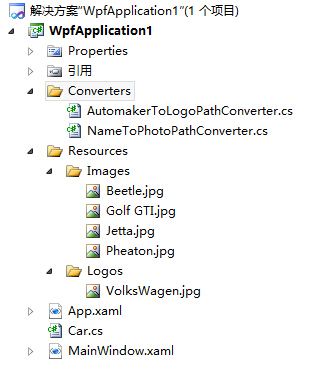
下面是文档结构:
WPF的模版的更多相关文章
- WPF Template模版之DataTemplate与ControlTemplate【一】
WPF Template模版之DataTemplate与ControlTemplate[一] 标签: Wpf模版 2015-04-19 11:52 510人阅读 评论(0) 收藏 举报 分类: -- ...
- WPF Template模版之寻找失落的控件【三】
“井水不犯河水”常用来形容两个组织之间界限分明.互不相干,LogicTree与控件内部这颗小树之间就保持着这种关系.换句话说,如果UI元素树上有个X:Name=“TextBox1”的控件,某个控件内部 ...
- WPF Template模版之DataTemplate与ControlTemplate的关系和应用【二】
1. DataTemplate和ControlTemplate的关系 学习过DataTemplate和ControlTemplate,你应该已经体会到,控件只是数据的行为和载体,是个抽象的概念,至于它 ...
- 【转】WPF Template模版之DataTemplate与ControlTemplate的关系和应用(二)
1. DataTemplate和ControlTemplate的关系 学习过DataTemplate和ControlTemplate,你应该已经体会到,控件只是数据的行为和载体,是个抽象的概念,至于它 ...
- 【转】WPF Template模版之DataTemplate与ControlTemplate(一)
WPF系统不但支持传统的Winfrom编程的用户界面和用户体验设计,更支持使用专门的设计工具Blend进行专业设计,同时还推出了以模板为核心的新一代设计理念. 1. 模板的内涵 作为表现形式,每个控件 ...
- WPF三大模板简介(Z)
WPF三大模板简介 WPF支持以下类型的模板: (1) 控件模板.控件模板可以将自定义模板应用到某一特定类型的所有控件,或是控件的某一实例.决定控件外观的是ControlTemplate,它决定了 ...
- WPF三大模板简介
WPF支持以下类型的模板: (1) 控件模板.控件模板可以将自定义模板应用到某一特定类型的所有控件,或是控件的某一实例.决定控件外观的是ControlTemplate,它决定了控件“长成什么样子”,因 ...
- 在普通的"类库"项目中添加 WPF 的 Window 对象
最近开发一个 WPF 项目, 在此项目中有个类库工程, 在开发的过程中发现在类库工程中竟然添加不了 WPF 窗口对象和一些其他的 WPF 对象,在新建窗口中选 WPF 类型,只有一个 “用户控件(WP ...
- WPF/Silverlight HierarchicalDataTemplate 模版的使用(转)
上一篇 对Wpf/Silverlight Template 进行了总结,本篇继续上一篇,主要是介绍 HierarchicalDataTemplate 的使用方法.HierarchicalDataTem ...
随机推荐
- Eclipse中SVN的安装步骤(两种)和使用方法[转载]
一.给Eclipse安装SVN,最常见的有两种方式:手动方式和使用安装向导方式.具体步骤如下: 方式一:手动安装 1.从官网下载site-1.6.9.zip文件,网址是:subclipse.tigri ...
- 数据库:JDBC编程
JDBC(Java Data Base Connectivity,java数据库连接)是一种用于运行SQL语句的Java API.能够为多种关系数据库提供统一訪问.它由一组用Java语言编写的类和接口 ...
- Lua 5.2 中文参考手册
闲来无事,发现Lua更新到了5.2.2,参考手册也更到了5.2,在网上发现只有云风翻译的5.1版,花了几天时间翻译了一些. 参考手册有点长,又要随时修改,所以在github上建了项目,有需要的朋友可以 ...
- AHCI vs NVMe
http://www.hkepc.com/13139 儘管現時有不少高階 SSD 產品改用 PCIe 接口,以突破 SATA 接口的頻寬瓶頸,但控制器設計與 SATA 接口 SSD 一樣,採用老舊的 ...
- GO的跨平台数扰类型
基本数据类型的包装: 1.跨平台,用于移植 2.不同的框架类型包装的类型(MFC ,WIN32SDK,C) 3.基本数据类型的组装成的结构体 4.宏定义 数字类型 Go 也有基于架构的类型,例如:in ...
- Makefile详解--隐含规则
Makefile详解--隐含规则(转) Makefile系列文章,这里有个前辈连续洗了一个系列来介绍,共有26篇博客文章. http://www.cppblog.com/ivenher/archive ...
- careercup-链表 2.6
2.6 给定一个有环链表,实现一个算法返回环路的开头结点. 类似leetcode中 Linked List Cycle II C++实现代码: #include<iostream> #in ...
- Java基础知识强化之IO流笔记31:转换流出现的原因和格式
1. 由于字节流操作中文不是特别方便,所以Java就提供了转换流. 字符流 = 字节流 + 编码表 2. 编码表 由字符及其对应数值组成的一张表 常见的编码表: • ASCII/Unicode字符集 ...
- MY_FAVOR_火埃及
- Call to undefined function curl_init()解决方法
今天在使用php中的 curl 扩展时 在开启