
GridView导出Excel的超好样例
事实上网上有非常多关于Excel的样例,可是不是非常好,他们的代码没有非常全,读的起来还非常晦涩。经过这几天的摸索,最终能够完毕我想要导出报表Excel的效果了。以下是我的效果图。
一.前台的页面图
GridView的第一页的内容
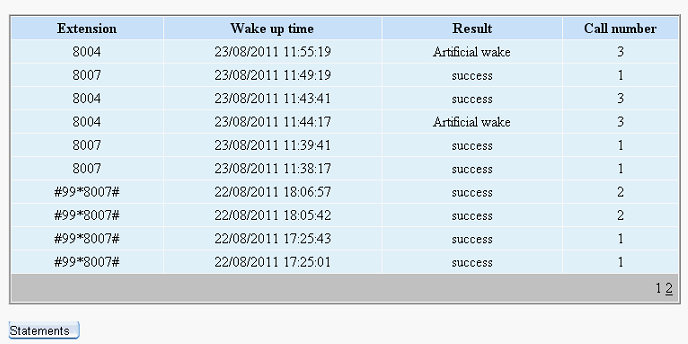
GridView第二页的内容:

大家可能遇到这样的情况,就是这个时候导出Excel的时候,打开Excel的时候发现GridView的第二页的内容却没有导出到Excel表里面。事实上解决这样的情况,非常easy,仅仅要在导出之前,把Gridview的设置分页设置为Flase即可了。
以下是我导出Gridview里面的所有内容,打开Excel表例如以下:
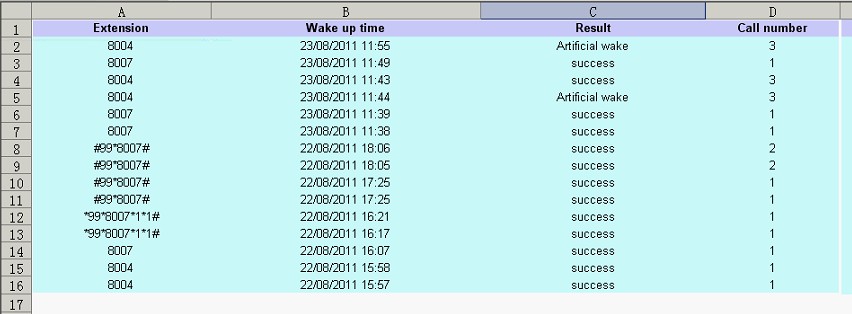
这就能够导出所有的GridView里面的内容了,包含了GridView的第一页和第二页的内容。
二、实现的代码
1.前台的代码:
<div style=" margin:20px;">
<asp:GridView ID="gvRecord" runat="server" AllowPaging="True" CellPadding="3"
AutoGenerateColumns="False" BorderColor="White"
BorderStyle="Ridge" BorderWidth="2px" BackColor="White" CellSpacing="1"
GridLines="None" onprerender="gvRecord_PreRender"
onpageindexchanged="gvRecord_PageIndexChanged"
onpageindexchanging="gvRecord_PageIndexChanging" >
<PagerSettings FirstPageText="Home Page" LastPageText="Last Page"
NextPageText="Next" PreviousPageText="Previous" />
<RowStyle ForeColor="Black" BackColor="#E5F1FF" HorizontalAlign="Center" />
<Columns>
<asp:TemplateField HeaderText="Extension">
<ItemTemplate>
<asp:Label ID="Label1" runat="server" Text='<%# Bind("Extn") %>'></asp:Label>
</ItemTemplate>
<ItemStyle Width="200px" />
</asp:TemplateField>
<asp:TemplateField HeaderText="Wake up time">
<ItemTemplate>
<asp:Label ID="Label2" runat="server" Text='<%# Bind("CallTime") %>'></asp:Label>
</ItemTemplate>
<ItemStyle Width="300px" />
</asp:TemplateField>
<asp:TemplateField HeaderText="Status">
<ItemTemplate>
<asp:Label ID="Label3" runat="server" Text='<%# getResult(Eval("Status").ToString()) %>'></asp:Label>
</ItemTemplate>
<ItemStyle Width="250px" />
</asp:TemplateField>
<asp:TemplateField HeaderText="Call number">
<ItemTemplate>
<asp:Label ID="Label4" runat="server" Text='<%# Bind("callcount") %>'></asp:Label>
</ItemTemplate>
<ItemStyle Width="150px" />
</asp:TemplateField>
</Columns>
<FooterStyle BackColor="#C6C3C6" ForeColor="Black" />
<PagerStyle BackColor="#C6C3C6" ForeColor="Black" HorizontalAlign="Right" />
<SelectedRowStyle BackColor="#9471DE" Font-Bold="True" ForeColor="White" />
<HeaderStyle BackColor="#C9E2FF" Font-Bold="True" ForeColor="#000000" />
</asp:GridView>
<p>
<asp:Button ID="btnExcel" CssClass="button" runat="server" Text="Statements
"
onclick="btnExcel_Click" /></p>
</div>
2.后台代码例如以下:
using System;
using System.Collections;
using System.Configuration;
using System.Data;
using System.Linq;
using System.Web;
using System.Web.Security;
using System.Web.UI;
using System.Web.UI.HtmlControls;
using System.Web.UI.WebControls;
using System.Web.UI.WebControls.WebParts;
using System.Xml.Linq;
using Model;
using DAL;
using System.Collections.Generic;
using System.IO;
public partial class _3C_CallManager_CallRecord : System.Web.UI.Page
{
int selectFlag = 0;
protected void Page_Load(object sender, EventArgs e)
{
if (!IsPostBack)
{
bind();
}
}
public string getResult(string str)
{
if (str == "0")
return "Haven't called";
if (str == "1")
return "check-out";
if (str == "2")
return "success";
if (str == "3")
return "fail";
if (str == "4")
return "dealing";
if (str == "5")
return "Artificial wake";
else
return "unkown";
}
public void bind() {
selectFlag = 0;
gvRecord.DataSource = VgCallService.GetInfo();
gvRecord.DataBind();
}
protected void btnExcel_Click(object sender, EventArgs e)
{
DateTime dt = System.DateTime.Now;
string str = dt.ToString("yyyyMMddhhmmss");
str = str + ".xls";
gvRecord.AllowPaging = false;
if (selectFlag == 0)
bind();
if (selectFlag == 1)
selectBind();
GridViewToExcel(gvRecord, "application/ms-excel", str);
// Export(gvRecord, "application/ms-excel", str);
}
/// <summary>
/// 将网格数据导出到Excel
/// </summary>
/// <param name="ctrl">网格名称(如GridView1)</param>
/// <param name="FileType">要导出的文件类型(Excel:application/ms-excel)</param>
/// <param name="FileName">要保存的文件名称</param>
public static void GridViewToExcel(Control ctrl, string FileType, string FileName)
{
HttpContext.Current.Response.Charset = "GB2312";
HttpContext.Current.Response.ContentEncoding = System.Text.Encoding.UTF8;//注意编码
HttpContext.Current.Response.AppendHeader("Content-Disposition",
"attachment;filename=" + HttpUtility.UrlEncode(FileName, System.Text.Encoding.UTF8).ToString());
HttpContext.Current.Response.ContentType = FileType;//image/JPEG;text/HTML;image/GIF;vnd.ms-excel/msword
ctrl.Page.EnableViewState = false;
StringWriter tw = new StringWriter();
HtmlTextWriter hw = new HtmlTextWriter(tw);
ctrl.RenderControl(hw);
HttpContext.Current.Response.Write(tw.ToString());
HttpContext.Current.Response.End();
}
/// <summary>
/// ReLoad this VerifyRenderingInServerForm is neccessary
/// </summary>
/// <param name="control"></param>
public override void VerifyRenderingInServerForm(Control control)
{
}
protected void gvRecord_PreRender(object sender, EventArgs e)
{
if(selectFlag==0)
bind();
}
protected void gvRecord_PageIndexChanged(object sender, EventArgs e)
{
}
protected void gvRecord_PageIndexChanging(object sender, GridViewPageEventArgs e)
{
this.gvRecord.PageIndex = e.NewPageIndex;
bind();
}
}
注意问题说明:
1)前台页面<%@ Page Language="C#" EnableEventValidation="false" AutoEventWireup="true" CodeFile="CallRecord.aspx.cs" Inherits="_3C_CallManager_CallRecord" %>注意加入EnableEventValidation="false",要不然会报错的。
2)GridView的绑定数据库的代码
gvRecord.DataSource = VgCallService.GetInfo();//VgCallService.GetInfo()是获取数据库的集合,我是封装好的,依据你们的获取的集合做不同的调整。
gvRecord.DataBind();
3)点击GridView下一页的关键代码,在PageIndexChanging事件里面
this.gvRecord.PageIndex = e.NewPageIndex; //注意这个不能少。
bind();
4)在导出Excel的button事件里面记得先gvRecord.AllowPaging = false;把GridView的分页取消之后,再调用GridViewToExcel方法。
5)以下的不可少。
public override void VerifyRenderingInServerForm(Control control)
{
}
GridView导出Excel的超好样例的更多相关文章
- Asp.net Gridview导出Excel
前台页面放一个GridView什么的就不说了,要注意的是在 <%@ Page Language="C#" AutoEventWireup="true" C ...
- C#实现GridView导出Excel
using System.Data;using System.Web;using System.Web.UI;using System.Web.UI.WebControls;using System. ...
- ASP.NET gridview导出excel,防止繁体产生有乱码的方式
//1.先引用比如 : using System; using System.Collections.Generic; using System.Linq; using System.Web; usi ...
- GridView导出excel格式问题
在导出的点击事件中,代码如下: //指定导出对应单元格为文本样式 string style = @"<style> .test { vnd.ms-excel.numberform ...
- C# GridView 导出Excel表
出错1:类型“GridView”的控件“GridView1”必须放在具有 runat=server 的窗体标记内解决方案:在后台文件中重载VerifyRenderingInServerForm方法,如 ...
- GridView导出Excel(中文乱码)
public void OUTEXCEL(string items,string where) { DataSet ds = new StudentBLL().GetTable(items,where ...
- GridView导出Excel
public void OUTEXCEL() { DataSet ds = new GW_T_DemandDAL().GetWzH(GetPersonInfoData(UserInfo), Reque ...
- GridView 导出Excel
protected void btnExcel_Click(object sender, EventArgs e) { ) { ExportGridViewForUTF8(GridView1, Dat ...
- NPOI 导出excel数据超65535自动分表
工作上遇到的问题,网上找了一些资料 整理了一个比较可行的解决方案. NPOI 大数据量分多个sheet导出 代码段 /// <summary> /// DataTable转换成Excel文 ...
随机推荐
- IE filter & z-index bug
对最近遇到的2个问题的一点总结. 1.IE filter & z-index 重构后的首页即将上线,测试提出fix导航条扩展菜单在ie789滚动后一段无法显示的问题. 疑云重重: 这个问题一开 ...
- [原博客] POJ 1704 Georgia and Bob
题目链接题意:如图,Georgia和Bob在玩游戏.一个无限长的棋盘上有N个旗子,第i个棋子的位置可以用Pi表示.现在Georgia先走.每个人每一次可以把一枚棋子向左移动任意个格子,但是不能超越其他 ...
- Codeforces Round #198 (Div. 2) —— C
C题很容易看懂题目,不过两个循环肯定会TLE,所以得用点小聪明: 首先排好序,因为是全排列,乱序和顺序的结果是一样的: 然后呢···· 如果是数列 1 2 3 4 5 元素1 被 2 3 4 5每个减 ...
- Codeforces Round #197 (Div. 2) : A
水题一个: 直接贴代码: #include<cstdio> #include<algorithm> #include<cstring> using namespac ...
- how to develop mobile web
http://blog.templatemonster.com/2010/05/11/how-make-mobile-website-6-easy-tips/ http://mobile.smashi ...
- ubuntu 10.04 安装qt 5.0.2
转自ubuntu 10.04 安装qt 5.0.2 从qt project网站下载下来最新的qt5.0.2套件,发现是个.run文件,添加x属性,然后直接sudo ./****.run, 提示 /l ...
- QLGame 2d Engine 搭建2d游戏原理
大家好,2d引擎基于opengl(es) 3d技术,是因为这样比之前的ddraw有很多好处! 1.坐标采用浮点数,可以进行曲线移动 2.如果在ddraw的对图片进行缩放和旋转的时候,是基于点像素的操作 ...
- NavigationDrawer+Fragment实现侧滑菜单效果
学习了NavigationDrawer 官方Support包中的SlidingMenu版本,练了下手.用到了ListView中item不同的布局 以后会升级加上ViewPager和GridView实现 ...
- 【HDOJ】1978 How many ways
DFS. #include <stdio.h> #include <string.h> #define MAXNUM 105 int map[MAXNUM][MAXNUM], ...
- SharePoint 2010 母版页制作的简单介绍
转:http://www.cnblogs.com/jianyus/archive/2012/01/11/2319621.html 1. 首先打开SharePoint Designer 2010,找到 ...