
Xcode use Protocol buffer
http://stackoverflow.com/questions/10277576/google-protocol-buffers-on-ios
http://stackoverflow.com/questions/8759202/google-protocol-buffers-on-ios-objective-c
#### build 2.4.1 failed on mac os x 10.9
I think the right way to fix it is to modify the message.h like below

#ifdef __DECCXX

// HP C++'s iosfwd doesn't work.

#include <iostream>

#else

#include <sstream>

//#include <iosfwd>

#endif
Adding #include <istream> to src/google/protobuf/message.cc fixes this problem, as per the latest version of that file in svn.
加入 proto文件自动编译
- In Xcode 4.2, open the target properties, go to the "Build Rules" tab and create a new build rule for "*.proto" files
In "Using:", choose "custom script" and use a script like this:
protoc --plugin=/usr/local/bin/protoc-gen-objc $INPUT_FILE_PATH --objc_out=$DERIVED_FILES_DIRIn Output files, add the generated files (there should be two files,
$(INPUT_FILE_BASE).pb.mand$(INPUT_FILE_BASE).pb.h.- Add the .proto files to your project.
To compile and test the easiest way Ive found is to just import the whole google directory in my own project :) (the second time you can make your own framework but for testing this procedure just works)
- download latest version
- autogen configure and make like you were just building for macosx (you need command line tools) . This way you end up with protoc
binary and the library for macosx (which you don't need) - open your Xcode iOS project
- add "new file" to your project and select google directory
- add the directory of google headers to your additional include directories
- add config.h from the protobuffer src directory to your app
- from the google group remove everything that contains unitest :)
- from the google group remove compiler and java stuff;
You should be able to compile without any linking error. To give you an idea this is what I directly compile
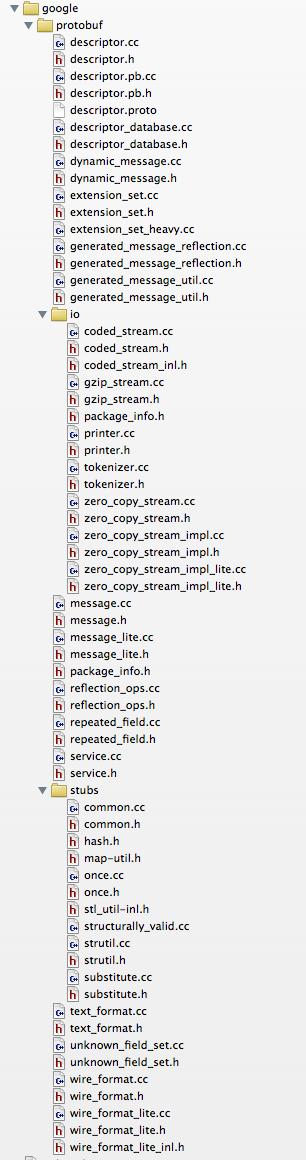
Then you can use protoc to generate c++ source files for your protocol. To use them with objc you have to rename your source to file "mm" then you can do something like
TO SERIALIZE TO NSDATA
let's say your message is called Packet
-(NSData*)getDataForPacket:(Packet*)packet {

    std::string ps = packet->SerializeAsString();return[NSData dataWithBytes:ps.c_str() length:ps.size()];
TO READ FROM NSDATA
-(Packet*)getPacketFromNSData:(NSData*)data {char raw[[data length]];Packet*p =newPacket;[data getBytes:raw length:[data length]];

  p->ParseFromArray(raw,[data length]);return p;}
Xcode use Protocol buffer的更多相关文章
- cocos2d-x protobuf; cocos2dx protocol buffer
昨天了解到项目要用到protocol buffer,今天晚上看了一下,了解protobuf本质上就是一个信息表达协议+编辑,解析库. linux开源软件都一个模式,先./configure --hel ...
- Protocol Buffer搭建及示例
本文来源:http://www.tanhao.me/code/150911.html/ Protocol Buffer(简称Protobuf或PB)是由Google推出的一种数据交换格式,与传统的XM ...
- 从零开始山寨Caffe·伍:Protocol Buffer简易指南
你为Class外访问private对象而苦恼嘛?你为设计序列化格式而头疼嘛? ——欢迎体验Google Protocol Buffer 面向对象之封装性 历史遗留问题 面向对象中最矛盾的一个特性,就是 ...
- [原创翻译]Protocol Buffer Basics: C#
Protocol Buffer 基础知识:c# 原文地址:https://developers.google.com/protocol-buffers/docs/csharptutorial ...
- Google Protocol Buffer 的使用和原理[转]
本文转自: http://www.ibm.com/developerworks/cn/linux/l-cn-gpb/ Protocol Buffers 是一种轻便高效的结构化数据存储格式,可以用于结构 ...
- Google Protocol Buffer 的使用
简介 Google Protocol Buffer( 简称 Protobuf) 是 Google 公司内部的混合语言数据标准,目前已经正在使用的有超过 48,162 种报文格式定义和超过 12,183 ...
- 学习Google Protocol buffer之语法
上一篇结尾的时候问了几个问题,其实主要就是这个protoBuffer协议的语法,弄清楚语法后边才好开展工作嘛,不然大眼而对小眼儿,互相不认识,就没法玩耍了.其实就是学习怎么用google提供的这套 p ...
- 学习Google Protocol buffer之概述
XML这种属于非常强大的一种格式,能存储任何你想存的数据,而且编辑起来还是比较方便的.致命的缺陷在于比较庞大,在某些情况下,序列化和解析都会成为瓶颈.这种对于实时性很强的应用来说,就不太适合了,想象下 ...
- Google Protocol Buffer 简单介绍
以下内容主要整理自官方文档. 为什么使用 Protocol Buffers .proto文件 Protocol Buffers 语法 编译.proto文件 Protocol Buffers API 枚 ...
随机推荐
- c#读取文件
你平时是怎么读取文件的?使用流读取.是的没错,C#给我们提供了非常强大的类库(又一次吹捧了.NET一番), 里面封装了几乎所有我们可以想到的和我们没有想到的类,流是读取文件的一般手段,那么你真的会用它 ...
- 获取IP所在地
$source=file_get_contents('http://www.ip138.com/ips138.asp?ip='.$ip.'&action=2'); preg_match_all ...
- 修改docker默认172.17网段
docker启动时默认使用172.17.x.x作为容器的ip地址,可以通过以下方法自定义该网段: sudo service docker stop通过命令route -n查看docker0是否存在,若 ...
- Objective-C中的分类与协议
分类 在谈分类之前,我们可以先探究下,OC中为什么出现分类这种机制,有什么好处? 假设你接到一个大项目:计算两个整数的和,差.接到任务的你马上动手.编写代码如下: #import <Founda ...
- prototype/constructor/__proto__之constructor。
1.constructor的字面意思就是构造.它是对象的一个属性,它对应的值是该对象的“构造者” //一.构造函数实例化的对象的constructor function Cmf(n,m){ this. ...
- Android输入法开发
1. 概念 * IMF: 输入法框架(Input Method Framework) * IM: 输入法(Input Method) * IMS: 输入法服务(Input Method Service ...
- Python Tutorial 学习(十)-- Brief Tour of the Standard Library
10.1. Operating System Interface os库 import os os.getcwd() # Return the current working directory 'C ...
- 【转】C#正则表达式详解
正则表达式通常包含字母文本(Literaltext)和元字符(metacharacter) 字母文本指的是普通文本如"abcde"可匹配字符串中任何包含"abcde&qu ...
- 【转】app后端如何选择合适的数据库产品
转自:http://blog.csdn.net/newjueqi/article/details/44003503 app后端的开发中,经常要面临的一个问题是:数据放在哪里? mysql ?redis ...
- Ruby自学笔记(一)— 基本概况
之前一直想要多看看RESTful Service相关的东西,找到一本相关的书,但是里面的代码都是用Ruby写的,虽然知道编程语言都是类似的,但是看到一些陌生的语法,还是有些摸不着头脑,所以最近终于下定 ...