
Xcode use Protocol buffer
http://stackoverflow.com/questions/10277576/google-protocol-buffers-on-ios
http://stackoverflow.com/questions/8759202/google-protocol-buffers-on-ios-objective-c
#### build 2.4.1 failed on mac os x 10.9
I think the right way to fix it is to modify the message.h like below

#ifdef __DECCXX

// HP C++'s iosfwd doesn't work.

#include <iostream>

#else

#include <sstream>

//#include <iosfwd>

#endif
Adding #include <istream> to src/google/protobuf/message.cc fixes this problem, as per the latest version of that file in svn.
加入 proto文件自动编译
- In Xcode 4.2, open the target properties, go to the "Build Rules" tab and create a new build rule for "*.proto" files
In "Using:", choose "custom script" and use a script like this:
protoc --plugin=/usr/local/bin/protoc-gen-objc $INPUT_FILE_PATH --objc_out=$DERIVED_FILES_DIRIn Output files, add the generated files (there should be two files,
$(INPUT_FILE_BASE).pb.mand$(INPUT_FILE_BASE).pb.h.- Add the .proto files to your project.
To compile and test the easiest way Ive found is to just import the whole google directory in my own project :) (the second time you can make your own framework but for testing this procedure just works)
- download latest version
- autogen configure and make like you were just building for macosx (you need command line tools) . This way you end up with protoc
binary and the library for macosx (which you don't need) - open your Xcode iOS project
- add "new file" to your project and select google directory
- add the directory of google headers to your additional include directories
- add config.h from the protobuffer src directory to your app
- from the google group remove everything that contains unitest :)
- from the google group remove compiler and java stuff;
You should be able to compile without any linking error. To give you an idea this is what I directly compile
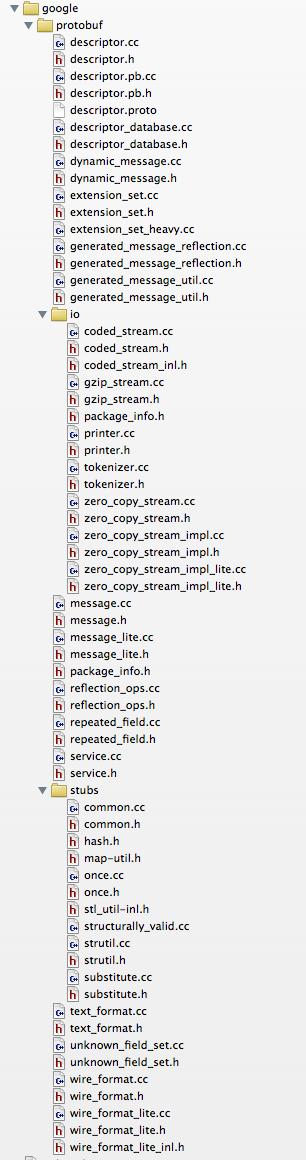
Then you can use protoc to generate c++ source files for your protocol. To use them with objc you have to rename your source to file "mm" then you can do something like
TO SERIALIZE TO NSDATA
let's say your message is called Packet
-(NSData*)getDataForPacket:(Packet*)packet {

    std::string ps = packet->SerializeAsString();return[NSData dataWithBytes:ps.c_str() length:ps.size()];
TO READ FROM NSDATA
-(Packet*)getPacketFromNSData:(NSData*)data {char raw[[data length]];Packet*p =newPacket;[data getBytes:raw length:[data length]];

  p->ParseFromArray(raw,[data length]);return p;}
Xcode use Protocol buffer的更多相关文章
- cocos2d-x protobuf; cocos2dx protocol buffer
昨天了解到项目要用到protocol buffer,今天晚上看了一下,了解protobuf本质上就是一个信息表达协议+编辑,解析库. linux开源软件都一个模式,先./configure --hel ...
- Protocol Buffer搭建及示例
本文来源:http://www.tanhao.me/code/150911.html/ Protocol Buffer(简称Protobuf或PB)是由Google推出的一种数据交换格式,与传统的XM ...
- 从零开始山寨Caffe·伍:Protocol Buffer简易指南
你为Class外访问private对象而苦恼嘛?你为设计序列化格式而头疼嘛? ——欢迎体验Google Protocol Buffer 面向对象之封装性 历史遗留问题 面向对象中最矛盾的一个特性,就是 ...
- [原创翻译]Protocol Buffer Basics: C#
Protocol Buffer 基础知识:c# 原文地址:https://developers.google.com/protocol-buffers/docs/csharptutorial ...
- Google Protocol Buffer 的使用和原理[转]
本文转自: http://www.ibm.com/developerworks/cn/linux/l-cn-gpb/ Protocol Buffers 是一种轻便高效的结构化数据存储格式,可以用于结构 ...
- Google Protocol Buffer 的使用
简介 Google Protocol Buffer( 简称 Protobuf) 是 Google 公司内部的混合语言数据标准,目前已经正在使用的有超过 48,162 种报文格式定义和超过 12,183 ...
- 学习Google Protocol buffer之语法
上一篇结尾的时候问了几个问题,其实主要就是这个protoBuffer协议的语法,弄清楚语法后边才好开展工作嘛,不然大眼而对小眼儿,互相不认识,就没法玩耍了.其实就是学习怎么用google提供的这套 p ...
- 学习Google Protocol buffer之概述
XML这种属于非常强大的一种格式,能存储任何你想存的数据,而且编辑起来还是比较方便的.致命的缺陷在于比较庞大,在某些情况下,序列化和解析都会成为瓶颈.这种对于实时性很强的应用来说,就不太适合了,想象下 ...
- Google Protocol Buffer 简单介绍
以下内容主要整理自官方文档. 为什么使用 Protocol Buffers .proto文件 Protocol Buffers 语法 编译.proto文件 Protocol Buffers API 枚 ...
随机推荐
- SQL替换空格,制表符,换行符,回车符.
首先是空格的替换,很重要的有点是,要确保字段的类型,不是char或nchar等固定的类型,否则无法去掉空格. 去掉空格很简单,如下为SQL实例: --去掉 T_StuffBasic 表中FBranch ...
- Xcode 7:Storyboard Reference、Strong IBOutlet以及Scene Dock
本文由CocoaChina译者小袋子(博客)翻译原文:Storyboard Reference, Strong IBOutlet, Scene Dock in iOS 9 在这个教程中,我想要聊一些有 ...
- cuda中时间用法
转载:http://blog.csdn.net/jdhanhua/article/details/4843653 在CUDA中统计运算时间,大致有三种方法: <1>使用cutil.h中的函 ...
- js string操作总结
var str = "0123456789"; console.log(str.substring(0)); //------------"0123456789" ...
- 给id赋值
var div = document.getElementByTagName('div') div.id="mydiv";div.setAttribute("id&quo ...
- jquery动画效果中,避免持续反应用户的连续点击
一.某些动画效果中,避免持续连续反应用户的连续点击(这标题真不好描述) 意思就是指用户点击速度很快,完成一次效果的时间不能很快结束的话,就会出现用户不点击了,效果还在持续.看下面例子就明白了,手风琴效 ...
- Java环境配置出现的问题及解决办法
我使用的安装文件,从博客园一个童鞋那里找到的,连接是http://www.cnblogs.com/SelectError/p/3205582.html#commentform 开发基础环境,版本为Ja ...
- Tomcat虚拟主机配置
3.1.配置虚拟主机 配置虚似主机就是配置一个网站. 在Tomcat服务器配置一个虚拟主机(网站),需要修改conf文件夹下的server.xml这个配置文件,使用Host元素进行配置,打开serve ...
- Django socketio 安装
如果你还没有安装过 gevent,首先需要安装 libevent, 编译安装 libevent 需要安装 Pyhton 开发库. 在Debain上可以运行如下指令: $ sudo apt-get in ...
- Notepad++插件之FingerText
FingerText是一个标签触发片段插件记事本.支持多个热点同时编辑,嵌套的热点,动态热点(很多不仅仅是纯文本的,可以通过命令,或触发另一个片段中的片段),热点的文本提示(而不是仅仅是$或#号)和热 ...