
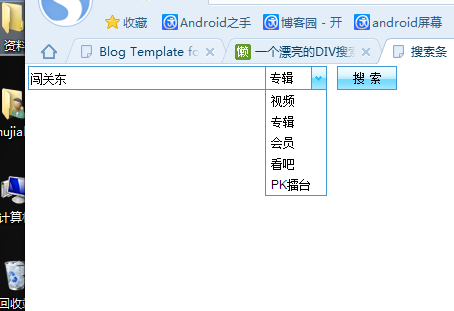
一个漂亮的DIV搜索条
<!DOCTYPE html PUBLIC "-//W3C//DTD XHTML 1.0 Transitional//EN" "http://www.w3.org/TR/xhtml1/DTD/xhtml1-transitional.dtd">

<html xmlns="http://www.w3.org/1999/xhtml">

<HTML>

<HEAD>

<TITLE>搜索条</TITLE>

<META NAME="Generator" CONTENT="EditPlus">

<META NAME="Author" CONTENT="">

<META NAME="Keywords" CONTENT="">

<META NAME="Description" CONTENT="">

<style>

/*basic*/

*{padding:;margin:;color:#;font:12px/20px Arial,Sans-serif,"宋体";}

/*elements*/

.clear{clear:both;height:0px;overflow:hidden;}

ul,li,ol{list-style-type:none;list-style-position:outside;}

button,.btnNormal{height:22px;line-height:18px;padding: 9px!important;padding: 5px;}

a{color:#0042ff;text-decoration:underline;}

a,a *{cursor:pointer;}

a img{border:;}

.searchTool{float:left;width:520px;}

.searchTool .searchExtend{float:left;line-height:24px;_padding-top:5px;}

.searchTool .radio{vertical-align:middle;margin-left:10px;margin-right:2px;*margin-right:;}

.searchTool .txtSearch{float:left;width:232px;padding:2px 2px  2px;height:20px;line-height:20px;vertical-align:bottom;border:1px solid #3e99d4;}

.searchTool .selSearch{float:left;width:60px;background:#fff;height:22px;line-height:22px;border:1px solid #3e99d4;border-left:;}

.searchTool .nowSearch{float:left;width:40px;height:20px;line-height:22px;overflow:hidden;padding-left:4px;}

.searchTool .btnSel{float:right;border-left:1px solid #3e99d4;width:14px;height:22px;}

.searchTool .btnSel a{background:url(http://static.youku.com/v1.0.0217/index/img/btn_sel.gif) no-repeat center center;display:block;width:14px;height:22px;}

.searchTool .btnSel a:hover{background:url(http://static.youku.com/v1.0.0217/index/img/btn_sel_over.gif) no-repeat center center;border:1px solid #fff;width:12px;height:20px;}

.searchTool .selOption{z-index:;position:absolute;margin-left:-1px;width:60px;background:#fff;border:1px solid #3e99d4;}

.searchTool .selOption a{display:block;height:21px;padding-left:5px;line-height:21px;color:#;text-decoration:none;}

.searchTool .selOption a:hover{color:#fff;background:#95d5f1;}

.searchTool .btnSearch{float:left;margin-left:10px;width:58px;height:22px;line-height:22px;border:1px solid #3e99d4;overflow:hidden;}

.searchTool .btnSearch a{background:url(http://static.youku.com/v1.0.0217/index/img/bg_nav_option.gif) repeat-x center -6px;display:block;text-decoration:none;height:22px;line-height:22px;overflow:hidden;}

.searchTool .btnSearch a:hover{background:url(http://static.youku.com/v1.0.0217/index/img/bg_nav_option_over.gif) repeat-x center center;border:1px solid #fff;height:20px;line-height:20px;}

.searchTool .btnSearch .lbl{cursor:pointer;display:block;width:40px;padding-left:5px;letter-spacing:5px;text-align:center;height:18px;padding-top:1px;margin: auto;filter:progid:DXImageTransform.Microsoft.DropShadow(color=#daeefa,offX=,offY=,positives=true);}

.searchTool .btnSearch a:hover .lbl{padding-top:0px;}

</style>

<script>

function drop_mouseover(pos){

 try{window.clearTimeout(timer);}catch(e){}

}

function drop_mouseout(pos){

 var posSel=document.getElementById(pos+"Sel").style.display;

 if(posSel=="block"){

  timer = setTimeout("drop_hide('"+pos+"')", );

 }

}

function drop_hide(pos){

 document.getElementById(pos+"Sel").style.display="none";

}

function search_show(pos,searchType,href){

    document.getElementById(pos+"SearchType").value=searchType;

    document.getElementById(pos+"Sel").style.display="none";

    document.getElementById(pos+"Slected").innerHTML=href.innerHTML;

    document.getElementById(pos+'q').focus();

    var sE = document.getElementById("searchExtend");

    if(sE != undefined  &&  searchType == "bar"){

     sE.style.display="block";

    }else if(sE != undefined){

     sE.style.display="none";

    }

 try{window.clearTimeout(timer);}catch(e){}

 return false;

}

</script>

</HEAD>

<BODY>

<div class="searchTool">

<form method="get" action="http://so.youku.com/search_playlist" name="headSearchForm" id="headSearchForm" onsubmit="return dosearch(this);">

     <input class="txtSearch" id="headq" name="q" type="text" value="闯关东" />

     <input name="searchdomain" type="hidden" value="http://so.youku.com">

     <input id="headSearchType" name="searchType" type="hidden" value="playlist">

     <div class="selSearch">

    <div class="nowSearch" id="headSlected" onclick="if(document.getElementById('headSel').style.display=='none'){document.getElementById('headSel').style.display='block';}else {document.getElementById('headSel').style.display='none';};return false;" onmouseout="drop_mouseout('head');">专辑</div>

    <div class="btnSel"><a href="#" onclick="if(document.getElementById('headSel').style.display=='none'){document.getElementById('headSel').style.display='block';}else {document.getElementById('headSel').style.display='none';};return false;" onmouseout="drop_mouseout('head');"></a></div>

    <div class="clear"></div>

    <ul class="selOption" id="headSel" style="display:none;">

     <li><a href="#" onclick="return search_show('head','video',this)" onmouseover="drop_mouseover('head');" onmouseout="drop_mouseout('head');">视频</a></li>

     <li><a href="#" onclick="return search_show('head','playlist',this)" onmouseover="drop_mouseover('head');" onmouseout="drop_mouseout('head');">专辑</a></li>

     <li><a href="#" onclick="return search_show('head','user',this)" onmouseover="drop_mouseover('head');" onmouseout="drop_mouseout('head');">会员</a></li>

     <li><a href="#" onclick="return search_show('head','bar',this)" onmouseover="drop_mouseover('head');" onmouseout="drop_mouseout('head');">看吧</a></li>

     <li><a href="#" onclick="return search_show('head','pk',this)" onmouseover="drop_mouseover('head');" onmouseout="drop_mouseout('head');">PK擂台</a></li>

    </ul>

     </div>

     <div class="btnSearch">

    <a href="#" onclick="javascript:return dosearch(document.getElementById('headSearchForm'));"><span class="lbl">搜索</span></a>

     </div>

          <div class="searchExtend" id="searchExtend" name="searchExtend" style="display:none">

           <input type="radio" class="radio" name="sbt" value="post" onclick="csbt(this,this.form.sbts);" />搜贴子<input type="radio" name="sbt" value="user" onclick="csbt(this,this.form.sbts);" class="radio" />按作者搜<input type="hidden" name="sbts" value="bar">

     </div>

          <div class="clear"></div>

     </form>

   </div>

   <div class="clear"></div>

  </div>

 </div>

</BODY>

</HTML>
一个漂亮的DIV搜索条的更多相关文章
- 使用CSS3和jQuery可伸缩的搜索条
使用CSS3和jQuery可伸缩的搜索条 helloweba.com 作者:月光光 时间:2013-12-09 21:23 标签: CSS3 jquery 搜索条在我们网站是必不可少的,尤其是在有限的 ...
- 模仿京东顶部搜索条效果制作的一个小demo
最近模仿京东顶部搜索条效果制作的一个小demo,特贴到这里,今后如果有用到可以参考一下,代码如下 #define kScreenWidth [UIScreen mainScreen].bounds.s ...
- 20个Flutter实例视频教程-第10节: 一个不简单的搜索条-1
20个Flutter实例视频教程-第10节: 一个不简单的搜索条-1 视频地址: https://www.bilibili.com/video/av39709290/?p=10 博客地址: https ...
- PS网页设计教程XXIV——从头设计一个漂亮的网站
作为编码者,美工基础是偏弱的.我们可以参考一些成熟的网页PS教程,提高自身的设计能力.套用一句话,“熟读唐诗三百首,不会作诗也会吟”. 本系列的教程来源于网上的PS教程,都是国外的,全英文的.本人尝试 ...
- 利用CSS3特性巧妙实现漂亮的DIV箭头
DIV箭头用于表现DIV内容的指向,是使用非常普遍的一种表现形式,例如新浪微博的消息转发: 还有傲游网站的导航条: 像傲游账户上方这种箭头更需要多幅图片以表现箭头和hover的效果. 传统的实现方式都 ...
- 一个漂亮的JavaScript“警告”替代品
下载 一个漂亮的JavaScript"警告"替代品 安装 $ npm安装-节省sweetalert 使用 从"sweetalert"进口swal; 横波测井(& ...
- Swift - 搜索条(UISearchBar)的用法
1,搜索条Options属性还可设置如下功能样式: Shows Search Results Button:勾选后,搜索框右边显示一个圆形向下的按钮,单击会发送特殊事件. Shows Bookmark ...
- 小强的HTML5移动开发之路(5)——制作一个漂亮的视频播放器
来自:http://blog.csdn.net/dawanganban/article/details/17679069 在前面几篇文章中介绍了HTML5的特点和需要掌握的基础知识,下面我们开始真正的 ...
- 一个漂亮而强大的自定义view
代码地址如下:http://www.demodashi.com/demo/13502.html 简介 主要提供一个漂亮而强大的自定义SeekBar,进度变化由提示牌 (sign)展示,具有强大的属性设 ...
随机推荐
- jquery easyui easyui-treegrid 使用异步加载数据
jquery easyui easyui-treegrid 使用异步加载数据 jquery easyui easyui-treegrid 异步请求 >>>>>>&g ...
- css3中允许单词内断句word-wrap和怎么处理断句word-break
首先说一下:浏览器的默认行为,在一行中几个单词 排列着,如果最后一个长单词 太长时 首先是移到下一行,如果该单词的长度大于父元素的宽度,会溢出. <!doctype html> <h ...
- (转) Spring读书笔记-----部署我的第一个Spring项目
一.Spring介绍 Spring是一个轻量级的Java EE容器,它也是一种从实际需求出发,着眼于轻便,灵活,易于开发,易测试和易部署的轻量级开发框架.Spring它完成了大量开发中的通用步骤,留给 ...
- U3D 精灵的点击监听
U3D游戏中,可能会用到点击对象,完成某项操作, 方法一:可以通过接收Input对象的输入,进行利用 方法二:给对象绑定一个collier 组件,然后就能后使用内置方法 这里有点不同,方法一,是不管哪 ...
- maven中tomcat7-maven-plugin插件的使用
1.(挺清晰,但是我在项目上尝试没有成功) http://blog.csdn.net/yhhazr/article/details/7866501 2.(算是有一些详细的运行命令吧,例如自动打包命令或 ...
- Android简单例子——IpHone样式AlertDialog
此例子源于网络,下载下来之后,自己加了写注释,作为总结,发到博客中,谢谢原作者 通过这个例子学到的东西 1.自定义对话框的使用 2.程序中使用颜色如何进行存放,增加复用性 3.加深线性布局.常用控件的 ...
- 配置wamp开发环境【2】 配置wamp开发环境之mysql的配置
此前我已经将wamp配置的Apache.PHP.phpmyadmin全部配置完成,以上三种配置参照 配置wamp开发环境 下面我们来看看mysql的配置,这里用的是mysql5.5.20,下载地址: ...
- Command 模式
Command 模式通过将请求封装到一个对象(Command)中,并将请求的接受者存放具体的 ConcreteCommand 类中(Receiver)中,从而实现调用操作的对象和操作的具体实现 者之间 ...
- Windowsphone 之xml序列化和反序列化的应用(WebService解析返回的数据DataSet )
关于Xml的序列化和反序列化: 可以看这篇文章,http://www.cnblogs.com/Windows-phone/p/3243575.html WebService解析返回的数据DataSet ...
- Linux平台上搭建apache+tomcat负载均衡集群
传统的Java Web项目是通过tomcat来运行和发布的.但在实际的企业应用环境中,采用单一的tomcat来维持项目的运行是不现实的.tomcat 处理能力低,效率低,承受并发小(1000左右).当 ...