
Springboot 连接 使用 Redis Example
通过一个简单的例子使用Springboot 连接并使用Redis。 本文假设已经安装好Redis。
1.首先将URL转换为一个ID ,并使用 StringRedisTemplate 将ID 和 URL 保存到Redis
2. 根据ID 从Redis中获取对应的URL
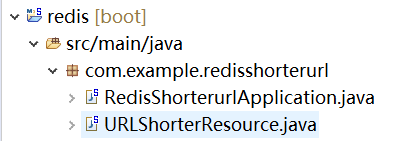
项目结构如下
POM文件
<?xml version="1.0" encoding="UTF-8"?>

<project xmlns="http://maven.apache.org/POM/4.0.0" xmlns:xsi="http://www.w3.org/2001/XMLSchema-instance"

    xsi:schemaLocation="http://maven.apache.org/POM/4.0.0 http://maven.apache.org/xsd/maven-4.0.0.xsd">

    <modelVersion>4.0.</modelVersion>

    <parent>

        <groupId>org.springframework.boot</groupId>

        <artifactId>spring-boot-starter-parent</artifactId>

        <version>2.0..RELEASE</version>

        <relativePath /> <!-- lookup parent from repository -->

    </parent>

    <groupId>com.example</groupId>

    <artifactId>redis-shorterurl</artifactId>

    <version>0.0.-SNAPSHOT</version>

    <name>redis-shorterurl</name>

    <description>Demo project for Spring Boot</description>

    <properties>

        <java.version>1.8</java.version>

    </properties>

    <dependencies>

        <dependency>

            <groupId>org.springframework.boot</groupId>

            <artifactId>spring-boot-starter-data-redis</artifactId>

        </dependency>

        <dependency>

            <groupId>org.springframework.boot</groupId>

            <artifactId>spring-boot-starter-web</artifactId>

        </dependency>

        <!-- https://mvnrepository.com/artifact/commons-validator/commons-validator -->

        <dependency>

            <groupId>commons-validator</groupId>

            <artifactId>commons-validator</artifactId>

            <version>1.6</version>

        </dependency>

        <dependency>

            <groupId>com.google.guava</groupId>

            <artifactId>guava</artifactId>

            <version>18.0</version>

        </dependency>

        <dependency>

            <groupId>org.springframework.boot</groupId>

            <artifactId>spring-boot-starter-test</artifactId>

            <scope>test</scope>

        </dependency>

    </dependencies>

    <build>

        <plugins>

            <plugin>

                <groupId>org.springframework.boot</groupId>

                <artifactId>spring-boot-maven-plugin</artifactId>

            </plugin>

        </plugins>

    </build>

</project>
以及Java文件
package com.example.redisshorterurl;

import org.springframework.boot.SpringApplication;

import org.springframework.boot.autoconfigure.SpringBootApplication;

@SpringBootApplication

public class RedisShorterurlApplication {

    public static void main(String[] args) {

        SpringApplication.run(RedisShorterurlApplication.class, args);

    }

}
package com.example.redisshorterurl;

import java.nio.charset.StandardCharsets;

import org.apache.commons.validator.routines.UrlValidator;

import org.springframework.beans.factory.annotation.Autowired;

import org.springframework.data.redis.core.StringRedisTemplate;

import org.springframework.web.bind.annotation.GetMapping;

import org.springframework.web.bind.annotation.PathVariable;

import org.springframework.web.bind.annotation.PostMapping;

import org.springframework.web.bind.annotation.RequestBody;

import org.springframework.web.bind.annotation.RestController;

import com.google.common.hash.Hashing;

@RestController

public class URLShorterResource {

    @Autowired

    StringRedisTemplate redisTemplate;

    @GetMapping("URL/{id}")

    public String getUrl(@PathVariable String id) {

    String url =  redisTemplate.opsForValue().get(id);

    System.out.println("URL Retrieved: " + url);

        if (url == null) {

            throw new RuntimeException("There is no shorter URL for : " + id);

        }

        return url;

    }

    @PostMapping("/create")

    public String create(@RequestBody String url) {

    UrlValidator urlValidator = new UrlValidator(new String[] { "http", "https" });

    if (urlValidator.isValid(url)) {

        String id = Hashing.murmur3_32().hashString(url, StandardCharsets.UTF_8).toString();

        System.out.println("URL ID generated:" + id);

        redisTemplate.opsForValue().set(id, url);

        return id;

    }

     throw new RuntimeException("URL Invalid: " + url);

    }

}
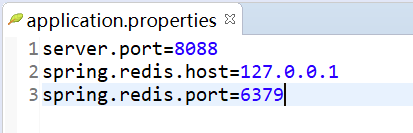
application.properties
之后启动Redis server

启动Springboot Application.
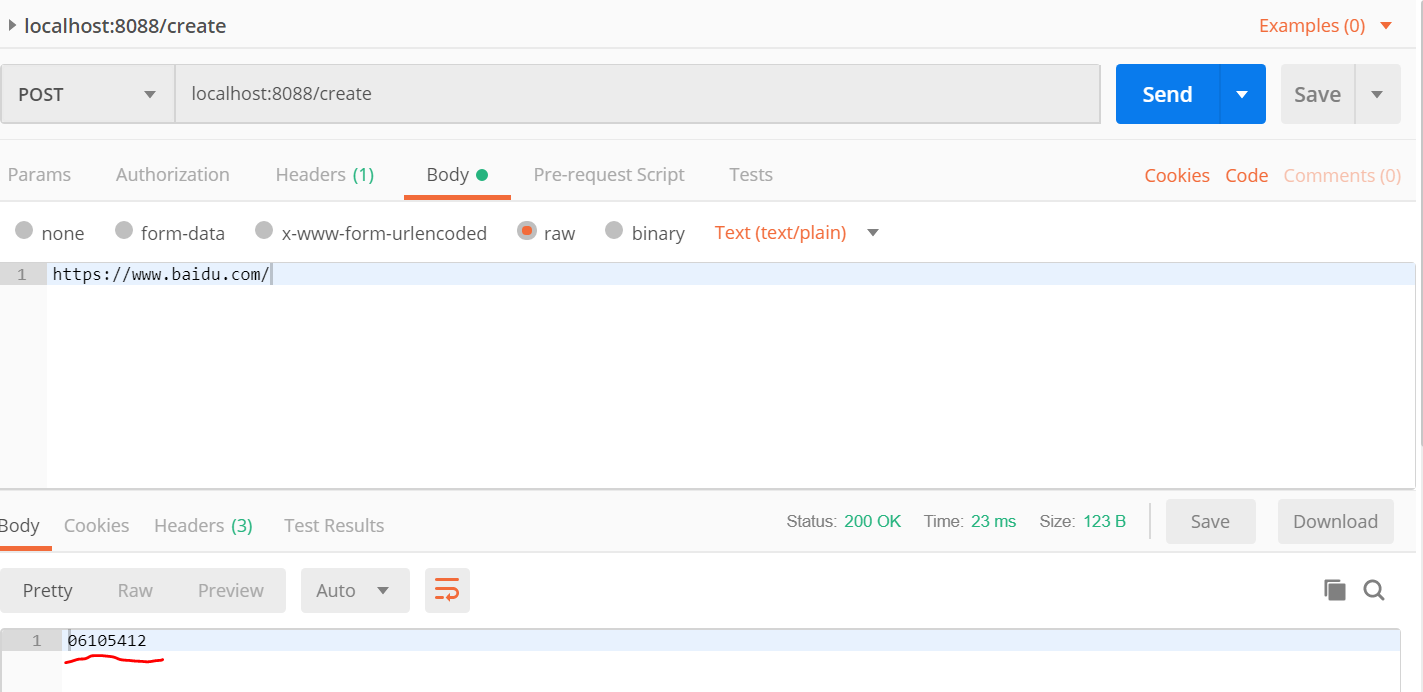
此时,可以用Postman测试效果。
首先, 使用 HTTP POST method 根据URL 生成一个 ID
之后,使用 ID 获取对应的 URL

Springboot 连接 使用 Redis Example的更多相关文章
- springboot连接redis进行CRUD
springboot连接redis进行CRUD: 1.添加以下依赖: <dependency> <groupId>org.springframework.boot</gr ...
- springboot连接redis错误 io.lettuce.core.RedisCommandTimeoutException:
springboot连接redis报错 超时连接不上 可以从以下方面排查 1查看自己的配置文件信息,把超时时间不要设置0毫秒 设置5000毫秒 2redis服务长时间不连接就会休眠,也会连接不上 重 ...
- 不会用SpringBoot连接Redis,那就赶紧看这篇
摘要:如何通过springboot来集成操作Redis. 本文分享自华为云社区<SpringBoot连接Redis操作教程>,作者: 灰小猿. 今天来和大家分享一个如何通过springbo ...
- springboot+redis+虚拟机 springboot连接linux虚拟机中的redis服务
文章目录 1.前提条件:确保虚拟机开启.并且连接到redis 2.新建立一个springboot项目,创建项目时勾选web选项 3.在pom中引入redis依赖 4.在application.prop ...
- springboot 连接redis
引入依赖: <dependency> <groupId>org.springframework.boot</groupId> <artifactId>s ...
- 由浅入深学习springboot中使用redis
很多时候,我们会在springboot中配置redis,但是就那么几个配置就配好了,没办法知道为什么,这里就详细的讲解一下 这里假设已经成功创建了一个springboot项目. redis连接工厂类 ...
- 基于springboot+bootstrap+mysql+redis搭建一套完整的权限架构【六】【引入bootstrap前端框架】
https://blog.csdn.net/linzhefeng89/article/details/78752658 基于springboot+bootstrap+mysql+redis搭建一套完整 ...
- SpringBoot中集成redis
转载:https://www.cnblogs.com/zeng1994/p/03303c805731afc9aa9c60dbbd32a323.html 不是使用注解而是代码调用 需要在springbo ...
- SpringBoot入门 (七) Redis访问操作
本文记录学习在SpringBoot中使用Redis. 一 什么是Redis Redis 是一个速度非常快的非关系数据库(Non-Relational Database),它可以存储键(Key)与 多种 ...
随机推荐
- silverlight,WPF动画终极攻略之番外 3D切换导航篇(Blend 4开发)
原文:silverlight,WPF动画终极攻略之番外 3D切换导航篇(Blend 4开发) 这篇介绍的是3D导航,点击图标,页面360°翻转的效果!有什么不足的欢迎大家指出来. 1.新建一个user ...
- WPF中Polyline拐角的bug
原文:WPF中Polyline拐角的bug Polyline绘制折线在小角度(比如几度)的时候会出现不连续的现象,形成拐角的两条线段中有一段会超出,角度越小越明显. 问题如下图 ...
- iOS-让button按钮显示成圆角
这里用到的属性layer是CALayer类型,属于UIView,也就是说所有UIView的子类都能使用这个属性. @property (strong, nonatomic) IBOutlet UIBu ...
- 待修 Bug
# 乱码 ## 描述 环境:Tomcat 8 + Spring 4 + Spring Security. 问题描述: 在类 AbstractAnnotationConfigDispatcherServ ...
- MVC 身份验证和异常处理过滤器
:在Global中注册为全局过滤器,应用于所有的Controller的Action 参数类均继承自ControllerContext,主要包含属性请求上下文.路由数据.结果 using FilterE ...
- 自绘LISTVIEW的滚动条(Delphi实现)
因项目需要准备对LISTVIEW的滚动条进行自绘.于是在网上搜了一下,问题没解决,却搜出一篇令人不愉快的帖子 .确实,那时候实力是不够的,但现在应该是没问题了,为这个目的才不断磨练自己的. LISTV ...
- Win10《芒果TV》更新v3.8.70周年版:升级高级配色、自动切换夜间模式
官宣!光阴似箭,已过三年时光,我们一起从最初的青涩变成更加成熟起来,同呼吸共命运,匠心依旧,感恩有你,Win10版<芒果TV>全平台同步更新周年版v3.8.70,升级高级配色,新增自动切换 ...
- Win10《芒果TV》更新v3.6.0秋收版:新增追剧磁贴、记忆续播、跳转列表
热血青春,唱响革命战歌,<秋收起义>正在芒果TV热播,Win10版<芒果TV>更新v3.6.0秋收版,新增追剧磁贴.记忆续播.跳转列表. Win10版<芒果TV>V ...
- PHPEXCEL 不能输出中文内容,只显示空白
以他带的示例文件为例 01simple-download-xls.php // Add some data $objPHPExcel->setActiveSheetIndex(0) ...
- win32 htmlayout dom操作demo
之前两篇关于win32 htmlayout博文,记载了一个实现了简单的点击按钮弹出新窗口的demo,之后实践中发现,图形界面开发,最重要的还是要实现响应用户操作,改变原有界面的功能.比如说,界面上有一 ...