
Entity Framework 6 中如何获取 EntityTypeConfiguration 的 Edm 信息?(三)
接着上一篇,我们继续来优化。
直接贴代码了:
LambdaHelper.cs
using System;

using System.Collections.Generic;

using System.Linq;

using System.Linq.Expressions;

using System.Text;

using System.Threading.Tasks;

namespace EntityFrameworkSample

{

    public static class LambdaHelper

    {

        public static string GetPropName<TEntityType, TProperty>(Expression<Func<TEntityType, TProperty>> propertyExpression)

        {

            MemberExpression memberExpression;

            if (!InspectIsMemberExpression<TEntityType, TProperty>(propertyExpression, true, out memberExpression))

            {

                return null;

            }

            return memberExpression.Member.Name;

        }

        public static bool InspectIsMemberExpression<TEntityType, TProperty>(Expression<Func<TEntityType, TProperty>> propertyExpression)

        {

            return InspectIsMemberExpression<TEntityType, TProperty>(propertyExpression, true);

        }

        public static bool InspectIsMemberExpression<TEntityType, TProperty>(Expression<Func<TEntityType, TProperty>> propertyExpression, bool throwExOnNull)

        {

            MemberExpression memberExpression;

            return InspectIsMemberExpression<TEntityType, TProperty>(propertyExpression, throwExOnNull, out memberExpression);

        }

        public static bool InspectIsMemberExpression<TEntityType, TProperty>(Expression<Func<TEntityType, TProperty>> propertyExpression, bool throwExOnNull, out MemberExpression memberExpression)

        {

            if (propertyExpression == null)

            {

                throw new ArgumentNullException("express");

            }

            memberExpression = propertyExpression.Body as MemberExpression;

            if (memberExpression == null)

            {

                if (throwExOnNull)

                {

                    throw new ArgumentException("请为类型 \"" + typeof(TEntityType).FullName + "\" 的指定一个字段(Field)或属性(Property)作为 Lambda 的主体(Body)。");

                }

                return false;

            }

            return true;

        }

    }

}
DbContextExtensions.cs
using System;

using System.Collections.Generic;

using System.Data.Entity;

using System.Data.Entity.Core.Mapping;

using System.Data.Entity.Core.Metadata.Edm;

using System.Data.Entity.Infrastructure;

using System.Data.Entity.ModelConfiguration;

using System.Data.Entity.ModelConfiguration.Conventions;

using System.Linq;

using EntityFramework.Extensions;

using System.Linq.Expressions;

namespace EntityFrameworkSample

{

    public enum AcquiredEdmType

    {

        TableName,

        FirstPrimaryKeyNameString,

        ColumnName

    }

    public static class DbContextExtensions

    {

        #region 基础方法

        public static string GetTableName<TEntity>(this DbContext context)

        {

            return GetTableName(context, typeof(TEntity));

        }

        public static string GetTableName(this DbContext context, Type type)

        {

            return GetTableNameOrColumnName(context, type, AcquiredEdmType.TableName);

        }

        public static string GetFirstPrimaryKeyName<TEntity>(this DbContext context)

        {

            return GetFirstPrimaryKeyName(context, typeof(TEntity));

        }

        public static string GetFirstPrimaryKeyName(this DbContext context, Type type)

        {

            return GetTableNameOrColumnName(context, type, AcquiredEdmType.FirstPrimaryKeyNameString);

        }

        public static string GetColumnName<TEntity, TProperty>(this DbContext context, Expression<Func<TEntity, TProperty>> propertyExpression)

        {

            return GetTableNameOrColumnName(context, typeof(TEntity), AcquiredEdmType.ColumnName, LambdaHelper.GetPropName(propertyExpression));

        }

        public static string GetColumnName(this DbContext context, Type type, string propertyName)

        {

            return GetTableNameOrColumnName(context, type, AcquiredEdmType.ColumnName, propertyName);

        }

        private static string GetTableNameOrColumnName(this DbContext context, Type type, AcquiredEdmType edmType, string propertyName = null)

        {

            var metadata = ((IObjectContextAdapter)context).ObjectContext.MetadataWorkspace;

            // Get the part of the model that contains info about the actual CLR types

            ObjectItemCollection objectItemCollection = ((ObjectItemCollection)metadata.GetItemCollection(DataSpace.OSpace));

            // Get the entity type from the model that maps to the CLR type

            EntityType entityType = metadata

                    .GetItems<EntityType>(DataSpace.OSpace)

                          .Single(e => objectItemCollection.GetClrType(e) == type);

            // Get the entity set that uses this entity type

            EntitySet entitySet = metadata

                .GetItems<EntityContainer>(DataSpace.CSpace)

                      .Single()

                      .EntitySets

                      .Single(s => s.ElementType.Name == entityType.Name);

            // Find the mapping between conceptual and storage model for this entity set

            EntitySetMapping mapping = metadata.GetItems<EntityContainerMapping>(DataSpace.CSSpace)

                          .Single()

                          .EntitySetMappings

                          .Single(s => s.EntitySet == entitySet);

            // Find the storage entity set (table) that the entity is mapped

            EntitySet tableEntitySet = mapping

                .EntityTypeMappings.Single()

                .Fragments.Single()

                .StoreEntitySet;

            // Return the table name from the storage entity set

            object objTableName = tableEntitySet.MetadataProperties["Table"].Value;

            string tableName = objTableName == null ? tableEntitySet.Name : Convert.ToString(objTableName);

            switch (edmType)

            {

                case AcquiredEdmType.TableName:

                    return tableName;

                case AcquiredEdmType.FirstPrimaryKeyNameString:

                    {

                        var firstKeyProp = tableEntitySet.ElementType.KeyProperties[];

                        //return tableName + "." + firstKeyProp.Name;

                        return firstKeyProp.Name;

                    }

                case AcquiredEdmType.ColumnName:

                    {

                        // Find the storage property (column) that the property is mapped

                        var columnName = mapping

                            .EntityTypeMappings.Single()

                            .Fragments.Single()

                            .PropertyMappings

                            .OfType<ScalarPropertyMapping>()

                                  .Single(m => m.Property.Name == propertyName)

                            .Column

                            .Name;

                        //return tableName + "." + columnName;

                        return columnName;

                    }

                default:

                    throw new ArgumentNullException("Invalid argument");

            }

        }

        #endregion

        #region 额外方法

        #endregion

    }

}
Program.cs
using System;

using System.Collections.Generic;

using System.Data.Entity;

using System.Data.Entity.Core.Mapping;

using System.Data.Entity.Core.Metadata.Edm;

using System.Data.Entity.Infrastructure;

using System.Data.Entity.ModelConfiguration;

using System.Data.Entity.ModelConfiguration.Conventions;

using System.Linq;

using EntityFramework.Extensions;

using System.Linq.Expressions;

using EntityFrameworkSample;

namespace EntityFrameworkSample

{

    class Program

    {

        static void Main(string[] args)

        {

            using (var context = new BloggingContext(@"Data Source=.\SQLExpress;Initial Catalog=TestDB;Persist Security Info=True;User ID=sa;Password=123456"))

            {

                string blogTableName = context.GetTableName<Blog>();

                string postTableName = context.GetTableName<Post>();

                Console.WriteLine("Blog maps to: {0}", blogTableName);

                Console.WriteLine("Post maps to: {0}", postTableName);

                string blogPrimaryKeyName = context.GetFirstPrimaryKeyName<Blog>();

                string postPrimaryKeyName = context.GetFirstPrimaryKeyName<Post>();

                Console.WriteLine("Blog primary key name: {0}", blogPrimaryKeyName);

                Console.WriteLine("Post primary key name: {0}", postPrimaryKeyName);

                //System.Diagnostics.Stopwatch watch = System.Diagnostics.Stopwatch.StartNew();

                //for (int i = 0; i < 600000; i++)

                //{

                //    context.GetColumnName<Blog, string>(c => c.BlogUrl); //经过测试,循环60万次,耗时14秒

                //}

                //watch.Stop();

                //Console.WriteLine("耗时:{0}秒", (watch.ElapsedMilliseconds / 1000).ToString());

                string blogUrlColumnName = context.GetColumnName<Blog, string>(c => c.BlogUrl);

                string postTitleColumnName = context.GetColumnName<Post, string>(c => c.PostTitle);

                //Console.WriteLine("Blog.BlogUrl maps to: {0}.{1}", blogTableName, blogUrlColumnName);

                Console.WriteLine("Post.PostTitle maps to: {0}.{1}", postTableName, postTitleColumnName);

            }

            Console.ReadLine();

        }

    }

    public class BloggingContext : DbContext

    {

        public BloggingContext(string nameOrConnectionString)

            : base(nameOrConnectionString)

        {

        }

        public DbSet<Blog> Blogs { get; set; }

        public DbSet<Post> Posts { get; set; }

        protected override void OnModelCreating(DbModelBuilder modelBuilder)

        {

            modelBuilder.Configurations.Add(new BlogMap());

            modelBuilder.Configurations.Add(new PostMap());

            modelBuilder.Conventions.Remove<PluralizingTableNameConvention>();

            base.OnModelCreating(modelBuilder);

        }

    }

    public class Blog

    {

        public int Id { get; set; }

        public string BlogUrl { get; set; }

        public List<Post> Posts { get; set; }

    }

    public class Post

    {

        public int Id { get; set; }

        public string PostTitle { get; set; }

        public string Body { get; set; }

        public int BlogId { get; set; }

        public Blog Blog { get; set; }

    }

    public class BlogMap : EntityTypeConfiguration<Blog>

    {

        public BlogMap()

        {

            this.HasKey(c => c.Id);

            this.ToTable("t_blog");

            this.Property(c => c.Id).HasColumnName("BlogId");

            this.Property(c => c.BlogUrl).HasColumnName("Url");

        }

    }

    public class PostMap : EntityTypeConfiguration<Post>

    {

        public PostMap()

        {

            this.HasKey(c => c.Id);

            this.ToTable("t_post");

            this.Property(c => c.Id).HasColumnName("PostId");

            this.Property(c => c.PostTitle).HasColumnName("Title");

        }

    }

}
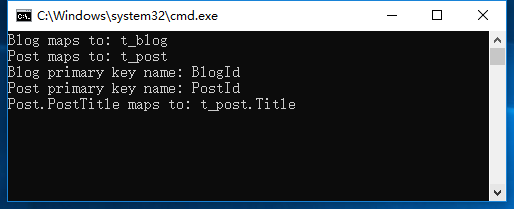
运行截图:
谢谢浏览!
Entity Framework 6 中如何获取 EntityTypeConfiguration 的 Edm 信息?(三)的更多相关文章
- Entity Framework 6 中如何获取 EntityTypeConfiguration 的 Edm 信息?(一)
1. 案例1 - 类型和表之间的EF代码优先映射 从EF6.1开始,有一种更简单的方法可以做到这一点.有关 详细信息,请参阅我的新EF6.1类型和表格之间的映射. 直接贴代码了 从EF6.1开始,有一 ...
- Entity Framework 6 中如何获取 EntityTypeConfiguration 的 Edm 信息?(五)
直接贴代码了: NewsInfo 实体类: public class NewsInfo { public int NewsInfoId { get; set; } public string News ...
- Entity Framework 6 中如何获取 EntityTypeConfiguration 的 Edm 信息?(四)
经过上一篇,里面有测试代码,循环60万次,耗时14秒.本次我们增加缓存来优化它. DbContextExtensions.cs using System; using System.Collectio ...
- Entity Framework 6 中如何获取 EntityTypeConfiguration 的 Edm 信息?(二)
接着上一篇 直接贴代码了: using System; using System.Collections.Generic; using System.Data.Entity; using System ...
- [Programming Entity Framework] 第3章 查询实体数据模型(EDM)(一)
http://www.cnblogs.com/sansi/archive/2012/10/18/2729337.html Programming Entity Framework 第二版翻译索引 你可 ...
- 浅析Entity Framework Core中的并发处理
前言 Entity Framework Core 2.0更新也已经有一段时间了,园子里也有不少的文章.. 本文主要是浅析一下Entity Framework Core的并发处理方式. 1.常见的并发处 ...
- 在Entity Framework 7中进行数据迁移
(此文章同时发表在本人微信公众号“dotNET每日精华文章”,欢迎右边二维码来关注.) 题记:虽然EF7重新设计了Entity Framework,不过也还是能够支持数据迁移的. Entity Fra ...
- 《Entity Framework 6 Recipes》中文翻译系列 (17) -----第三章 查询之分页、过滤和使用DateTime中的日期部分分组
翻译的初衷以及为什么选择<Entity Framework 6 Recipes>来学习,请看本系列开篇 3-12 分页和过滤 问题 你想使用分页和过滤来创建查询. 解决方案 假设你有如图3 ...
- 如何处理Entity Framework / Entity Framework Core中的DbUpdateConcurrencyException异常(转载)
1. Concurrency的作用 场景有个修改用户的页面功能,我们有一条数据User, ID是1的这个User的年龄是20, 性别是female(数据库中的原始数据)正确的该User的年龄是25, ...
随机推荐
- netty ByteBuf与String相互转换
String转为ByteBuf 1)使用String.getBytes(Charset),将String转为byte[]类型 2)使用Unpooled.wrappedBuffer(byte[]),将b ...
- opencv Mat基础
Mat Mat由两部分构成 matrix header pointer to the matrix containing the pixel values Mat is basically a cla ...
- Linux软件安装——服务管理的命令
Linux软件安装——服务管理的命令 摘要:本文主要学习了Linux系统中服务管理的命令. service命令 service命令用于对系统服务进行管理,比如启动(start).停止(stop).重启 ...
- 【XML】XML基本结构以及XML-Schema约束
XML 简介 1998年2月,W3C正式批准了可扩展标记语言的标准定义,可扩展标记语言可以对文档和数据进行结构化处理,从而能够在部门.客户和供应商之间进行交换,实现动态内容生成,企业集成和应用开发.可 ...
- Hive优化面试题
对待像我这种2年开发经验的同学 一般都会被问到. 在面试中,我们只要简短的介绍就好了. 首先低调一波,我可能懂的比你少,我就简单说说 1.在排序中,我们使用的是sortBy,它是基于索引,效率高于or ...
- Linux—主机扫描工具(Nmap)
Nmap包含五项基本功能: 主机探测 (Host Discovery) 端口扫描 (Port Scanning) 版本检测 (Version Detection) 操作系统侦测 (Operating ...
- MySQL 同一Windows系统上安装多个数据库
Step 1:拷贝一份MySQL整个安装文件,并拷贝一份 my.ini 文件放置安装目录下,然后修改以下内容.注意 port 不能设置为默认的3306,这里我们设置为3307端口. basedir=C ...
- postman---postman文件夹介绍以及批量执行用例
我们在做测试的过程中,都会多次请求接口,都会把接口保存下来,方便下次直接请求,节省时间不用每次都重新输入,我们一起看下Postman如何保存接口会话 保存请求作用 Postman可以将各个请求组合保存 ...
- 【cf375】D. Tree and Queries(dsu on tree+线段树)
传送门 题意: 给出一颗以\(1\)为根的有根树,每个结点有个颜色\(c_i\). 之后要回答\(m\)组询问,每组询问包含\(v_i,k_i\),要回答以\(v_i\)为根的子树中,颜色出现次数不小 ...
- Tensorflow之MNIST手写数字识别:分类问题(1)
一.MNIST数据集读取 one hot 独热编码独热编码是一种稀疏向量,其中:一个向量设为1,其他元素均设为0.独热编码常用于表示拥有有限个可能值的字符串或标识符优点: 1.将离散特征的取值扩展 ...