
Easyui datagrid行内【添加】、【编辑】、【上移】、【下移】
前几天项目中遇到一个需求用到了Easyui datagrd行内添加和编辑数据,同时对行内数据上移下移,所以对这几个功能做个总结。
1、首先大概说下这几个功能里用到的主要方法,行内添加数据主要是添加列的editor属性, 行内编辑主要使用beginEdit(), endEdit(),同时一个关键就是拿到当前的操作行索引editIndex.
2、撤销用到了rejectChanges().
3、保存时使用getRows()或者getChanges(). getChanges()主要是获取添加或编辑的数据,getRows()获取到本页所有数据,主要是配合【上移】【下移】方法使用。
4、在做这个功能中我使用了一个序列化前台对象组件【json.js】,这个组件可以很方便的把前台的对象转化成json字符串,然后传到后台,实在是方便至极让我眼前一亮,要知道就在这个功能前面我还手动处理数组,使用join()拼字符串,当找到这个组件时速度效率一下几提起来了,实在是相见恨晚。
5、在做这个功能,用到这些方法时遇到的问题,刚开始时我是看easyui的官方demo,我发现添加数据后点保存,再点获取数据时就获取不到了,后经过测试发现好像是调用了acceptChanges()引起的问题。
function GetTable() {

    var editRow = undefined;

    $("#Student_Table").datagrid({

        height: 300,

        width: 450,

        title: '学生表',

        collapsible: true,

        singleSelect: true,

        url: '/Home/StuList',

        idField: 'ID',

        columns: [[

		 { field: 'ID', title: 'ID', width: 100 },

        	{ field: 'Name', title: '姓名', width: 100, editor: { type: 'text', options: { required: true } } },

        	{ field: 'Age', title: '年龄', width: 100, align: 'center', editor: { type: 'text', options: { required: true } } },

            { field: 'Address', title: '地址', width: 100, align: 'center', editor: { type: 'text', options: { required: true } } }

        ]],

        toolbar: [{

            text: '添加', iconCls: 'icon-add', handler: function () {

                if (editRow != undefined) {

                    $("#Student_Table").datagrid('endEdit', editRow);

                }

                if (editRow == undefined) {

                    $("#Student_Table").datagrid('insertRow', {

                        index: 0,

                        row: {}

                    });

                    $("#Student_Table").datagrid('beginEdit', 0);

                    editRow = 0;

                }

            }

        }, '-', {

            text: '保存', iconCls: 'icon-save', handler: function () {

                $("#Student_Table").datagrid('endEdit', editRow);

                //如果调用acceptChanges(),使用getChanges()则获取不到编辑和新增的数据。

                //使用JSON序列化datarow对象,发送到后台。

                var rows = $("#Student_Table").datagrid('getChanges');

                var rowstr = JSON.stringify(rows);

                $.post('/Home/Create', rowstr, function (data) {

                });

            }

        }, '-', {

            text: '撤销', iconCls: 'icon-redo', handler: function () {

                editRow = undefined;

                $("#Student_Table").datagrid('rejectChanges');

                $("#Student_Table").datagrid('unselectAll');

            }

        }, '-', {

            text: '删除', iconCls: 'icon-remove', handler: function () {

                var row = $("#Student_Table").datagrid('getSelections');

            }

        }, '-', {

            text: '修改', iconCls: 'icon-edit', handler: function () {

                var row = $("#Student_Table").datagrid('getSelected');

                if (row !=null) {

                    if (editRow != undefined) {

                        $("#Student_Table").datagrid('endEdit', editRow);

                    }

                    if (editRow == undefined) {

                        var index = $("#Student_Table").datagrid('getRowIndex', row);

                        $("#Student_Table").datagrid('beginEdit', index);

                        editRow = index;

                        $("#Student_Table").datagrid('unselectAll');

                    }

                } else {

                }

            }

        }, '-', {

            text: '上移', iconCls: 'icon-up', handler: function () {

                MoveUp();

            }

        }, '-', {

            text: '下移', iconCls: 'icon-down', handler: function () {

                MoveDown();

            }

        }],

        onAfterEdit: function (rowIndex, rowData, changes) {

            editRow = undefined;

        },

        onDblClickRow:function (rowIndex, rowData) {

            if (editRow != undefined) {

                $("#Student_Table").datagrid('endEdit', editRow);

            }

            if (editRow == undefined) {

                $("#Student_Table").datagrid('beginEdit', rowIndex);

                editRow = rowIndex;

            }

        },

        onClickRow:function(rowIndex,rowData){

            if (editRow != undefined) {

                $("#Student_Table").datagrid('endEdit', editRow);

            }

        }

    });

}
//上移

function MoveUp() {

    var row = $("#Student_Table").datagrid('getSelected');

    var index = $("#Student_Table").datagrid('getRowIndex', row);

    mysort(index, 'up', 'Student_Table');

}

//下移

function MoveDown() {

    var row = $("#Student_Table").datagrid('getSelected');

    var index = $("#Student_Table").datagrid('getRowIndex', row);

    mysort(index, 'down', 'Student_Table');

}

function mysort(index, type, gridname) {

    if ("up" == type) {

        if (index != 0) {

            var toup = $('#' + gridname).datagrid('getData').rows[index];

            var todown = $('#' + gridname).datagrid('getData').rows[index - 1];

            $('#' + gridname).datagrid('getData').rows[index] = todown;

            $('#' + gridname).datagrid('getData').rows[index - 1] = toup;

            $('#' + gridname).datagrid('refreshRow', index);

            $('#' + gridname).datagrid('refreshRow', index - 1);

            $('#' + gridname).datagrid('selectRow', index - 1);

        }

    } else if ("down" == type) {

        var rows = $('#' + gridname).datagrid('getRows').length;

        if (index != rows - 1) {

            var todown = $('#' + gridname).datagrid('getData').rows[index];

            var toup = $('#' + gridname).datagrid('getData').rows[index + 1];

            $('#' + gridname).datagrid('getData').rows[index + 1] = todown;

            $('#' + gridname).datagrid('getData').rows[index] = toup;

            $('#' + gridname).datagrid('refreshRow', index);

            $('#' + gridname).datagrid('refreshRow', index + 1);

            $('#' + gridname).datagrid('selectRow', index + 1);

        }

    }

}
[HttpPost]

 public ActionResult Create()

 {

     string result = Request.Form[0];

     //后台拿到字符串时直接反序列化。根据需要自己处理

     var list = JsonConvert.DeserializeObject<List<Student>>(result);

     return Json(true);

 }
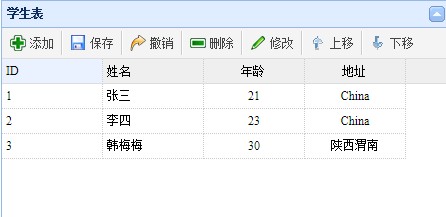
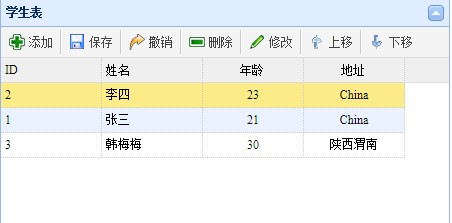
截图:
Easyui datagrid行内【添加】、【编辑】、【上移】、【下移】的更多相关文章
- ASP.NET MVC5+EF6+EasyUI 后台管理系统(83)-Easyui Datagrid 行内编辑扩展
这次我们要从复杂的交互入手来说明一些用法,这才能让系统做出更加复杂的业务,上一节讲述了Datagird的批量编辑和提交本节主要演示扩展Datagrid行内编辑的属性,下面来看一个例子,我开启编辑行的时 ...
- easyui datagrid行内编辑
<!DOCTYPE html PUBLIC "-//W3C//DTD HTML 4.01 Transitional//EN" "http://www.w3.org/ ...
- 【全面解禁!真正的Expression Blend实战开发技巧】第七章 MVVM初体验-在DataGrid行末添加按钮
原文:[全面解禁!真正的Expression Blend实战开发技巧]第七章 MVVM初体验-在DataGrid行末添加按钮 博客更新较慢,先向各位读者说声抱歉.这一节讲解的依然是开发中经常遇到的一种 ...
- EasyUI datagrid 明细表格中编辑框 事件绑定 及灵活计算 可根据此思路 扩展其他
原创 : EasyUI datagrid 明细表格中编辑框 事件绑定 及灵活计算 可根据此思路 扩展其他 转载,请注明出处哦!谢谢! 原创 : EasyUI datagrid 明细表格中编辑框 事件绑 ...
- easyui datagrid行合并
easyui datagrid行合并 合并方法 /** * EasyUI DataGrid根据字段动态合并单元格 * 参数 tableID 要合并table的id * 参数 colList 要合并的列 ...
- easyui datagrid行编辑中数据联动
easyui的datagrid中行内编辑使用数据联动.即:当编辑产品编号时,该行的产品名称自动根据产品编号显示出来. 在编辑中获取当前行的索引 function getRowIndex(target) ...
- EasyUI 启用行内编辑
创建数据网格(DataGrid) $(function(){ $('#tt').datagrid({ title:'Editable DataGrid', iconCls:'icon-edit', w ...
- 第一节:EasyUI样式,行内编辑,基础知识
一丶常用属性 $('#j_dg_left').datagrid({ url: '/Stu_Areas/Stu/GradeList', fit: true, // 自动适应父容器大小 singleSel ...
- datagrid行内编辑
编辑属性 :editor: { type: 'text'} $('#listShow').datagrid({ height : 478, pagesize : 20, pageList : [20, ...
随机推荐
- MUI框架---实现百度地图定位功能
1 2 <script type="text/javascript" src="http://api.map.baidu.com/api?v=2.0&ak= ...
- C++基础_总结
(1)多态性都有哪些?(静态和动态,然后分别叙述了一下虚函数和函数重载) 多态分为两种:静态和动态.静态主要包括函数重载和模板:动态主要是依靠虚函数实现的. 静态联编:重载函数不加virtual关键字 ...
- Lesson 3 Please send me a card
Text Postcards always spoil my holidays. Last summer, I went to Italy. I visited museums and sat in ...
- NoSQL初探之人人都爱Redis:(4)Redis主从复制架构初步探索
一.主从复制架构简介 通过前面几篇的介绍中,我们都是在单机上使用Redis进行相关的实践操作,从本篇起,我们将初步探索一下Redis的集群,而集群中最经典的架构便是主从复制架构.那么,我们首先来了解一 ...
- log4j2.xml实用例子
一个多月前,我写了篇关于log4j.xml配置的文章,点击此处查看:http://www.cnblogs.com/guogangj/p/3931397.html 最近,我把自己的log4j升级到2.0 ...
- 备忘-Android ViewPager 子页监听事件
@Override public Object instantiateItem(View arg0, int arg1) { ((ViewPager) arg0).addView(mListViews ...
- MySQL中的全文索引
之前曾经发表了一篇关于SQL Server全文索引的文章.现在将MySQL全文索引的配置过程记录一下. Step1:创建Student表 CREATE TABLE `student` ( `id` I ...
- springboot之filter/listener/servlet
简介 SpringBoot可以简化开发流程,但是在其中如何使用传统的J2EE servlet/listener/filter呢 @Bean配置 在Configuration类中加入filter和ser ...
- 海淘手表Invicta8926OB到手~晒图
3月3号通过国内代购网站Hai360海外购下单: 3月5号美亚发货: 3月6号到达转运仓: 3月12号到达天津清关: 清关等了7天: 3月19号转国内快递,我将原武汉地址,改上海,耽误了3天: 3月2 ...
- Oracle 中 union 和union all 的简单使用说明
1.刚刚工作不久,经常接触oracle,但是对oracle很多东西都不是很熟.今天我们来了解一下union和union all的简单使用说明.Union(union all): 指令的目的是将两个 S ...