
Spring Boot(二) 配置文件
文章导航-readme
一、配置Spring Boot热部署
技术的发展总是因为人们想偷懒的心理,如果我们不想每次修改了代码,都必须重启一下服务器,并重新运行代码。那么可以配置一下热部署。有了它之后,修改了代码只需要重新build一下,就可以看到效果了,不需要重启服务器。
1.配置热部署
- pom.xml文件中添加如下依赖:
        <dependency>

            <groupId>org.springframework.boot</groupId>

            <artifactId>spring-boot-devtools</artifactId>            		                     <optional>true</optional>

        </dependency>
- 修改pom.xml文件
 <build>

        <plugins>

            <plugin>

                <groupId>org.springframework.boot</groupId>

                <artifactId>spring-boot-maven-plugin</artifactId>

                <configuration>

                	<!--开启热部署-->

                    <fork>true</fork>

                </configuration>

            </plugin>

        </plugins>

    </build>
修改pom.xml文件后,idea会弹出一个让你自动导入包的文件,点击Import Changes。就会自动将jar包下载到依赖库中。
如此,就实现了Spring Boot的热部署,此时修改我们的代码,只需重新Build一下就可以了。
2. 配置自动build
当然,如果你更懒的话,练build都不想做,也可以在Idea中配置自动Build(自动Build仅支持Spring Boot项目)。
- 打开Idea->File->Settings...可以看到如下界面
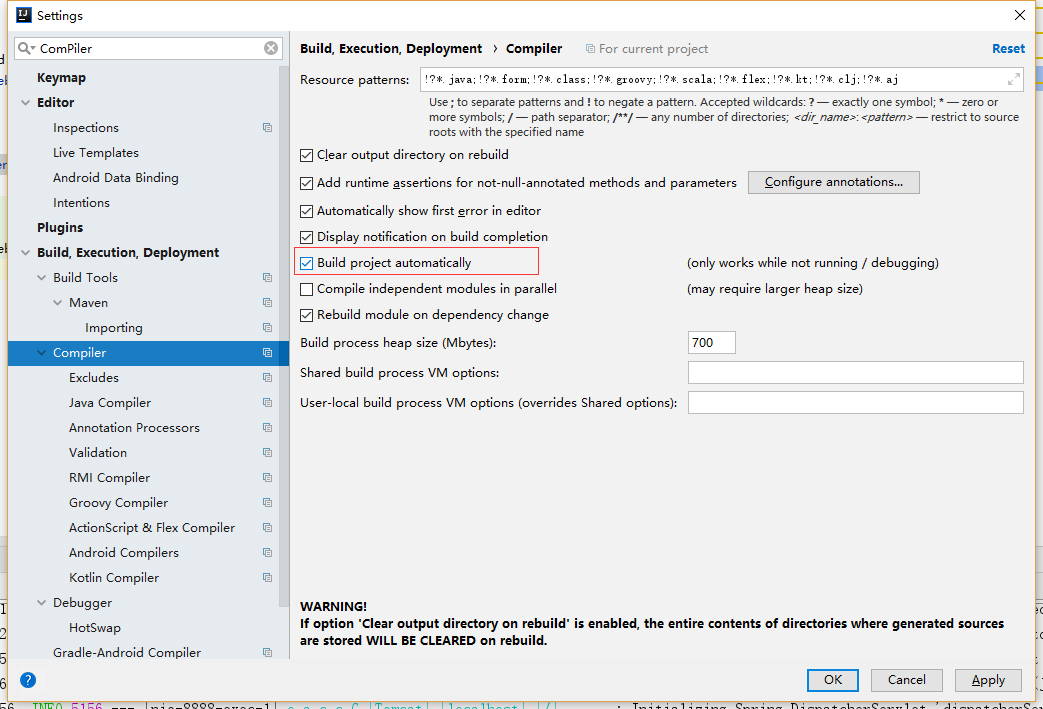
选中上图中的Build Project automatical
- 按组合键
Shift+ALT+Ctrl+/选择Registry可以看到如下界面
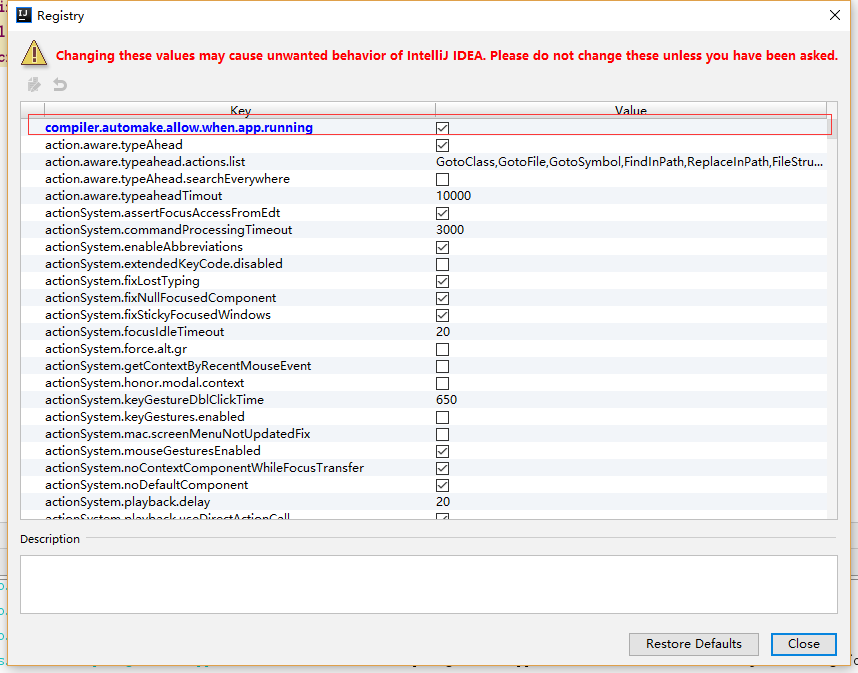
选中上图中的complier.automake.allow.when.app.running
如此,修改我们的代码后,无需重新build也无需重新重启。
二、Spring Boot读取配置文件
- 修改我们的配置文件
application.properties
server.port=8888

<!--网站配置-->

website.name=Loading

website.domin=www.loading.ink

website.title=我的博客网站

website.description=分享我的生活和技术
- 新建配置文件类
WebSiteConfig
package spring.boot.web.config;

import org.springframework.beans.factory.annotation.Value;

import org.springframework.boot.context.properties.ConfigurationProperties;

import org.springframework.context.annotation.Configuration;

import org.springframework.context.annotation.PropertySource;

import java.text.MessageFormat;

@Configuration

//@ConfigurationProperties(prefix = "website")

//要读取的配置文件地址

@PropertySource(value = "classpath:application.properties")

public class WebSiteConfig {

    @Value("${website.title}")

    private String title;

    @Value("${website.domain}")

    private String domain;

    @Value("${website.description}")

    private String description;

    public String getTitle() {

        return title;

    }

    public void setTitle(String title) {

        this.title = title;

    }

    public String getDomain() {

        return domain;

    }

    public void setDomain(String domain) {

        this.domain = domain;

    }

    public String getDescription() {

        return description;

    }

    public void setDescription(String description) {

        this.description = description;

    }

    @Override

    public String toString() {

        return MessageFormat.format("Title:{0} Domin:{1} Description:{2}", title, domain, description);

    }

}
读取配置文件中的配置有两种方式
1.@ConfigurationProperties(prefix = "website")用于绑定属性,其中prefix表示所绑定的属性的前缀。如果配置文件中的配置和属性名一致可以用此种方式
2.@Value("${website.title}") 绑定配置文件中的属性
注意:
注解@Configuration用于定义配置类
注解@PropertySource(value = "classpath:application.properties")代表要读取配置文件的路径当配置文件是application.properties时,这个注解可以省略不写
- 新建
WebSiteController
package spring.boot.web.controller;

import org.springframework.beans.factory.annotation.Autowired;

import org.springframework.web.bind.annotation.RequestMapping;

import org.springframework.web.bind.annotation.RequestMethod;

import org.springframework.web.bind.annotation.RestController;

import spring.boot.web.config.WebSiteConfig;

@RequestMapping("/website")

@RestController

public class WebSiteController {

    //通过@Autowired注解注入bean

    @Autowired

    private WebSiteConfig webSiteConfig;

    @RequestMapping(method = RequestMethod.GET)

    public String get() {

        return webSiteConfig.toString();

    }

}
- 测试运行
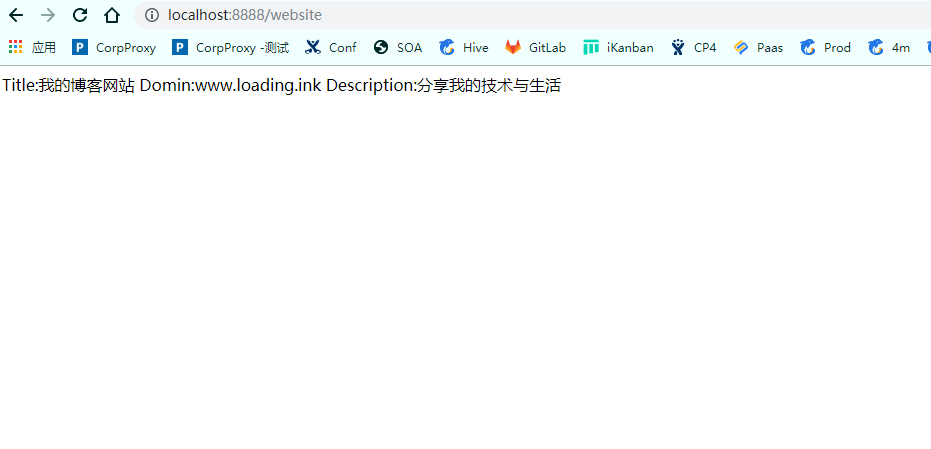
- 注意,如果第一次运行时遇到读取配置文件里的中文乱码的问题。其主要原因可能是因为配置文件的格式并不是utf-8的格式。此时可在idea中进行设置。
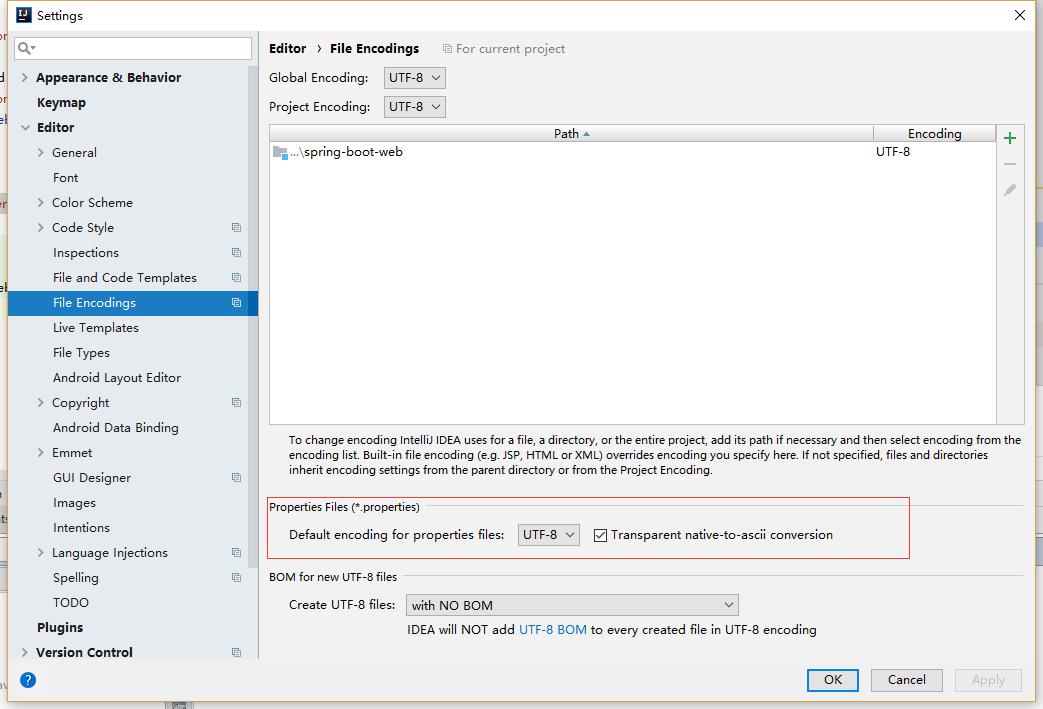
如上图所示更改为uft-8,注意后面的一定要勾选上。
通过上面配置后如果还不行,可以将配置文件删除后重新建一个,问题就可以解决!
三、Spring Boot Profile
Spring Boot 使用一个全局的配置文件 application.properties ,Spring Boot 的全局配置文件的作用是对一些默认配置的配置值进行修改。
在日常开发中,我们常常会遇到一个问题。就是在不同的环境使用不同的配置。比如生产、开发、测试三个不同的环境,我们的配置肯定不一样。这时,我们就要用到Profile。
Profile 是 Spring 用来针对不同的环境对不同的配置提供支持的,全局 Profile 配置使用 application-{profile}.properties (如 application-dev.properties)。通过在 application.properties 中设置 spring.profiles.active = dev 来指定活动的 Profile。
- 依次再目录下面新建三个配置文件,
application-dev.properties、application-test.properties、application-prod.properties。它们分别代表开发环境、测试环境、生产环境的配置文件。
server.port=8887

website.title=我的博客网站--Dev

website.domain=www.loading.ink

website.description=分享我的技术与生活
server.port=8886

website.title=我的博客网站--test

website.domain=www.loading.ink

website.description=分享我的技术与生活
server.port=8885

website.title=我的博客网站--prod

website.domain=www.loading.ink

website.description=分享我的技术与生活
- 接下来修改
application.properties:表示,将采用application-dev.properties这个配置文件。
spring.profiles.active=dev
测试运行我们可以看到会启动开发环境配置文件的端口8887
注意:配置文件会优先获取Profile中的配置,如果Profile中没有的配置项, 那么会直接取application.properties中的配置
Spring Boot(二) 配置文件的更多相关文章
- Spring Boot(二十):使用spring-boot-admin对spring-boot服务进行监控
Spring Boot(二十):使用spring-boot-admin对spring-boot服务进行监控 Spring Boot Actuator提供了对单个Spring Boot的监控,信息包含: ...
- Spring Boot 二十个注解
Spring Boot 二十个注解 占据无力拥有的东西是一种悲哀. Cold on the outside passionate on the insede. 背景:Spring Boot 注解的强大 ...
- Spring Boot 的配置文件application.properties
Spring Boot 中的application.properties 是一个全局的配置文件,放在src/main/resources 目录下或者类路径的/config下. 作为全局配置文件的app ...
- Spring Boot之配置文件值注入(@ConfigurationProperties)
前言:Spring Boot配置文件值的注入有两种方式,分别是 @ConfigurationProperties @Value 这里我们使用第一种 首先我们创建一个application.yml文件, ...
- Spring Boot属性配置文件:application.properties 详解
学习资料 网址 官方说明文档 https://docs.spring.io/spring-boot/docs/current/reference/html/common-application-pro ...
- 一:Spring Boot 的配置文件 application.properties
Spring Boot 的配置文件 application.properties 1.位置问题 2.普通的属性注入 3.类型安全的属性注入 1.位置问题 当我们创建一个 Spring Boot 工程时 ...
- Spring Boot 核心配置文件 bootstrap & application
Spring Boot 核心配置文件 bootstrap & application 1.SpringBoot bootstrap配置文件不生效问题 2.bootstrap/ applicat ...
- 精进 Spring Boot 03:Spring Boot 的配置文件和配置管理,以及用三种方式读取配置文件
精进 Spring Boot 03:Spring Boot 的配置文件和配置管理,以及用三种方式读取配置文件 内容简介:本文介绍 Spring Boot 的配置文件和配置管理,以及介绍了三种读取配置文 ...
- spring boot全局配置文件优先级
前两篇介绍的application配置文件,即为spring boot全局配置文件.那么spring boot加载配置文件的时候,怎么确定加载哪个目录下哪个文件呢? spring boot默认的配置文 ...
随机推荐
- DFS树求割点问题
时间复杂度:O(n玄学)总之不大 代码实现(好麻烦,蓝题变紫题) #include<iostream> #include<string.h> #include<algor ...
- Ansible实践总结
Ansible playbook 根据条件动态设置变量 首先新建 inventory,主机列表如下: node-01 ansible_host=192.168.64.30 node-02 ansibl ...
- 计算机基础+python初阶
今日内容: 1.计算机基础知识 2.python简介 3.快速入门 今日内容: 一.计算机基础 1. 计算机什么组成的 输入输出设备 cpu 硬盘 内存 中央处理器 处理各种数据 相当于人的大脑 内存 ...
- liunx安装jdk
jdk 安装包 https://pan.baidu.com/s/1cKnUQGU2Sk2nsARAzzVAHw [root@localhost ~]# tar -zxvf jdk-8u152-lin ...
- NLP(二十三)使用LSTM进行语言建模以预测最优词
N元模型 预测要输入的连续词,比如 如果抽取两个连续的词汇,则称之为二元模型 准备工作 数据集使用 Alice in Wonderland 将初始数据提取N-grams import nltk imp ...
- hdu 5534 Partial Tree(完全背包)
题目链接:http://acm.split.hdu.edu.cn/showproblem.php?pid=5534 题解:这题一看有点像树形dp但是树形dp显然没什么思路.然后由于这里的约束几乎没有就 ...
- 模板汇总——Tarjian
1. 单向边 + 新图建边 int belong[N], dfn[N], low[N], now_time, scc_cnt; stack<int> s; void dfs(int u) ...
- 树形dp poj2342 Anniversary party * 求最大价值
Description There is going to be a party to celebrate the 80-th Anniversary of the Ural State Univer ...
- 字符编码与gcc 编译器的编码问题
最近在 vscode 中借助 gcc 编译器来配置 c 语言开发环境时,发现中文编码存在乱码问题.再加上最近学习到多字节字符与宽字符,搅在一起,搞得很乱,就把自己的理解写下来,供有需者参考吧. 1. ...
- window对象,BOM,window事件,延时器,DOM
01.定时器补充 function fn(){ console.log(1);}setInterval("fn()",100); //定时器调用匿名函数/* funct ...