
.NET MVC5简介(五)管道处理模型IHttpModule
https://www.cnblogs.com/JimmyZhang/archive/2007/09/04/880967.html
IHttpModule
HTTPRuntime(运行时)。在一个控制台程序中,程序的入口是Program中的Main方法。那么,一个网站的入口在哪里呢?在最开始的ashx中,有个ProcessRequest方法,后来在WebForm中,在后台是一个不分类,继承自Page类,在Page_Load方法中去写代码。其实Page类型也有一个ProcessRequest的虚方法。
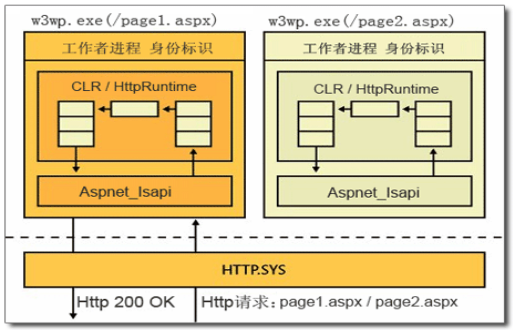
都是这个ProcessRequest方法来处理请求的。在MVC中也是如此。在MVC中,任何一个Http请求,一定有一个IHttpHandler来处理,在这个接口中,定义了一个ProcessRequest方法。HttpApplication继承自IHttpHandler接口。任何一个Http请求就是一个HttpApplication对象来处理的,然后处理过程固定包含权限认证、缓存处理、Session处理、Cookie出库、生成html、输出客户端,与此同时,千千万万的开发者,又有各种各样的扩展诉求,任何一个环节都有可能扩展,如果是我们来设计,该怎么设计?
其实在MVC框架里面,用到的是观察者模式:
在HttpApplication类型,有这些事件:
 //

        // 摘要:

        //     Occurs just before ASP.NET sends HTTP headers to the client.

        public event EventHandler PreSendRequestHeaders;

 //

        // 摘要:

        //     Occurs when the handler is selected to respond to the request.

        public event EventHandler MapRequestHandler;

 //

        // 摘要:

        //     Occurs when the application is disposed.

        public event EventHandler Disposed;

 //

        // 摘要:

        //     Occurs as the first event in the HTTP pipeline chain of execution when ASP.NET

        //     responds to a request.

        public event EventHandler BeginRequest;

 //

        // 摘要:

        //     Occurs when a security module has established the identity of the user.

        public event EventHandler AuthenticateRequest;

 //

        // 摘要:

        //     Occurs when a security module has established the identity of the user.

        public event EventHandler PostAuthenticateRequest;

 //

        // 摘要:

        //     Occurs when a security module has verified user authorization.

        public event EventHandler AuthorizeRequest;

 //

        // 摘要:

        //     Occurs when the user for the current request has been authorized.

        public event EventHandler PostAuthorizeRequest;

 //

        // 摘要:

        //     Occurs when ASP.NET finishes an authorization event to let the caching modules

        //     serve requests from the cache, bypassing execution of the event handler (for

        //     example, a page or an XML Web service).

        public event EventHandler ResolveRequestCache;

 //

        // 摘要:

        //     Occurs when ASP.NET bypasses execution of the current event handler and allows

        //     a caching module to serve a request from the cache.

        public event EventHandler PostResolveRequestCache;

 //

        // 摘要:

        //     Occurs just before ASP.NET sends content to the client.

        public event EventHandler PreSendRequestContent;

 //

        // 摘要:

        //     Occurs when ASP.NET has mapped the current request to the appropriate event handler.

        public event EventHandler PostMapRequestHandler;

 //

        // 摘要:

        //     Occurs when ASP.NET has completed processing all the event handlers for the System.Web.HttpApplication.LogRequest

        //     event.

        public event EventHandler PostLogRequest;

 //

        // 摘要:

        //     Occurs when the managed objects that are associated with the request have been

        //     released.

        public event EventHandler RequestCompleted;

 //

        // 摘要:

        //     Occurs when the request state (for example, session state) that is associated

        //     with the current request has been obtained.

        public event EventHandler PostAcquireRequestState;

 //

        // 摘要:

        //     Occurs just before ASP.NET starts executing an event handler (for example, a

        //     page or an XML Web service).

        public event EventHandler PreRequestHandlerExecute;

 //

        // 摘要:

        //     Occurs when the ASP.NET event handler (for example, a page or an XML Web service)

        //     finishes execution.

        public event EventHandler PostRequestHandlerExecute;

 //

        // 摘要:

        //     Occurs after ASP.NET finishes executing all request event handlers. This event

        //     causes state modules to save the current state data.

        public event EventHandler ReleaseRequestState;

 //

        // 摘要:

        //     Occurs when ASP.NET has completed executing all request event handlers and the

        //     request state data has been stored.

        public event EventHandler PostReleaseRequestState;

 //

        // 摘要:

        //     Occurs when ASP.NET finishes executing an event handler in order to let caching

        //     modules store responses that will be used to serve subsequent requests from the

        //     cache.

        public event EventHandler UpdateRequestCache;

 //

        // 摘要:

        //     Occurs when ASP.NET finishes updating caching modules and storing responses that

        //     are used to serve subsequent requests from the cache.

        public event EventHandler PostUpdateRequestCache;

 //

        // 摘要:

        //     Occurs just before ASP.NET performs any logging for the current request.

        public event EventHandler LogRequest;

 //

        // 摘要:

        //     Occurs when ASP.NET acquires the current state (for example, session state) that

        //     is associated with the current request.

        public event EventHandler AcquireRequestState;

 //

        // 摘要:

        //     Occurs as the last event in the HTTP pipeline chain of execution when ASP.NET

        //     responds to a request.

        public event EventHandler EndRequest;

 //

        // 摘要:

        //     Occurs when an unhandled exception is thrown.

        public event EventHandler Error;

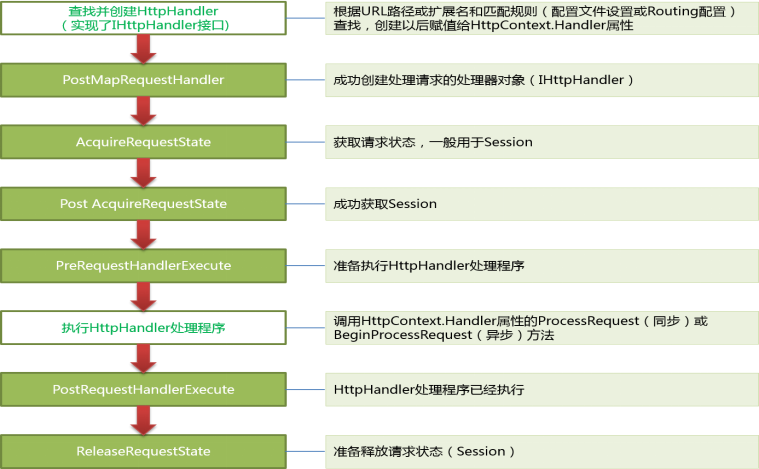
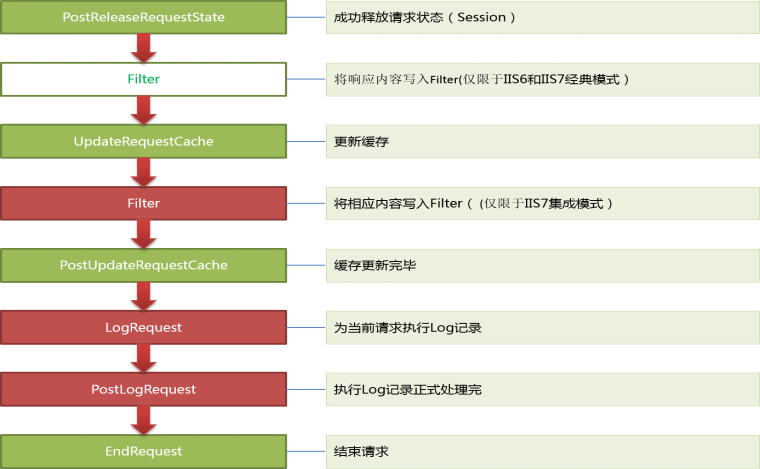
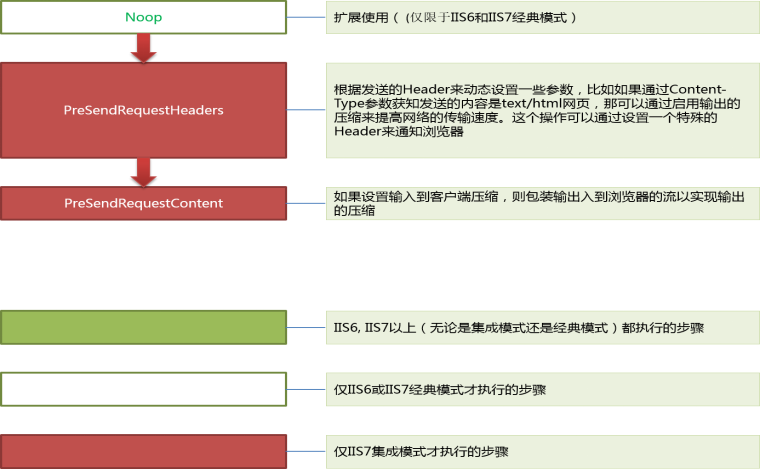
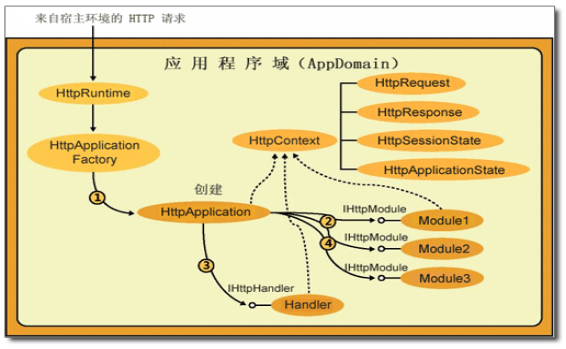
这里用的是观察者模式,把固定的步骤直接写在handler里面,在步骤前后分别放一个事件,然后开发者可以对事件注册动作,等着请求进来了,然后就可以按照顺讯执行一下。这种设计是不是很完美?但是仍有不完美的地方,就是每个请求都要执行这些事件,太多管闲事了。在.NET Core中出现了中间件,比这种更加完美。后续再详细介绍。
请见下列代码
 public class HttpProcessDemo

 {

     public class HttpApplicationDemo : IHttpHandler

     {

         public bool IsReusable => true;

         public event Action BeginRequest;

         public event Action EndRequest;

         public event Action PreSomething1Handler;

         public event Action PostSomething1Handler;

         public event Action PreSomething2Handler;

         public event Action PostSomething2Handler;

         public event Action PreSomething3Handler;

         public event Action PostSomething3Handler;

         public event Action PreSomething4Handler;

         public event Action PostSomething4Handler;

         public event Action PreSomething5Handler;

         public event Action PostSomething5Handler;

         public event Action PreSomething6Handler;

         public event Action PostSomething6Handler;

         public void ProcessRequest(HttpContext context)

         {

             this.BeginRequest?.Invoke();

             this.PreSomething1Handler?.Invoke();

             Console.WriteLine("Something 1");

             this.PostSomething1Handler?.Invoke();

             this.PreSomething2Handler?.Invoke();

             Console.WriteLine("Something 2");

             this.PostSomething2Handler?.Invoke();

             this.PreSomething3Handler?.Invoke();

             Console.WriteLine("Something 3");

             this.PostSomething3Handler?.Invoke();

             this.PreSomething4Handler?.Invoke();

             Console.WriteLine("Something 4");

             this.PostSomething4Handler?.Invoke();

             this.PreSomething5Handler?.Invoke();

             Console.WriteLine("Something 5");

             this.PostSomething5Handler?.Invoke();

             this.PreSomething6Handler?.Invoke();

             Console.WriteLine("Something 6");

             this.PostSomething6Handler?.Invoke();

             this.EndRequest?.Invoke();

         }

         //任何请求进来,只能是 123456

         //事件升级后,可以在程序启动时,实例化HttpApplicationDemo后,可以给事件注册动作,请求再进来时,处理不仅是123456了,还有多个事件里面的动作

     }
对HttpApplication里面的事件进行动作注册,就叫IHttpModule。
自定义一个HttpModule+配置文件注册,然后任何一个请求都会执行Init里面注册给Application事件的动作。

 public class CustomHttpModule : IHttpModule

 {

     public void Dispose()

     {

         Console.WriteLine();

     }

     public event EventHandler CustomHttpModuleHandler;

     /// <summary>

     /// 注册动作

     /// </summary>

     /// <param name="context"></param>

     public void Init(HttpApplication application)

     {

         application.BeginRequest += (s, e) =>

           {

               this.CustomHttpModuleHandler?.Invoke(application, null);

           };

         //application.EndRequest += (s, e) =>

         //{

         //    HttpContext.Current.Response.Write("CustomHttpModule.EndRequest");

         //};

         #region 为每一个事件,都注册了一个动作,向客户端输出信息

         application.AcquireRequestState += (s, e) => application.Response.Write(string.Format("<h1 style='color:#00f'>来自MyCustomModule 的处理,{0}请求到达 {1}</h1><hr>", DateTime.Now.ToString(), "AcquireRequestState        "));

         application.AuthenticateRequest += (s, e) => application.Response.Write(string.Format("<h1 style='color:#00f'>来自MyCustomModule 的处理,{0}请求到达 {1}</h1><hr>", DateTime.Now.ToString(), "AuthenticateRequest        "));

         application.AuthorizeRequest += (s, e) => application.Response.Write(string.Format("<h1 style='color:#00f'>来自MyCustomModule 的处理,{0}请求到达 {1}</h1><hr>", DateTime.Now.ToString(), "AuthorizeRequest           "));

         application.BeginRequest += (s, e) => application.Response.Write(string.Format("<h1 style='color:#00f'>来自MyCustomModule 的处理,{0}请求到达 {1}</h1><hr>", DateTime.Now.ToString(), "BeginRequest               "));

         application.Disposed += (s, e) => application.Response.Write(string.Format("<h1 style='color:#00f'>来自MyCustomModule 的处理,{0}请求到达 {1}</h1><hr>", DateTime.Now.ToString(), "Disposed                   "));

         application.EndRequest += (s, e) => application.Response.Write(string.Format("<h1 style='color:#00f'>来自MyCustomModule 的处理,{0}请求到达 {1}</h1><hr>", DateTime.Now.ToString(), "EndRequest                 "));

         application.Error += (s, e) => application.Response.Write(string.Format("<h1 style='color:#00f'>来自MyCustomModule 的处理,{0}请求到达 {1}</h1><hr>", DateTime.Now.ToString(), "Error                      "));

         application.LogRequest += (s, e) => application.Response.Write(string.Format("<h1 style='color:#00f'>来自MyCustomModule 的处理,{0}请求到达 {1}</h1><hr>", DateTime.Now.ToString(), "LogRequest                 "));

         application.MapRequestHandler += (s, e) => application.Response.Write(string.Format("<h1 style='color:#00f'>来自MyCustomModule 的处理,{0}请求到达 {1}</h1><hr>", DateTime.Now.ToString(), "MapRequestHandler          "));

         application.PostAcquireRequestState += (s, e) => application.Response.Write(string.Format("<h1 style='color:#00f'>来自MyCustomModule 的处理,{0}请求到达 {1}</h1><hr>", DateTime.Now.ToString(), "PostAcquireRequestState    "));

         application.PostAuthenticateRequest += (s, e) => application.Response.Write(string.Format("<h1 style='color:#00f'>来自MyCustomModule 的处理,{0}请求到达 {1}</h1><hr>", DateTime.Now.ToString(), "PostAuthenticateRequest    "));

         application.PostAuthorizeRequest += (s, e) => application.Response.Write(string.Format("<h1 style='color:#00f'>来自MyCustomModule 的处理,{0}请求到达 {1}</h1><hr>", DateTime.Now.ToString(), "PostAuthorizeRequest       "));

         application.PostLogRequest += (s, e) => application.Response.Write(string.Format("<h1 style='color:#00f'>来自MyCustomModule 的处理,{0}请求到达 {1}</h1><hr>", DateTime.Now.ToString(), "PostLogRequest             "));

         application.PostMapRequestHandler += (s, e) => application.Response.Write(string.Format("<h1 style='color:#00f'>来自MyCustomModule 的处理,{0}请求到达 {1}</h1><hr>", DateTime.Now.ToString(), "PostMapRequestHandler      "));

         application.PostReleaseRequestState += (s, e) => application.Response.Write(string.Format("<h1 style='color:#00f'>来自MyCustomModule 的处理,{0}请求到达 {1}</h1><hr>", DateTime.Now.ToString(), "PostReleaseRequestState    "));

         application.PostRequestHandlerExecute += (s, e) => application.Response.Write(string.Format("<h1 style='color:#00f'>来自MyCustomModule 的处理,{0}请求到达 {1}</h1><hr>", DateTime.Now.ToString(), "PostRequestHandlerExecute  "));

         application.PostResolveRequestCache += (s, e) => application.Response.Write(string.Format("<h1 style='color:#00f'>来自MyCustomModule 的处理,{0}请求到达 {1}</h1><hr>", DateTime.Now.ToString(), "PostResolveRequestCache    "));

         application.PostUpdateRequestCache += (s, e) => application.Response.Write(string.Format("<h1 style='color:#00f'>来自MyCustomModule 的处理,{0}请求到达 {1}</h1><hr>", DateTime.Now.ToString(), "PostUpdateRequestCache     "));

         application.PreRequestHandlerExecute += (s, e) => application.Response.Write(string.Format("<h1 style='color:#00f'>来自MyCustomModule 的处理,{0}请求到达 {1}</h1><hr>", DateTime.Now.ToString(), "PreRequestHandlerExecute   "));

         application.PreSendRequestContent += (s, e) => application.Response.Write(string.Format("<h1 style='color:#00f'>来自MyCustomModule 的处理,{0}请求到达 {1}</h1><hr>", DateTime.Now.ToString(), "PreSendRequestContent      "));

         application.PreSendRequestHeaders += (s, e) => application.Response.Write(string.Format("<h1 style='color:#00f'>来自MyCustomModule 的处理,{0}请求到达 {1}</h1><hr>", DateTime.Now.ToString(), "PreSendRequestHeaders      "));

         application.ReleaseRequestState += (s, e) => application.Response.Write(string.Format("<h1 style='color:#00f'>来自MyCustomModule 的处理,{0}请求到达 {1}</h1><hr>", DateTime.Now.ToString(), "ReleaseRequestState        "));

         application.RequestCompleted += (s, e) => application.Response.Write(string.Format("<h1 style='color:#00f'>来自MyCustomModule 的处理,{0}请求到达 {1}</h1><hr>", DateTime.Now.ToString(), "RequestCompleted           "));

         application.ResolveRequestCache += (s, e) => application.Response.Write(string.Format("<h1 style='color:#00f'>来自MyCustomModule 的处理,{0}请求到达 {1}</h1><hr>", DateTime.Now.ToString(), "ResolveRequestCache        "));

         application.UpdateRequestCache += (s, e) => application.Response.Write(string.Format("<h1 style='color:#00f'>来自MyCustomModule 的处理,{0}请求到达 {1}</h1><hr>", DateTime.Now.ToString(), "UpdateRequestCache         "));

         #endregion

     }

 }
访问下页面,就是这样的结果:

正常流程下,会按照顺序执行19个事件。
学完HttpModule,我们可以做点什么有用的扩展?
任何一个请求都会执行HttpModuleInit里面注册给Application的事件
1、日志-性能监控
2、权限
3、缓存
4、页面加点东西
5、请求过滤
6、MVC就是一个Module的扩展
不适合的:不是针对全部请求的,就不太适合用Module,因为有性能损耗
1、多语言,根据Cookie信息去查询不同的数据做不同的展示,如果是全部一套处理,最后HttpModule拦截+处理,适合httpModule
2、跳转到不同界面,也不合适
3、防盗链,针对一类的后缀来处理的,而不是全部请求---判断----再防盗链
在HttpModule里面发布一个CustomHttpModuleHandler,在Global增加一个动作CustomHttpModuleBingle_CustomHttpModuleHandler(配置文件module名称_module里面事件名称),请求响应时,该事件会执行
protected void CustomHttpModuleBingle_CustomHttpModuleHandler(object sender, EventArgs e)

{

    this.logger.Info("this is CustomHttpModuleBingle_CustomHttpModuleHandler");
}
HttpModule是对HttpApplication的事件动作注册动作,Global是对HttpModule里面的事件注册动作。
.NET MVC5简介(五)管道处理模型IHttpModule的更多相关文章
- MVC5管道处理模型
原文:MVC5管道处理模型 版权声明:本文为博主原创文章,未经博主允许不得转载. https://blog.csdn.net/m0_37591671/article/details/82970442 ...
- .NET MVC5简介(六)HttpHandler
浏览器到网站程序 上一篇中,介绍IHttpModule的时候,自定义一个类CustomHttpModule继承自IHttpModule,自定义一个事件,并配合配置文件,就可以执行自定义Module中的 ...
- [转载] Linux五种IO模型
转载:http://blog.csdn.net/jay900323/article/details/18141217 Linux五种IO模型性能分析 目录(?)[-] 概念理解 Lin ...
- Windows五种IO模型性能分析和Linux五种IO模型性能分析
Windows五种IO模型性能分析和Linux五种IO模型性能分析 http://blog.csdn.net/jay900323/article/details/18141217 http://blo ...
- (转载) Linux五种IO模型
转载:http://blog.csdn.net/jay900323/article/details/18141217 Linux五种IO模型及分析 目录(?)[-] 概念理解 Linux下 ...
- 五种IO模型
参考文档 https://www.jianshu.com/p/486b0965c296 概念说明 用户空间和内核空间 现在操作系统都是采用虚拟存储器,那么对32位操作系统而言,它的寻址空 ...
- day 69 Django基础五之django模型层(一)单表操作
Django基础五之django模型层(一)单表操作 本节目录 一 ORM简介 二 单表操作 三 章节作业 四 xxx 一 ORM简介 MVC或者MVC框架中包括一个重要的部分,就是ORM,它实现 ...
- day 55 Django基础五之django模型层(一)单表操作
Django基础五之django模型层(一)单表操作 本节目录 一 ORM简介 二 单表操作 三 章节作业 四 xxx 一 ORM简介 MVC或者MVC框架中包括一个重要的部分,就是ORM,它 ...
- 五种IO模型(Model)
目录 一:IO模型简介 1.五种IO Model: 二:五种IO模型简介 1.阻塞IO 2.非阻塞IO 3.多路复用IO 4.信号驱动IO模型 5.异步IO 三:5种I/O模型的比较 一:IO模型简介 ...
随机推荐
- VS出现未加载wntdll.pdb的解决办法
无缘无故出现了未加载wntdll.pdb的的错误,不知道原因是什么,但找到了解决方法.在调试中选择选项,然后选择调试->符号,勾选Microsoft符号服务器,确定.重新生成项目时会有各种加载, ...
- Java入门总结
1. 一个Java源码只能定义一个public类型的class,并且class名称和文件名要完全一致: 使用javac可以将.java源码编译成.class字节码: 使用java可以运行一个已编译的J ...
- C - Train Problem II——卡特兰数
题目链接_HDU-1023 题目 As we all know the Train Problem I, the boss of the Ignatius Train Station want to ...
- react+ant-mobile+lib-flexible构建移动端项目适应设计图尺寸(750)
使用lib-flexible在react中先安装 npm install lib-flexible --save 因为插件使用的是rem适配,所以安装两个插件 npm install postcss- ...
- go语言的json
简介 json 中提供的处理 json 的标准包是 encoding/json,主要使用的是以下两个方法: // 序列化 func Marshal(v interface{}) ([]byte, er ...
- js 轮播图效果
<!DOCTYPE html> <html> <head lang="en"> <meta charset="UTF-8&quo ...
- socket经典案例-发送数据
一:客户端向服务端发送数据. 服务端: package com.company.s; import java.io.*; import java.net.ServerSocket; import ja ...
- [转]UIPATH机器人指南
本文转自:https://blog.csdn.net/weixin_33957036/article/details/80907372 介绍 机器人是UiPath的执行代理,可运行Studio中内置的 ...
- Masonry纯码实现UIScrollView 之上下滚动,设置UIScrollView背景图片
参考链接:https://www.jianshu.com/p/9a158308c50b 亲测有效,很赞! 你们最想要的Demo下载地址:https://github.com/objcxiaobai/C ...
- JS For
JS For 循环可以将代码块执行指定的次数. JavaScript 循环 document.write(cars[0] + "<br>"); document.wri ...