
Javascript之三种按钮点击事件
学习Javascript必须要先掌握基本的事件方法和语法,这些都是我们学过的也是最基本的。以前忘了总结,所以现在回顾,综合地总结一下,温故而知新。
Javascript有三种按钮点击事件,分别为alert、confirm和prompt,简单介绍一下它们的基本方法。
1. alert是弹出警告框,在文本里面加入\n就可以换行。
2. confirm弹出确认框,会返回布尔值,通过这个值可以判断点击时确认还是取消。true表示点击了确认,false表示点击了取消。
3. prompt弹出输入框,点击确认返回输入框中的值,点击取消返回null,prompt(“提示信息”,初始值“”)。
Open(URL,windowName,parameterList):open方法创建一个新的浏览器窗口,并在新的窗口载入一个新的URL地址,windowName表示新建窗口标题名字, parameterList表示各参数值。
Close():关闭一个浏览器窗口。
Window.open()打开浏览器窗口,window对象表示的是浏览器窗口,它有多种操作,其中一个重要的方法是open,表示新建一个窗口来打开指定页面,例如在windowtest.html中执行以下语句:
window.open(“http://www.baidu.com”);
这和我们一般用的<a href=”http://www.baidu.com”>百度一下</a>打开页面效果是一样的。
然而你是否注意了到了window.open方法有更大的优势?
window.open对新建窗口的样式可以有更多的控制,例如窗口的大小、是否显示菜单栏、是否显示滚动条、是否显示地址等等,其完整的调用语法为下:
window.open(url,windowName,”name1=value1[,name2=value2,[……]”);
window的常用属性与值如下:
属性名称 |
意义 |
属性值 |
height |
窗口高度 |
单位为像素(可以为纯数字不带单位) |
width |
窗口宽度 |
单位为像素 |
left |
窗口左上角距屏幕左上角宽度距离 |
单位为像素 |
top |
窗口左上角距屏幕左上角高度距离 |
单位为像素 |
directories |
是否显示链接工具栏 |
有:1,没有:0,缺省:1 |
location |
是否显示地址栏 |
有:1,没有:0,缺省:1 |
menubar |
是否显示菜单栏 |
有:1,没有:0,缺省:1 |
resizable |
是否允许调整窗口大小 |
有:1,没有:0,缺省:1 |
scrollbars |
是否显示滚动条 |
有:1,没有:0,缺省:1 |
status |
是否显示状态栏 |
有:1,没有:0,缺省:1 |
toolbar |
是否显示工具栏 |
可以:1,不可以:0,缺省:1 |
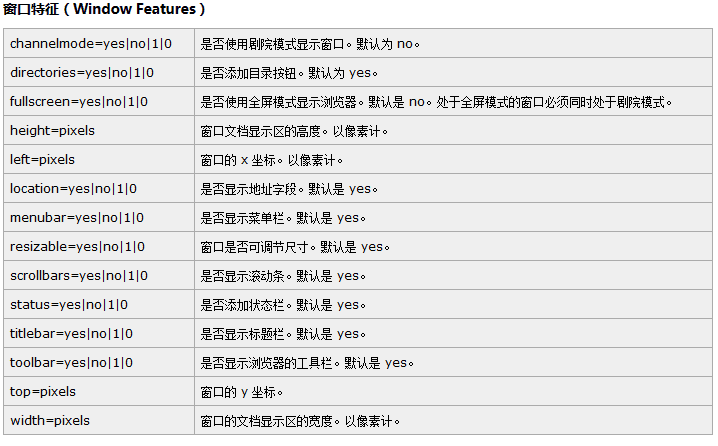
我们可以看看实际应用,下面我就把这三种方法全部放在一个例子中:
<head>
<title> new document </title>
<meta http-equiv="Content-Type" content="text/html; charset=utf-8" />
</head>
<script language="javascript">
function button_Click_1(btn){
alert("我是"+btn.value);
alert("我被点中了!");
}
function button_Click_2(){
var value = prompt('输入你的名字:', '默认名字');
if(value == null){
alert('你取消了输入!');
}else if(value == ''){
alert('姓名输入为空,请重新输入!');
show_prompt();
}else{
alert('你好,'+value);
}
}
function button_Click_3(){
var result = confirm('是否删除!');
if(result){
alert('删除成功!');
}else{
alert('不删除!');
}
}
document.getElementById("Button4").setAttribute("onclick","button_Click_2(this)");
document.getElementById("Button5").setAttribute("onclick","button_Click_3(this)");
</script>
<body>
<input id="Button1" type="button" value="button1" onclick='alert("我是"+this.value);alert("我被点中了!");' />
<input id="Button2" type="button" value="button2" onclick="button_Click_1(this);" />
<input id="Button3" type="button" value="button3" onclick="button_Click_1(this);" />
<!--
button3、button4可以依次类推
<input id="Button4" type="button" value="button4" onclick="button_Click_1(this);"/>
<input id="Button5" type="button" value="button5" onclick="button_Click_1(this);"/>
-->
<input id="Button4" type="button" value="button4" onclick="button_Click_2(this);" />
<input id="Button5" type="button" value="button5" onclick="button_Click_3(this);" />
</body>
(温馨提示:亲,可改动文本域中的代码运行哦!)
Javascript之三种按钮点击事件的更多相关文章
- qt 两种按钮点击事件应用
1.传统connect 例如: connect(ui->findPushBtn,SIGNAL(clicked()),this,SLOT(find())); 参数1:事件UI 参数2:点击系统函数 ...
- js触发按钮点击事件
js触发按钮点击事件 博客分类: javascript 模拟JS触发按钮点击功能 <html> <head> <title>usually function&l ...
- 【Android】按钮点击事件的常用写法
学习总结: 最近学习了Android点击事件的常用写法.点击事件会触发监听对象身上的回调,常用写法有以下四种: 方法一:使用匿名内部类. public class MainActivity exten ...
- js和jquery触发按钮点击事件
js触发按钮点击事件 function load(){ //下面两种方法效果是一样的 document.getElementById("target").onclick(); do ...
- 查找和定位Android应用的按钮点击事件的代码位置基于Xposed Hook实现
本文博客地址:https://blog.csdn.net/QQ1084283172/article/details/80956455 在进行Android程序的逆向分析的时候,经常需要通过Androi ...
- 按钮点击事件,打开新的Activity
按钮点击事件,打开新Activity, 打开网页 findViewById(R.id.btnStartBAty).setOnClickListener(new View.OnClickListener ...
- Objective-C:模拟按钮点击事件理解代理模式
OC中的协议(Protocol)和和.NET中的接口(Interface)类似,简单来讲,就是一系列方法的列表,其中声明的方法可以被任何类实现.不同的是,在.NET中,如果某个类实现了一个接口,就必须 ...
- 【转】Android开发20——单个监听器监听多个按钮点击事件
原文网址:http://woshixy.blog.51cto.com/5637578/1093936 原创作品,允许转载,转载时请务必以超链接形式标明文章 原始出处 .作者信息和本声明.否则将追究法律 ...
- ButtonAddListener监听按钮点击事件
ButtonAddListener监听按钮点击事件 using UnityEngine; using System.Collections; using UnityEngine.UI; using U ...
随机推荐
- win8图片默认不显示
最近,发现了一个问题,在查看图片的时候,出现了这样的情况: 查看的时候很不方便,想要找到自己需要的图片就要误打误撞,也不知道自己在哪儿设置了,于是,上网查资料,才发现其实只需要简单的该一下设置就可以了 ...
- CLR探索应用程序域世界(上):Windbg SOS剖析揭示域世界
在CLR的世界中,有一系列的令人Amazing的技术和架构.其中,CLR对应用程序在内存中内存分配,执行模型,程序之间的交互等一系列的技术,值得每一个致力于DotNet平台的技术人员深究. 编程人员在 ...
- WordPress主题制作教程[壹] - 了解WP&结构&索引
最近开始筹备WordPress主题开发了.首先我们在此章节中进行了解什么是WP,以及WP的结构.通过这个文章索引到以后所写的WP系列教程. (抱歉,大家不要急,持续更新中....) 1.首先,我们来认 ...
- 窗体 dialog 弹出时动画效果
1.先创建 anim中的 xml 动画文件 <?xml version="1.0" encoding="utf-8"? > <set x ...
- c# winform 把彩色图片转换为灰色的图片,变灰,灰度图片,速度很快,safe,unsafe
把彩色图片转换为灰色的图片,直接用.net接口遍历每个像素点转换的效率非常低,800K的图片65万像素我的电脑要用5分钟,而用了unsafe,速度提高了几千倍,同样的图片只用了0.几秒 附一个常用的遍 ...
- C++的XML编程经验――LIBXML2库使用指南[转]
C++的XML编程经验――LIBXML2库使用指南 写这篇文章的原因有如下几点:1)C++标准库中没有操作XML的方法,用C++操作XML文件必须熟悉一种函数库,LIBXML2是其中一种很优秀的XML ...
- 网络IPC:套接字之寻址
在学习用套接字做一些有意义的事情之前,需要知道如何确定一个目标通信进程. 进程的标识有两个部分:计算机的网络地址可以帮助标识网络上想与之通信的计算机,而服务可以帮助标识计算机上特定的进程. 1.字节序 ...
- 通用PE u盘装Ghost Win7系统
http://www.tongyongpe.com/win7ghost.html 导读 通用pe工具箱是现在最老牌的的U盘装系统和维护电脑的专用工具之一,一键式制作.操作简单便捷,几乎100%支持所有 ...
- Android 高级UI设计笔记05:使用TextView实现跑马灯的效果
1. 使用TextView属性实现跑马灯的效果: (1). 新建一个Android工程,命名为"MarqueeTextViewDemo",如下: (2). 来到activity_m ...
- github使用成长记
学校里一直都有自己写一些网页,一方面为了学习熟练技能,另一方面也是兴趣所在.但是独乐乐不如众乐乐,一直向往有那么一个平台能把自己做得东西分享给广大网友,并且想借着分享的契机和各位程序猿交流学习心得(这 ...