
vagrant Ubuntu server 12.04 dpkg: dependency problems prevent configuration of python-gi
Ubuntu server 12.04因为尝试安装过xfce,导致sudo apt-get install xxx 都会返回,如:
 vagrant@precise32:~$ sudo apt-get install phpunit

 Reading package lists... Done

 Building dependency tree

 Reading state information... Done

 phpunit is already the newest version.

 The following packages were automatically installed and are no longer required:

   libclass-isa-perl libswitch-perl

 Use 'apt-get autoremove' to remove them.

  upgraded,  newly installed,  to remove and  not upgraded.

  not fully installed or removed.

 After this operation,  B of additional disk space will be used.

 Do you want to continue [Y/n]? y

 dpkg: dependency problems prevent configuration of python-gi:

  python-gi depends on python:any (>= 2.7.-0ubuntu2).

 dpkg: error processing package python-gi (--configure):

  dependency problems - leaving unconfigured

 No apport report written because MaxReports is reached already

                                                               Errors were encountered while processing:

  python-gi

 E: Sub-process /usr/bin/dpkg returned an error code ()
的错误信息,而且安装不到xxx软件,参考 Error 'Depends: python:any. Unmet dependencies' after installing python 2.7.5 之后,运行了
sudo apt-get install --reinstall python
解决了这个问题。
原来我已经安装了ant,phpunit的最新版本,总以为是没安装到,我才觉得我必须更新系统版本才能用,才出现了Ubuntu server 12.04升级到Ubuntu server 14.04.4 之后,出现vagnrat up之后,不能自动登录tty和virtualbox没有共享windows目录的问题,最终还是解决了,YES!
---------------------------------------------------------------------------------------------------------------------------------------------------------------------------------------------
目前还是安装不到任何软件,我运行
sudo apt-get dist-upgrade
进行更新。
 ,运行之后,既然升级到14.04了。
在重启vagrant之后,因为重写了/etc/sudoers,启动时,会显示
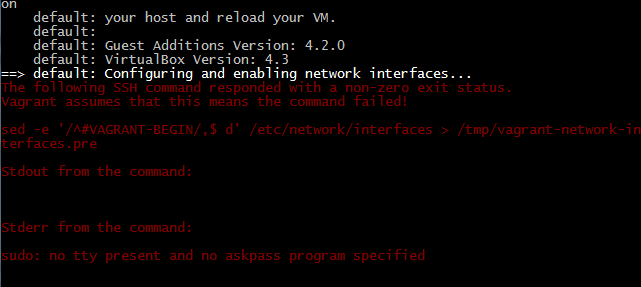
因为看到最后的一句,我觉得是vagrant用户没有自动登录tty
在参考
ubuntu的sudo操作出现下面提示,怎么办?
vagrant up : The following SSH command responded with a non-zero exit status. #1659
Ubuntu新添加用户无法sudo问题的解决:修改sudoers
- Linux/Ubuntu sudo不用输入密码的方法
Win7在命令提示符(cmd.exe)中如何进行复制、粘贴工作
我修改了 /etc/sudoers
vagrant@precise32:~$ sudo su -

[sudo] password for vagrant:

root@precise32:~# chmod a+w /etc/sudoers

root@precise32:~# vi /etc/sudoers

root@precise32:~# chmod a-w /etc/sudoers

root@precise32:~# sudo shutdown -h now
我将/etc/sudoers中的root下添加了vagrant ,将%admin ALL=(ALL) ALL,%sudo ALL=(ALL) ALL
root    ALL=(ALL:ALL) ALL

vagrant ALL=(ALL) NOPASSWD: ALL

Defaults:vagrant !requiretty

# Members of the admin group may gain root privileges

%admin ALL=(ALL) NOPASSWD: NOPASSWD: ALL

# Allow members of group sudo to execute any command

%sudo   ALL=(ALL) NOPASSWD: NOPASSWD: ALL
重新vagrant up显示
 Failed to mount folders in Linux guest. This is usually because

 the "vboxsf" file system is not available. Please verify that

 the guest additions are properly installed in the guest and

 can work properly. The command attempted was:

 mount -t vboxsf -o uid=`id -u vagrant`,gid=`getent group vagrant |

 vagrant /vagrant

 mount -t vboxsf -o uid=`id -u vagrant`,gid=`id -g vagrant` vagrant

 The error output from the last command was:

 stdin: is not a tty

 /sbin/mount.vboxsf: mounting failed with the error: No such device
参考了:
Vagrant can't mount shared folder in VirtualBox 4.3.10 #3341

进行更新Ubuntu 14.04的linux-headers,linux-headers更新参考了:UBUNTU内核升级后,kernel headers问题的解决
 sudo apt-get install

 cd /usr/src

 apt-cache search linux-headers-$(uname -r)

 sudo apt-get install linux-headers-$(uname -r)
然后关闭ubuntu 14.04, sudo shutdown -h now
在运行vagrant up,就可以看到virtualbox 更新Virtualbox的增强组件了,欧耶!!

参考链接:
vagrant Ubuntu server 12.04 dpkg: dependency problems prevent configuration of python-gi的更多相关文章
- dpkg dependency problems prevent configuration
dpkg: dependency problems prevent configuration of cr3: cr3 depends on libpng12-0 (>= 1.2.13-4); ...
- U盘安装ubuntu server 12.04的问题检测不到CDROM的解决
U盘安装ubuntu server 12.04的问题检测不到CDROM的解决 ========================== 我是u盘安装ubuntu 14 64Bit 也是出现同样的问题 用u ...
- [Linux] Ubuntu Server 12.04 LTS 平台上搭建WordPress(Nginx+MySql+PHP) Part II
接着上一节继续搭建我们的LNMP平台,接下来我们安装PHP相关的服务 sudo apt-get install php5-cli php5-cgi php5-fpm php5-mcrypt php5- ...
- [Linux] Ubuntu Server 12.04 LTS 平台上搭建WordPress(Nginx+MySQL+PHP) Part IV
接下来我们去下载 WorePress 用最新的 3.7.1 下载地址是:http://cn.wordpress.org/wordpress-3.7.1-zh_CN.zip 我们先建立一个文件夹 /va ...
- Ubuntu Server 12.04 静态IP简洁配置
PS:很长时间没使用Ubuntu了,刚才安装个Ubuntu Server 12.04做测试.Ubuntu的网络设置跟Redhat系是不一样的,配置IP时发现跟以前的Ubuntu桌面版本也有所不同,记录 ...
- Ubuntu Server 12.04安装图解教程
Ubuntu S ...
- Ubuntu Server 12.04 安装 Jabberd2 服务器
本篇文章由:http://xinpure.com/install-ubuntu-server-12-04-jabberd2-server/ Ubuntu Server 12.04 安装 Jabberd ...
- 安装Drupal7.12+Postgresql9.1(Ubuntu Server 12.04)
怀揣着为中小企业量身定做一整套开源软件解决方案的梦想开始了一个网站的搭建.http://osssme.org/ OS环境准备 这次是从OS开始安装的.最开始装Ubuntu12.04这里就不再赘述, 唯 ...
- 阿里云的ubuntu server 12.04 下安装jdk和tomcat
因为想自己在做个简单粗暴的小游戏,弄到朋友圈去,买了个阿里云服务,当时选的的ubuntu sever 12.04的os,恰巧朋友又委托一个小项目,所以先尝试搭建下环境. 首先,用putty或者SSH ...
随机推荐
- 使用 cloc 统计代码行数
可能大家都知道用 `wc -l` 命令进行代码行数统计,但是它会将代码中的注释.空行所占用的文本行都统计在内.如果想查看一个 tar 包或一个项目目录中“实际”的代码行数并且不愿意自己去写一个脚本来做 ...
- tomcat Connector 连接器
连接器的核心功能,本文去除非核心功能,留下整个程序的框架,便于理解. 1.接受连接请求 2.创建request,和response. 3.调用容器对应的Invoke方法, 首先看类的依赖结构. 1.C ...
- sizeof的作用——解释类中与类之外static变量的情况
今天看程序员面试宝典的时候遇到一个问题,书上有这么一句话:sizeof计算栈中分配的大小.咋一看这句话的时候,很不理解,难道像函数中类似于static.extern const类型的变量的sizeof ...
- 微软CEO私享会——广东天使会专场圆满落幕
http://www.cnblogs.com/sennly/p/4140976.html 10月17日,微软中国联合广东天使会首期“微软CEO 私享会”在中国微软广东分公司广州太古汇办公室举 ...
- 将Magento后台汉化的方法
方法一: 打开/app/code/core/Mage/Adminhtml/Block/Catalog/Product/Attribute/Set/Main.php文件, 找到几个用来显示的代码,替换成 ...
- sql-逻辑循环while if
--计算1-100的和 declare @int int=1; declare @total int=0; while(@int<=100) begin set @total=@total+@i ...
- 关于图像读取函数imread()的一点使用经验,注意默认参数的赋值
读入数字图像到数组,用CNN进行训练,发现关于图像读取的一个问题. 问题描述:读取灰度数字图像,在验证时发现存在错误,从图像到数组中的值不完全一样? main code as follows: int ...
- HDU-4689 Derangement DP
题目链接:http://acm.hdu.edu.cn/showproblem.php?pid=4689 题意:初始序列1,2...n,求所有满足与初始序列规定大小的错排数目.. 这道题目感觉很不错~ ...
- hdu 2716 Message Decowding
Message Decowding Time Limit: 2000/1000 MS (Java/Others) Memory Limit: 32768/32768 K (Java/Others ...
- SQL Server中取两个表的交集,并集和差集
在项目中遇到要取两个表差集的情况 假设有两个表tblNZPostCodes, NZPostcode 两个表中存储的都是新西兰的post code信息,字段一致,只是数据上有所差异. 1. Union ...