
(IOS)截图Demo
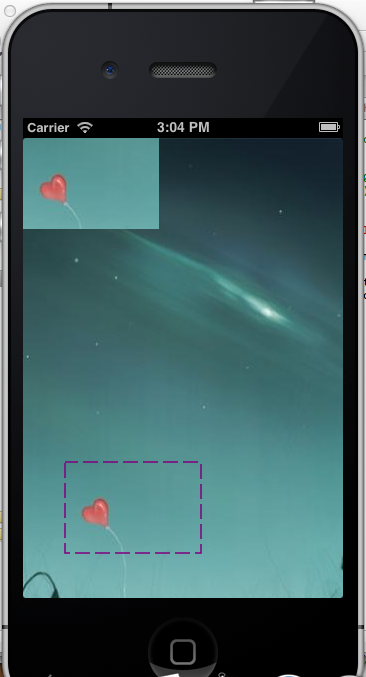
思路是建一个UIView的子类,获取划动出的矩形,用协议将矩形传递给代理对象,依据该矩形完成图像数据的截取,并显示出来。
截图视图类:
#import <UIKit/UIKit.h>

@protocol UICutImgDelegate;

@interface BIDCutView : UIView

{

    CGPoint startPoint;

    CGRect targetRect;

    id <UICutImgDelegate> _delegate;

}

@property (assign , nonatomic) id delegate;

@end

@protocol UICutImgDelegate <NSObject>

-(void)cutImgWithRect:(CGRect) aRect;

-(void)clear;

@end
#import "BIDCutView.h"

@implementation BIDCutView

@synthesize delegate=_delegate;

- (id)initWithFrame:(CGRect)frame

{

    self = [super initWithFrame:frame];

    if (self) {

        // Initialization code

    }

    return self;

}

- (void)drawRect:(CGRect)rect

{

    CGContextRef ctx = UIGraphicsGetCurrentContext();

    CGContextSetLineWidth(ctx, 1.5);

    CGContextSetStrokeColorWithColor(ctx, [UIColor purpleColor].CGColor);

    CGFloat lengths[] = {15.0,5.0};

    CGContextSetLineDash(ctx, , lengths, );

    CGContextStrokeRect(ctx, targetRect);  //画虚线矩形

}

-(void)touchesBegan:(NSSet *)touches withEvent:(UIEvent *)event

{

    [self.delegate clear];

    startPoint=[[touches anyObject] locationInView:self];

}

-(void)touchesMoved:(NSSet *)touches withEvent:(UIEvent *)event

{

    CGPoint currentPoint=[[touches anyObject] locationInView:self];

    targetRect = CGRectMake(startPoint.x, startPoint.y, currentPoint.x-startPoint.x, currentPoint.y-startPoint.y);

    [self setNeedsDisplay];

}

-(void)touchesEnded:(NSSet *)touches withEvent:(UIEvent *)event

{

    if (self.delegate && [self.delegate respondsToSelector:@selector(cutImgWithRect:)]) {

        [self.delegate cutImgWithRect:targetRect];

    }

}

@end
视图控制器:(作为截图视图的代理对象)
#import <UIKit/UIKit.h>

#import "BIDCutView.h"

@interface BIDRootViewController : UIViewController <UICutImgDelegate>

@end
#import "BIDRootViewController.h"

#import "BIDSimpleTouchFun.h"

#import "BIDDiscount.h"

@implementation BIDRootViewController

-(void)loadView

{

    [super loadView];
  //self.view=[[[BIDDrawViewalloc] initWithFrame:CGRectMake(0, 0, 320, 460)] autorelease];
    BIDCutView *cutView=[[BIDCutView alloc] initWithFrame:CGRectMake(, , , )];

    cutView.backgroundColor=[UIColor colorWithPatternImage:[UIImage imageNamed:@"abc.jpg"]];

    cutView.delegate = self;

    [self.view addSubview:cutView];

    [cutView release];

}

- (void)viewDidLoad

{

    [super viewDidLoad];

}

- (void)didReceiveMemoryWarning

{

    [super didReceiveMemoryWarning];

}

-(void)cutImgWithRect:(CGRect)aRect

{

    UIImage *img=[UIImage imageNamed:@"abc.jpg"];

    CGImageRef imgRef = img.CGImage;

    CGImageRef targetImgRef = CGImageCreateWithImageInRect(imgRef, aRect);  //图像的截取

    UIImage *targetImg=[UIImage imageWithCGImage:targetImgRef];

    UIImageView *imgView = [[UIImageView alloc] initWithFrame:CGRectMake(, , aRect.size.width, aRect.size.height)];

    imgView.image = targetImg; //把截取得的图像显示到视图中去

    imgView.tag=;

    [self.view addSubview:imgView];

    [imgView release];

}

-(void)clear

{

    UIImageView *imgView=(UIImageView *)[self.view viewWithTag:];

    [imgView removeFromSuperview];

}
效果:
(IOS)截图Demo的更多相关文章
- 91平台iOS接入demo
源码:http://pan.baidu.com/s/1DuBl6 今天整理硬盘,找到了一个有趣的demo.一年前,91助手游戏联运呈爆棚趋势,但是许多使用FlashAir开发的优秀的游戏和应用都卡在了 ...
- 03.WebView演练-iOS开发Demo(示例程序)源代码
技术博客http://www.cnblogs.com/ChenYilong/ 新浪微博http://weibo.com/luohanchenyilong //转载请注明出处--本文永久链接:h ...
- XMPP协议实现即时通讯底层书写 (二)-- IOS XMPPFramework Demo+分析
我希望,This is a new day! 在看代码之前,我认为你还是应该先整理一下心情,来听我说几句: 首先,我希望你是在早上边看这篇blog,然后一边開始动手操作,假设你仅仅是看blog而不去自 ...
- 适合新人学习的iOS官方Demo
UICatalog.包括了绝大部分经常使用的UI,入门必备良药. 9 分段选择器 10滑动条 Slider 11stack view 12 分步条 13 开关 14 textfield 15text ...
- iOS商城demo、音乐播放器、视频通话、自定义搜索、转场动画等源码
iOS精选源码 微信自定义搜索框实现 一个商城Demo,持续更新中 在Object-C中学习数据结构与算法之排序算法 iOS 音乐播放器之锁屏歌词+歌词解析+锁屏效果 XLsn0wPushTimePi ...
- iOS 截图功能
步骤: 当我们所需截的图的大小超过我们屏幕的大小时,可以用UIScrollView作为底图,这样就可以截图我们所需的大小,即 UIScrollView *scrollView = self.view. ...
- iOS截图
1.普通的截图办法,在View上面截图 /** * 截图代码 * * @param view 需要截图的view * @param rect 需要截取的区域 * * @return 返回截取的对象 * ...
- iOS Sqlite3 Demo 及 FMDB Demo
本文是主要实现了三个函数: testSQLite3 是测试系统自带的sqlite3的demo testFMDB是测试FMDB存取简单的数据类型的 的demo testFMDB2是将任意对象作为一个整体 ...
- iOS多线程
iOS开发Demo(示例程序)源代码
本系列所有开发文档翻译链接地址:iOS7开发-Apple苹果iPhone开发Xcode官方文档翻译PDF下载地址(2013年12月29日更新版) iOS程序源代码下载链接:01.大任务.zip22 ...
随机推荐
- easyui使用总结
(一)datagrid 1.jquery的easyui中的datagrid刷新时的问题 在你的页面里增加2个class样式: .datagrid-mask{ opacity:0; ...
- UBER人民优步司机注册攻略
注意:本文驾驶证行驶证图片为本人拍摄,请广大网友勿作它用 转载请修改! 详细的介绍注册优步uber司机端步骤; uber对司机的要求: 车辆为本地牌照 车龄在5年以内 裸车价格在10万以上 目 ...
- geometry(简单数学题)
geometry Accepts: 324 Submissions: 622 Time Limit: 2000/1000 MS (Java/Others) Memory Limit: 6553 ...
- 物理DG主备库切换时遇到ORA-16139: media recovery required错误
在物理DG主备库切换时遇到ORA-16139: media recovery required错误 SQL> ALTER DATABASE COMMIT TO SWITCHOVER TO PRI ...
- 经典mssql语句大全
一.基础 1.说明:创建数据库CREATE DATABASE database-name 2.说明:删除数据库drop database dbname3.说明:备份sql server--- 创建 备 ...
- ssh环境搭建并实现登录功能
参照了这篇博客,但是里面有些地方进行了更改 http://wenku.baidu.com/link?url=edeegTquV2eR3CJ5-zvNcJbyuq11Afp-lD2Fz2jfmuHhV1 ...
- Ubuntu_16.04_Lamp
Ubuntu_16.04安装Lamp开发环境 目录 安装Apache2 安装php5 安装mysql-server 安装php5-mysql(php使用mysql服务,包括mysql,mysqli,m ...
- 我们在 web 应用开发过程中经常遇到输出某种编码的字 符, 如 iso8859-1 等, 如何输出一个某种编码的字符串?
public String translate (String str) { String tempStr = ""; try { tempStr = new String(str ...
- JavaBean组件在JSP文档中的应用
Bean: package cn.donghaua.bean; public class StringBean { private String message = "No message ...
- BZOJ 1207: [HNOI2004]打鼹鼠( dp )
dp.. dp[ i ] = max( dp[ j ] + 1 ) ------------------------------------------------------------------ ...