
supersocket--SuperSocket 1.4系列文档(1) 第一个例子, EchoService
First example, EchoService
1. 新建一个名叫 “EchoService” 的空白项目
2. 添加SuperSocket的Common和SocketBase这两个dll或者项目引用到EchoService项目
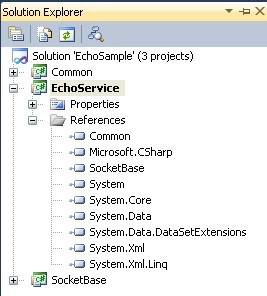
3. 新增名为EchoServer和EchoSession的类,如下图
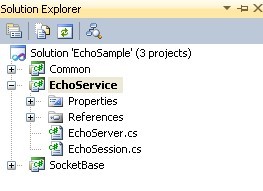
EchoSession.cs
using System;
using System.Collections.Generic;
using System.Linq;
using System.Text;
using SuperSocket.SocketBase;
namespace SuperSocket.QuickStart.EchoService
{
public class EchoSession : AppSession<EchoSession>
{
public override void StartSession()
{
SendResponse("Welcome to EchoServer!");
}
public override void HandleExceptionalError(Exception e)
{
SendResponse("Server side error occurred!");
}
}
}
EchoServer.cs
using System;
using System.Collections.Generic;
using System.Linq;
using System.Text;
using SuperSocket.SocketBase;
namespace SuperSocket.QuickStart.EchoService
{
public class EchoServer : AppServer<EchoSession>
{
}
}
4. 添加命令类
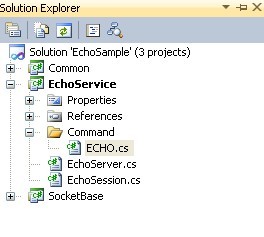
ECHO.cs
using System;
using System.Collections.Generic;
using System.Linq;
using System.Text;
using SuperSocket.SocketBase.Command;
namespace SuperSocket.QuickStart.EchoService.Command
{
public class ECHO : StringCommandBase<EchoSession>
{
#region CommandBase<EchoSession> Members
public override void ExecuteCommand(EchoSession session, StringCommandInfo commandInfo)
{
session.SendResponse(commandInfo.Data);
}
#endregion
}
}
注意: 命令类必须为public.
5. 编译项目 “EchoService” 然后拷贝项目输出到"SocketService"这个项目的输出目录 (请先提前编译SocketService项目)
6. 更新SocketService的配置文件app.config 来启用“EchoService”
<?xml version="1.0" encoding="utf-8" ?>
<configuration>
<configSections>
<section name="socketServer" type="SuperSocket.SocketEngine.Configuration.SocketServiceConfig, SuperSocket.SocketEngine"/>
</configSections>
<appSettings>
<add key="ServiceName" value="EchoService"/>
</appSettings>
<socketServer loggingMode="IndependantFile">
<servers>
<server name="EchoServer"
serviceName="EchoService" ip="Any" port="911" mode="Async">
</server>
</servers>
<services>
<service name="EchoService"
type="SuperSocket.QuickStart.EchoService.EchoServer, SuperSocket.QuickStart.EchoService" />
</services>
</socketServer>
<startup>
<supportedRuntime version="v4.0" sku=".NETFramework,Version=v4.0" />
</startup>
</configuration>
请注意配置文件中的 "socketServer" 节点.
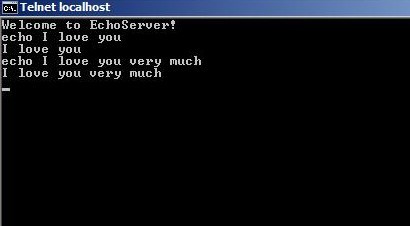
7. 运行“RunServer.bat” 然后输入任意键启动SuperSocket, 然后你就可以通过telnet client来测试你的EchoService了 (你也可以运行"InstallService.bat"来将SuperSocket安装成服务, 服务的名称是在app.config的appSetting以"ServiceName"为key的值,你可以按照项目需要修改它),测试方式如下,输入“ECHO Any message”:
本文源代码在SuperSocket的源代码中QuickStart目录中已包含:
http://supersocket.codeplex.com/releases/
supersocket--SuperSocket 1.4系列文档(1) 第一个例子, EchoService的更多相关文章
- AIO系列文档(2)----TIO使用
AIO系列文档(1)----图解ByteBuffer中介绍了ByteBuffer用法,下面通过介绍t-io介绍如何使用: hello world例子简介 本例子演示的是一个典型的TCP长连接应用,代码 ...
- 老猿学5G扫盲贴:3GPP规范文档命名规则及同系列文档阅读指南
专栏:Python基础教程目录 专栏:使用PyQt开发图形界面Python应用 专栏:PyQt入门学习 老猿Python博文目录 老猿学5G博文目录 在学习5G规范过程中,有些内容把握不定的时候,有时 ...
- Sharepoint学习笔记—ECM系列—文档列表的Metedata Navigation与Key Filter功能的实现
如果一个文档列表中存放了成百上千的文档,想要快速的找到你想要的还真不是件容易的事,Sharepoint提供了Metedata Navigation与Key Filter功能可以帮助我们快速的过滤和定位 ...
- Sharepoint学习笔记—ECM系列--文档集(Document Set)的实现
文档集是 SharePoint Server 2010 中的一项新功能,它使组织能够管理单个可交付文档或工作产品(可包含多个文档或文件).文档集是特殊类型的文件夹,它合并了唯一的文档集属性以及文件夹和 ...
- Thinking in Java系列 文档+代码+简评
声明:本人无意侵犯原作者的版权,这里可下载的文档都属于作者自行开放下载的,统一放置在这里是因为不可预测的原因使得原文档和代码不方便下载,故将我所收集的内容统一在这里,如果这里的内容侵犯了别人,请告知我 ...
- 微软官方的.net系列文档
闲下来的时候给自己补充补充基础,微软官方的相关技术文档地址,最新最全最官方:https://docs.microsoft.com/zh-cn/ 其中.NET专区:https://docs.micros ...
- Unity文档阅读 第一章 入门
Before you learn about dependency injection and Unity, you need to understand why you should use the ...
- 一起买Beta版本系列文档
一起买beta版本文档报告汇总 031402401鲍亮 031402402曹鑫杰 031402403常松 031402412林淋 031402418汪培侨 031402426许秋鑫 一.Beta版本冲 ...
- JEECMS8——系列文档
jeecms8 系列文章地址 https://blog.csdn.net/weixin_37490221/article/details/78652035
随机推荐
- tftp使用方法
参数说明:-l 是local的缩写,后跟存在于Client的源文件名,或下载Client后 重命名的文件名. -r 是remote的缩写,后跟Se ...
- TCP的那些事(转载)
(转载本站文章请注明作者和出处 酷 壳 – CoolShell.cn ,请勿用于任何商业用途) TCP是一个巨复杂的协议,因为他要解决很多问题,而这些问题又带出了很多子问题和阴暗面.所以学习TCP本身 ...
- uva156 By sixleaves
1 #include <iostream> 2 #include <string> 3 #include <algorithm> 4 #include <ma ...
- jquery获取父窗口的元素[转]
$("#父窗口元素ID",window.parent.document); 对应javascript版本为window.parent.document.getElementById ...
- CF 444A(DZY Loves Physics-低密度脂蛋白诱导子图)
A. DZY Loves Physics time limit per test 1 second memory limit per test 256 megabytes input standard ...
- 依赖注入及AOP简述(二)——工厂和ServiceLocator .
2.2. 工厂模式 基于手工构建组件的诸多弱点,1995年“大师4人组”(GoF)在其经典著作<DesignPatterns>一书中提出了“工厂模式”,这种模式在一定程度上有效的解决 ...
- Oracle User Management FAQ翻译及学习笔记
转载 最近了解到AME 的东西,很迫切,先转载一篇 [@more@] Oracle User Management FAQ翻译及学习笔记 写在前面 本文主要是翻译的英文版的Oracle User Ma ...
- c#中的数据类型简介(数组)
c#中的数据类型简介(数组) 数组定义 可以将数组看成相同数据类型的一组或多组数据,包括一维数组,多维数组和交错数组. 数值数组元素的默认值设置为零,而引用元素的默认值设置为 null. 交错数组是指 ...
- 整理mysql的一些常用用法
在php项目中,使用mysql的一些常用的语句,今天有空系统整体一下.有些整理自网络,如有错误,请指正,谢谢.... #显示数据库和显示数据表show databases;use databaseNa ...
- iOS Dev (22) 文件、路径
iOS Dev (22) 文件.路径 作者:CSDN 大锐哥 博客:http://blog.csdn.net/prevention 沙箱 Sandbox 的路径 和其他很多应用平台一样,iOS 也限定 ...