
【代码笔记】iOS-自定义开关
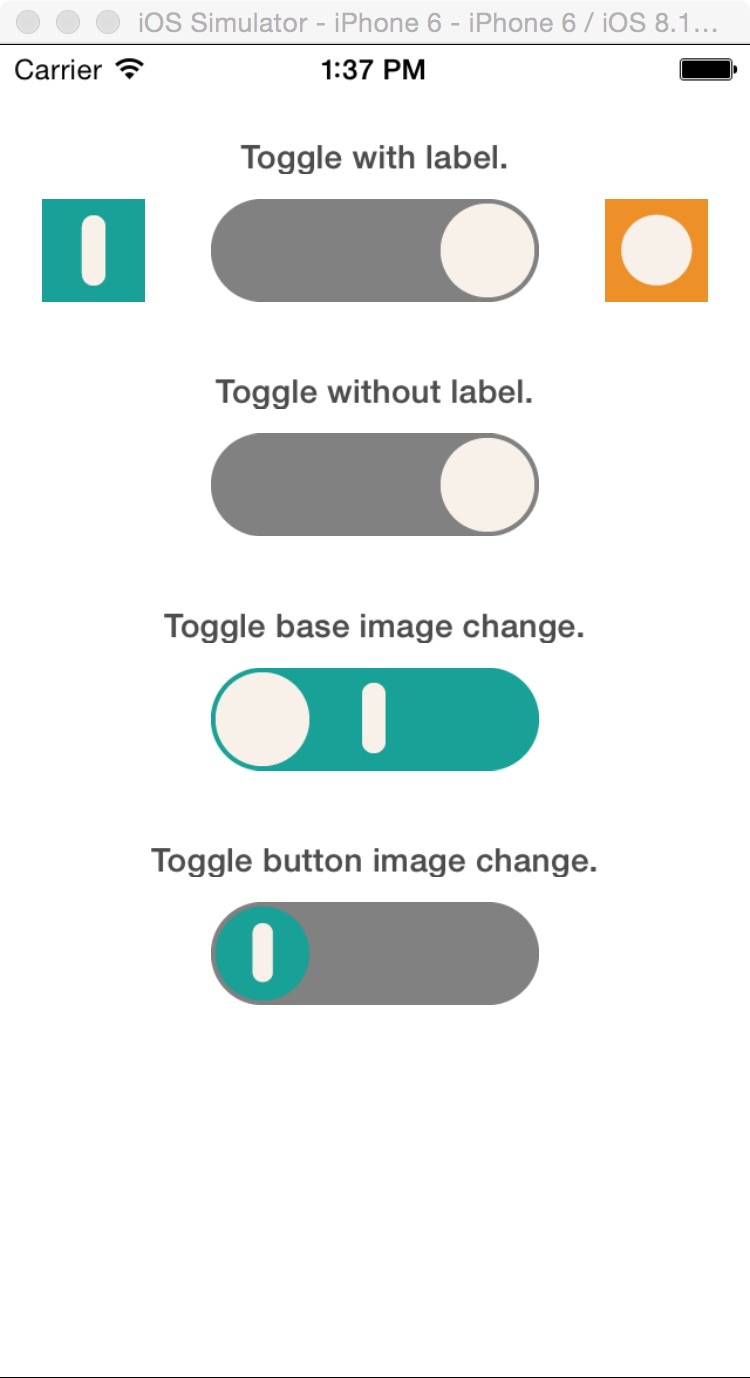
一,效果图。
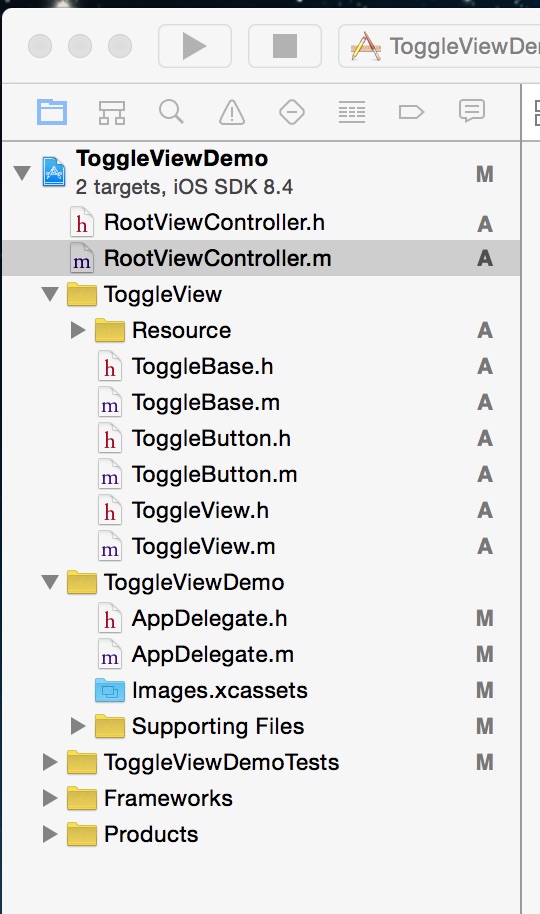
二,工程图。
三,代码。
RootViewController.h

#import <UIKit/UIKit.h>

#import "ToggleView.h"

@interface RootViewController : UIViewController

<ToggleViewDelegate>

@property(nonatomic, strong)ToggleView *toggleViewWithLabel;

@property(nonatomic, strong)ToggleView *toggleViewWithoutLabel;

@property(nonatomic, strong)ToggleView *toggleViewBaseChange;

@property(nonatomic, strong)ToggleView *toggleViewButtonChange;

@end
RootViewController.m
#import "RootViewController.h"

@interface RootViewController ()

@end

@implementation RootViewController

@synthesize toggleViewWithLabel;

@synthesize toggleViewWithoutLabel;

@synthesize toggleViewBaseChange;

@synthesize toggleViewButtonChange;

- (id)initWithNibName:(NSString *)nibNameOrNil bundle:(NSBundle *)nibBundleOrNil

{

    self = [super initWithNibName:nibNameOrNil bundle:nibBundleOrNil];

    if (self) {

        // Custom initialization

    }

    return self;

}

- (void)viewDidLoad

{

    [super viewDidLoad];

    // Do any additional setup after loading the view.

    //可以通过换图片,而为成自己需要的按钮。

     [[self navigationController] setNavigationBarHidden:YES animated:YES];

    toggleViewWithLabel = [[ToggleView alloc]initWithFrame:CGRectMake(0, 50, 320, 75) toggleViewType:ToggleViewTypeWithLabel toggleBaseType:ToggleBaseTypeDefault toggleButtonType:ToggleButtonTypeDefault];

    toggleViewWithLabel.toggleDelegate = self;

    toggleViewWithoutLabel = [[ToggleView alloc]initWithFrame:CGRectMake(0, 150, 320, 75) toggleViewType:ToggleViewTypeNoLabel toggleBaseType:ToggleBaseTypeDefault toggleButtonType:ToggleButtonTypeDefault];

    toggleViewWithoutLabel.toggleDelegate = self;

    toggleViewBaseChange = [[ToggleView alloc]initWithFrame:CGRectMake(0, 250, 320, 75) toggleViewType:ToggleViewTypeNoLabel toggleBaseType:ToggleBaseTypeChangeImage toggleButtonType:ToggleButtonTypeDefault];

    toggleViewBaseChange.toggleDelegate = self;

    toggleViewButtonChange = [[ToggleView alloc]initWithFrame:CGRectMake(0, 350, 320, 75) toggleViewType:ToggleViewTypeNoLabel toggleBaseType:ToggleBaseTypeDefault toggleButtonType:ToggleButtonTypeChangeImage];

    toggleViewButtonChange.toggleDelegate = self;

    [self.view addSubview:toggleViewWithLabel];

    [self.view addSubview:toggleViewWithoutLabel];

    [self.view addSubview:toggleViewBaseChange];

    [self.view addSubview:toggleViewButtonChange];

    /*label*/

    UILabel *label1 = [[UILabel alloc]initWithFrame:CGRectMake(60, 40, 200, 15)];

    UILabel *label2 = [[UILabel alloc]initWithFrame:CGRectMake(60, 140, 200, 15)];

    UILabel *label3 = [[UILabel alloc]initWithFrame:CGRectMake(60, 240, 200, 15)];

    UILabel *label4 = [[UILabel alloc]initWithFrame:CGRectMake(60, 340, 200, 15)];

    label1.text = @"Toggle with label.";

    label2.text = @"Toggle without label.";

    label3.text = @"Toggle base image change.";

    label4.text = @"Toggle button image change.";

    label1.backgroundColor = [UIColor clearColor];

    label2.backgroundColor = [UIColor clearColor];

    label3.backgroundColor = [UIColor clearColor];

    label4.backgroundColor = [UIColor clearColor];

    label1.font = [UIFont boldSystemFontOfSize:14];

    label2.font = [UIFont boldSystemFontOfSize:14];

    label3.font = [UIFont boldSystemFontOfSize:14];

    label4.font = [UIFont boldSystemFontOfSize:14];

    label1.alpha = 0.7f;

    label2.alpha = 0.7f;

    label3.alpha = 0.7f;

    label4.alpha = 0.7f;

    label1.textAlignment = 1;

    label2.textAlignment = 1;

    label3.textAlignment = 1;

    label4.textAlignment = 1;

    [self.view addSubview:label1];

    [self.view addSubview:label2];

    [self.view addSubview:label3];

    [self.view addSubview:label4];

    [toggleViewBaseChange setSelectedButton:ToggleButtonSelectedRight];

    [toggleViewButtonChange setSelectedButton:ToggleButtonSelectedRight];

}

#pragma -mark - ToggleViewDelegate

- (void)selectLeftButton

{

    NSLog(@"LeftButton Selected");

}

- (void)selectRightButton

{

    NSLog(@"RightButton Selected");

}

- (void)didReceiveMemoryWarning

{

    [super didReceiveMemoryWarning];

    // Dispose of any resources that can be recreated.

}
【代码笔记】iOS-自定义开关的更多相关文章
- iOS 自定义导航栏笔记
一.UINavigationBar的结构 导航栏几乎是每个页面都会碰到的问题,一般两种处理方式:1.隐藏掉不显示 2.自定义 1. 添加导航栏 TestViewController * mainVC ...
- iOS自定义的UISwitch按钮
UISwitch开关控件 开关代替了点选框.开关是到目前为止用起来最简单的控件,不过仍然可以作一定程度的定制化. 一.创建 UISwitch* mySwitch = [[ UISwitchalloc] ...
- 【iOS自定义键盘及键盘切换】详解
[iOS自定义键盘]详解 实现效果展示: 一.实现的协议方法代码 #import <UIKit/UIKit.h> //创建自定义键盘协议 @protocol XFG_KeyBoardDel ...
- 笔记-iOS 视图控制器转场详解(上)
这是一篇长文,详细讲解了视图控制器转场的方方面面,配有详细的示意图和代码,为了使得文章在微信公众号中易于阅读,seedante 辛苦将大量长篇代码用截图的方式呈现,另外作者也在 Github 上附上了 ...
- IOS开发笔记 IOS如何访问通讯录
IOS开发笔记 IOS如何访问通讯录 其实我是反对这类的需求,你说你读我的隐私,我肯定不愿意的. 幸好ios6.0 以后给了个权限控制.当打开app的时候你可以选择拒绝. 实现方法: [plain] ...
- Hadoop学习笔记—5.自定义类型处理手机上网日志
转载自http://www.cnblogs.com/edisonchou/p/4288737.html Hadoop学习笔记—5.自定义类型处理手机上网日志 一.测试数据:手机上网日志 1.1 关于这 ...
- OpenGL ES: iOS 自定义 UIView 响应屏幕旋转
iOS下使用OpenGL 如果使用GLKit View 那么不用担心屏幕旋转的问题,说明如下: If you change the size, scale factor, or drawable pr ...
- iOS 自定义转场动画
代码地址如下:http://www.demodashi.com/demo/12955.html 一.总效果 本文记录分享下自定义转场动画的实现方法,具体到动画效果:新浪微博图集浏览转场效果.手势过渡动 ...
- iOS 自定义转场动画浅谈
代码地址如下:http://www.demodashi.com/demo/11612.html 路漫漫其修远兮,吾将上下而求索 前记 想研究自定义转场动画很久了,时间就像海绵,挤一挤还是有的,花了差不 ...
- iOS自定义转场动画实战讲解
iOS自定义转场动画实战讲解 转场动画这事,说简单也简单,可以通过presentViewController:animated:completion:和dismissViewControllerA ...
随机推荐
- Dubbo 备注
Dubbo是阿里开源的一款服务治理中间件,主要包含如下节点: Provider: 暴露服务的服务提供方. Consumer: 调用远程服务的服务消费方. Registry: 服务注册与发现的注册中心. ...
- AngularJs之四
一,数据循环:特别要注意作用域 使用ng-repeat指令. <div ng-app="myApp" ng-controller="myCtrl"> ...
- Nginx服务器之Nginx与tomcat结合访问jsp
本文使用linux centos系统 本文概述: JSP是一种动态网页技术标准.使用的方式是在HTML文件中插入程序段和JSP标记,而形成JSP文件.使用JSP开发WEB应用可以跨平台开发.但jsp需 ...
- 版本控制工具比较-CVS,SVN,GIT
首先介绍几个版本控制软件相互比较的重要依据: a.版本库模型(Repository model):描述了多个源码版本库副本间的关系,有客户端/服务器和分布式两种模式.在客户端/服务器模式下,每一用户通 ...
- 【JAVA框架】Hibernate 与Mybatis 区别
Hibernate Mybatis 简介 区别 与联系 欢迎提出见解及转载. 1 简单简介 1.1 Hibernate 框架 Hibernate是一个开放源代码的对象关 ...
- C#/VB.NET Excel数据分列
C#/VB.NET Excel数据分列 有时候我们需要将保存在Excel单元格中的组合型数据拆分为多列(如将全名拆分为姓和名两列)以方便我们处理.记忆或保存.为了避免重复和大量的手动输入工作,Exce ...
- 跨域之同源策略 Same-origin policy
同源策略是浏览器中最基本的隔离潜在恶意文件的安全策略,他限制了来自不同源(origin)的文档或脚本之间的相互作用. 何谓同源 在跨域之URL中介绍过一个URL的标准格式如下: 协议类型://服务器地 ...
- [Quartz笔记]玩转定时调度
简介 Quartz是什么? Quartz是一个特性丰富的.开源的作业调度框架.它可以集成到任何Java应用. 使用它,你可以非常轻松的实现定时任务的调度执行. Quartz的应用场景 场景1:提醒和告 ...
- 结合ABP源码实现邮件发送功能
1. 前言 2. 实现过程 1. 代码图(重) 2.具体实现 2.1 定义AppSettingNames及AppSettingProvider 2.2 EmailSenderConfiguration ...
- 给 DevOps 初学者的入门指南
当我们谈到 DevOps 时,可能讨论的是:流程和管理,运维和自动化,架构和服务,以及文化和组织等等概念.那么,到底什么是"DevOps"呢? 什么是DevOps 随着软件发布迭代 ...