
GridBagLayout占多行效果注意
如果想要出现按钮2占两行的效果,必须按键3、按钮4同时存在且同时可见。
- 如果缺少按钮4,则按钮2不会占两行;
- 如果缺少按钮3、4,则按钮2也不会占两行。

 package com.wst.bj;

 import java.awt.GridBagConstraints;

 import java.awt.GridBagLayout;

 import javax.swing.JButton;

 import javax.swing.JFrame;

 class GridBagText {

     JFrame jframe = new JFrame("搜索");

     JButton jButton = new JButton("按钮1");

     JButton jButton2 = new JButton("按钮2");

     JButton jButton3 = new JButton("按钮3");

     JButton jButton4 = new JButton("按钮4");

     public GridBagText() {

         init();

     }

     private void init()

     {

         FrameUtil.initFram(jframe, 500, 700);

         GridBagLayout gridBagLayout = new GridBagLayout();

         jframe.setLayout(gridBagLayout);

         GridBagConstraints constraints = new  GridBagConstraints();

         constraints.fill = GridBagConstraints.BOTH;

         constraints.weightx = 1.0;

         constraints.weighty = 1.0;

         constraints.gridheight = 1;

         constraints.gridwidth = GridBagConstraints.REMAINDER;

         gridBagLayout.setConstraints(jButton, constraints);

         jframe.add(jButton);

         constraints.gridheight = 2;

         constraints.gridwidth = 1;

         gridBagLayout.setConstraints(jButton2, constraints);

         jframe.add(jButton2);

         constraints.gridheight = 1;

         constraints.gridwidth = GridBagConstraints.REMAINDER;

         gridBagLayout.setConstraints(jButton3, constraints);

         jframe.add(jButton3);

         gridBagLayout.setConstraints(jButton4, constraints);

         jframe.add(jButton4);

         jframe.setSize(jframe.getPreferredSize());

         jframe.setVisible(true);

 //        jframe.pack();

     }

 }
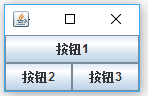
 package com.wst.bj;

 import java.awt.GridBagConstraints;

 import java.awt.GridBagLayout;

 import javax.swing.JButton;

 import javax.swing.JFrame;

 class GridBagText {

     JFrame jframe = new JFrame("搜索");

     JButton jButton = new JButton("按钮1");

     JButton jButton2 = new JButton("按钮2");

     JButton jButton3 = new JButton("按钮3");

 //    JButton jButton4 = new JButton("按钮4");

     public GridBagText() {

         init();

     }

     private void init()

     {

         FrameUtil.initFram(jframe, 500, 700);

         GridBagLayout gridBagLayout = new GridBagLayout();

         jframe.setLayout(gridBagLayout);

         GridBagConstraints constraints = new  GridBagConstraints();

         constraints.fill = GridBagConstraints.BOTH;

         constraints.weightx = 1.0;

         constraints.weighty = 1.0;

         constraints.gridheight = 1;

         constraints.gridwidth = GridBagConstraints.REMAINDER;

         gridBagLayout.setConstraints(jButton, constraints);

         jframe.add(jButton);

         constraints.gridheight = 2;

         constraints.gridwidth = 1;

         gridBagLayout.setConstraints(jButton2, constraints);

         jframe.add(jButton2);

         constraints.gridheight = 1;

         constraints.gridwidth = GridBagConstraints.REMAINDER;

         gridBagLayout.setConstraints(jButton3, constraints);

         jframe.add(jButton3);

 //        gridBagLayout.setConstraints(jButton4, constraints);

 //        jframe.add(jButton4);

         jframe.setSize(jframe.getPreferredSize());

         jframe.setVisible(true);

 //        jframe.pack();

     }

 }
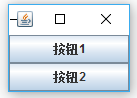
 package com.wst.bj;

 import java.awt.GridBagConstraints;

 import java.awt.GridBagLayout;

 import javax.swing.JButton;

 import javax.swing.JFrame;

 class GridBagText {

     JFrame jframe = new JFrame("搜索");

     JButton jButton = new JButton("按钮1");

     JButton jButton2 = new JButton("按钮2");

 //    JButton jButton3 = new JButton("按钮3");

 //    JButton jButton4 = new JButton("按钮4");

     public GridBagText() {

         init();

     }

     private void init()

     {

         FrameUtil.initFram(jframe, 500, 700);

         GridBagLayout gridBagLayout = new GridBagLayout();

         jframe.setLayout(gridBagLayout);

         GridBagConstraints constraints = new  GridBagConstraints();

         constraints.fill = GridBagConstraints.BOTH;

         constraints.weightx = 1.0;

         constraints.weighty = 1.0;

         constraints.gridheight = 1;

         constraints.gridwidth = GridBagConstraints.REMAINDER;

         gridBagLayout.setConstraints(jButton, constraints);

         jframe.add(jButton);

         constraints.gridheight = 2;

         constraints.gridwidth = 1;

         gridBagLayout.setConstraints(jButton2, constraints);

         jframe.add(jButton2);

 //        constraints.gridheight = 2;

 //        constraints.gridwidth = GridBagConstraints.REMAINDER;

 //        gridBagLayout.setConstraints(jButton3, constraints);

 //        jframe.add(jButton3);

 //        gridBagLayout.setConstraints(jButton4, constraints);

 //        jframe.add(jButton4);

         jframe.setSize(jframe.getPreferredSize());

         jframe.setVisible(true);

 //        jframe.pack();

     }

 }
GridBagLayout占多行效果注意的更多相关文章
- linkbutton datagrid showdialog 行效果
protected void DataGrid1_ItemDataBound(object sender, DataGridItemEventArgs e) { ListItemType itemTy ...
- SQL Server查询所有的表名/空间占用量/行数
select object_name(id) tablename, 8*reserved/1024 reserved, rtrim(8*dpages)+'kb' used, 8*(reserved-d ...
- android TextView字体设置最少占多少行. 及其 Java String 字符串操作 . .
① 字体设置: 修改代码 : GridViewActivity.java priceTv为 TextView priceTv.setMaxLines(3); //当多与7个字fu的时候 , 其余字 ...
- sqlserver查询数据的所有表名和行数及空间占用量
//查询所有表名 select name from sysobjects where xtype='u' --modify_date指表结构最后更新日期,并非数据最后更新日期SELECT na ...
- webpages框架中使用Html.TextArea()在前台显示多行信息时,如何进行大小、样式的设置
环境:vs2015 webpages框架+razor语法: 目的:服务器进行数据更新操作后,在前台显示更新的相关信息: 后台代码:将更新条数等相关信息存储在一个变量中: @{ var serverIn ...
- 用VBA计算WPS 表格ET EXCEL中的行数和列数的多重方法
用VBA计算WPS 表格ET EXCEL中的行数和列数 每种方法中上面的是Excel的行数,下面的是Excel的列数. 方法1: ActiveSheet.UsedRange.Rows.Count Ac ...
- VBA取得EXCEL表格中的行数和列数
VBA取得EXCEL表格中的行数和列数 初学EXCEL宏的童鞋,总是很想知道表格中含有数据的行数和列数,尤其是行数和列数不确定的情况下.这样可以避免很多的错误,并且可以提高效率.但每次用到的时候到网上 ...
- C# 得到EXCEL表格中的有效行数和列数
每种方法中上面的是Excel的行数,下面的是Excel的列数.方法七:经过加工修改已经可以读出来的是有效数据行 using Excel = Microsoft.Office.Interop.Excel ...
- Office EXCEL VBA如何取得EXCEL中的行数和列数
VBA取得EXCEL表格中的行数和列数 请注意不要使用Columus等关键字作为变量,例如"Columus = ActiveSheet.UsedRange.Columns.Count&quo ...
随机推荐
- AsyncTask实现登录功能,上传图片,get,post
提交成功时,从服务器端返回数据“load success” 用户名.密码正确后成功登录,并且在服务器端的文件保存目录上看到了从客户端上传的图片. 客户端代码: MainActivity.java im ...
- JQuery 动画之 广告
html页面: <!DOCTYPE html> <html xmlns="http://www.w3.org/1999/xhtml"> <head&g ...
- 再一次强调,ORACLE外键必须加索引
外键加索引是常识,必须牢记.本来不想写这样的简单案例.可是连续遇到好几起外键不加索引导致性能问题,所以还是写一下. 一个兄弟问我 delete from Sa_Sales_Comm_Detail s ...
- 文件系统 busybox and initramfs
1.busybox制作根文件系统 http://wenku.baidu.com/link?url=h2m_xrj6OsLiHVVhMY2e0C7WKikw_H3dZY_b4mUiW1E7AEf_q34 ...
- 编程算法 - 圆圈中最后剩下的数字(递推公式) 代码(C++)
圆圈中最后剩下的数字(递推公式) 代码(C++) 本文地址: http://blog.csdn.net/caroline_wendy 题目: 0,1...,n-1这n个数字排成一个圆圈, 从数字0開始 ...
- Linux 挂载命令 --mount
1.挂载光盘命令 mount : mount [-t vfstype] [-o options] device dir mount [-t 文件系统] [-o 特殊选项] 设备文件名 挂载点 -t ...
- ASP.NET的Application简介1
ASP.NET中的Application 1. Application是用于保存所有用户共有的信息.在ASP时代,如果要保存的数据在应用程序生存期内不会或者很少改变,那么使用Application是理 ...
- 使用log4net写自定义日志
在使用log4net写Web服务器端日志的时候,通常需要一些自定义的参数,比如请求的url,method,以及用户名等等,而log4net中默认的Log接口只提供了很少的参数. 在网上找的其他的 ...
- 我的第一个QML Button的实现
编写第一个QML,在成功跑完HelloWorld后,决定自己实现Button按钮类. Button是在Quick2版本以上的QtQuick Controls出现的. 在Qt5.5.1版本中,选择插入Q ...
- UVA 227 Puzzle - 输入输出
题目: acm.hust.edu.cn/vjudge/roblem/viewProblem.action?id=19191 这道题本身难度不大,但输入输出时需要特别小心,一不留神就会出问题. 对于输入 ...