
RadioButtonList控件
在这里只写,绑定数据库数据的RadioButtonList控件:
一:
首先,先在数据库中建立一张表:
1 CREATE TABLE KK

2 (

3     id INT,

4     [name] VARCHAR(20),

5 )
然后插入数据:

1 INSERT INTO KK (id, [name]) VALUES (1, '张三')

2 INSERT INTO KK (id, [name]) VALUES (2, '李四')

3 INSERT INTO KK (id, [name]) VALUES (3, '王五')

4 INSERT INTO KK (id, [name]) VALUES (4, '赵六')

5 ·

6 ·

7 ·

8 ·

9 ·
这是最终建立的表:
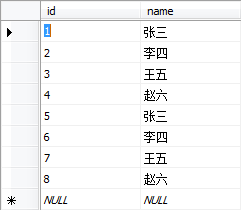
二:
前台代码:
 <div>

     <asp:RadioButtonList ID="RadioButtonList1" runat="server" RepeatDirection="Horizontal"></asp:RadioButtonList>

     <asp:Button ID="Button1" runat="server" Text="Button" OnClick ="Button1_Click"/><br /><br />

     <asp:Label ID="Label1" runat="server" Text=""></asp:Label>

 </div>
*其中:RepeatDirection="Horizontal"是设置其选项横向显示。
后台代码(Page_Load):
 protected void Page_Load(object sender, EventArgs e)

 {

     if (!IsPostBack)

     /* 为什么判断IsPostBack:当你需要执行一些仅需要在页面第一次浏览时执行的事件

         * 比如页面初始化,数据绑定之类的操作时,需要将操作放在if(!IspostBack)里面,

         * 这样当你在点击页面中的按钮或者执行其他回发事件时,不贵再次初搜索始化或者

         * 重复绑定数据,提高了执行效率。

         */

     {

         string connectionString = ConfigurationManager.ConnectionStrings["connectionString"].ConnectionString;

         SqlConnection connection = new SqlConnection(connectionString);

         connection.Open();

         string sql = "SELECT * FROM KK";

         SqlCommand cmd = new SqlCommand(sql, connection);

         SqlDataReader sdr = cmd.ExecuteReader();

         //任意给的字段名,只要是想显示在界面上的就行。其值给了:Text

         this.RadioButtonList1.DataTextField = "name";

         //任意给得字段名,只要是想在后台看到前台看不到的数据就行。其值给了:Value

         this.RadioButtonList1.DataValueField = "id";//此字段可以去掉。value的值默认为Text的值。

         this.RadioButtonList1.DataSource = sdr;

         this.RadioButtonList1.DataBind();

         sdr.Close();

         connection.Close();

     }

 }
后台代码(Button1):
 /// <summary>

 /// Button1按钮的单机事件

 /// </summary>

 /// <param name="sender"></param>

 /// <param name="e"></param>

 protected void Button1_Click(object sender, EventArgs e)

 {

     string s = string.Empty;

     for (int i = ; i < RadioButtonList1.Items.Count; i++)

     {

         if (RadioButtonList1.Items[i].Selected)

         {

             s = RadioButtonList1.Items[i].Text;

         }

     }

     this.Label1.Text = "你选中的是:" + s;

 }
最终效果:
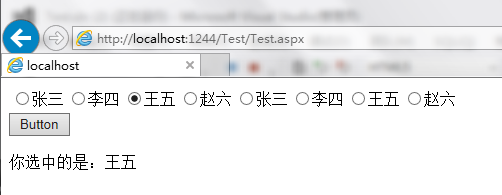
以上就是RadioButtonList控件。
RadioButtonList控件的更多相关文章
- RadioButtonList控件如何取得选中的值
1.需求:我现在页面上有放两个单选控件,现在要通过判断不同的单选控件来对页面上的标签进行显示和隐藏操作 2.控件如下 <asp:RadioButtonList ID=" RepeatD ...
- [PDF] - 获取 RadioButtonList 控件值的方法
背景 目标是通过 iTextSharp 读取 PDF 模板,填充内容后以生成新 PDF 文件.利用 福昕PDF编辑器个人版 可以获取到 RadioButtonList 的组名,但是获取不到每一个 Ra ...
- js如何获取asp.net服务器端控件的值(label,textbox,dropdownlist,radiobuttonlist等)
js如何获取asp.net服务器端控件的值(label,textbox,dropdownlist,radiobuttonlist等) 欢迎访问原稿:http://hi.baidu.com/2wixia ...
- ASP.NET控件之RadioButtonList
“RadioButtonList”控件表示一个封装了一组单选按钮控件的列表控件. 可以使用两种类型的 ASP.NET 控件将单选按钮添加到网页上:各个“RadioButton”控件或一个“RadioB ...
- javascript获取asp.net服务器端控件的值
代码如下: <%@ Page Language="C#" CodeFile="A.aspx.cs" Inherits="OrderManage_ ...
- Web控件文本框Reset的功能
在前一篇中<怎样实现Web控件文本框Reset的功能>http://www.cnblogs.com/insus/p/4120889.html Insus.NET只实现了文本框的功能.单个或 ...
- 基本的Web控件四
基本的Web控件用法二 ListBox控件 页面布局: <div> <h1>ListBox控件</h1> 学生列表: <br/> <asp:Lis ...
- 基本的Web控件三
基本的Web控件用法一 ListBox控件 页面布局: <div> <h1>ListBox控件</h1> 学生列表: <br/> <asp:Lis ...
- 基本的Web控件二
ListBox控件 ListBox控件用于创建多选的列表框,而可选项是通过ListItem元素来定义的. ListBox控件常用的属性: 1.Count:表示列表框中条目的总数. 2.Items:表示 ...
随机推荐
- [置顶] 使用mongofiles操作GridFS
使用mongofiles操作GridFS GridFS描述: GridFS,看起来像一种文件系统,其实是一种数据库用法.主要用来在数据库中存储二进制大文件.可以统一用数据库处理数据,而无需借助外部的文 ...
- C# Best Practices - Specify Clear Method Parameters
Improve parameters parameter order public OperationResult PlaceOrder(Product product, int quantity, ...
- 五毛的cocos2d-x学习笔记03-控件
VS2013快捷键:注释,Ctrl+K+C:取消注释Ctrl+K+U.都是单行.要实现多行注释与取消注释,就选中多行.run方法调用了AppDelegate的applicationDidFinishL ...
- [C#参考]事件和委托的关系
前面说了委托,接下来就要说一说事件了,同时最后再说一下委托和事件的区别. 事件和委托很相似,事件就好像是被简化的针对特殊用途的委托.看下面的图: 从这张图中能看到,事件是发布者的一个成员,它不是类型. ...
- 字符通向字节流的桥梁---- OutputStreamWriter
OutputStream out = System.out; OutputStreamWriter osw = new OutputStreamWriter(out); BufferedWriter ...
- 如何解决JavaWeb乱码问题
作为一个合格的web开发人员应该是什么问题都遇到过的,尤其是乱码问题.大家也许都体会到了,我们中国人学编程,很大的一个不便就是程序的编码问题,无论学习什么技术,我们都需要探讨他的编码问题. 今天来讲一 ...
- Flask对请求的处理
由http://www.cnblogs.com/steinliber/p/5133386.html 中可得服务器会把environ和start_response发送给Flask的实例app,返回的是a ...
- mongoDB初接触
首先去官网http://www.mongodb.org/ 下载mongoDB 下载后解压D:\mongodb 创建两个新文件夹data以及log 新建一个文件命名为mongodb.cfg dbpath ...
- frame和bounds的区别
frame:根据父视图坐标系来确定自己的位置 bounds:该视图在自己坐标系的位置和大小 修改bounds并不会引起视图位置的变化,会影响自身子视图的位置:修改frame会引起视图位置的变化 UIV ...
- 在MDK中怎样生成*.bin格式的文件?
在Realview MDK的集成开发环境中.默认情况下能够生成*.axf格式的调试文件和*.hex格式的可运行文件. 尽管这两个格式的文件很有利于ULINK2仿真器的下载和调试,可是ADS的用户更习惯 ...