
c#进程间通信(Inter-Process Communication)
原文:c#进程间通信(Inter-Process Communication)
c#进程间通信(IPC, Inter-Process Communication)
接收端:
using System;

using System.Collections.Generic;

using System.ComponentModel;

using System.Data;

using System.Drawing;

using System.Linq;

using System.Text;

using System.Windows.Forms;

using System.Runtime.InteropServices;  //for  MarshalAs

namespace receive

{

    public partial class Receive : Form

    {

public Receive()

        {

            InitializeComponent();

        }

        protected override void DefWndProc(ref System.Windows.Forms.Message m)          //重构此函数接收数据

        {

            switch (m.Msg)

            {

                case Message.WM_TEST:  //确定类型后,处理数据

                     string  message = string.Format("收到消息!参数为:{0},{1},{2}", m.Msg, m.WParam, m.LParam);

                    label1.Text = message;

                    break;

                default:

                    base.DefWndProc(ref m);

                    break;

            }

        }

    }

    class Message

    {

        public const int USER = 0X0400;

        public const int WM_TEST = USER + ;

        public const int WM_MSG = USER + ;

    }

}
发送端:
using System;

using System.Collections.Generic;

using System.ComponentModel;

using System.Data;

using System.Drawing;

using System.Linq;

using System.Text;

using System.Windows.Forms;

using System.Runtime.InteropServices;  //for DllImport

namespace send

{

    public partial class Form1 : Form

    {

        [DllImport("User32.dll", EntryPoint = "SendMessage")]

        private static extern int SendMessage(int hWnd, int msg, int wParam, int lParam);      //发送消息

        [DllImport("User32.dll", EntryPoint = "FindWindow")]

        private static extern int FindWindow(string lpClassName, string lpWindowName);      //获取另一个进程的窗口句柄

        public Form1()

        {

            InitializeComponent();

        }

        private void button1_Click(object sender, EventArgs e)

        {

            int hWnd = FindWindow(null, @"Receive");

            SendMessage(hWnd, Message.WM_TEST, , );//参数1、窗口句柄。2 、消息类型。 3、数据1。 4、数据2

        }

    }

    class Message

    {

        public const int USER = 0X0400;

        public const int WM_TEST = USER + ;      //简单的数据传输类型,传两个整数。

        public const int WM_MSG = USER + ;

    }

}


比较复杂的字符串传输:
发送端:
using System;

using System.Collections.Generic;

using System.ComponentModel;

using System.Data;

using System.Drawing;

using System.Linq;

using System.Text;

using System.Windows.Forms;

using System.Runtime.InteropServices;  //for DllImport

namespace send

{

    public partial class Form1 : Form

    {

        [DllImport("User32.dll", EntryPoint = "SendMessage")]

       // private static extern int SendMessage(int hWnd, int msg, int wParam, int lParam);       //发送消息

        private static extern int SendMessage(int hWnd, int msg, int wParam, ref COPYDATASTRUCT lParam);

        [DllImport("User32.dll", EntryPoint = "FindWindow")]

        private static extern int FindWindow(string lpClassName, string lpWindowName);      //获取另一个进程的窗口句柄

        const int WM_COPYDATA = 0x004A;

        public Form1()

        {

            InitializeComponent();

        }

        private void button1_Click(object sender, EventArgs e)

        {

            int hWnd = FindWindow(null, @"Receive");

            string message = "你好消息成功发送!";

            int i = message.Length;

            byte[] sarr = System.Text.Encoding.Default.GetBytes(message);

            COPYDATASTRUCT cds;

            cds.dwData = (IntPtr);

            cds.lpData = message;

            cds.cbData = sarr.Length+;         //此值错误会引发接收端崩溃

            SendMessage(hWnd, WM_COPYDATA, , ref cds);

        }

    }

    public struct COPYDATASTRUCT

    {

        public IntPtr dwData;

        public int cbData;

        [MarshalAs(UnmanagedType.LPStr)]

        public string lpData;

    }

}
接收端:
using System;

using System.Collections.Generic;

using System.ComponentModel;

using System.Data;

using System.Drawing;

using System.Linq;

using System.Text;

using System.Windows.Forms;

using System.Runtime.InteropServices;  //for  MarshalAs

namespace receive

{

    public partial class Receive : Form

    {

        const int WM_COPYDATA = 0x004A;

        const int WM_MYSYMPLE = 0x005A;

        public Receive()

        {

            InitializeComponent();

        }

        protected override void DefWndProc(ref System.Windows.Forms.Message m)

        {

            switch (m.Msg)

            {

                case WM_COPYDATA:

                    COPYDATASTRUCT myStr = new COPYDATASTRUCT();

                    Type myType = myStr.GetType();

                    myStr = (COPYDATASTRUCT)m.GetLParam(myType);    //m中获取LParam参数以myType类型的方式,让后转换问结构体。

                    label1.Text = myStr.lpData;

                    break;

                default:

                    base.DefWndProc(ref m);

                    break;

            }

        }

    }

    public struct COPYDATASTRUCT

    {

        public IntPtr dwData;

        public int cbData;

        [MarshalAs(UnmanagedType.LPStr)]

        public string lpData;

    }

}
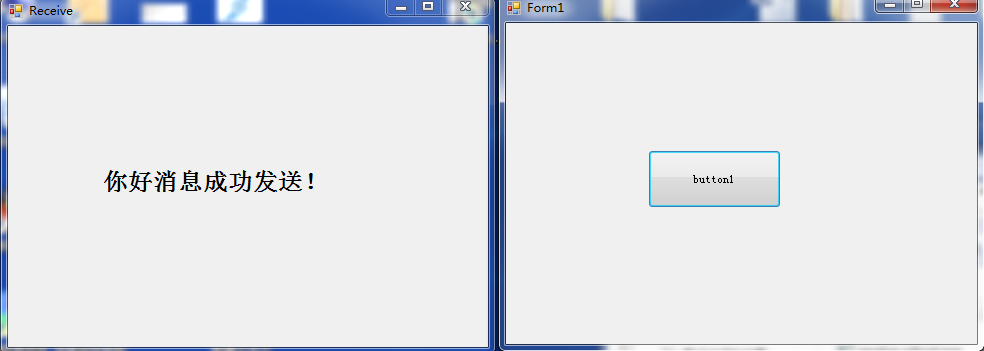
下载:链接:http://pan.baidu.com/s/1c0lWpt2 密码:yvzz
其他方法参考:
http://blog.csdn.net/feiren127/article/details/5459827
附:在程序中使用代码启动程序
using System.Diagnostics;   // for ProcessStartInfo

ProcessStartInfo startInfo = new ProcessStartInfo();

startInfo.FileName = @"C:\Users\dell\Documents\Visual Studio 2010\Projects\receive\receive\bin\Debug\receive.exe";

Process pro = new Process();

pro.StartInfo = startInfo;

pro.Start();        //开启

IntPtr hWnd = pro.MainWindowHandle;    //进程的句柄

pro.Kill();            //关闭
参考: http://blog.csdn.net/u011000290/article/details/48108557
c#进程间通信(Inter-Process Communication)的更多相关文章
- 〖Linux〗Linux高级编程 - 进程间通信(Interprocess Communication)
[转自: http://blog.csdn.net/Paradise_for_why/article/details/5550619] 这一章就是著名的IPC,这个东西实际的作用和它的名字一样普及.例 ...
- 进程间通信IPC (InterProcess Communication)
一.进程间通信的概念 每个进程各自有不同的用户地址空间,任何一个进程的全局变量在另一个进程中都看不到,所以进程之间要交换数据必须通过内核,在内核中开辟一块缓冲区,进程1把数据从用户空间拷到内核缓冲区, ...
- The Signals Of Process Communication
在之前大概的概述了进程之间的通信,下面笔者具体述说一下进程通信中最古老的一种通信方式之一---信号(Signals ),信号是用户进程之间通信和同步的一种原始机制,操作系统通过信号来通知进程系统中发生 ...
- Java 编程要点之并发(Concurrency)详解
计算机用户想当然地认为他们的系统在一个时间可以做多件事.他们认为,他们可以工作在一个字处理器,而其他应用程序在下载文件,管理打印队列和音频流.即使是单一的应用程序通常也是被期望在一个时间来做多件事.例 ...
- linux kernel menuconfig【转载】
原文网址:http://www.cnblogs.com/kulin/archive/2013/01/04/linux-core.html Linux内核裁减 (1)安装新内核: i)将新内核copy到 ...
- Python第十三章-网络编程
网络编程 一.网络编程基础 python 的网络编程模块主要支持两种Internet协议: TCP 和 UDP. 1.1通信协议 通信协议也叫网络传输协议或简称为传送协议(Communications ...
- Unix/Linux进程间通信(一):概述
序 Linux下的进程通信手段基本上是从Unix平台上的进程通信手段继承而来的.而对Unix发展做出重大贡献的两大主力AT&T的贝尔实验室及BSD(加州大学伯克利分校的伯克利软件发布中心)在进 ...
- c# 进程间通信 IPC
最近在调试一个算法,想通过改变算法的参数看看结果有什么变化. 碰到一个麻烦的事情是,从磁盘加载.构建数据需要15分钟.这就比较讨厌了,也就是说我每次调一个参数前都要等15分钟启动时间? 于是我就想,能 ...
- linux 进程间通信机制(IPC机制)一总览
1.作用:进程间通信机制(Inter Process Communication,IPC),这些IPC机制的存在使UNIX在进程通信领域手段相当丰富,也使得程序员在开发一个由多个进程协作的任务组成的系 ...
随机推荐
- Android显示表情对话框
final EditText editface=(EditText) this.findViewById(R.id.EditText); List<Map<String,Object> ...
- HDU_2030——统计文本中汉字的个数
Problem Description 统计给定文本文件中汉字的个数. Input 输入文件首先包含一个整数n,表示测试实例的个数,然后是n段文本. Output 对于每一段文本,输出其中的汉 ...
- WC2015流水账
THU那四场考试没考好,只有20+名.这也许是我OI生涯中最后一场吧(已确认是最后一场),真是感慨万千. day0 搬进浙大宿舍404房间(神房间号),四个人一间.中午发现学军伙食相当良心,是我参加的 ...
- 取得select框的text
function selectInput(choose) { alert(choose.options[choose.selectedIndex].text); }
- Jmeter数据库连接
1.添加配置元件:测试计划右键-->配置元件-->JDBC Connection Configuration如下图: 注意:上述的Variable Name:在后续的JDBC Reques ...
- Android Fragment详解(二):Fragment创建及其生命周期
Fragments的生命周期 每一个fragments 都有自己的一套生命周期回调方法和处理自己的用户输入事件. 对应生命周期可参考下图: 创建片元(Creating a Fragment) To c ...
- 使用Mina框架开发 QQ Android 客户端
Apache MINA是一个网络应用程序框架,用来帮助用户简单地开发高性能和高可靠性的网络应用程序.它提供了一个通过Java NIO在不同的传输例如TCP/IP和UDP/IP上抽象的事件驱动的异步AP ...
- tail-head
[root@rusky]# tail test3 #不加参数默认显示全部内容 line line2 line3 line4 line5 line6 line7 line8 line9 line10 [ ...
- Intent 数据传递 总结
系统API 可以传递的数据类型 1.传递8大基本类型+String+CharSequence及其数组类型 2.传递ArrayList集合 public Intent putIntegerArr ...
- 多线程下载 HttpURLConnection
Activity /**实际开发涉及文件上传.下载都不会自己写这些代码,一般会使用第三方库(如xUtils)或Android提供的DownloadManager下载*/ public class Ht ...