
php Debugging with Xdebug and Sublime Text 3(转)
Debugging – we all do it a lot. Writing code perfectly the first time around is hard and only a few (if any) succeed at it. More than a year ago, Shameer wrote an article on SitePoint about how you can debug your application using Xdebug and Netbeans. In this article, we are going to have a look at how we can debug using Xdebug in combination with Sublime Text.
Getting started
First of all, we need to have the PHP Xdebug extension installed. If you are uncertain on how to get this done, please have a look at the link provided in the introduction. Make sure that Xdebug is working by checking if it’s listed in your phpinfo().
Of course we also need Sublime Text. I will be using the latest version:
Sublime Text 3. It should also work with Sublime Text 2.
Setting up Xdebug
We need to configure xdebug by adding the following to your php.ini file, or even better, to an xdebug.ini file as described here under How-to On Linux.
xdebug.remote_enable=1

xdebug.remote_handler=dbgp

xdebug.remote_host=127.0.0.1

xdebug.remote_port=9000

xdebug.remote_log="/var/log/xdebug/xdebug.log"
In general you will be using 127.0.0.1 as your host. However, If you are using vagrant for example, you will be using something like 10.0.2.2, depending on where Xdebug can find your system.
The remote log is not necessary, but in case of problems, it’s the place where you can find information about errors that occurred.
Don’t forget to restart your webserver!
Setting up Sublime Text 3
One of the strengths of Sublime is the fact that you can extend it easily with packages. In this case, we are going to install the Xdebug package. If you haven’t done so already, make sure you can install packages by installing package control.
Once you have the package control installed, you should start Sublime Text 3. Open up the command palette from the tools menu and search for “install package”.
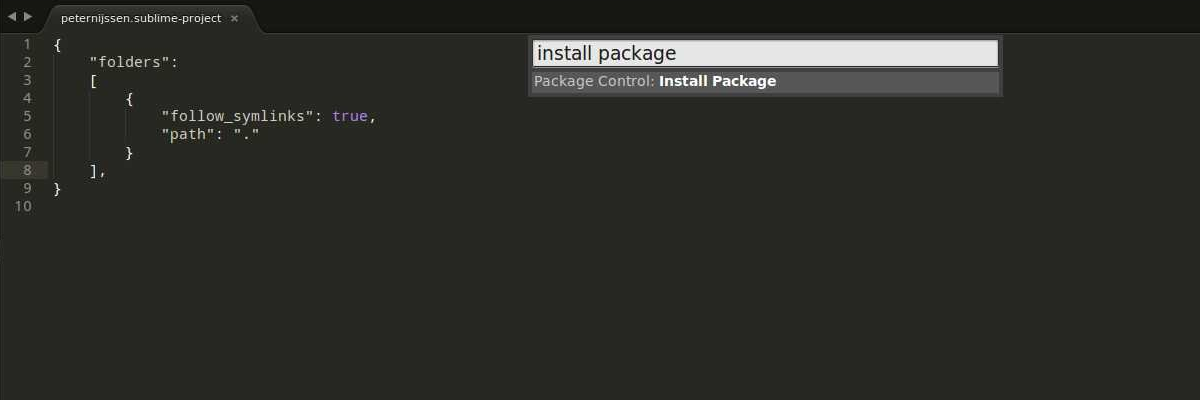
Now you can search for any package you like. In our case, we are going to search for the package “Xdebug client”.

The last bit we have to do is set up the project within Sublime. The
easiest way to do this is to open up the root directory of your
application, go to projects and click on “save projects as”. I suggest
you save the file within the root of your application, so you can save
it in your version control system if you are using any and you can
configure it easily at all times.
Open up the just created project file. The content will look like this:
{

    "folders":

    [

        {

           "follow_symlinks": true,

           "path": "."

        }

    ]

}
We are going to add a few more lines:
{

    "folders":

    [

        {

            "follow_symlinks": true,

            "path": "."

        }

    ],

    "settings": {

        "xdebug": {

             "url": "http://my.local.website/",

        }

    }

}
As you can see, I only added a URL to my actual web application. I could set more settings for Xdebug, however, this is enough to start with. I could have also set this URL in the Xdebug settings itself, but in that case, I couldn’t work on multiple projects without having to change the Xdebug config each time.
Start the Xdebug session
We can now start the Xdebug session to see if everything is set up properly. In the menu, click on tools -> Xdebug and click on start debugging (launch browser). You will notice that your website is opened up and that ?XDEBUG_SESSION_START=sublime.xdebug is added to the end of the URL. This will start the xdebug session. In Sublime, some extra panels appear where debug information will be shown, after you have set one or more breakpoints.
Breakpoints
Let’s set out first breakpoint. A breakpoint is basically a flag where your application will halt when it reaches it. At the moment it halts, you can inspect all the variables’ values so you know actually what is going on.
We can add a breakpoint by clicking with our right mouse on a line, going to Xdebug and then clicking on add/remove breakpoint. A marker will be added to the line gutter to indicate that a breakpoint has been set.
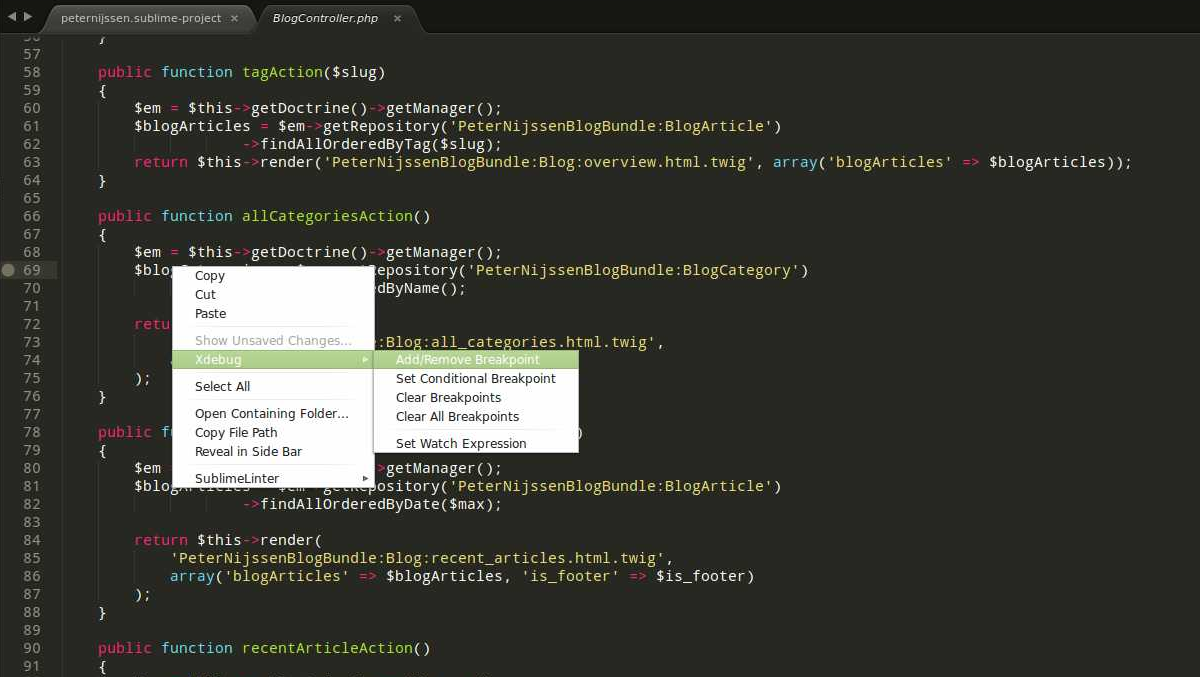
We open up our browser again and continue with the session we just started. You will notice that as soon as you go to the page where the breakpoint is, the page will stop loading. If you now open up Sublime, you will see a lot of information shown in the Xdebug panels.
The Xdebug stack and Xdebug context are very interesting. In the stack, you can see the whole stacktrace your call went through.
In the context, you will see all global variables, but also the variables you defined yourself. You can click on these variables to see exactly these variables are holding. For instance, in the screenshot below, I clicked on the $_SERVER variable.
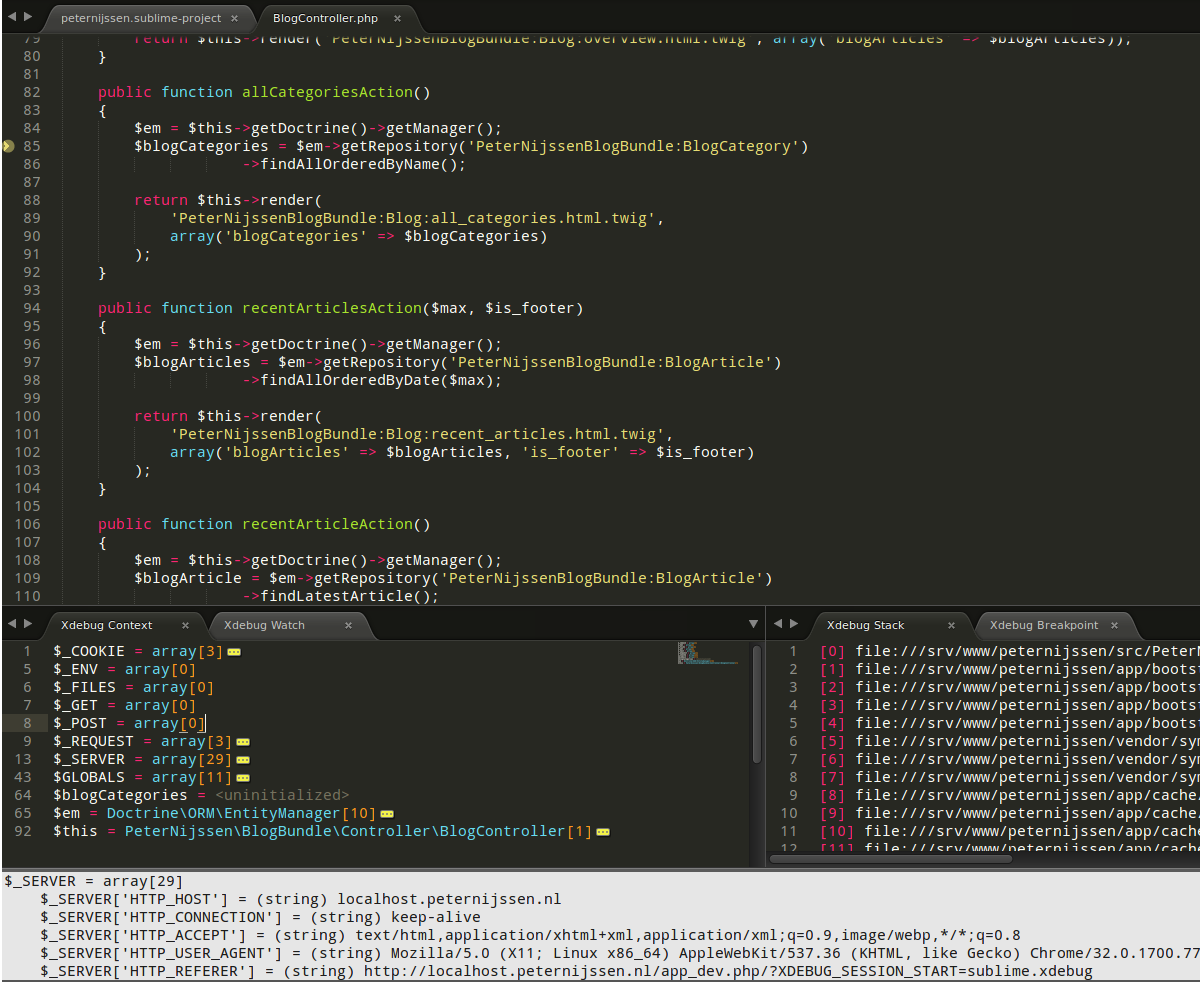
Notice that a yellow arrow is pointing at the line the application is currently halted on.
So our application halted and now we can look through the variables defined. However, we are done and we want to move on. What now? When you right mouse click once again and hover over the Xdebug menu, you will have several options:
- Run Which will run the application until the next breakpoint or until the ending.
- Run to line which will run until the line you clicked.
- Step into will step into the current function and stops right after.
- Step over Will step over the current function and stops right after.
- Step out Will step out of the current function and stop right after.
- Stop Will stop debugging.
- Detach Will also stop debugging.
Run and stop are quite easy to understand. The step methods could be a little confusing. Let’s dive into these with a simple example.
Class Foo()

{

    public function bar(Array $arr)

    {

        $arr = self::fooBar($arr); // Breakpoint

        return $arr;

    }

    public function fooBar(Array $arr)

    {

        return array_values($arr);

    }

}
Imagine you added a breakpoint to the first line of the method bar. So on the line with the breakpoint comment (// breakpoint).
With step into, the debugger will step into the fooBar method and will stop there at the first line. So in this case, the debugger will halt on the return array_values($arr); line.
Step over will call the method, but will not stop. It will stop at the next line available after calling the method. So in this case, it will stop at return $arr;
Lastly, with step out it will run through the whole bar method and return to the caller. In this case, it will go out of the object, back to the original caller.
If you just decide to run, the application will run further until the moment it is done executing or another breakpoint occurs.
Conclusion
In this article we saw how we could integrate Xdebug with Sublime and made sure we understood how to debug. Almost every IDE suitable for PHP can integrate with Xdebug. If you are interested in debugging like this in Netbeans, have a look at the article mentioned in the introduction. Are you using breakpoints? Or are you using PHP functions like var_dump to get your debug data? Let us know in the comments below!
Was this helpful?
 Peter Nijssen
php Debugging with Xdebug and Sublime Text 3(转)的更多相关文章
- Provides PHP completions for Sublime Text
来源:https://packagecontrol.io/packages/PHP%20Completions%20Kit php-completions php-completions plugin ...
- 配置 Sublime Text 3 作为Python R LaTeX Markdown IDE
配置 Sublime Text 3 作为Python R LaTeX Markdown IDE 配置 Sublime Text 3 作为Python IDE IDE的基本功能:代码提醒.补全:编译文件 ...
- sublime text plugins
Sublime Text 插件,HTML+CSS+JAVASCRIPT+JSON快速格式化: htmlpretty 快捷键:Ctrl+Shift+H Essential Sublime Text 2 ...
- COMPILING ACTIONSCRIPT 3.0 WITH SUBLIME TEXT 2
At Clock we typically spend our time developing JavaScript and PHP, however, occasionally Flash pres ...
- Sublime Text 3中文乱码解决方法以及安装包管理器方法
一般出现乱码是因为文本采用了GBK编码格式,Sublime Text默认不支持GBK编码. 安装包管理器 简单安装 使用Ctrl+`快捷键或者通过View->Show Console菜单打开命令 ...
- 在Sublime Text 3上安装代码格式化插件CodeFormatter
1.了解CodeFormatter插件 在Sublime Text 3中编写代码,为了能让我们的代码格式变得漂亮整洁,需要一个能自动格式代码的插件.这里发现CodeFormatter插件不错,它能支持 ...
- sublime text 3 + python配置,完整搭建及常用插件安装
四年的时间,一直使用EmEditor编辑器进行Python开发,之前是做面向过程,只需要将一个单独的py文件维护好即可,用着也挺顺手,但是最近在做面向对象的开发,不同的py文件中相互关联较多,感觉单纯 ...
- 前端工程师手中的Sublime Text
原文地址:http://css-tricks.com/sublime-text-front-end-developers/ 我的Blog:http://cabbit.me/sublime-text-f ...
- Sublime Text 全程指引 by Lucida
作者:Lucida 微博:@peng_gong 豆瓣:@figure9 博客园:@figure9 原文链接:http://zh.lucida.me/blog/sublime-text-complete ...
随机推荐
- C#设置程序自启动
public static void SetAutoRun(string fileName, bool isAutoRun) { RegistryKey reg = ...
- [hdu5136]Yue Fei's Battle 2014 亚洲区域赛广州赛区J题(dp)
转载请注明出处: http://www.cnblogs.com/fraud/ ——by fraud 现场赛的时候由于有个地方有点小问题,没有成功AC,导致与金牌失之交臂. 由于今天下 ...
- (原)Eclipse中将JNI生成的so打包成jar的步骤
说明:新人,对java不熟,见谅. 1. 新建工程,添加好native support,写好对应的文件(包括cpp文件,so文件和对应的java文件,此处称对应的java文件为SoJAR.java,) ...
- Mac OS X和iOS上基本数据类型的字节数
在Mac和IPhone上分别运行下面的程序: NSLog(@"char size = %lu", sizeof(char)); NSLog(@"short int siz ...
- Hadoop常见异常及其解决方案
1.Shell$ExitCodeException 现象:运行hadoop job时出现如下异常: 14/07/09 14:42:50 INFO mapreduce.Job: Task Id : at ...
- 子元素用margin-top 为什么反而作用在父元素上?对使用margin-top 的元素本身不起作用?
在这个说明中,“collapsing margins”(折叠margin)的意思是:2个或以上盒模型之间(关系可以是相邻或嵌套)相邻的margin属性(这之间不能有非空内容.padding区域.bor ...
- [原]C++关于运算符重载的程序报错error…
错误信息如下: 1>t2.obj : error LNK2019: 无法解析的外部符号 "public: __thiscall Date::Date(void)" (??0D ...
- NAS4Free 配置BT下载
NAS4Free 9.3.0.2 开启BT下载功能 Services|BitTorrent 选中右上角的复选框 Peer port 是监听端口,用于接受外部连接,需要在路由器配置该端口到服务器,才能提 ...
- CentOS6.4卸载自带的OpenJDK并安装jdk1.6.21
#进入系统的terminal,查看当前的jdk版本: shell>java -version #查看安装包 shell>rpm -qa|grep java #将上条命令查出来的结果卸载掉, ...
- Bitmap 与ImageSource之间的转换
public class ImageConverter { [DllImport("gdi32.dll", SetLastError = true)] private static ...