
TMS X-Cloud Todolist with FNC
Wednesday, June 22, 2016
It's almost three months since we released the first version of the TMS FNC UI Pack, a set of Framework Neutral Components (FNC), and have meanwhile released 2 major updates which include the TTMSFNCTabSet/TTMSFNCPageControl (v1.1), the recently introduced TTMSFNCListBox/TTMSFNCCheckedListBox and significant improvements / new features to the TTMSFNCTreeView such as filtering, sorting, keyboard lookup, clipboard support, ... (v1.2).
As already explained in previous blog posts (http://www.tmssoftware.com/site/blog.asp?post=335 andhttp://tmssoftware.com/site/blog.asp?post=346), the TMS FNC UI Pack is a set of UI controls that can be used from VCL Windows applications, FireMonkey (FMX) Windows, Mac OS-X, iOS, Android applications and LCL framework based Lazarus applications for Windows, Linux, Mac OS-X, ... . The TMS FNC UI Pack contains highly complex & feature-rich components such as grid, planner, rich editor, treeview, toolbars. So, with a single set of controls, you have the freedom of choice to use Delphi, C++Builder or the free Lazarus to create applications for a myriad of operating systems, you have a single learning curve to these components and as demonstrated here, you can use a single source to create apps for multiple targets.
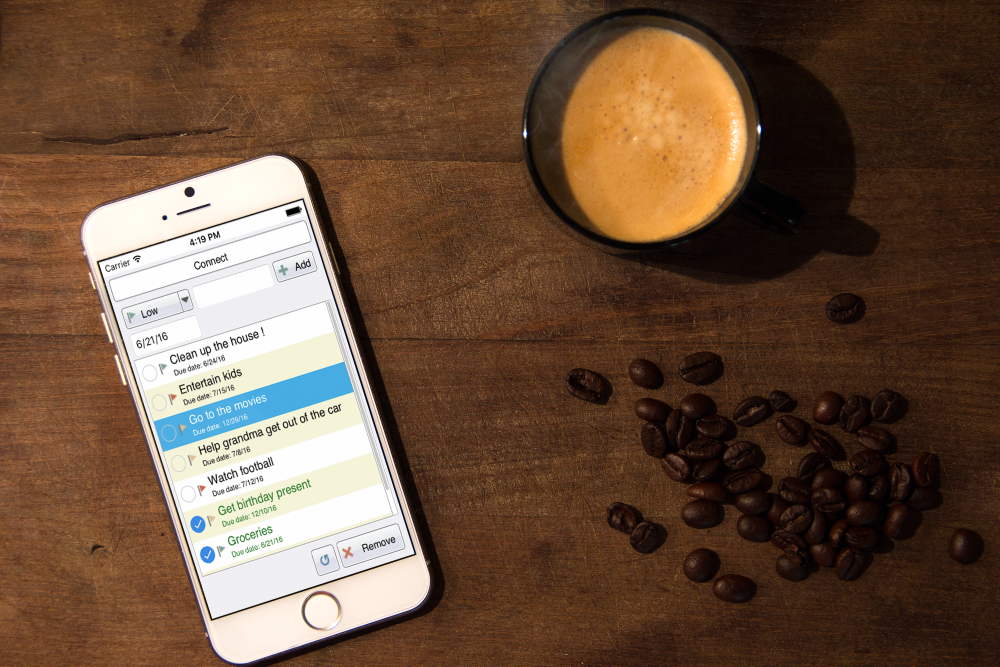
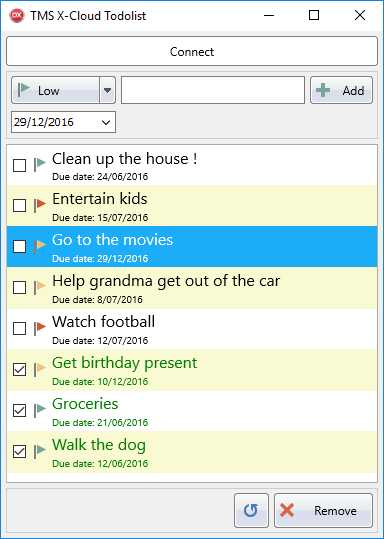
This blog post will cover the TTMSFNCCheckedListBox, which is one of the new components that are added in the latest release (v1.2) of the TMS FNC UI Pack, show how to use myCloudData.net to store data and demonstrate how easy it is to switch between FMX, VCL and LCL with one shared source code. myCloudData is an easy to use & flexible service to make use of structured storage in the cloud from Windows, web, mobile or IoT apps and is offered by tmssoftware.com. myCloudData is OAUTH/JSON REST based and our TMS Cloud Pack includes a component to access the service and thus your data seamlessly.
Click image for more screenshots.
A single shared source
As with our TV-guide sample we have created a single shared source file that is used in a FMX, VCL and LCL project. The unit starts by defining the business logic class that will be instantiated in our application main form unit.
- TTODOListLogic = class
- private
- FTable: TMyCloudDataTable;
- FListBox: TTMSFNCCheckedListBox;
- FMyCloudDataAccess: TMyCloudDataAccess;
- FOnConnected: TNotifyEvent;
- FBitmapContainer: TTMSFNCBitmapContainer;
- protected
- procedure DoConnected(Sender: TObject);
- public
- destructor Destroy; override;
- procedure InitListBox(AListBox: TTMSFNCCheckedListBox);
- procedure InitMyCloudData;
- procedure Refresh;
- procedure InitializeTable;
- procedure AddNewItem(AText: string; ADate: TDateTime; APriority: TPriority);
- procedure DeleteItem;
- procedure Connect;
- procedure DoBeforeDrawItem(Sender: TObject; AGraphics: TTMSFNCGraphics; ARect: TRectF; AItem: TTMSFNCListBoxItem; var AAllow: Boolean; var ADefaultDraw: Boolean);
- procedure DoItemCheckChanged(Sender: TObject; AItem: TTMSFNCCheckedListBoxItem);
- procedure DoItemCompare(Sender: TObject; Item1, Item2: TTMSFNCListBoxItem; var ACompareResult: Integer);
- property OnConnected: TNotifyEvent read FOnConnected write FOnConnected;
- property BitmapContainer: TTMSFNCBitmapContainer read FBitmapContainer write FBitmapContainer;
- end;
Each framework has its own set of units in order to compile succesfully. We use the conditional defines added to our project to make the difference between each framework.
- uses
- Classes, SysUtils, DB
- {$IFDEF VCL}
- ,VCL.TMSFNCListBox, VCL.TMSFNCCheckedListBox, CloudMyCloudData, CloudBase, VCL.TMSFNCUtils,
- CloudCustomMyCloudData, VCL.TMSFNCGraphics, VCL.Dialogs, VCL.TMSFNCTypes, Types, VCL.TMSFNCBitmapContainer;
- {$ENDIF}
- {$IFDEF FMX}
- ,FMX.TMSFNCListBox, FMX.TMSFNCCheckedListBox, FMX.TMSCloudMyCloudData, FMX.TMSCloudBase,
- FMX.TMSFNCUtils, FMX.TMSCloudCustomMyCloudData, FMX.TMSFNCGraphics, FMX.TMSFNCTypes, FMX.Dialogs, Types, FMX.TMSFNCBitmapContainer;
- {$ENDIF}
- {$IFDEF LCL}
- ,LCLTMSFNCListBox, LCLTMSFNCCheckedListBox, LCLTMSCloudMyCloudData, LCLTMSCloudBase,
- LCLTMSFNCUtils, LCLTMSCloudCustomMyCloudData, LCLTMSFNCGraphics, Dialogs, LCLTMSFNCTypes, LCLTMSFNCBitmapContainer;
- {$ENDIF}
myCloudData
As our todolist is storing its todo items in the cloud we take advantage of our own service, that can virtually store anything we want. The initialization is done programmatically.
- procedure TTODOListLogic.InitMyCloudData;
- begin
- FMyCloudDataAccess := TMyCloudDataAccess.Create(nil);
- FMyCloudDataAccess.PersistTokens.Location := plIniFile;
- {$IFDEF FMX}
- FMyCloudDataAccess.PersistTokens.Key := TTMSFNCUtils.GetDocumentsPath + PthDel + 'myclouddatafmx.ini';
- FMyCloudDataAccess.OnConnected := DoConnected;
- {$ENDIF}
- {$IFDEF VCL}
- FMyCloudDataAccess.PersistTokens.Key := TTMSFNCUtils.GetDocumentsPath + PthDel + 'myclouddatavcl.ini';
- FMyCloudDataAccess.OnConnected := DoConnected;
- {$ENDIF}
- {$IFDEF LCL}
- FMyCloudDataAccess.PersistTokens.Key := TTMSFNCUtils.GetDocumentsPath + PthDel + 'myclouddatalcl.ini';
- FMyCloudDataAccess.OnConnected := @DoConnected;
- {$ENDIF}
- FMyCloudDataAccess.PersistTokens.Section := 'tokens';
- FMyCloudDataAccess.App.Key := MYCLOUDDATAKEY;
- FMyCloudDataAccess.App.Secret := MYCLOUDDATASECRET;
- FMyCloudDataAccess.App.CallBackPort := 8888;
- FMyCloudDataAccess.App.CallBackURL := 'http://127.0.0.1:8888';
- end;
You might notice 3 things here. First is the TMyCloudDataAccess class which is common between FMX, VCL and LCL. This is defined earlier in our business logic as the unit names are different for FMX, VCL and LCL.
- type
- {$IFDEF VCL}
- TMyCloudDataAccess = class(TAdvMyCloudData);
- {$ENDIF}
- {$IFDEF FMX}
- TMyCloudDataAccess = class(TTMSFMXCloudMyCloudData);
- {$ENDIF}
- {$IFDEF LCL}
- TMyCloudDataAccess = class(TTMSLCLCloudMyCloudData);
- {$ENDIF}
Second, is the event handler assignment, that we also need to wrap with conditional defines because LCL works with an additional @. Third is the ini file that is also created with a framework suffix, as the token and token encryption are unique per application and not shareable. After defining our business logic, it's time to setup our GUI. The form unit is shared between FMX, VCL and LCL and there you will also notice the uses list and the form file is separated with defines. After designing our form (using the TTMSFNCCheckedListBox, some tool bar buttons (TTMSFNCToolBarButton) we are ready to connect to our business logic and create a working todo list that stores its items in the cloud.
- procedure TTODOListForm.DoConnected(Sender: TObject);
- begin
- Panel1.Enabled := True;
- Panel2.Enabled := True;
- TMSFNCToolBarButton2.Enabled := False;
- TMSFNCCheckedListBox1.Enabled := True;
- TMSFNCToolBarButton4.Enabled := True;
- TMSFNCToolBarButton5.Enabled := True;
- TMSFNCToolBarButton6.Enabled := True;
- TMSFNCToolBarItemPicker1.Enabled := True;
- FTODOListLogic.InitializeTable;
- FTODOListLogic.Refresh;
- end;
- procedure TTODOListForm.FormCreate(Sender: TObject);
- begin
- FTODOListLogic := TTODOListLogic.Create;
- FTODOListLogic.InitListBox(TMSFNCCheckedListBox1);
- FTODOListLogic.InitMyCloudData;
- {$IFDEF LCL}
- FTODOListLogic.OnConnected := @DoConnected;
- {$ELSE}
- FTODOListLogic.OnConnected := DoConnected;
- {$ENDIF}
- TMSFNCCheckedListBox1.BitmapContainer := TMSFNCBitmapContainer1;
- TMSFNCToolBarItemPicker1.BitmapContainer := TMSFNCBitmapContainer1;
- TMSFNCToolBarItemPicker1.Bitmaps.Clear;
- TMSFNCToolBarItemPicker1.Bitmaps.AddBitmapName('low');
- TMSFNCToolBarItemPicker1.DisabledBitmaps.Assign(TMSFNCToolBarItemPicker1.Bitmaps);
- TMSFNCToolBarButton2.DisabledBitmaps.Assign(TMSFNCToolBarButton2.Bitmaps);
- TMSFNCToolBarButton4.DisabledBitmaps.Assign(TMSFNCToolBarButton4.Bitmaps);
- TMSFNCToolBarButton5.DisabledBitmaps.Assign(TMSFNCToolBarButton5.Bitmaps);
- TMSFNCToolBarButton6.DisabledBitmaps.Assign(TMSFNCToolBarButton6.Bitmaps);
- dt := TMyDateTimePicker.Create(Self);
- {$IFDEF FMX}
- dt.Position.X := 5;
- dt.Position.Y := 40;
- {$ELSE}
- dt.Left := 5;
- dt.Top := 40;
- {$ENDIF}
- dt.Date := Now;
- dt.Parent := Panel1;
- dt.Width := 105;
- end;
- procedure TTODOListForm.FormDestroy(Sender: TObject);
- begin
- FTODOListLogic.Free;
- end;
- procedure TTODOListForm.TMSFNCCheckedListBox1ItemSelected(Sender: TObject;
- AItem: TTMSFNCListBoxItem);
- begin
- TMSFNCToolBarButton6.Enabled := True;
- end;
- procedure TTODOListForm.TMSFNCToolBarButton1Click(Sender: TObject);
- begin
- FTODOListLogic.Refresh;
- end;
- procedure TTODOListForm.TMSFNCToolBarButton2Click(Sender: TObject);
- begin
- FTODOListLogic.Connect;
- end;
- procedure TTODOListForm.TMSFNCToolBarButton3Click(Sender: TObject);
- begin
- FTODOListLogic.DeleteItem;
- end;
- procedure TTODOListForm.TMSFNCToolBarButton4Click(Sender: TObject);
- begin
- FTODOListLogic.AddNewItem(Edit1.Text, dt.Date, TPriority(TMSFNCToolBarItemPicker1.SelectedItemIndex));
- end;
- procedure TTODOListForm.TMSFNCToolBarItemPicker1ItemSelected(Sender: TObject;
- AItemIndex: Integer);
- begin
- TMSFNCToolBarItemPicker1.Bitmaps.Clear;
- TMSFNCToolBarItemPicker1.Bitmaps.AddBitmapName(TMSFNCBitmapContainer1.Items[AItemIndex].Name);
- TMSFNCToolBarItemPicker1.DisabledBitmaps.Assign(TMSFNCToolBarItemPicker1.Bitmaps);
- end;
When starting the application, and clicking the connect button, our business logic unit will do the work. It will create a table in myCloudData, send a notification to our GUI, which will then allow to add items to our listbox, refresh or delete existing items, and this is done with one source code, available on multiple frameworks, multiple platforms.
The full source code is available for download
Click image for more screenshots.
Pieter Scheldeman
http://www.tmssoftware.com/site/blog.asp?post=353
TMS X-Cloud Todolist with FNC的更多相关文章
- Everything starts with a dream(A day has only 24 hours and these things take time,所以要抓紧)
There is the famous quote: "Everything starts with a dream" and many years ago, Michael Va ...
- Developing your first FNC custom control
Friday, May 13, 2016 Some weeks ago, we released the TMS FNC UI Pack, a set of Framework Neutral Com ...
- 【Spring Cloud & Alibaba 实战 | 总结篇】Spring Cloud Gateway + Spring Security OAuth2 + JWT 实现微服务统一认证授权和鉴权
一. 前言 hi,大家好~ 好久没更文了,期间主要致力于项目的功能升级和问题修复中,经过一年时间的打磨,[有来]终于迎来v2.0版本,相较于v1.x版本主要完善了OAuth2认证授权.鉴权的逻辑,结合 ...
- On cloud, be cloud native
本来不想起一个英文名,但是想来想去都没能想出一个简洁地表述该意思的中文释义,所以就用了一个英文名称,望见谅. Cloud Native是一个刚刚由VMware所提出一年左右的名词.其表示在设计并实现一 ...
- 在公有云AZURE上部署私有云AZUREPACK以及WEBSITE CLOUD(六)
(六)在Website Cloud中添加site 1新建Website,并打开 使用前面创建的用户 newbee@waplab.com 登录租户Portal,新建一个website 新建完成后, 可以 ...
- 在公有云AZURE上部署私有云AZUREPACK以及WEBSITE CLOUD(五)
(五)注册Website Cloud 1 注册Website Cloud 添加Website Cloud 连接Website Cloud 注意, endpoint 是使用Management Se ...
- 在公有云AZURE上部署私有云AZUREPACK以及WEBSITE CLOUD(四)
(四)搭建Website Cloud环境 1安装CONTROLLER主机 在开始安装Web site Cloud之前,读者应该对该服务的拓扑结构有个大概了解. 如图: Controller是非常重要的 ...
- 在公有云AZURE上部署私有云AZUREPACK以及WEBSITE CLOUD(二)
前言 (二)建立虚拟网络环境,以及域控和DNS服务器 1搭建虚拟网络环境 在Azure上创建虚拟网络.本例选择的是东南亚数据中心.后面在创建虚机的时候,也选择这个数据中心. VNet Name: ...
- spring/spring boot/spring cloud开发总结
背景 针对RPC远程调用,都在使用dubbo.dubbox等,我们也是如此.由于社区暂停维护.应对未来发展,我们准备尝试新技术(或许这时候也不算什么新技术了吧),选择使用了spring ...
随机推荐
- leetcode Jump Game II python
@link http://www.cnblogs.com/zuoyuan/p/3781953.htmlGiven an array of non-negative integers, you are ...
- Linux网络管理——子网掩码
1. 网络基础 .note-content {font-family: "Helvetica Neue",Arial,"Hiragino Sans GB",&q ...
- zend framework安装中出现的问题与总结
1.按照官方的教程来做http://framework.zend.com/manual/current/en/user-guide/skeleton-application.html 但其中有些步骤没 ...
- 读取本地HTML的小说阅读器应用源码项目
该源码是一个不错的读取本地HTML的小说阅读器,读取本地HTML的小说阅读器,并且源码也比较简单的,非常适合我们的新手朋友拿来学习,有兴趣的朋友研究下. 源码下载: http://code.662p. ...
- Matlab插值计算各时刻磁法勘探日变观测值
Matlab插值计算各时刻磁法勘探日变观测值 在磁法勘探中,消日变影响的改正称为日变改正.进行日变改正时必须设立日变站,观测日变情况.根据日变数据和测点观测时间,对观测数据进行改正. 在本次磁法实习中 ...
- 【Chromium中文文档】进程模型
进程模型 转载请注明出处:https://ahangchen.gitbooks.io/chromium_doc_zh/content/zh//General_Architecture/Process_ ...
- CeontOS7安装ansible
安装方法一. 第一步:安装epel rpm -ivh http://mirror.pnl.gov/epel/7/x86_64/e/epel-release-7-5.noarch.rpm 第二步:安装a ...
- 柯南君:看大数据时代下的IT架构(2)消息队列之RabbitMQ-基础概念详细介绍
一.基础概念详细介绍 1.引言 你是否遇到过两个(多个)系统间需要通过定时任务来同步某些数据?你是否在为异构系统的不同进程间相互调用.通讯的问题而苦恼.挣扎?如果是,那么恭喜你,消息服务让你可以很轻松 ...
- poj2583---Series Determination
#include <stdio.h> #include <stdlib.h> int main() { int x,y,z,a,b,c; while(scanf("% ...
- oracle任务计划debug
crontab -eno crontab for root - using an empty onecrontab: installing new crontab"/tmp/crontab. ...