
Nginx CORS实现JS跨域
1. 什么是跨域
简单地理解就是因为JavaScript同源策略的限制,a.com 域名下的js无法操作b.com或是c.a.com域名下的对象。
同源是指相同的协议、域名、端口。特别注意两点:
- 如果是协议和端口造成的跨域问题“前台”是无能为力的,
- 在跨域问题上,域仅仅是通过“协议+域名+端口”来识别,两个不同的域名即便指向同一个ip地址,也是跨域的。
2. 跨域解决方案
跨域解决方案有多种,大多是利用JS Hack:
- document.domain+iframe的设置
- 动态创建script
- 利用iframe和location.hash
- window.name实现的跨域数据传输
- 使用HTML5 postMessage
- 利用flash
以上方案见http://www.cnblogs.com/rainman/archive/2011/02/20/1959325.html#m5
- 通过代理,js访问代理,代理转到不同的域http://developer.yahoo.com/javascript/howto-proxy.html
- Jquery JSONP(本质上就是动态创建script)http://www.cnblogs.com/chopper/archive/2012/03/24/2403945.html
- 跨域资源共享(CORS) 这就是我们要介绍的跨域解决方案,也是未来的跨域问题的标准解决方案
3. CORS
CORS: 跨域资源共享(Cross-Origin Resource Sharing)http://www.w3.org/TR/cors/
当前几乎所有的浏览器(Internet Explorer 8+, Firefox 3.5+, Safari 4+和 Chrome 3+)都可通过名为跨域资源共享(Cross-Origin Resource Sharing)的协议支持ajax跨域调用。(see: http://caniuse.com/#search=cors)
Chrome, Firefox, Opera and Safari 都使用的是 XMLHttpRequest2 对象, IE使用XDomainRequest。XMLHttpRequest2的Request属性:open()、setRequestHeader()、timeout、withCredentials、upload、send()、send()、abort()。
XMLHttpRequest2的Response属性:status、statusText、getResponseHeader()、getAllResponseHeaders()、entity、overrideMimeType()、responseType、response、responseText、responseXML。
启用 CORS 请求
假设您的应用已经在 example.com 上了,而您想要从 www.example2.com 提取数据。一般情况下,如果您尝试进行这种类型的 AJAX 调用,请求将会失败,而浏览器将会出现“源不匹配”的错误。利用 CORS,www.example2.com 服务端只需添加一个HTTP Response头,就可以允许来自 example.com 的请求:
Access-Control-Allow-Origin: http://example.com

Access-Control-Allow-Credentials: true(可选)
可将 Access-Control-Allow-Origin 添加到某网站下或整个域中的单个资源。要允许任何域向您提交请求,请设置如下:
Access-Control-Allow-Origin: *

Access-Control-Allow-Credentials: true(可选)
其实,该网站 (html5rocks.com) 已在其所有网页上均启用了 CORS。启用开发人员工具后,您就会在我们的响应中看到 Access-Control-Allow-Origin 了。
提交跨域请求
如果服务器端已启用了 CORS,那么提交跨域请求就和普通的 XMLHttpRequest 请求没什么区别。例如,现在 example.com 可以向 www.example2.com 提交请求了:
var xhr = new XMLHttpRequest();

// xhr.withCredentials = true; //如果需要Cookie等

xhr.open('GET', 'http://www.example2.com/hello.json');

xhr.onload = function(e) {

  var data = JSON.parse(this.response);

  ...

}

xhr.send();
4. 服务端Nginx配置
要实现CORS跨域,服务端需要这个一个流程:http://www.html5rocks.com/static/images/cors_server_flowchart.png
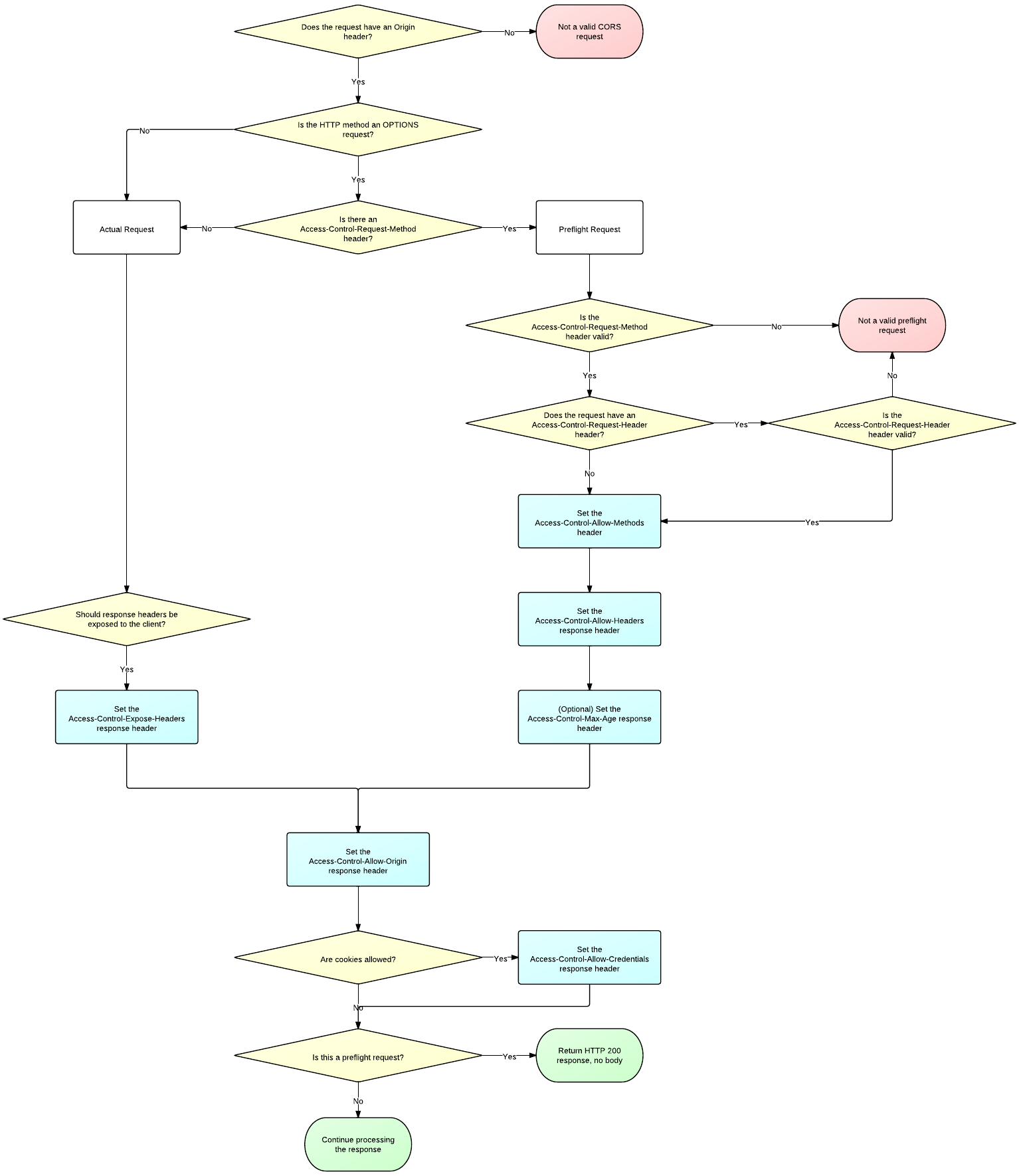
对于简单请求,如GET,只需要在HTTP Response后添加Access-Control-Allow-Origin。
对于非简单请求,比如POST、PUT、DELETE等,浏览器会分两次应答。第一次preflight(method: OPTIONS),主要验证来源是否合法,并返回允许的Header等。第二次才是真正的HTTP应答。所以服务器必须处理OPTIONS应答。
http://enable-cors.org/server_nginx.html这里是一个nginx启用COSR的参考配置。
流程如下:
- 首先查看http头部有无origin字段;
- 如果没有,或者不允许,直接当成普通请求处理,结束;
- 如果有并且是允许的,那么再看是否是preflight(method=OPTIONS);
- 如果是preflight,就返回Allow-Headers、Allow-Methods等,内容为空;
- 如果不是preflight,就返回Allow-Origin、Allow-Credentials等,并返回正常内容。
用伪代码表示:
location /pub/(.+) {

    if ($http_origin ~ <允许的域(正则匹配)>) {

        add_header 'Access-Control-Allow-Origin' "$http_origin";

        add_header 'Access-Control-Allow-Credentials' "true";

        if ($request_method = "OPTIONS") {

            add_header 'Access-Control-Max-Age' 86400;

            add_header 'Access-Control-Allow-Methods' 'GET, POST, OPTIONS, DELETE';

            add_header 'Access-Control-Allow-Headers' 'reqid, nid, host, x-real-ip, x-forwarded-ip, event-type, event-id, accept, content-type';

            add_header 'Content-Length' 0;

            add_header 'Content-Type' 'text/plain, charset=utf-8';

            return 204;

        }

    }

    # 正常nginx配置

    ......

}但是由于Nginx 的 if 是邪恶的,所以配置就相当地让人不爽(是我的配置不够简洁吗?)。下面nginx-spdy-push里/pub接口启用CORS的配置:
# push publish

# broadcast channel name must start with '_'

# (i.e., normal channel must not start with '_')

# GET    /pub/channel_id -> get statistics about a channel

# POST   /pub/channel_id -> publish a message to the channel

# DELETE /pub_admin?id=channel_id -> delete the channel

#rewrite_log on;

# server_name test.gw.com.cn

# listen      2443 ssl spdy

location ~ ^/pub/([-_.A-Za-z0-9]+)$ {

    set $cors "local";

    # configure CORS based on https://gist.github.com/alexjs/4165271

    # (See: http://www.w3.org/TR/2013/CR-cors-20130129/#access-control-allow-origin-response-header )

    if ( $http_origin ~* "https://.+\.gw\.com\.cn(?=:[0-9]+)?" ) {

        set $cors "allow";

    }

    if ($request_method = "OPTIONS") {

        set $cors "${cors}options";

    }

    # if CORS request is not a simple method

    if ($cors = "allowoptions") {

        # Tells the browser this origin may make cross-origin requests

        add_header 'Access-Control-Allow-Origin' "$http_origin";

        # in a preflight response, tells browser the subsequent actual request can include user credentials (e.g., cookies)

        add_header 'Access-Control-Allow-Credentials' "true";

        # === Return special preflight info ===

        # Tell browser to cache this pre-flight info for 1 day

        add_header 'Access-Control-Max-Age' 86400;

        # Tell browser we respond to GET,POST,OPTIONS in normal CORS requests.

        # Not officially needed but still included to help non-conforming browsers.

        # OPTIONS should not be needed here, since the field is used

        # to indicate methods allowed for 'actual request' not the preflight request.

        # GET,POST also should not be needed, since the 'simple methods' GET,POST,HEAD are included by default.

        # We should only need this header for non-simple requests  methods (e.g., DELETE), or custom request methods (e.g., XMODIFY)

        add_header 'Access-Control-Allow-Methods' 'GET, POST, OPTIONS, DELETE';

        # Tell browser we accept these headers in the actual request

        add_header 'Access-Control-Allow-Headers' 'reqid, nid, host, x-real-ip, x-forwarded-ip, event-type, event-id, accept, content-type';

        # === response for OPTIONS method ===

        # no body in this response

        add_header 'Content-Length' 0;

        # (should not be necessary, but included for non-conforming browsers)

        add_header 'Content-Type' 'text/plain, charset=utf-8';

        # indicate successful return with no content

        return 204;

    }

    if ($cors = "allow") {

        rewrite /pub/(.*) /pub_cors/$1 last;

    }

    if ($cors = "local") {

        rewrite /pub/(.*) /pub_int/$1 last;

    }

}

location ~ /pub_cors/(.*) {

    internal;

    # Tells the browser this origin may make cross-origin requests

    add_header 'Access-Control-Allow-Origin' "$http_origin";

    # in a preflight response, tells browser the subsequent actual request can include user credentials (e.g., cookies)

    add_header 'Access-Control-Allow-Credentials' "true";

    push_stream_publisher                   admin; # enable delete channel

    set $push_stream_channel_id             $1;

    push_stream_store_messages              on;  # enable /sub/ch.b3

    push_stream_channel_info_on_publish     on;

}

location ~ /pub_int/(.*) {

  #  internal;

    push_stream_publisher                   admin; # enable delete channel

    set $push_stream_channel_id             $1;

    push_stream_store_messages              on;  # enable /sub/ch.b3

    push_stream_channel_info_on_publish     on;

}
5. 客户端javascript代码
下面是https://spdy.gw.com.cn/sse.html里的代码
var xhr = new XMLHttpRequest();

//xhr.withCredentials = true;

xhr.open("POST", "https://test.gw.com.cn:2443/pub/ch1", true);

// xhr.setRequestHeader("accept", "application/json");

xhr.onload = function()  {

  $('back').innerHTML = xhr.responseText;

  $('ch1').value = + $('ch1').value + 1;

}

xhr.onerror = function() {

  alert('Woops, there was an error making the request.');

};

xhr.send($('ch1').value);页面的域是https://spdy.gw.com.cn, XMLHttpRequest的域是https://test.gw.com.cn:2443,不同的域,并且Post方式。
用Chrome测试,可以发现有一次OPTIONS应答。如过没有OPTIONS应答,可能是之前已经应答过,被浏览器缓存了'Access-Control-Max-Age' 86400;,清除缓存,再试验。
6. 相关链接
- Using CORS
- XMLHttpRequest2草案
- XMLHttpRequest2 新技巧
- XMLHttpRequest Level 2 使用指南
http://www.ruanyifeng.com/blog/2012/09/xmlhttprequest_level_2.html
- XMLHttpRequest2的进步之处
- 理解DOMString、Document、FormData、Blob、File、ArrayBuffer数据类型
- nginx启用COSR的参考配置
- 要实现CORS跨域,服务端需要这个一个流程
http://www.html5rocks.com/static/images/cors_server_flowchart.png
- Compatibility tables for support of HTML5, CSS3, SVG and more in desktop and mobile browsers
- 通过代理,js访问代理,代理转到不同的域
- JavaScript跨域总结与解决办法
http://www.cnblogs.com/rainman/archive/2011/02/20/1959325.html#m5
- 深入浅出JSONP--解决ajax跨域问题
http://www.cnblogs.com/chopper/archive/2012/03/24/2403945.html
- JavaScript: Use a Web Proxy for Cross-Domain XMLHttpRequest Calls
Nginx CORS实现JS跨域的更多相关文章
- Atitit.js跨域解决方案attilax大总结 后台java php c#.net的CORS支持
Atitit.js跨域解决方案attilax大总结 后台java php c#.net的CORS支持 1. 设置 document.domain为一致 推荐1 2. Apache 反向代理 推荐1 ...
- js跨域请求解决方案
什么是跨域? 跨域是指一个域下的文档或脚本试图去请求另一个域下的资源,这里跨域是广义的. 广义的跨域: 1.) 资源跳转: A链接.重定向.表单提交 2.) 资源嵌入: <link>.&l ...
- 前端Js跨域方法汇总—剪不断,理还乱,是跨域
1.通过jsonp跨域2.通过修改document.domain来跨子域(iframe)3.隐藏的iframe+window.name跨域4.iframe+跨文档消息传递(XDM)5.跨域资源共享 C ...
- 【前端】【转】JS跨域问题总结
详情见原博客:详解js跨域问题 概念:只要协议.域名.端口有任何一个不同,都被当作是不同的域. 跨域资源共享(CORS) CORS(Cross-Origin Resource Sharing)跨域资源 ...
- CORS 协议(跨域资源共享)
跨域问题 只要协议.域名.端口有任何一个不同,都被当作是不同的域. 为什么会有跨域的限制? 之前发生过的一些跨域安全事件: 新浪微博XSS受攻击事件 2011年6月28日晚,新浪微博出现了一次 ...
- JS跨域两三事
今日,前端开发要求新的Web服务需要支持跨域,因为要发起 Ajax 到后端web 服务域名请求数据: 前端application域名是 other.abc.com (举个栗子) api接口域名是 a ...
- SpringBoot入门教程(十三)CORS方式实现跨域
什么是跨域?浏览器从一个域名的网页去请求另一个域名的资源时,域名.端口.协议任一不同,都是跨域 . 跨域资源访问是经常会遇到的场景,当一个资源从与该资源本身所在的服务器不同的域或端口请求一个资源时,资 ...
- 基于CORS的GeoServer跨域访问策略
GeoServer的跨域访问问题,有多种解决方法,本文介绍一种基于CORS的GeoServer跨域访问方法. CORS简介 CORS是一个W3C标准,全称是"跨域资源共享"(Cro ...
- 什么是JS跨域请求
这里说的js跨域是指通过js在不同的域之间进行数据传输或通信,比如用ajax向一个不同的域请求数据,或者通过js获取页面中不同域的框架中(iframe)的数据.只要协议.域名.端口有任何一个不同,都被 ...
随机推荐
- 全球最快的JS模板引擎
废话不多说,先上测试: 亲测请访问:[在线测试地址]单次结果不一定准确,请多测几次. tppl 的编译渲染速度是著名的 jQuery 作者 John Resig 开发的 tmpl 的 43 倍!与第二 ...
- swipe.js文档及用法
最近的一个项目中使用到了swipe.js这个插件 感觉非常的好用的 官方网站 http://swipejs.com/ https://github.com/bradbirdsall/Swipe 简介 ...
- 2014.8.18for循环
for循环 1.初始状态 2.循环条件 3.循环体 4.状态改变 语法 for( 初始状态 ; 循环条件 ; 状态改变 ) { 循环体; } eg: ; i <= ; i++) { Con ...
- 一个人的旅行(用小技巧转化为dijkstra算法)
注意: 1:因为两点之间可能有多条路,所以更新路径长度的时候做一次判断 if(time < mat[a][b]) mat[a][b] = mat[b][a] = time; 2:因为主函数中的数 ...
- IO库 8.5
题目:重写8.4中的函数,将每一个单词作为一个独立的元素进行存储. #include <iostream> #include <fstream> #include <st ...
- SGU 310. Hippopotamus( 状压dp )
题目大意:给N块板, 有A,B2种类型的板, 要求任意M块连续的板中至少有K块B板.1≤n≤60,1≤m≤15,0≤k≤m≤n. dp(x, s)表示第x块板, x前M块板的状态为s, 然后合法状态转 ...
- Log4net 自定义字段到数据库(二)
这种方法比第一种方法麻烦些 Log4Net.config <?xml version="1.0" encoding="utf-8" ?> <c ...
- Expression Language
EL找不到属性会返回"" page –- request --- session --- application ------------------------------- ...
- Oracle 生成指定范围内随机日期
Oracle生成一个指定范围内的随机日期 /* 年1月1日)的整数偏移量来保存(即把日期保存为一个数字); * 因此可通过寻找‘指定日期’与‘关键日期’相对应的整数偏移量,再加一个指定范围内的随机整数 ...
- Android UI设计
Android UI设计--PopupWindow显示位置设置 摘要: 当点击某个按钮并弹出PopupWindow时,PopupWindow左下角默认与按钮对齐,但是如果PopupWindow是下图的 ...