
Python股票信息抓取~
本来想把股票的涨跌抓取出来,用汇通网的股票为例,就找了国际外汇为例。
页面里有xhr请求,并且每个xhr的url请求的 http://api.q.fx678.com/history.php?symbol=USD&limit=288&resolution=5&codeType=8100&st=0.43342772855649625
然后请求里面哟一个limit=288表示288个时间段,汇通网里面将5分钟为一个时间段,所以一天的话有288个时间间隔。
xhr请求中的st参数好像是跟页面的请求的过期与否有关,因为有的股票可以通过该st值获得数据,但是有的股票就不可以。然后此xhr请求可以将从该时间段为止的24小时内的所有股票的变动返回,包括该时间段的开盘,收盘,最高,最低,然后依次来解析。
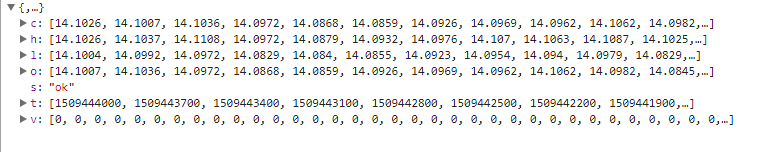
处理的时候只是将所有整点的数据该股票的最高点解析出来,xhr请求中的时间戳是秒级的,然后将之转换成北京时间,并且将时间进行排序,然后获取正确的其他的并没有进行处理,程序中存储时间和最高点都是用数组存储的,并且改程序是单进程,会更新~
只想说xpath是真心好用,第二次用,解析参数的时候很方便。
#-*-coding:utf-8 -*-

import urllib

import re

import json

import urllib2

from lxml import etree

import requests

import time

from Queue import Queue

import matplotlib.pyplot as plt

URL = 'http://quote.fx678.com/exchange/WH'

nation_que = Queue()

nation = Queue()

high = Queue()

start_time = Queue()

Chart = []

def __cmp__(self, other):

    if self.time < other.time:

        return -1

    elif self.time == other.time:

        return 0

    else:

        return 1

class Share:

    def __init__(self,time,score):

        self.time = time

        self.score = score

    def __getitem__(self, key):

        self.item.get(key)

    def __cmp__(self, other):

        return cmp(self.time, other.time)

    def __str__(self):

        return self.time + " " + str(self.score)

def download(url, headers, num_try=2):

    while num_try >0:

        num_try -= 1

        try:

            content = requests.get(url, headers=headers)

            return content.text

        except urllib2.URLError as e:

            print 'Download error', e.reason

    return None

def get_type_url():

    headers = {

        'User_agent': 'Mozilla/5.0 (Macintosh; Intel Mac OS X 10_12_6) AppleWebKit/537.36 (KHTML, like Gecko) Chrome/61.0.3163.100 Safari/537.36',

        'Referer': 'http://quote.fx678.com/exchange/WH',

        'Cookie': 'io=-voMclEjiizK9nWKALqB; UM_distinctid=15f5938ddc72db-089cf9ba58d9e5-31657c00-fa000-15f5938ddc8b24; Hm_lvt_d25bd1db5bca2537d34deae7edca67d3=1509030420; Hm_lpvt_d25bd1db5bca2537d34deae7edca67d3=1509031023',

        'Accept-Language': 'zh-CN,zh;q=0.8',

        'Accept-Encoding': 'gzip, deflate',

        'Accept': '*/*'

    }

    content = download(URL,headers)

    html = etree.HTML(content)

    result = html.xpath('//a[@class="mar_name"]/@href')

    for each in result:

        print each

        st = each.split('/')

        nation_que.put(st[len(st)-1])

    get_precent()

def get_precent():

    while not nation_que.empty():

        ss = nation_que.get(False)

        print ss

        url = 'http://api.q.fx678.com/history.php?symbol=' + ss +'&limit=288&resolution=5&codeType=8100&st=0.43342772855649625'

        print url

        headers = {'Accept':'application/json, text/javascript, */*; q=0.01',

                'Accept-Encoding':'gzip, deflate',

                'Accept-Language':'zh-CN,zh;q=0.8',

                'Connection':'keep-alive',

                'Host':'api.q.fx678.com',

                'Origin':'http://quote.fx678.com',

                'Referer':'http://quote.fx678.com/symbol/USD',

                'User-Agent':'Mozilla/5.0 (Windows NT 6.1; WOW64) AppleWebKit/537.36 (KHTML, like Gecko) Chrome/61.0.3163.100 Safari/537.36'

               }

        num_try = 2

        while num_try >0:

            num_try -= 1

            try:

                content = requests.get(url, headers=headers)

                html = json.loads(content.text)

                st = html['h']

                T_time = html['t']

                if  len(st) > 0 and len(T_time) > 0:

                    nation.put(ss)

                    high.put(st)

                    start_time.put(T_time)

                break

            except urllib2.URLError as e:

                print 'Download error', e.reason

        nation_que.task_done()

        draw_pict()

def sub_sort(array,array1,low,high):

    key = array[low]

    key1 = array1[low]

    while low < high:

        while low < high and array[high] >= key:

            high -= 1

        while low < high and array[high] < key:

            array[low] = array[high]

            array1[low] = array1[high]

            low += 1

            array[high] = array[low]

            array1[high] = array1[low]

    array[low] = key

    array1[low] = key1

    return low

def quick_sort(array,array1,low,high):

     if low < high:

        key_index = sub_sort(array,array1,low,high)

        quick_sort(array,array1,low,key_index)

        quick_sort(array,array1,key_index+1,high)

def draw_pict():

    while True:

        Nation = nation.get(False)

        High = high.get(False)

        Time = start_time.get(False)

        T_time = []

        High_Rate = []

        num = 0

        for each,high1 in zip(Time,High):

            st = time.localtime(float(each))

            if st.tm_min == 0:

                T_time.append(st.tm_hour)

                High_Rate.append(high1)

        quick_sort(T_time,High_Rate,0,len(T_time)-1)

        plt.plot(T_time,High_Rate, marker='*')

        plt.show()

        plt.title(Nation)

        nation.task_done()

        high.task_done()

        break

if __name__ == '__main__':

    get_type_url()
Python股票信息抓取~的更多相关文章
- Python股票信息抓取(三)
最近在看mongodb,然后会用了一些最简单的mongodb的操作,然后想着结合股票信息的数据的抓取,然后将数据存储在mongodb中,对于mongo和数据库的最大的区别是,mongo不需要建表,直接 ...
- Python股票信息抓取(二)
在一的基础上,想着把所有的折线图放在一个图中,然后图的结果如图所示: 不是略丑,是很丑~ 依然的单进程,只是将图标结果放在了一张图里 代码如下: #-*-coding:utf-8 -*- import ...
- python 爬虫抓取心得
quanwei9958 转自 python 爬虫抓取心得分享 urllib.quote('要编码的字符串') 如果你要在url请求里面放入中文,对相应的中文进行编码的话,可以用: urllib.quo ...
- python requests抓取NBA球员数据,pandas进行数据分析,echarts进行可视化 (前言)
python requests抓取NBA球员数据,pandas进行数据分析,echarts进行可视化 (前言) 感觉要总结总结了,希望这次能写个系列文章分享分享心得,和大神们交流交流,提升提升. 因为 ...
- python数据抓取分析(python + mongodb)
分享点干货!!! Python数据抓取分析 编程模块:requests,lxml,pymongo,time,BeautifulSoup 首先获取所有产品的分类网址: def step(): try: ...
- python 处理抓取网页乱码
python 处理抓取网页乱码问题一招鲜 相信用python的人一定在抓取网页时,被编码问题弄晕过一阵 前几天写了一个测试网页的小脚本,并查找是否包含指定的信息. 在html = urllib2. ...
- Python爬虫----抓取豆瓣电影Top250
有了上次利用python爬虫抓取糗事百科的经验,这次自己动手写了个爬虫抓取豆瓣电影Top250的简要信息. 1.观察url 首先观察一下网址的结构 http://movie.douban.com/to ...
- Python爬虫抓取东方财富网股票数据并实现MySQL数据库存储
Python爬虫可以说是好玩又好用了.现想利用Python爬取网页股票数据保存到本地csv数据文件中,同时想把股票数据保存到MySQL数据库中.需求有了,剩下的就是实现了. 在开始之前,保证已经安装好 ...
- python Web抓取(一)[没写完]
需要的模块: python web抓取通过: webbrowser:是python自带的,打开浏览器获取指定页面 requests:从因特网上下载文件和网页 Beautiful Soup:解析HTML ...
随机推荐
- 使图片相对于上层DIV始终水平、垂直都居中
<!DOCTYPE html PUBLIC "-//W3C//DTD XHTML 1.0 Transitional//EN" "http://www.w3.org/ ...
- Linux内核分析3
周子轩创作品转载请注明出处 <Linux内核分析>MOOC课程http://mooc.study.163.com/course/USTC-1000029000 gdb跟踪start_ke ...
- bzoj4165: 矩阵(堆+hash)
求第k大用堆维护最值并出堆的时候扩展的经典题... 因为只有正数,所以一个矩阵的权值肯定比它的任意子矩阵的权值大,那么一开始把所有满足条件的最小矩阵加进堆里,弹出的时候上下左右扩展一行加进堆,用has ...
- 编写优质嵌入式C程序(转)
前言:这是一年前我为公司内部写的一个文档,旨在向年轻的嵌入式软件工程师们介绍如何在裸机环境下编写优质嵌入式C程序.感觉是有一定的参考价值,所以拿出来分享,抛砖引玉. 转载请注明出处:http://bl ...
- Ubuntu配置vncserver
https://help.aliyun.com/knowledge_detail/59330.html 首先,安装桌面环境和vnc4server: sudo apt-get install gnome ...
- jsp 项目中 web.xml 的作用
每个 web 应用的 WEB-INF 路径下(而且必须位于该路径)的 web.xml 文件被称为配置描述符. 对于 java web 应用而言,WEB-INF 是一个特殊的文件夹,web 容器会包含该 ...
- swift4.0中http连接(据于xcode9.3 URLSession)
NSURLSession是NSURLConnection的替代者,在2013年苹果全球开发者大会上(WWDC2013)随iOS7一起发布的,是对NSURLConnection进行了重构优化后的新的网络 ...
- 关于变长数组的一点小想法-C语言定义数组但是数组长度不确定怎么办
很多数据机构,比如栈,链表等,都可以动态分配存储空间 那么数组呢?一般声明时都要指定数组长度,那么数组可以实现动态分配么? 假设数组存的是int型 那么 你先申请10个元素 int* a = (int ...
- ② 设计模式的艺术-08.桥接(Bridge)模式
为什么需要桥接(Bridge)模式 商城系统中常见的商品分类,以电脑为类,如何良好的处理商品分类销售的问题? 采用多层继承结构: 多层继承结构代码示例 Computer.java package co ...
- Tool1—安装配置Windows Live Writer
详细步骤请看:http://home.cnblogs.com/group/topic/8550.html . Windows Live Writer手工配置步骤(在博客园配置时输入用户名与密码会自动完 ...