
Python股票信息抓取~
本来想把股票的涨跌抓取出来,用汇通网的股票为例,就找了国际外汇为例。
页面里有xhr请求,并且每个xhr的url请求的 http://api.q.fx678.com/history.php?symbol=USD&limit=288&resolution=5&codeType=8100&st=0.43342772855649625
然后请求里面哟一个limit=288表示288个时间段,汇通网里面将5分钟为一个时间段,所以一天的话有288个时间间隔。
xhr请求中的st参数好像是跟页面的请求的过期与否有关,因为有的股票可以通过该st值获得数据,但是有的股票就不可以。然后此xhr请求可以将从该时间段为止的24小时内的所有股票的变动返回,包括该时间段的开盘,收盘,最高,最低,然后依次来解析。
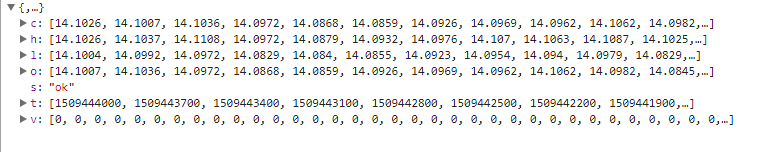
处理的时候只是将所有整点的数据该股票的最高点解析出来,xhr请求中的时间戳是秒级的,然后将之转换成北京时间,并且将时间进行排序,然后获取正确的其他的并没有进行处理,程序中存储时间和最高点都是用数组存储的,并且改程序是单进程,会更新~
只想说xpath是真心好用,第二次用,解析参数的时候很方便。
#-*-coding:utf-8 -*-

import urllib

import re

import json

import urllib2

from lxml import etree

import requests

import time

from Queue import Queue

import matplotlib.pyplot as plt

URL = 'http://quote.fx678.com/exchange/WH'

nation_que = Queue()

nation = Queue()

high = Queue()

start_time = Queue()

Chart = []

def __cmp__(self, other):

    if self.time < other.time:

        return -1

    elif self.time == other.time:

        return 0

    else:

        return 1

class Share:

    def __init__(self,time,score):

        self.time = time

        self.score = score

    def __getitem__(self, key):

        self.item.get(key)

    def __cmp__(self, other):

        return cmp(self.time, other.time)

    def __str__(self):

        return self.time + " " + str(self.score)

def download(url, headers, num_try=2):

    while num_try >0:

        num_try -= 1

        try:

            content = requests.get(url, headers=headers)

            return content.text

        except urllib2.URLError as e:

            print 'Download error', e.reason

    return None

def get_type_url():

    headers = {

        'User_agent': 'Mozilla/5.0 (Macintosh; Intel Mac OS X 10_12_6) AppleWebKit/537.36 (KHTML, like Gecko) Chrome/61.0.3163.100 Safari/537.36',

        'Referer': 'http://quote.fx678.com/exchange/WH',

        'Cookie': 'io=-voMclEjiizK9nWKALqB; UM_distinctid=15f5938ddc72db-089cf9ba58d9e5-31657c00-fa000-15f5938ddc8b24; Hm_lvt_d25bd1db5bca2537d34deae7edca67d3=1509030420; Hm_lpvt_d25bd1db5bca2537d34deae7edca67d3=1509031023',

        'Accept-Language': 'zh-CN,zh;q=0.8',

        'Accept-Encoding': 'gzip, deflate',

        'Accept': '*/*'

    }

    content = download(URL,headers)

    html = etree.HTML(content)

    result = html.xpath('//a[@class="mar_name"]/@href')

    for each in result:

        print each

        st = each.split('/')

        nation_que.put(st[len(st)-1])

    get_precent()

def get_precent():

    while not nation_que.empty():

        ss = nation_que.get(False)

        print ss

        url = 'http://api.q.fx678.com/history.php?symbol=' + ss +'&limit=288&resolution=5&codeType=8100&st=0.43342772855649625'

        print url

        headers = {'Accept':'application/json, text/javascript, */*; q=0.01',

                'Accept-Encoding':'gzip, deflate',

                'Accept-Language':'zh-CN,zh;q=0.8',

                'Connection':'keep-alive',

                'Host':'api.q.fx678.com',

                'Origin':'http://quote.fx678.com',

                'Referer':'http://quote.fx678.com/symbol/USD',

                'User-Agent':'Mozilla/5.0 (Windows NT 6.1; WOW64) AppleWebKit/537.36 (KHTML, like Gecko) Chrome/61.0.3163.100 Safari/537.36'

               }

        num_try = 2

        while num_try >0:

            num_try -= 1

            try:

                content = requests.get(url, headers=headers)

                html = json.loads(content.text)

                st = html['h']

                T_time = html['t']

                if  len(st) > 0 and len(T_time) > 0:

                    nation.put(ss)

                    high.put(st)

                    start_time.put(T_time)

                break

            except urllib2.URLError as e:

                print 'Download error', e.reason

        nation_que.task_done()

        draw_pict()

def sub_sort(array,array1,low,high):

    key = array[low]

    key1 = array1[low]

    while low < high:

        while low < high and array[high] >= key:

            high -= 1

        while low < high and array[high] < key:

            array[low] = array[high]

            array1[low] = array1[high]

            low += 1

            array[high] = array[low]

            array1[high] = array1[low]

    array[low] = key

    array1[low] = key1

    return low

def quick_sort(array,array1,low,high):

     if low < high:

        key_index = sub_sort(array,array1,low,high)

        quick_sort(array,array1,low,key_index)

        quick_sort(array,array1,key_index+1,high)

def draw_pict():

    while True:

        Nation = nation.get(False)

        High = high.get(False)

        Time = start_time.get(False)

        T_time = []

        High_Rate = []

        num = 0

        for each,high1 in zip(Time,High):

            st = time.localtime(float(each))

            if st.tm_min == 0:

                T_time.append(st.tm_hour)

                High_Rate.append(high1)

        quick_sort(T_time,High_Rate,0,len(T_time)-1)

        plt.plot(T_time,High_Rate, marker='*')

        plt.show()

        plt.title(Nation)

        nation.task_done()

        high.task_done()

        break

if __name__ == '__main__':

    get_type_url()
Python股票信息抓取~的更多相关文章
- Python股票信息抓取(三)
最近在看mongodb,然后会用了一些最简单的mongodb的操作,然后想着结合股票信息的数据的抓取,然后将数据存储在mongodb中,对于mongo和数据库的最大的区别是,mongo不需要建表,直接 ...
- Python股票信息抓取(二)
在一的基础上,想着把所有的折线图放在一个图中,然后图的结果如图所示: 不是略丑,是很丑~ 依然的单进程,只是将图标结果放在了一张图里 代码如下: #-*-coding:utf-8 -*- import ...
- python 爬虫抓取心得
quanwei9958 转自 python 爬虫抓取心得分享 urllib.quote('要编码的字符串') 如果你要在url请求里面放入中文,对相应的中文进行编码的话,可以用: urllib.quo ...
- python requests抓取NBA球员数据,pandas进行数据分析,echarts进行可视化 (前言)
python requests抓取NBA球员数据,pandas进行数据分析,echarts进行可视化 (前言) 感觉要总结总结了,希望这次能写个系列文章分享分享心得,和大神们交流交流,提升提升. 因为 ...
- python数据抓取分析(python + mongodb)
分享点干货!!! Python数据抓取分析 编程模块:requests,lxml,pymongo,time,BeautifulSoup 首先获取所有产品的分类网址: def step(): try: ...
- python 处理抓取网页乱码
python 处理抓取网页乱码问题一招鲜 相信用python的人一定在抓取网页时,被编码问题弄晕过一阵 前几天写了一个测试网页的小脚本,并查找是否包含指定的信息. 在html = urllib2. ...
- Python爬虫----抓取豆瓣电影Top250
有了上次利用python爬虫抓取糗事百科的经验,这次自己动手写了个爬虫抓取豆瓣电影Top250的简要信息. 1.观察url 首先观察一下网址的结构 http://movie.douban.com/to ...
- Python爬虫抓取东方财富网股票数据并实现MySQL数据库存储
Python爬虫可以说是好玩又好用了.现想利用Python爬取网页股票数据保存到本地csv数据文件中,同时想把股票数据保存到MySQL数据库中.需求有了,剩下的就是实现了. 在开始之前,保证已经安装好 ...
- python Web抓取(一)[没写完]
需要的模块: python web抓取通过: webbrowser:是python自带的,打开浏览器获取指定页面 requests:从因特网上下载文件和网页 Beautiful Soup:解析HTML ...
随机推荐
- The meterprter basic commonds
Using Meterpeter commands Since the Meterpreter provides awhole new environment, we will cover some ...
- Update submitted Perforce changelist description by P4.net api
Firstly download the p4.net sdk from Perforce official site's download page. It's a .zip file, extra ...
- HDU 2586 倍增法求lca
How far away ? Time Limit: 2000/1000 MS (Java/Others) Memory Limit: 32768/32768 K (Java/Others)To ...
- c++构造是否要加大括号
笔者被这个问题困扰良久,终于下决心看个究竟.废话不多说,先上结论: 如果对象是原生类型,加大括号会保证生成对象被初始化(一般是0) 如果对象非原生类型,加大括号或者不加,效果是一样的,都会执行该类的默 ...
- 「git」mac下git提交github代码
1.打开终端,输入 cd -/.ssh 这个是检查你的ssh的是否存在的,如果存在,先将已有的ssh备份,或者将新建的ssh生成到另外的目录下(如果第一次配置一般都是不存在的),不存在,你将会看到如下 ...
- Splay 区间操作(二)
首先基本操作如下: 删除第rank个点 void Remove(int id){//删除第rank个点 rank++; int x = find(root, rank - 1); splay(x, 0 ...
- php基础知识(语法与原理)
一.php简介 PHP超文本预处理器.是嵌入HTML文件中的服务器脚本程序. PHP代码标记:<?php …. ?> PHP文件的扩展名:.php PHP文件的执行:必须从域名开始访问 P ...
- sso单点登录的PHP实现(Laravel框架)
简单说一下我的逻辑,我也不知道我理解sso对不对. 假如三个站点 a.baidu.com b.baidu.com c.baidu.com a.baidu.com 作为验证用户登录账户. b和c作为客户 ...
- 使用git拉取github上的项目
一. 安装Git 去Git官网,下载安装包,一路点next,默认安装. 安装之后,在空白处右键,菜单显示有 Git GUI Here 和 Git Bash Here ,表示Git安装成功. 二. 配置 ...
- Linux高级编程--02.gcc和动态库
在Linux环境下,我们通常用gcc将C代码编译成可执行文件,如下就是一个简单的例子: 小实验:hello.c #include <stdlib.h> #include <stdio ...