
Docker Zero Deployment and Secrets (一)
在本节中,主要介绍在Docker swarm中如何不中断应用高可靠性的情况下更新服务和stack.这也叫做zero downtime deployment.还有就是swam如何管理密钥,保证容器之间的通信是安全可靠的。
一. Zero downtime deployment
1. 比较常见的更新方法
(1) Rolling updates
(2) Blue-green deployments
(3)Canary releases
2. Rolling updates
在关键的应用中,每个应用的服务都运行多个复本。举个例子,假如我们有三个复本实例,认为至少得有两个实例在同一时间运行,假如有100个实例复本,至少得有90实例复本在同一时间要有效。所以我们可以定义同时更新的实例有多少 个。在第二种假设的情况中,就是同时更新实例数为10个。
说白话一点就是假如一个应用有100个实例容器提供服务,那么我们每次更新10个,这样轮着更新。直至100个更新完,在这期间不停止服务。
注意:在署在多个节点的服务进行rolling updates时,最好是无状态的服务,假如是有状态的服务,建议调整方法,这个方法可能不太适合。
(1)定义stack文件 ,内容如下:
xiodi@c720131:~/docker$ cat stack.yaml
version: "3.5"
services:
web:
image: nginx:1.12-alpine
ports:
- 80:80
deploy:
replicas: 10
update_config:
parallelism: 2
delay: 10s
(2)使用stack文件部署服务
xiodi@c720131:~/docker$ sudo docker stack deploy -c stack.yaml web
[sudo] password for xiodi:
Creating network web_default
Creating service web_web
(3)在服务部署后,使用下面的命令进行服务的监控
xiodi@c720131:~/docker$ sudo watch docker stack ps web
ID NAME IMAGE NODE DESIRED STATE CURRENT STATE ERROR PORTS
tsmz1yh1r8sq web_web.1 nginx:1.12-alpine c720131.xiodi.cn Running Running about a minute ago
9efbgiu8xfu6 web_web.2 nginx:1.12-alpine c720132.xiodi.cn Running Running about a minute ago
j3ka20b1330l web_web.3 nginx:1.12-alpine c720132.xiodi.cn Running Running about a minute ago
t96zpspkrdll web_web.4 nginx:1.12-alpine c720132.xiodi.cn Running Running about a minute ago
q7vgy2b5ripc web_web.5 nginx:1.12-alpine ubuntu Running Running about a minute ago
lkrxparc8y5x web_web.6 nginx:1.12-alpine c720131.xiodi.cn Running Running about a minute ago
0nw5y74ow3vc web_web.7 nginx:1.12-alpine ubuntu Running Running about a minute ago
wpsn04qxzy0a web_web.8 nginx:1.12-alpine c720131.xiodi.cn Running Running about a minute ago
qcernrxbachq web_web.9 nginx:1.12-alpine ubuntu Running Running about a minute ago
kd5dbexndk61 web_web.10 nginx:1.12-alpine c720132.xiodi.cn Running Running about a minute ago
(4)更新web服务,然后观察结果 。
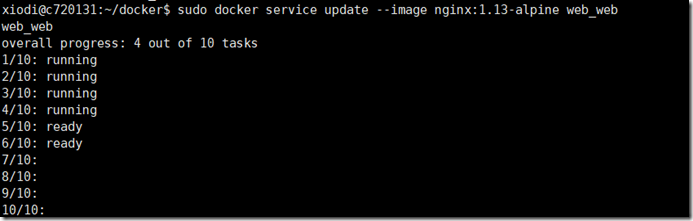
(5)更新完成后,显示结果如下
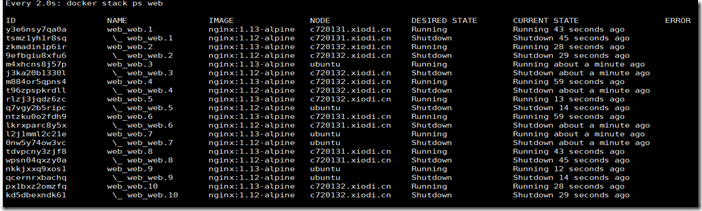
xiodi@c720131:~/docker$ sudo docker stack ps web
ID NAME IMAGE NODE DESIRED STATE CURRENT STATE ERROR PORTS
y3e6nsy7qa0a web_web.1 nginx:1.13-alpine c720131.xiodi.cn Running Running 3 minutes ago
tsmz1yh1r8sq \_ web_web.1 nginx:1.12-alpine c720131.xiodi.cn Shutdown Shutdown 3 minutes ago
zkmadin1p6ir web_web.2 nginx:1.13-alpine c720132.xiodi.cn Running Running 3 minutes ago
9efbgiu8xfu6 \_ web_web.2 nginx:1.12-alpine c720132.xiodi.cn Shutdown Shutdown 3 minutes ago
m4xhcns8j57p web_web.3 nginx:1.13-alpine ubuntu Running Running 4 minutes ago
j3ka20b1330l \_ web_web.3 nginx:1.12-alpine c720132.xiodi.cn Shutdown Shutdown 4 minutes ago
m884or5qpns4 web_web.4 nginx:1.13-alpine c720132.xiodi.cn Running Running 3 minutes ago
t96zpspkrdll \_ web_web.4 nginx:1.12-alpine c720132.xiodi.cn Shutdown Shutdown 3 minutes ago
rlzj3jqdz6zc web_web.5 nginx:1.13-alpine c720132.xiodi.cn Running Running 3 minutes ago
q7vgy2b5ripc \_ web_web.5 nginx:1.12-alpine ubuntu Shutdown Shutdown 3 minutes ago
ntzku0o2fdh9 web_web.6 nginx:1.13-alpine c720131.xiodi.cn Running Running 3 minutes ago
lkrxparc8y5x \_ web_web.6 nginx:1.12-alpine c720131.xiodi.cn Shutdown Shutdown 3 minutes ago
l2j1mml2c21e web_web.7 nginx:1.13-alpine ubuntu Running Running 4 minutes ago
0nw5y74ow3vc \_ web_web.7 nginx:1.12-alpine ubuntu Shutdown Shutdown 4 minutes ago
tdvpcny3zjf8 web_web.8 nginx:1.13-alpine c720131.xiodi.cn Running Running 3 minutes ago
wpsn04qxzy0a \_ web_web.8 nginx:1.12-alpine c720131.xiodi.cn Shutdown Shutdown 3 minutes ago
nkkjxxq9xos1 web_web.9 nginx:1.13-alpine ubuntu Running Running 3 minutes ago
qcernrxbachq \_ web_web.9 nginx:1.12-alpine ubuntu Shutdown Shutdown 3 minutes ago
px1bxz2omzfq web_web.10 nginx:1.13-alpine c720132.xiodi.cn Running Running 3 minutes ago
kd5dbexndk61 \_ web_web.10 nginx:1.12-alpine c720132.xiodi.cn Shutdown Shu
(5)执行下列命令,移除stack.
xiodi@c720131:~/docker$ sudo docker stack rm web
Removing service web_web
Removing network web_default
(6)如果部署单一的服务的话,可以使用以下命令设置新的一些rolling update值。
xiodi@c720131:~/docker$ sudo docker service create --name web \
> --replicas 10 \
> --update-parallelism 2 \
> --update-delay 10s \
> nginx:alpine
Docker Zero Deployment and Secrets (一)的更多相关文章
- Docker Zero Deployment and Secrets (二)
一. 健康检测: (1)定义检测信息如下(案例,在Dockerfile中定义) FROM alpine:3.6 ... HEALTHCHECK --interval=30s \ --timeo ...
- Kubernetes的控制器之Deployment的定义
Deploy 的控制器定义参数介绍 [root@master manifests]# kubectl explain deploy KIND: Deployment VERSION: extensio ...
- SpringCloud微服务实战——搭建企业级开发框架(三十五):SpringCloud + Docker + k8s实现微服务集群打包部署-集群环境部署
一.集群环境规划配置 生产环境不要使用一主多从,要使用多主多从.这里使用三台主机进行测试一台Master(172.16.20.111),两台Node(172.16.20.112和172.16.20.1 ...
- Docker Resources
Menu Main Resources Books Websites Documents Archives Community Blogs Personal Blogs Videos Related ...
- Docker下安装Jenkins
Docker安装参见:https://www.cnblogs.com/hackyo/p/9280042.html 安装Jenkins: docker run \ -u root \ --rm \ -d ...
- [转帖]Docker的数据管理(volume/bind mount/tmpfs)
Docker(十五)-Docker的数据管理(volume/bind mount/tmpfs) https://www.cnblogs.com/zhuochong/p/10069719.html do ...
- docker的安装及项目部署
Making Docker and Deployment Process Step: set up your docker environment build a image of activeMQ ...
- Docker(十五)-Docker的数据管理(volume/bind mount/tmpfs)
Docker提供了三种不同的方式用于将宿主的数据挂载到容器中:volumes,bind mounts,tmpfs volumes.当你不知道该选择哪种方式时,记住,volumes总是正确的选择. vo ...
- Docker的数据管理(volume/bind mount/tmpfs)
Docker提供了三种不同的方式用于将宿主的数据挂载到容器中:volumes,bind mounts,tmpfs volumes.当你不知道该选择哪种方式时,记住,volumes总是正确的选择. vo ...
随机推荐
- $('.goods_tag_ids_all')[0].checked = true;//~~~~~ 单条改变checkbox 属性样式
//点击左边全选选中时,都全选$('.goods_tag_ids_all').on('click',function(){ if($('.goods_tag_ids_all').is(':checke ...
- Python --Redis Hash操作
一.Redis Hash操作 Redis 数据库hash数据类型是一个string类型的key和value的映射表,适用于存储对象.Redis 中每个 hash 可以存储 232 - 1 键值对(40 ...
- Nginx -- proxy_pass配置
一.proxy_pass 作用域: location 不影响浏览器地址栏的url 设置被代理server的协议和地址 协议可以为http或https 地址可以为域名或IP 二.配置规则 2.1 测试环 ...
- phpstrom+xdebug+chrome+postman调试工具搭建
php是解释性语言,大部分调试的时候使用var_dump+exit就可以搞定了,但是在大项目或遇到了负载的问题的时候你就需要断点调试.变量打印.性能分析了,php也有非常程序的解决方案,我们现在就动手 ...
- OpenCV---边缘保留滤波EPF
OpenCV经典的两种实现EPF方法:高斯双边和均值迁移 一:双边模糊 差异越大,越会完整保留 def bi_demo(image): dst = cv.bilateralFilter(image,0 ...
- HDU6128 二次剩余/二次域求二次剩余解/LL快速乘法取模
LINK 题意:求满足模p下$\frac{1}{a_i+a_j}\equiv\frac{1}{a_i}+\frac{1}{a_j}$的对数,其中$n,p(1\leq n\leq10^5,2\leq p ...
- 2015/10/9 Python核编初级部分学习总结
终于在十一长假之后的两天看完了<Python核心编程>的初级部分.虽然到后来两章,类和环境看得越来越慢,越来越难以理解.很多东西只能靠强记,也没办法真正掌握了,我想了想,还是不强迫自己去背 ...
- 【Nginx】修改响应头,根据不同请求IP重定向到不同IP
背景: 使用CAS登录的过程中会涉及到三次重定向,如果在同一个局域网内,是没有任何问题的,但如果涉及到跨网访问,这个问题就比较蛋疼了. 解决思路: 通过Nginx对要访问的系统进行代理,根据请求IP来 ...
- Windows.event
获取鼠标位置 document.getElementById('div').onmousemove = function(e){ //--------Chrome, firefox 支持------- ...
- Ubuntu 14.04 开机手动开启numlock led
在windows开机后,数字键盘灯是亮着的,但是当切换到ubuntu系统后登录用户名和密码时,如果你设定的有数字,都要先打开数字键盘区NUMLOCK键,然后再输入了,很不方便. 首先,需要安装一个小软 ...