
re模块、hashlib模块
一.re模块
1.什么是正则?
正则就是用一系列具有特殊含义的字符组成一套规则,该规则用来描述具有某一特征的字符串,
正则就是用来去一个大的字符串中匹配出符合规则的子字符串
2.为何要用正则?
用户注册,爬虫程序
3.常用方法:
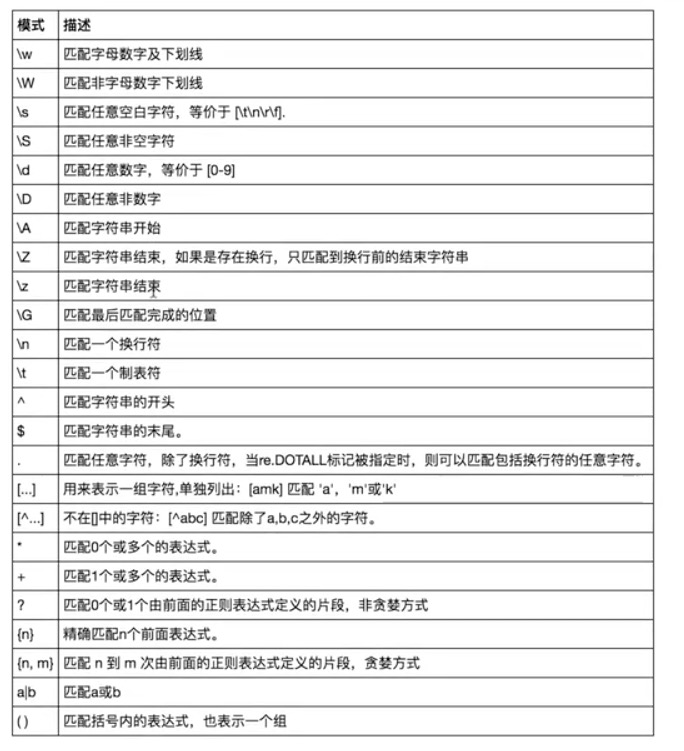
import re

print(re.findall('\w','Aah123 +-_'))

#['A', 'a', 'h', '1', '2', '3', '_']

print(re.findall('\w9\w','Aa9h123 aaa9c+-_'))

# ['a9h','a9c']

print(re.findall('\W','Aah123 +-_'))

#[' ', '+', '-']

print(re.findall('\s','Aah\t12\n3 +-_'))

#['\t', '\n', ' ']

print(re.findall('\S','Aah\t12\n3 +-_'))

#['A', 'a', 'h', '1', '2', '3', '+', '-', '_']

print(re.findall('\d','Aah\t12\n3 +-_'))

#['1', '2', '3']

print(re.findall('\D','Aah\t12\n3 +-_'))

#['A', 'a', 'h', '\t', '\n', ' ', '+', '-', '_']

print(re.findall('\t','Aah\t12\n3 +-_'))

#['\t']

print(re.findall('\n','Aah\t12\n3 +-_'))

#['\n']

# ^: 仅从头开始匹配

print(re.findall('^alex','alex is alex is alex'))

#['alex']

# $: 仅从尾部开始匹配

print(re.findall('alex$',' alex is alex is alex'))

['alex']

# .: 代表匹配一个字符,该字符可以是除换行符之外任意字符 #如果后面跟上re.DOTALL就是可以匹配全部任意的字符

print(re.findall('a.c','a a1c aaac a c asfdsaf a\nc',re.DOTALL))

# ['a1c','aac','a c','a\nc']

# []:代表匹配一个字符,这一个字符是来自于我们自定义的范围,[]内的上尖号表示的是取反

print(re.findall('a[0-9]c','a,c a a1c a9c aaac a c asfdsaf a\nc',re.DOTALL))

print(re.findall('a[a-zA-Z]c','a,c aAc a1c a9c aaac a c asfdsaf a\nc',re.DOTALL))

print(re.findall('a[a-zA-Z]c','a,c aAc a1c a9c aaac a c asfdsaf a\nc',re.DOTALL))

print(re.findall('a[+*/-]c','a,c a+c a-c a*c a/c aAc a1c a9c aaac a c asfdsaf a\nc',re.DOTALL))

print(re.findall('a[+*\-/]c','a,c a+c a-c a*c a/c aAc a1c a9c aaac ac asfdsaf a\nc',re.DOTALL))

print(re.findall('a[^0-9]c','a,c a a1c a9c aaac a c asfdsaf a\nc',re.DOTALL))

# 重复匹配

# ?:代表左边那一个字符出现0次到1次

print(re.findall('ab?','a ab abb abbbb a123b a123bbbb'))

# ['a','ab','ab','ab','a','a']

# *: 代表左边那一个字符出现0次到无穷次

print(re.findall('ab*','a ab abb abbbb a123b a123bbbb'))

# ['a','ab','abb','abbbb','a','a']

# +: 代表左边那一个字符出现1次到无穷次

print(re.findall('ab+','a ab abb abbbb a123b a123bbbb'))

# ['ab','abb','abbbb']

# {n,m}:代表左边那一个字符出现n次到m次

print(re.findall('ab{1,3}','a ab abb abbbb a123b a123bbbb'))

# ['ab', 'abb', 'abbb']

print(re.findall('ab{1,}','a ab abb abbbb a123b a123bbbb'))

print(re.findall('ab+','a ab abb abbbb a123b a123bbbb'))

print(re.findall('ab{0,}','a ab abb abbbb a123b a123bbbb'))

print(re.findall('ab*','a ab abb abbbb a123b a123bbbb'))

print(re.findall('ab{3}','a ab abb abbbb a123b a123bbbb'))

# .*: 匹配任意0个到无穷个字符,贪婪匹配

print(re.findall('a.*c','a123213123asdfasdfc123123123123+-0)((c123123'))

#.*?:匹配任意0个到无穷个字符,非贪婪匹配

print(re.findall('a.*?c','a123213123asdfasdfc123123123123+-0)((c123123'))

#|:或者

print(re.findall('companies|company','Too many companies have gone bankrupt,c and the next one is my company'))

#忽略大小写

print(re.findall('alex','my name is alex Alex is dsb aLex ALeX',re.I))

msg="""

my name is egon

asdfsadfadfsadf egon

123123123123123egon

"""

print(re.findall('egon$',msg,re.M)) #my name is egon\nasdfsadfadfsadf egon\n123123123123123egon'

#\# print(re.findall('a\\c','a\c')) #对于正则来说a\\c确实可以匹配到a\c,但是在python解释器读取a\\c时,会发生转义,然后交给re去执行,所以抛出异常

print(re.findall(r'a\\c','a\c')) #r代表告诉解释器使用rawstring,即原生字符串,把我们正则内的所有符号都当普通字符处理,不要转义

print(re.findall('a\\\\c','a\c')) #同上面的意思一样,和上面的结果一样都是['a\\c']

#():分组

print(re.findall('ab+','ababab123')) #['ab', 'ab', 'ab']

print(re.findall('(ab)+123','ababab123')) #['ab'],匹配到末尾的ab123中的ab

print(re.findall('(?:ab)+123','ababab123')) #findall的结果不是匹配的全部内容,而是组内的内容,?:可以让结果为匹配的全部内容

print(re.findall('href="(.*?)"','<a href="http://www.baidu.com">点击</a>'))#['http://www.baidu.com']

print(re.findall('href="(?:.*?)"','<a href="http://www.baidu.com">点击</a>'))#['href="http://www.baidu.com"']
#['1', '2', '60', '-40.35', '5', '-4', '3']取出其中的数字

msg="1-2*(60+(-40.35/5)-(-40*3))"

print(re.findall('\D?(-?\d+\.?\d*)',msg))
re模块的其他方法:
res=re.search() #只匹配成功一次,就结束,res.group() 取其中的分组,如果不写,就全取,如果写参数,就只取参数所对应的那个组
res=re.match() #只从开头进行匹配,相当于在search中的正则表达式中加 上尖号
# res=re.findall('(href)="(.*?)"','<p>动感视频</p><a href="https://www.douniwan.com/1.mp4">逗你玩呢</a><a href="https://www.xxx.com/2.mp4">葫芦娃</a>')

# print(res)

# res=re.search('(href)="(.*?)"','<p>动感视频</p><a href="https://www.douniwan.com/1.mp4">逗你玩呢</a><a href="https://www.xxx.com/2.mp4">葫芦娃</a>')

# print(res)

# print(res.group(0))

# print(res.group(1))

# print(res.group(2))

# res=re.match('abc','123abc') ## res=re.search('^abc','123abc')

# print(res)

# print(re.findall('alex','alex is alex is alex'))

# print(re.search('alex','alex is alex is alex'))

# print(re.match('alex','alex is alex is alex'))

# pattern=re.compile('alex')

# print(pattern.findall('alex is alex is alex'))

# print(pattern.search('alex is alex is alex'))

# print(pattern.match('alex is alex is alex'))
二.hashlib模块
1.什么是hash?
hash是一种算法,该算法接受一系列的数据,经过运算会得到一个hash值。
hash值具备三大特性:
1.传入的内容一样,得到的hash值一定一样,换句话说hash值一样,内容就一样。
2.如果采用的hash算法固定,无论传入的内容多大,hash值的长度是固定的。
3.hash值不可逆,就是说不能通过hash值逆推出内容。
2.为何要用hash?
特性1+2=>文件完整性的校验
特性3=>用于加密
import hashlib

m=hashlib.md5()

m.update('你好'.encode('utf-8'))

m.update('hello'.encode('utf-8'))

print(m.hexdigest()) #65c83c71cb3b2e2882f99358430679c3

m1=hashlib.md5()

m1.update('你好hello'.encode('utf-8'))

print(m1.hexdigest()) #65c83c71cb3b2e2882f99358430679c3

print(len(m1.hexdigest())) #

m2=hashlib.sha512()

m2.update(b'asdfassssssssssssssssssssssssssss')

print(m2.hexdigest())

print(len(m2.hexdigest()))
re模块、hashlib模块的更多相关文章
- Python第十一天 异常处理 glob模块和shlex模块 打开外部程序和subprocess模块 subprocess类 Pipe管道 operator模块 sorted函数 os模块 hashlib模块 platform模块 csv模块
Python第十一天 异常处理 glob模块和shlex模块 打开外部程序和subprocess模块 subprocess类 Pipe管道 operator模块 sorted函 ...
- Python进阶(九)----json模块, pickle模块, os模块,sys模块,hashlib模块
Python进阶----json模块, pickle模块, os模块,sys模块,hashlib模块 一丶序列化模块 什么是序列化: 将一种数据结构,转换成一个特殊的序列(特殊字符串,用于网络传输 ...
- 4-20模块 序列化模块 hashlib模块
1,模块,py文件就是模块,py之所以好用就是模块多. 2,模块的分类: 1,内置模块,python 安装时自带的模块 2,扩展模块,别人写好的,需要安装之后,可以直接使用.itchat微信模块, b ...
- python模块: hashlib模块, configparse模块, logging模块,collections模块
一. hashlib模块 Python的hashlib提供了常见的摘要算法,如MD5,SHA1等等. 摘要算法又称哈希算法.散列算法.它通过一个函数,把任意长度的数据转换为一个长度固定的数据串(通常用 ...
- python模块——hashlib模块(简单文件摘要算法实现)
#!/usr/bin/env python # -*- coding:utf-8 -*- __author__ = "loki" # Usage: hashlib模块 import ...
- Python3 os模块&sys模块&hashlib模块
''' os模块 非常重要的模块 ''' import os # print(os.getcwd()) # 获取当前工作目录 # os.chdir(r'路径名') # 改变当前工作目录 # print ...
- 0420模块 序列化模块 hashlib模块
复习:内置方法 __len__ len(obj)的结果依赖于obj.__len__()的结果,计算对象的长度__hash__ hash(obj)的结果依赖于obj.__hash__()的结果,计算对象 ...
- day13 函数模块之序列化 random 模块 os模块 sys模块 hashlib模块 collections模块
json import json dic = {'k1':'v1','k2':'v2','k3':'v3'} str_dic = json.dumps(dic) #序列化:将一个字典转换成一个字符串 ...
- python day 8: re模块补充,导入模块,hashlib模块,字符串格式化,模块知识拾遗,requests模块初识
目录 python day 8 1. re模块补充 2. import模块导入 3. os模块 4. hashlib模块 5. 字符串格式:百分号法与format方法 6. 模块知识拾遗 7. req ...
- python笔记7 logging模块 hashlib模块 异常处理 datetime模块 shutil模块 xml模块(了解)
logging模块 日志就是记录一些信息,方便查询或者辅助开发 记录文件,显示屏幕 低配日志, 只能写入文件或者屏幕输出 屏幕输出 import logging logging.debug('调试模式 ...
随机推荐
- 【rabbitmq】安装卸载
安装: 1. 在http://www.rabbitmq.com/install-rpm.html下载对应系统的rpm包 我下载的是rabbitmq-server-3.6.6-1.el6.noarch ...
- 《剑指offer》 数值的整数次方
本题来自<剑指offer> 数值的整数次方 题目: 给定一个double类型的浮点数base和int类型的整数exponent.求base的exponent次方. 思路: 代码从三个方面处 ...
- java接口实现
1.接口中的方法一定是public abstract方法所以类要继承实现接口的时候,一定要去掉abstract修饰符,而且还要标明方法的访问权限一定是public 声明接口不适用public就是友好的 ...
- Java在线备份和还原MySQL数据库。
2018年6月29日14:00:48 阅读数:1534 今天整了整整一整天,终于使用Java在线备份和还原MySQL数据库了,哎,备份倒是很快,就是在还原的时候遇到了一个问题,也不报错,结果将sql语 ...
- 引用的作用&引用与指针的区别
引入 C语言中函数有两种传参的方式: 传值和传址.以传值方式, 在函数调用过程中会生成一份临时变量用形参代替, 最终把实参的值传递给新分配的临时变量即形参. 它的优点是避免了函数调用的一些副作用, 但 ...
- Python面向对象 三大特性 综合案例+1(视频里的作业)
class Dog: # 在创建一个小狗实例的时候,给它设置几个属性 def __init__(self, name, age = 1): self.name = name self.age = ag ...
- 【C++ Primer | 10】再探迭代器
插入迭代器 1. 测试代码: #include<iostream> #include<vector> #include<list> #include<iter ...
- OSGi HelloWorld
1.创建项目 2.Debug Configurations,配好之后,可以点一下右下角的Validate Bundles验证一下是否有问题 3.Debug
- [转] HTML5 Blob与ArrayBuffer、TypeArray和字符串String之间转换
1.将String字符串转换成Blob对象 //将字符串 转换成 Blob 对象 var blob = new Blob(["Hello World!"], { type: 'te ...
- Spring MVC基础知识整理➣国际化和异常处理
概述 Spring框架为WEB项目提供了国际化以及异常处理机制.所谓的国际化也就是不同国籍,显示不同国籍的语言与符号.异常处理,也就是能够捕获WEB项目下的所有异常信息,并能处理记录这些异常信息机制. ...