
Flask源码解读--所有可扩展点
一、前言
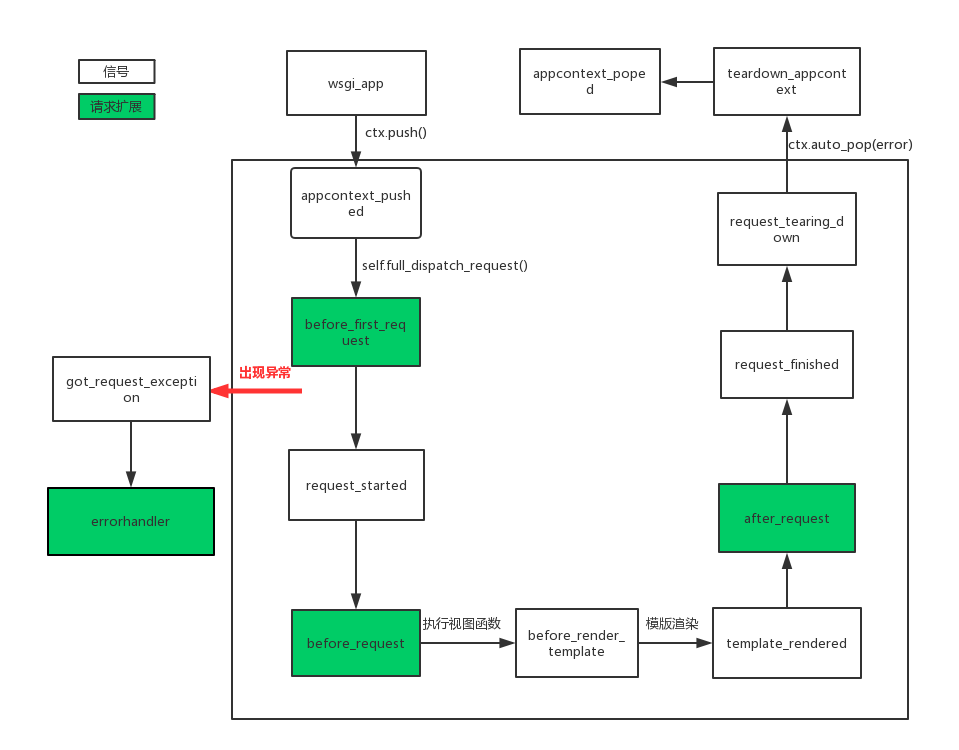
flask中有很多可扩展点(笔者这样称呼),其中包含了信号和请求钩子,这些信号和钩子有什么用呢?其主要作用用于帮助我们进行程序的耦合性,当然还可以让我们自定义一些行为。话不多说,通过阅读源码,笔者将这些所有的可扩展点的执行顺序进行总结(如下图),这样我们更能清楚的知道flask的内部请求流程,后面将对信号以及源码流程做说明,最后以下所有内容都是基于flask版本为1.0.2。重要:信号的触发可以在任何时候,以下流程只是源码的触发顺序。
二、信号
在django中同样也有信号,但django中是内置的,而Flask框架中的信号基于blinker,所以我们在使用flask信号时候需安装blinker。
pip3 install blinker
flask中所有的信号在其源码中都有定义:
request_started = _signals.signal('request-started')                # 请求到来前执行

request_finished = _signals.signal('request-finished')              # 请求结束后执行

before_render_template = _signals.signal('before-render-template')  # 模板渲染前执行

template_rendered = _signals.signal('template-rendered')            # 模板渲染后执行

got_request_exception = _signals.signal('got-request-exception')    # 请求执行出现异常时执行

request_tearing_down = _signals.signal('request-tearing-down')      # 请求执行完毕后自动执行(无论成功与否)

appcontext_tearing_down = _signals.signal('appcontext-tearing-down')# 应用上下文执行完毕后自动执行(无论成功与否)

appcontext_pushed = _signals.signal('appcontext-pushed')            # 应用上下文push时执行

appcontext_popped = _signals.signal('appcontext-popped')            # 应用上下文pop时执行

message_flashed = _signals.signal('message-flashed')                # 调用消息闪现时,自动触发
如何使用
使用信号的 connect() 方法订阅该信号,该方法的第一个参数是当信号发出时所调用的函数。第二个参数是可选参数,定义一个发送者。使用 disconnect() 方法可以退订信号。
示例:
from flask import Flask, signals, request

app = Flask(import_name=__name__)

def check_host(app, *args):

    print(app.config['DEBUG'])

    print("host is :", request.host)

signals.request_started.connect(receiver=check_host)  # 请求之前发送信号检查请求的host

@app.route("/")

def index():

    return 'index'

if __name__ == '__main__':

    app.run()

#结果

False

host is : 127.0.0.1:5000
在新的版本中还可以使用connect_via信号装饰器来订阅信号,以下代码可以修改为:
from flask import Flask, signals, request

app = Flask(import_name=__name__)

@signals.request_started.connect_via(app)

def check_host(app, *args):

    print(app.config['DEBUG'])

    print("host is :", request.host)

@app.route("/")

def index():

    return 'index'

if __name__ == '__main__':

    app.run()
自定义信号
自定义信号允许我们能跟多进行自定义操作,在自定义信号步骤:
- 定义信号
- 订阅信号
- 触发信号
示例:
rom flask import Flask

from blinker import Namespace

app = Flask(import_name=__name__)

model_signals=Namespace()

# 定义信号

model_update = model_signals.signal(name='model_update')

#触发信号是对应的操作

def logging(arg):

    print(arg)

    print('write log..')

#订阅信号

model_update.connect(logging)

@app.route("/")

def index():

    # 触发信号

    model_update.send('save model')

    return 'index'

if __name__ == '__main__':

    app.run()

结果:

save model

write log..
三、源码流程
在熟悉源码之前,你需要了解下flask的上线文管理,请移步这里, 之前在请求上下文源码中就介绍了请求进来会到wsgi_app,以下是源码定义:
def wsgi_app(self, environ, start_response):

    """The actual WSGI application. This is not implemented in

    :meth:`__call__` so that middlewares can be applied without

    losing a reference to the app object. Instead of doing this::

        app = MyMiddleware(app)

    It's a better idea to do this instead::

        app.wsgi_app = MyMiddleware(app.wsgi_app)

    Then you still have the original application object around and

    can continue to call methods on it.

    .. versionchanged:: 0.7

        Teardown events for the request and app contexts are called

        even if an unhandled error occurs. Other events may not be

        called depending on when an error occurs during dispatch.

        See :ref:`callbacks-and-errors`.

    :param environ: A WSGI environment.

    :param start_response: A callable accepting a status code,

        a list of headers, and an optional exception context to

        start the response.

    """

    ctx = self.request_context(environ)

    error = None

    try:

        try:

            ctx.push() #存储请求上下文

            response = self.full_dispatch_request() #处理请求,执行视图函数,返回响应

        except Exception as e:

            error = e

            response = self.handle_exception(e) # 处理异常

        except:

            error = sys.exc_info()[1]

            raise

        return response(environ, start_response) #返回给客户端

    finally:

        if self.should_ignore_error(error):

            error = None

        ctx.auto_pop(error) #删除栈中的请求上下文
在wsgi_app中会执行ctx.push方法将上线问push到栈中,此时触发1.appcontext_pushed,以下是源码部分:
def push(self):

    """Binds the app context to the current context."""

    self._refcnt += 1

    if hasattr(sys, 'exc_clear'):

        sys.exc_clear()

    _app_ctx_stack.push(self)

    appcontext_pushed.send(self.app) #触发appcontext_pushed信号
接着执行self.full_dispatch_request(),在改方法中主要是用于请求预处理、以及更具路由匹配执行视图函数,下面其源码:
def full_dispatch_request(self):

    """Dispatches the request and on top of that performs request

    pre and postprocessing as well as HTTP exception catching and

    error handling.

    .. versionadded:: 0.7

    """

    self.try_trigger_before_first_request_functions() #执行请求扩展before_first_request

    try:

        request_started.send(self)  #触发request_started信号

        rv = self.preprocess_request()

        if rv is None:

            rv = self.dispatch_request()

    except Exception as e:

        rv = self.handle_user_exception(e)  #处理异常

    return self.finalize_request(rv)  #最后对请求进行最后的处理
这里面执行请求扩展2.before_first_request,然后触发信号3.request_started信号,接着执行self.preprocess_request()进行请求预处理,源码:
bp = _request_ctx_stack.top.request.blueprint

funcs = self.url_value_preprocessors.get(None, ())

if bp is not None and bp in self.url_value_preprocessors:

    funcs = chain(funcs, self.url_value_preprocessors[bp])

for func in funcs:

    func(request.endpoint, request.view_args)

funcs = self.before_request_funcs.get(None, ()) #执行请求扩展before_request

if bp is not None and bp in self.before_request_funcs:

    funcs = chain(funcs, self.before_request_funcs[bp])

for func in funcs:

    rv = func()

    if rv is not None:

        return rv
在视图函数中如果使用了render_template(模版渲染),我们来看下其渲染方法:
def _render(template, context, app):

    """Renders the template and fires the signal"""

    before_render_template.send(app, template=template, context=context) # 触发before_render_template信号

    rv = template.render(context)   # 模版渲染

    template_rendered.send(app, template=template, context=context) ## 触发template_rendered信号

    return rv
渲染模版时候分别触发5.before_render_template以及6.template_rendered信号,在执行wsgi_app中的self.finalize_request(rv)对请求做最后的处理,源码:
def finalize_request(self, rv, from_error_handler=False):

    """Given the return value from a view function this finalizes

    the request by converting it into a response and invoking the

    postprocessing functions.  This is invoked for both normal

    request dispatching as well as error handlers.

    Because this means that it might be called as a result of a

    failure a special safe mode is available which can be enabled

    with the `from_error_handler` flag.  If enabled, failures in

    response processing will be logged and otherwise ignored.

    :internal:

    """

    response = self.make_response(rv)

    try:

        response = self.process_response(response)   #处理响应

        request_finished.send(self, response=response) # 触发request_finished信号

    except Exception:

        if not from_error_handler:

            raise

        self.logger.exception('Request finalizing failed with an '

                              'error while handling an error')

    return response
在触发request_finished之前会执行self.process_response,源码:
def process_response(self, response):

    """Can be overridden in order to modify the response object

    before it's sent to the WSGI server.  By default this will

    call all the :meth:`after_request` decorated functions.

    .. versionchanged:: 0.5

       As of Flask 0.5 the functions registered for after request

       execution are called in reverse order of registration.

    :param response: a :attr:`response_class` object.

    :return: a new response object or the same, has to be an

             instance of :attr:`response_class`.

    """

    ctx = _request_ctx_stack.top #获取请求上下文

    bp = ctx.request.blueprint  # 获取蓝图

    funcs = ctx._after_request_functions

    if bp is not None and bp in self.after_request_funcs:

        funcs = chain(funcs, reversed(self.after_request_funcs[bp]))#执行请求扩张after_request

    if None in self.after_request_funcs:

        funcs = chain(funcs, reversed(self.after_request_funcs[None]))

    for handler in funcs:

        response = handler(response)

    if not self.session_interface.is_null_session(ctx.session):

        self.session_interface.save_session(self, ctx.session, response)  # 保存session

    return response
所以这里先执行了请求扩展7.after_request然后触发信号8.request_finished信号,当在处理请求时候出现异常则会执行self.handle_exception(e),源码:
def handle_exception(self, e):

    """Default exception handling that kicks in when an exception

    occurs that is not caught.  In debug mode the exception will

    be re-raised immediately, otherwise it is logged and the handler

    for a 500 internal server error is used.  If no such handler

    exists, a default 500 internal server error message is displayed.

    .. versionadded:: 0.3

    """

    exc_type, exc_value, tb = sys.exc_info()

    got_request_exception.send(self, exception=e) #触发got_request_exception信号

    handler = self._find_error_handler(InternalServerError())

    if self.propagate_exceptions:

        # if we want to repropagate the exception, we can attempt to

        # raise it with the whole traceback in case we can do that

        # (the function was actually called from the except part)

        # otherwise, we just raise the error again

        if exc_value is e:

            reraise(exc_type, exc_value, tb)

        else:

            raise e

    self.log_exception((exc_type, exc_value, tb))

    if handler is None:

        return InternalServerError()

    return self.finalize_request(handler(e), from_error_handler=True)
def pop(self, exc=_sentinel):

    """Pops the request context and unbinds it by doing that.  This will

    also trigger the execution of functions registered by the

    :meth:`~flask.Flask.teardown_request` decorator.

    .. versionchanged:: 0.9

       Added the `exc` argument.

    """

    app_ctx = self._implicit_app_ctx_stack.pop()

    try:

        clear_request = False

        if not self._implicit_app_ctx_stack:

            self.preserved = False

            self._preserved_exc = None

            if exc is _sentinel:

                exc = sys.exc_info()[1]

            self.app.do_teardown_request(exc) # 触发request_tearing_down信号

            # If this interpreter supports clearing the exception information

            # we do that now.  This will only go into effect on Python 2.x,

            # on 3.x it disappears automatically at the end of the exception

            # stack.

            if hasattr(sys, 'exc_clear'):

                sys.exc_clear()

            request_close = getattr(self.request, 'close', None)

            if request_close is not None:

                request_close()

            clear_request = True

    finally:

        rv = _request_ctx_stack.pop()

        # get rid of circular dependencies at the end of the request

        # so that we don't require the GC to be active.

        if clear_request:

            rv.request.environ['werkzeug.request'] = None

        # Get rid of the app as well if necessary.

        if app_ctx is not None:

            app_ctx.pop(exc)  #触发teardown_appcontext信号

        assert rv is self, 'Popped wrong request context.  ' \

            '(%r instead of %r)' % (rv, self)
此时会触发9.request_tearing_down信号,然后执行到app_ctx.pop(exc):
def pop(self, exc=_sentinel):

    """Pops the app context."""

    try:

        self._refcnt -= 1

        if self._refcnt <= 0:

            if exc is _sentinel:

                exc = sys.exc_info()[1]

            self.app.do_teardown_appcontext(exc) #触发teardown_appcontext信号

    finally:

        rv = _app_ctx_stack.pop()

    assert rv is self, 'Popped wrong app context.  (%r instead of %r)' \

        % (rv, self)

    appcontext_popped.send(self.app) # 触发appcontext_poped信号
到pop app_ctx是先触发了10.teardown_appcontext信号再触发11.appcontext_poped信号,到此整个flask的所有信号以及所有可扩展点的所有顺序执行完毕。
最后,整体的执行顺序的流程图我已经在最开始放上了。
Flask源码解读--所有可扩展点的更多相关文章
- Python Web Flask源码解读(一)——启动流程
关于我 一个有思想的程序猿,终身学习实践者,目前在一个创业团队任team lead,技术栈涉及Android.Python.Java和Go,这个也是我们团队的主要技术栈. Github:https:/ ...
- Python Web Flask源码解读(二)——路由原理
关于我 一个有思想的程序猿,终身学习实践者,目前在一个创业团队任team lead,技术栈涉及Android.Python.Java和Go,这个也是我们团队的主要技术栈. Github:https:/ ...
- Python Web Flask源码解读(三)——模板渲染过程
关于我 一个有思想的程序猿,终身学习实践者,目前在一个创业团队任team lead,技术栈涉及Android.Python.Java和Go,这个也是我们团队的主要技术栈. Github:https:/ ...
- Python Web Flask源码解读(四)——全局变量
关于我 一个有思想的程序猿,终身学习实践者,目前在一个创业团队任team lead,技术栈涉及Android.Python.Java和Go,这个也是我们团队的主要技术栈. Github:https:/ ...
- 【mybatis源码学习】mybtias扩展点
[1]org.apache.ibatis.reflection.ReflectorFactory 该扩展点,主要是对javaBean对象,进行反射操作. org.apache.ibatis.refle ...
- Flask源码解读(一)
Flask是一个使用 Python 编写的轻量级 Web 应用框架.Flask 本身只是 Werkezug 和 Jinja2 的之间的桥梁,前者实现一个合适的 WSGI 应用,后者处理模板. 当然, ...
- flask 源码专题(九):flask扩展点
1. 信号(源码) 信号,是在flask框架中为我们预留的钩子,让我们可以进行一些自定义操作. pip3 install blinker 2. 根据flask项目的请求流程来进行设置扩展点 中间件 # ...
- Flask(4)- flask请求上下文源码解读、http聊天室单聊/群聊(基于gevent-websocket)
一.flask请求上下文源码解读 通过上篇源码分析,我们知道了有请求发来的时候就执行了app(Flask的实例化对象)的__call__方法,而__call__方法返回了app的wsgi_app(en ...
- flask的请求上下文源码解读
一.flask请求上下文源码解读 通过上篇源码分析( ---Flask中的CBV和上下文管理--- ),我们知道了有请求发来的时候就执行了app(Flask的实例化对象)的__call__方法,而__ ...
随机推荐
- Netatalk CVE-2018–1160 越界访问漏洞分析
编译安装 首先下载带有漏洞的源代码 https://sourceforge.net/projects/netatalk/files/netatalk/3.1.11/ 安装一些依赖库(可能不全,到时根据 ...
- Fiddler抓包使用教程-过滤
转载请标明出处:http://blog.csdn.net/zhaoyanjun6/article/details/72929800 本文出自[赵彦军的博客] Fiddler抓包可以完成我们移动开发者的 ...
- 【CSS基础】实现 div 里的内容垂直水平居中
方案一: 所有内容垂直水平居中 兼容性:IE8+. 条件:内容宽度和高度可以未知,可以是多行文字.图片.div. 描述:使用table-cell + vertical-align , html代码见文 ...
- python第三十三天----静态方法、类方法、属性方法
@staticmethod 装饰后,类中的方法转成静态方法 class a: @staticmethod def b(self): print('') 静态方法不可以访问实例变量或类变量,相当于类中的 ...
- 减少MySQL主从延迟的神器--并行复制大揭密
1. 简介 MySQL 5.6引入了基于schema的并行复制,即如果binlog events操作的是不同schema的对象,不是DDL,且操作的对象没有对其他schema的foreign key关 ...
- 合理配置SQLSERVER内存
合理配置SQLSERVER内存 原文地址:https://www.cnblogs.com/lyhabc/archive/2012/09/28/2707857.html SQLSERVER是个很喜欢内存 ...
- WTL汉化版
基于 WTL90_4060 仅汉化了Windows部分,CE和Mobile未汉化 AppWizard和rc文件已全部汉化 如果不需要汉化则将所有的2052目录删除即可 如有问题可以给我留言 点我下载
- MonkeyRunner 之如何获取APP的Package Name和Activity Name
别人写的就收藏了: MonkeyRunner 之如何获取APP的Package Name和Activity Name http://www.mamicode.com/info-detail-51278 ...
- mysql启动失败又一例
搭的wordpress报错: 后台用的mysql,之前也崩过,原因是虚拟内存耗尽,通过增加swap空间最终让数据重新启动. 但仅过一晚上,数据库再次崩溃.看来要查一查是什么程序耗尽资源. 执行top, ...
- 【记录】GIT 常用命令记录
1. 查看所有的提交版本,包含当你co到之前提交版本后依旧可以看到以前的日志 git log --graph --pretty=format:'%h -%d %s (%cr)' --abbrev-co ...