
U3D Transform用法
最近在学习unity3d,下面对Transform类做一个小结
一、常用属性和方法
1.1 常用属性:
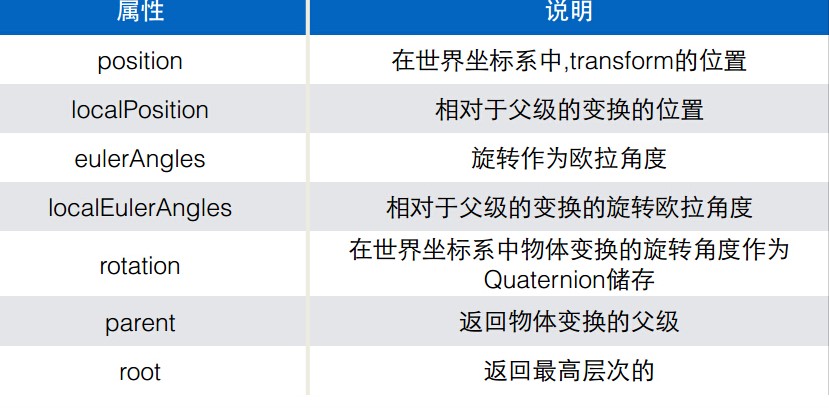
用代码展示一下上面的一些属性,值得注意的是myCube是mySphere的父物体
using UnityEngine;

public class test : MonoBehaviour

{

    GameObject myCube;

    GameObject mySphere;

    void Start()

    {

        myCube = GameObject.Find("Cube");

        mySphere = GameObject.Find("Sphere");

        Debug.Log("Cube position:" + myCube.transform.position);

        Debug.Log("Sphere position:" + mySphere.transform.position);

        Debug.Log("Sphere localPosition:" + mySphere.transform.localPosition);

        Debug.Log("eulerAngle" + myCube.transform.eulerAngles);

    }

}
结果如下:
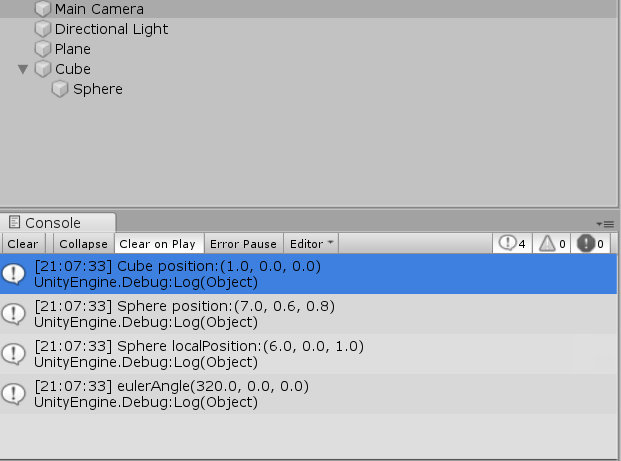
position 和localPosition的区别:
position是世界坐标中transform的位置,而localPosition是相对于父级变换的位置,即以父级物体的坐标为原点,它的相对位置。
eulerAngles:欧拉角,当rotate小于中的各个值都小于360时,使用eulerAngles将可以正确的将rotate的值转换为欧拉角
x、y、z角代表绕z轴旋转z度,绕x轴旋转x度,绕y轴旋转y度(这个顺序)。
仅使用这个变量读取和设置角度为绝对值。不要递增它们,当超过角度360度,它将错误。使用Transform.Rotate替代。
using UnityEngine;

using System.Collections;

public class ExampleClass : MonoBehaviour {

    public float yRotation = 5.0F;

    void Update() {

        yRotation += Input.GetAxis("Horizontal");

        transform.eulerAngles = new Vector3(, yRotation, );

    }

    void Example() {

        print(transform.eulerAngles.x);

        print(transform.eulerAngles.y);

        print(transform.eulerAngles.z);

    }

}
不要分别设置欧拉角其中一个轴(例如: eulerAngles.x = 10; ),因为这将导致偏移和不希望的旋转。当设置它们一个新的值时,要同时设置全部,如上所示。
translate:可以使物体向某方向移动物体多少距离。它有许多个重载
void Translate(Vector3 translation, Space relativeTo = Space.Self): 移动transform在translation的方向和距离。
如果relativeTo留空或者设置为Space.Self,移动被应用相对于变换的自身轴。(当在场景视图选择物体时,x、y和z轴显示)如果相对于Space.World 移动被应用相对于世界坐标系统。
using UnityEngine;

using System.Collections;

public class ExampleClass : MonoBehaviour {

    void Update() {

        transform.Translate(Vector3.forward * Time.deltaTime);

        transform.Translate(Vector3.up * Time.deltaTime, Space.World);

    }

}
void Translate(float x, float y, float z, Space relativeTo = Space.Self):: 移动变换由x沿着x轴,y沿着y轴,z沿着z轴。
using UnityEngine;

using System.Collections;

public class ExampleClass : MonoBehaviour {

    void Update() {

        transform.Translate(, , Time.deltaTime);

        transform.Translate(, Time.deltaTime, , Space.World);

    }

}
还有一些这里就不一一例举了
rotate:旋转
transform.Rotate(0, 90, 0);//分别绕X,Y,Z轴旋转
transform.Rotate(Vector3.right * Time.deltaTime);//以欧拉角旋转,顺序是ZXY,right是向X轴旋转1度
transform.Rotate(0, 45, 0, Space.World);//绕世界坐标系的XYZ轴旋转,也就是其顶层父物体的坐标系,如果自身在顶层则没有区别,并不是绕点旋转,而是不按照自身的坐标系旋转
transform.Rotate(Vector3.up, Space.Self);//绕自身坐标系旋转,这是默认的
void Rotate(Vector3 axis, float angle, Space relativeTo = Space.Self):按照angle度围绕axis轴旋转变换。
下面例子将使挂载脚本的物体绕Y轴不停地每次旋转45度
using UnityEngine;

public class MyRotate : MonoBehaviour

{

    void Update()

    {

        transform.Rotate(Vector3.up*Time.deltaTime, );

    }

}
在代码中直接使用小写的transform代表的是挂载该脚本的物体的transform
控制物体旋转的时候可能会弄不明白让它沿着哪个轴转,个人总结出了一个小技巧,即你在Rotate中使用了哪个轴就代表绕哪个轴转,上面的代码用的是Vector3.up,使用了包含Y轴的参数,所以是按Y轴旋转,当改成
Vector3.back则绕X轴旋转
二、Transform完整的内容(来自unity圣典)
Variables 变量
| childCount | The number of children the Transform has. 该变换的子对象数量。 |
| eulerAngles | The rotation as Euler angles in degrees. 此旋转作为欧拉角度。 |
| forward | The blue axis of the transform in world space. 在世界空间坐标,变换的蓝色轴。也就是z轴。 |
| hasChanged | Has the transform changed since the last time the flag was set to 'false'? 此变换自从上次标识是否被设置为false了? |
| localEulerAngles | The rotation as Euler angles in degrees relative to the parent transform's rotation. 旋转作为欧拉角度,相对于父级的变换旋转。 |
| localPosition | Position of the transform relative to the parent transform. 相对于父级的变换的位置。 |
| localRotation | The rotation of the transform relative to the parent transform's rotation. 该变换的旋转角度相对于父级变换的旋转角度。 |
| localScale | The scale of the transform relative to the parent. 相对于父级变换的缩放。 |
| localToWorldMatrix | Matrix that transforms a point from local space into world space (Read Only). 变换点的矩阵从局部坐标到世界坐标(只读)。 |
| lossyScale | The global scale of the object (Read Only). 该对象的整体缩放(只读)。 |
| parent | The parent of the transform. 该变换的父对象。 |
| position | The position of the transform in world space. 在世界空间坐标transform的位置。 |
| right | The red axis of the transform in world space. 在世界坐标空间,变换的红色轴。也就是x轴。 |
| root | Returns the topmost transform in the hierarchy. 返回最高层级的变换。 |
| rotation | The rotation of the transform in world space stored as a Quaternion. 在世界坐标空间,储存为四元数变换的旋转角度。 |
| up | The green axis of the transform in world space. 在世界坐标空间,变换的绿色轴。也就是Y轴。 |
| worldToLocalMatrix | Matrix that transforms a point from world space into local space (Read Only). 变换点的矩阵从世界坐标到局部坐标(只读)。 |
Functions 函数
| DetachChildren | Unparents all children.、 所有子对象解除父子关系。 |
| Find | Finds a child by name and returns it. 通过名字查找子对象并返回它。 |
| GetChild | Returns a transform child by index. 通过索引返回一个变换的子对象。 |
| GetSiblingIndex | Gets the sibling index. 获取该对象的同级索引。 |
| InverseTransformDirection | Transforms a direction from world space to local space. The opposite of Transform.TransformDirection. 变换的方向从世界坐标转换到局部坐标。和Transform.TransformDirection相反。 |
| InverseTransformPoint | Transforms position from world space to local space. The opposite of Transform.TransformPoint. 变换位置从世界坐标到局部坐标。和Transform.TransformPoint相反。 |
| InverseTransformVector | Transforms a vector from world space to local space. The opposite of Transform.TransformVector. 变换一个向量从世界坐标空间到局部坐标空间。这个操作与Transform.TransformVector相反。 |
| IsChildOf | Is this transform a child of /parent/? 这个变换是parent的子对象? |
| LookAt | Rotates the transform so the forward vector points at /target/'s current position. 旋转此变换,让向前向量指向target的当前位置。(照相机的视口对准目标) |
| Rotate | Applies a rotation of /eulerAngles.z/ degrees around the z axis, /eulerAngles.x/ degrees around the x axis, and /eulerAngles.y/ degrees around the y axis (in that order). 应用一个欧拉角的旋转角度,eulerAngles.z度围绕z轴,eulerAngles.x度围绕x轴,eulerAngles.y度围绕y轴(这样的顺序)。 |
| RotateAround | Rotates the transform about axis passing through point in world coordinates by angle degrees. 围绕世界坐标的point点的axis旋转该变换angle度。 |
| SetAsFirstSibling | Move the transform to the start of the local transfrom list. 移动该变换到此局部变换列表的开始。 |
| SetAsLastSibling | Move the transform to the end of the local transfrom list. 移动该变换到此局部变换列表的末尾。 |
| SetParent | Set the parent of the transform. 设置该变换的父级。 |
| SetSiblingIndex | Sets the sibling index. 设置同级对象的索引。 |
| TransformDirection | Transforms direction from local space to world space. 变换方向从局部坐标转换到世界坐标。 |
| TransformPoint | Transforms position from local space to world space. 变换位置从局部坐标到世界坐标。 |
| TransformVector | Transforms vector from local space to world space. \\变换一个向量从局部坐标空间到世界坐标空间。 |
| Translate | Moves the transform in the direction and distance of translation. 移动transform在translation的方向和距离。 |
U3D Transform用法的更多相关文章
- Raphael的transform用法
Raphael的transform用法 <%@ page language="java" contentType="text/html; charset=UTF-8 ...
- css3动画2(transform用法)
1.直接写在样式里,比如一个小箭头,transform:rotate(135deg)即可 2.写动画过程,@keyframes和transform和animation组合起来用 写在@keyframe ...
- U3D Transform组件
Variables position Vector3类型,物体位置,相对于世界坐标系的值.就是矩阵的最后一行的值. localPosition Vector3类型,物体相对于父元素的位置. euler ...
- 也谈谈Unity的transform使用
一.Transform和transform 我们来详谈Unity的transform使用,这里所说的tansform不是类UnityEngine命名空间下的Transform,而是transform. ...
- Akka(7): FSM:通过状态变化来转换运算行为
在上篇讨论里我们提到了become/unbecome.由于它们本质上是堆栈操作,所以只能在较少的状态切换下才能保证堆栈操作的协调及维持程序的清晰逻辑.对于比较复杂的程序流程,Akka提供了FSM:一种 ...
- CSS布局方案
居中布局 水平居中 1)使用inline-block+text-align 原理:先将子框由块级元素改变为行内块元素,再通过设置行内块元素居中以达到水平居中. 用法:对子框设置display:inli ...
- CSS 居中布局
来源:http://www.cnblogs.com/QianBoy/p/8539077.html 水平居中 1)使用inline-block+text-align 原理:先将子框由块级元素改变为行内块 ...
- css3 制作一个遮罩
思路:1.显示两块图片,2.图片区域(初始隐藏),3.鼠标移入,遮罩显示,此时遮住图片,4.鼠标移出,遮罩恢复初始状态 用到两个css3 属性:transtion ,transform 用法: 1. ...
- STL学习笔记(变动性算法)
本节描述的算法会变动区间内的元素内容.有两种方法可以变动元素内容: 1.运用迭代器遍历序列的过程中,直接加以变动 2.将元素从源区间赋值到目标区间的过程中加以变动 复制(copy)元素 OutputI ...
随机推荐
- java29
1.封装小练习--长方形 创建长方形类 使用getset方法 利用返回值方法计算长方形的面积,周长. 保证长方形的长宽为整数 2.继承小练习--猫狗 当父类中有构造器时,子类也要有构造器,并且要求设置 ...
- MFC停靠窗口实现(CDockablePane)
工作中编写MFC界面程序时用到了停靠窗口,为了避免之后用到时再去查询,这里记录下. 步骤 1.定义一个继承自CDockablePane的类 Class CDockableTest : public C ...
- Ubuntu 利用 crontab 和 notify-send 定时发送桌面通知,提示该休息啦
[经测试,每隔多少分钟执行并不像自己想象的一样] 比如:每隔50分钟执行一次提醒 */50 * * * * export DISPLAY=:0.0; notify-send -i /home ...
- Struts2学习第三天——保存登陆信息及数据校验
在JSP中服务器端保存数据的作用域通常有request.session.application,它们对应的Servlet API分别是HttpServletRquerst.HttpSession.Se ...
- 3 week work—Position
源代码部分: (1)httm部分: <!DOCTYPE html> <html lang="en"> <head> <meta chars ...
- 附加题2 :git 简单练习
目的: 练习git 基本操作 理解版本管理 Task 1:在码云上新建一个项目,项目命名 『Helloworld』 ,设置为公开访问. step 0: 在你计算机安装git.参照互联网教程<gi ...
- MyBatis 源码分析 - 映射文件解析过程
1.简介 在上一篇文章中,我详细分析了 MyBatis 配置文件的解析过程.由于上一篇文章的篇幅比较大,加之映射文件解析过程也比较复杂的原因.所以我将映射文件解析过程的分析内容从上一篇文章中抽取出来, ...
- Alpha代码规范、冲刺任务与计划
Alpha代码规范.冲刺任务与计划 团队名称: 云打印 作业要求: Alpha代码规范.冲刺任务与计划 作业目标:代码规范.冲刺任务与计划. 团队队员 队员学号 队员姓名 个人博客地址 备注 2216 ...
- 代码的重构(Refactor-Extract)
1.vs中的代码重构快捷方式:Refactor-Extract: 选中两个需要重构的部分完整代码,右击,选中Refactoe-Extract-Extract Method: 该选中的代码会自动形成一个 ...
- Nginx---(main block)
正常运行必备配置 1,user USERNAME [GROUPAME] ; 指定用于运行worker进程的用户和组: user nginx nginx; 2, pid /PATH/TO/PID_F ...