
1-监控界面sql保存
1, BufferSize_machine
1), template
主要用来监控buffersize的状态的
name: 模块名字, 用于后续调取使用,
label: 模块显示名字, 在页面显示的
includeAll: 是否包含 all 按钮
query: 查询的sql语句, 由于模版一致, 所以后续只保留sql
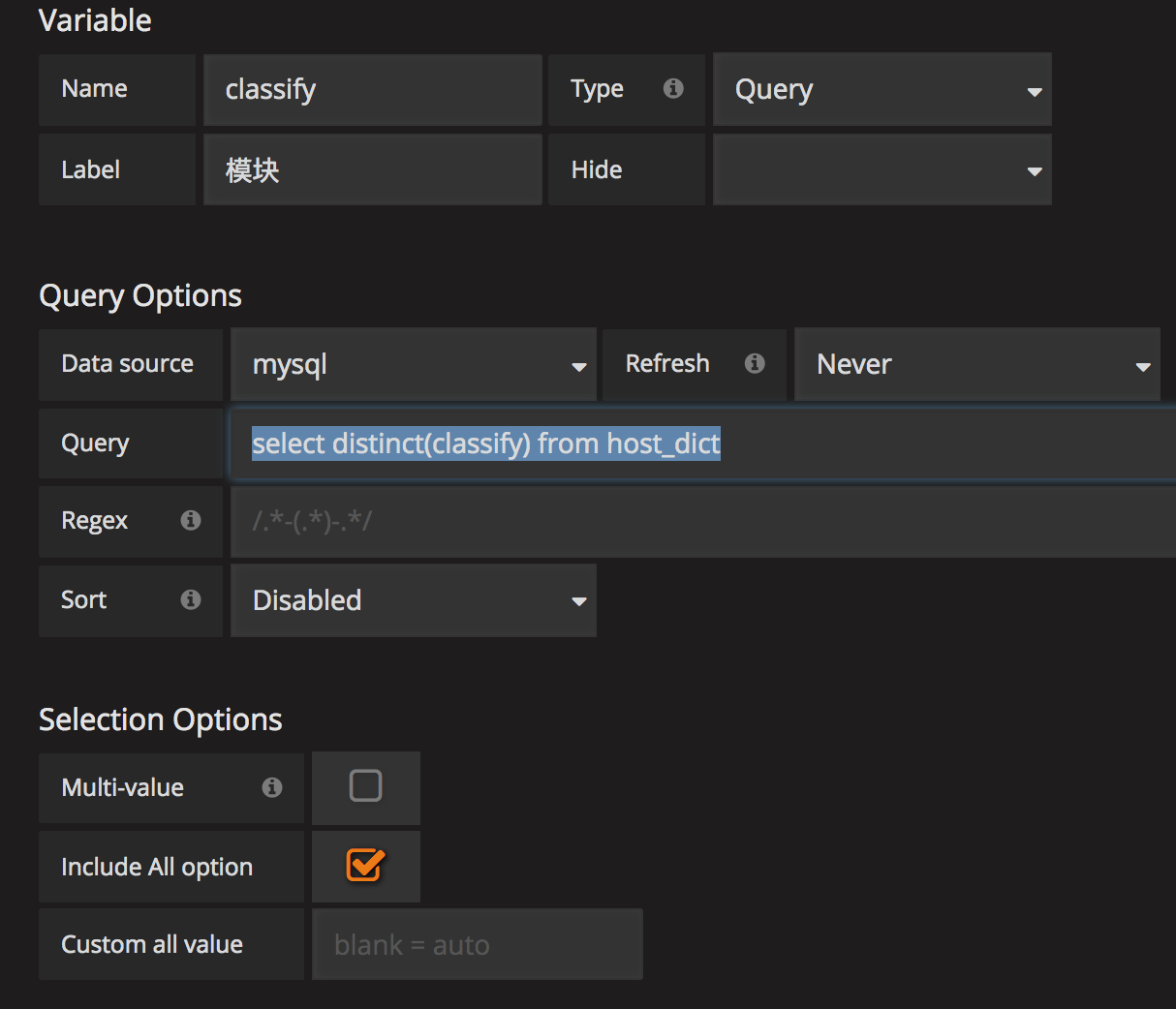
classify:
select distinct(classify) from host_dict
model_name
select distinct(model_name) from host_dict where classify in ($classify)
2) KafkaSinkNetword
SELECT

  UNIX_TIMESTAMP(time) as time_sec,

  value as value,

  host as metric

FROM jmx_status as jmx

left join host_dict as hd

  on hd.innet_ip = jmx.host

WHERE $__timeFilter(time)

  AND attribute = "BufferSize"

  AND object = 'KafkaSinkNetwork'

  AND hd.classify in ($classify)

  and hd.model_name in ($model_name)

ORDER BY time ASC, host
3), KafkaSinkFile
SELECT

  UNIX_TIMESTAMP(time) as time_sec,

  value as value,

  host as metric

FROM jmx_status as jmx

left join host_dict as hd

  on hd.innet_ip = jmx.host

WHERE $__timeFilter(time)

  AND attribute = "BufferSize"

  AND object = 'KafkaSinkFile'

  AND hd.classify in ($classify)

  and hd.model_name in ($model_name)

ORDER BY time ASC, host
4), FileSink
SELECT

  UNIX_TIMESTAMP(time) as time_sec,

  value as value,

  host as metric

FROM jmx_status as jmx

left join host_dict as hd

  on hd.innet_ip = jmx.host

WHERE $__timeFilter(time)

  AND attribute = "BufferSize"

  AND object = 'FileSink'

  AND hd.classify in ($classify)

  and hd.model_name in ($model_name)

ORDER BY time ASC, host
5), MessageCopy
SELECT

  UNIX_TIMESTAMP(time) as time_sec,

  value as value,

  host as metric

FROM jmx_status as jmx

left join host_dict as hd

  on hd.innet_ip = jmx.host

WHERE $__timeFilter(time)

  AND attribute = "BufferSize"

  AND object = 'MessageCopy'

  AND hd.classify in ($classify)

  and hd.model_name in ($model_name)

ORDER BY time ASC, host
2, BufferSizeTopic
1) BufferSize长度
SELECT

  UNIX_TIMESTAMP(time) as time_sec,

  sum(value) as value,

  object as metric

FROM jmx_status

WHERE $__timeFilter(time)

  AND attribute = 'BufferSize'

GROUP BY object, time

ORDER BY time ASC, metric
3, Metric_machine
1), template
Classify
select distinct(classify) from host_dict
model_name
select distinct(model_name) from host_dict where classify in ($classify)
source_file
select distinct(component) from topic_count where component like '%Source'
kafka_file
select distinct(component) from topic_count where component like 'Kafka%';
2), 接受消息总量
SELECT

  UNIX_TIMESTAMP(tc.time) as time_sec,

  tc.host as metric,

  SUM(out_num) as value

FROM topic_count as tc

left join topic_dict as td

  on tc.topic = td.topic

left join host_dict as hd

  on hd.innet_ip = tc.host

WHERE $__timeFilter(time)

  AND tc.component in ($source_file)

  AND hd.classify in ($classify)

  and hd.model_name in ($model_name)

GROUP BY tc.host, tc.time

ORDER BY tc.time ASC, tc.host
3), 发送kafka消息总量
SELECT

  UNIX_TIMESTAMP(tc.time) as time_sec,

  tc.host as metric,

  SUM(in_num - out_num) as value

FROM topic_count as tc

left join topic_dict as td

  on tc.topic = td.topic

left join host_dict as hd

  on hd.innet_ip = tc.host

WHERE $__timeFilter(time)

  AND tc.component in ($kafka_file)

  AND hd.classify in ($classify)

  and hd.model_name in ($model_name)

GROUP BY tc.host, tc.time

ORDER BY tc.time ASC, tc.host
4), 发送kafka消息失败量
SELECT

  UNIX_TIMESTAMP(tc.time) as time_sec,

  tc.host as metric,

  SUM(out_num) as value

FROM topic_count as tc

left join host_dict as hd

  on hd.innet_ip = tc.host

WHERE $__timeFilter(time)

 AND (tc.component = 'KafkaSinkNetwork' OR tc.component = 'KafkaSinkFile')

  AND hd.classify in ($classify)

  and hd.model_name in ($model_name)

GROUP BY tc.host, tc.time

ORDER BY tc.time ASC, tc.host
4, Metric_topic
1), template
component_name
select distinct(component_name) from topic_dict
topic
select distinct(topic) from topic_dict where component_name in ($component_name)
source_file
select distinct(component) from topic_count where component like '%Source'
kafka_file
select distinct(component) from topic_count where component like 'Kafka%';
2), iris接收总量
SELECT

  UNIX_TIMESTAMP(tc.time) as time_sec,

  tc.topic as metric,

  SUM(out_num) as value

FROM topic_count as tc

left join topic_dict as td

  on tc.topic = td.topic

WHERE $__timeFilter(time)

  AND tc.topic in ($topic)

  AND tc.component in ($source_file)

GROUP BY tc.topic, tc.time

ORDER BY tc.time ASC, tc.topic
3), 发送kafka消息总量
SELECT

  UNIX_TIMESTAMP(time) as time_sec,

  tc.topic as metric,

  SUM(in_num - out_num) as value

FROM topic_count as tc

left join topic_dict as td

  on tc.topic = td.topic

WHERE $__timeFilter(time)

  AND tc.topic in ($topic)

  AND tc.component in ($kafka_file)

GROUP BY tc.topic, tc.time

ORDER BY tc.time ASC, tc.topic
4), 发送kafka消息失败量
SELECT

  UNIX_TIMESTAMP(time) as time_sec,

  sum(out_num) as value,

  topic as metric

FROM topic_count

WHERE $__timeFilter(time)

  AND (component = 'KafkaSinkNetwork' OR component = 'KafkaSinkFile')

  AND topic in ($topic)

GROUP BY topic, time

ORDER BY time ASC, metric
5), 消息丢失数
SELECT

  UNIX_TIMESTAMP(time) as time_sec,

  (temp.value - SUM(tc.in_num - tc.out_num)) as value,

  tc.topic as metric

FROM topic_count as tc

left join topic_dict as td

  on tc.topic = td.topic

right join (

    SELECT

      tc2.time as calen,

      tc2.topic,

      SUM(out_num) as value

    FROM topic_count as tc2

    left join topic_dict as td2

      on tc2.topic = td2.topic

    WHERE $__timeFilter(tc2.time)

      AND tc2.topic in ($topic)

      AND tc2.component in ($source_file)

      AND tc2.component <> 'FileSource'

    GROUP BY tc2.topic, tc2.time

) as temp

  on temp.calen = tc.time

    and temp.topic = tc.topic

WHERE $__timeFilter(time)

  AND tc.topic in ($topic)

  AND tc.component in ($kafka_file)

GROUP BY tc.time, tc.topic

ORDER BY tc.topic, tc.time asc
6), 验平汇总, 此为表格
SELECT

  date_format(time, '%Y-%m-%d %H:%i:%s') as time,

  tc.topic,

  temp.value as iris总接受量,

  SUM(tc.in_num - tc.out_num) as kafka发送成功,

  SUM(tc.out_num) as kafka发送失败,

  (temp.value - SUM(tc.in_num - tc.out_num)) as 消息丢失数

FROM topic_count as tc

left join topic_dict as td

  on tc.topic = td.topic

right join (

    SELECT

      tc2.time as calen,

      tc2.topic,

      SUM(out_num) as value

    FROM topic_count as tc2

    left join topic_dict as td2

      on tc2.topic = td2.topic

    WHERE $__timeFilter(tc2.time)

      AND tc2.topic in ($topic)

      AND tc2.component in ($source_file)

      AND tc2.component <> 'FileSource'

    GROUP BY tc2.topic, tc2.time

) as temp

  on temp.calen = tc.time

    and temp.topic = tc.topic

WHERE $__timeFilter(time)

  AND tc.topic in ($topic)

  AND tc.component in ($kafka_file)

GROUP BY tc.time, tc.topic

ORDER BY tc.topic, tc.time asc
5, QPS_Component
qps
SELECT

  UNIX_TIMESTAMP(time) as time_sec,

  sum(value) as value,

  object as metric

FROM jmx_status

WHERE $__timeFilter(time)

  AND attribute = 'QPS'

GROUP BY object, time

ORDER BY time ASC, metric
6, QPS_machine
1), template
classify
select distinct(classify) from host_dict
model_name
select distinct(model_name) from host_dict where classify in ($classify)
2), topic_source
SELECT

  UNIX_TIMESTAMP(time) as time_sec,

  value as value,

  host as metric

FROM jmx_status as jmx

left join host_dict as hd

  on hd.innet_ip = jmx.host

WHERE $__timeFilter(time)

  AND attribute = "QPS"

  AND object = 'TcpSource'

  AND hd.classify in ($classify)

  and hd.model_name in ($model_name)

ORDER BY time DESC, metric

limit
3), js_source
SELECT

  UNIX_TIMESTAMP(time) as time_sec,

  value as value,

  host as metric

FROM jmx_status as jmx

left join host_dict as hd

  on hd.innet_ip = jmx.host

WHERE $__timeFilter(time)

  AND attribute = "QPS"

  AND object = 'JsSource'

  AND hd.classify in ($classify)

  and hd.model_name in ($model_name)

ORDER BY time DESC

limit
4), legency_source
SELECT

  UNIX_TIMESTAMP(time) as time_sec,

  value as value,

  host as metric

FROM jmx_status as jmx

left join host_dict as hd

  on hd.innet_ip = jmx.host

WHERE object = 'LegacyJsSource'

  AND attribute = "QPS"

  AND $__timeFilter(time)

  AND hd.classify in ($classify)

  and hd.model_name in ($model_name)

ORDER BY time DESC

limit
5), webSource
SELECT

  UNIX_TIMESTAMP(time) as time_sec,

  value as value,

  host as metric

FROM jmx_status as jmx

left join host_dict as hd

  on hd.innet_ip = jmx.host

WHERE object = 'WebSource'

  AND attribute = "QPS"

  AND $__timeFilter(time)

  AND hd.classify in ($classify)

  and hd.model_name in ($model_name)

ORDER BY time DESC

limit
6), zhixinSource
SELECT

  UNIX_TIMESTAMP(time) as time_sec,

  value as value,

  concat('KSF-', host) as metric

FROM jmx_status as jmx

left join host_dict as hd

  on hd.innet_ip = jmx.host

WHERE object = 'ZhixinSource'

  AND attribute = "QPS"

  AND $__timeFilter(time)

  AND hd.classify in ($classify)

  and hd.model_name in ($model_name)

ORDER BY time DESC

limit
7) cdn_httpsource
SELECT

  UNIX_TIMESTAMP(time) as time_sec,

  value as value,

  host as metric

FROM jmx_status as jmx

left join host_dict as hd

  on hd.innet_ip = jmx.host

WHERE object = 'CdnHttpSource'

  AND attribute = "QPS"

  AND $__timeFilter(time)

  AND hd.classify in ($classify)

  and hd.model_name in ($model_name)

ORDER BY time DESC

limit
8), qps_everyhost
SELECT

  UNIX_TIMESTAMP(time) as time_sec,

  sum(value) as value,

  host as metric

FROM jmx_status as jmx

left join host_dict as hd

  on hd.innet_ip = jmx.host

WHERE $__timeFilter(time)

  AND attribute = "QPS"

  AND hd.classify in ($classify)

  and hd.model_name in ($model_name)

group by host, time

ORDER BY time DESC, metric

limit
9), qps_hostnum
SELECT

  UNIX_TIMESTAMP(js.time) as time_sec,

  count(distinct(js.host)) as value,

  hd.classify as metric

FROM jmx_status as js

left join host_dict as hd

  on js.host = hd.innet_ip

WHERE $__timeFilter(time)

  AND attribute = "QPS"

group by time, hd.classify

ORDER BY time DESC, metric

limit
7, Resource_machine
1), template
classify
select distinct(classify) from host_dict
model_name
select distinct(model_name) from host_dict where classify in ($classify)
2), cpu_used
SELECT

  UNIX_TIMESTAMP(time) as time_sec,

  value as value,

  host as metric

FROM jmx_status as jmx

left join host_dict as hd

  on hd.innet_ip = jmx.host

WHERE $__timeFilter(time)

  AND attribute = "SystemCpuLoad"

  AND hd.classify in ($classify)

  and hd.model_name in ($model_name)

ORDER BY time ASC, metric
3), memory_used
SELECT

  UNIX_TIMESTAMP(time) as time_sec,

  value as value,

  host as metric

FROM jmx_status as jmx

left join host_dict as hd

  on hd.innet_ip = jmx.host

WHERE $__timeFilter(time)

  AND attribute = "HeapMemoryUsage.used"

  AND hd.classify in ($classify)

  and hd.model_name in ($model_name)

ORDER BY time ASC, metric
4), thread_count
SELECT

  UNIX_TIMESTAMP(time) as time_sec,

  value as value,

  host as metric

FROM jmx_status as jmx

left join host_dict as hd

  on hd.innet_ip = jmx.host

WHERE $__timeFilter(time)

  AND attribute = "ThreadCount"

  AND hd.classify in ($classify)

  and hd.model_name in ($model_name)

ORDER BY time ASC, metric
5), openfile_script
SELECT

  UNIX_TIMESTAMP(time) as time_sec,

  value as value,

  host as metric

FROM jmx_status as jmx

left join host_dict as hd

  on hd.innet_ip = jmx.host

WHERE $__timeFilter(time)

  AND attribute = "OpenFileDescriptorCount"

  AND hd.classify in ($classify)

  and hd.model_name in ($model_name)

ORDER BY time ASC, metric
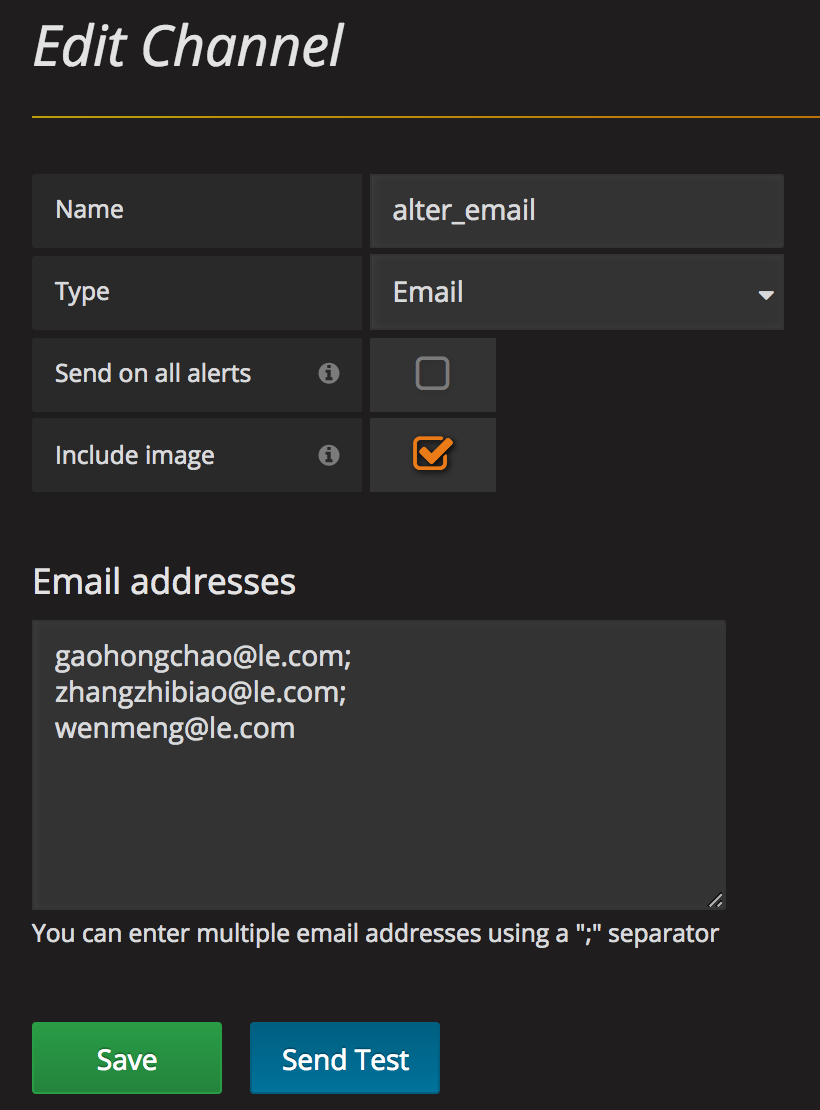
8, alter 报警用, 需要配合设置
iris第一次尝试入kafka失败百分比
SELECT

  UNIX_TIMESTAMP(time) as time_sec,

  value as value,

  host as metric

FROM jmx_status as jmx

left join host_dict as hd

  on hd.innet_ip = jmx.host

WHERE $__timeFilter(time)

  AND attribute = "OpenFileDescriptorCount"

  AND hd.classify in ($classify)

  and hd.model_name in ($model_name)

ORDER BY time ASC, metric
主要在alter标签中
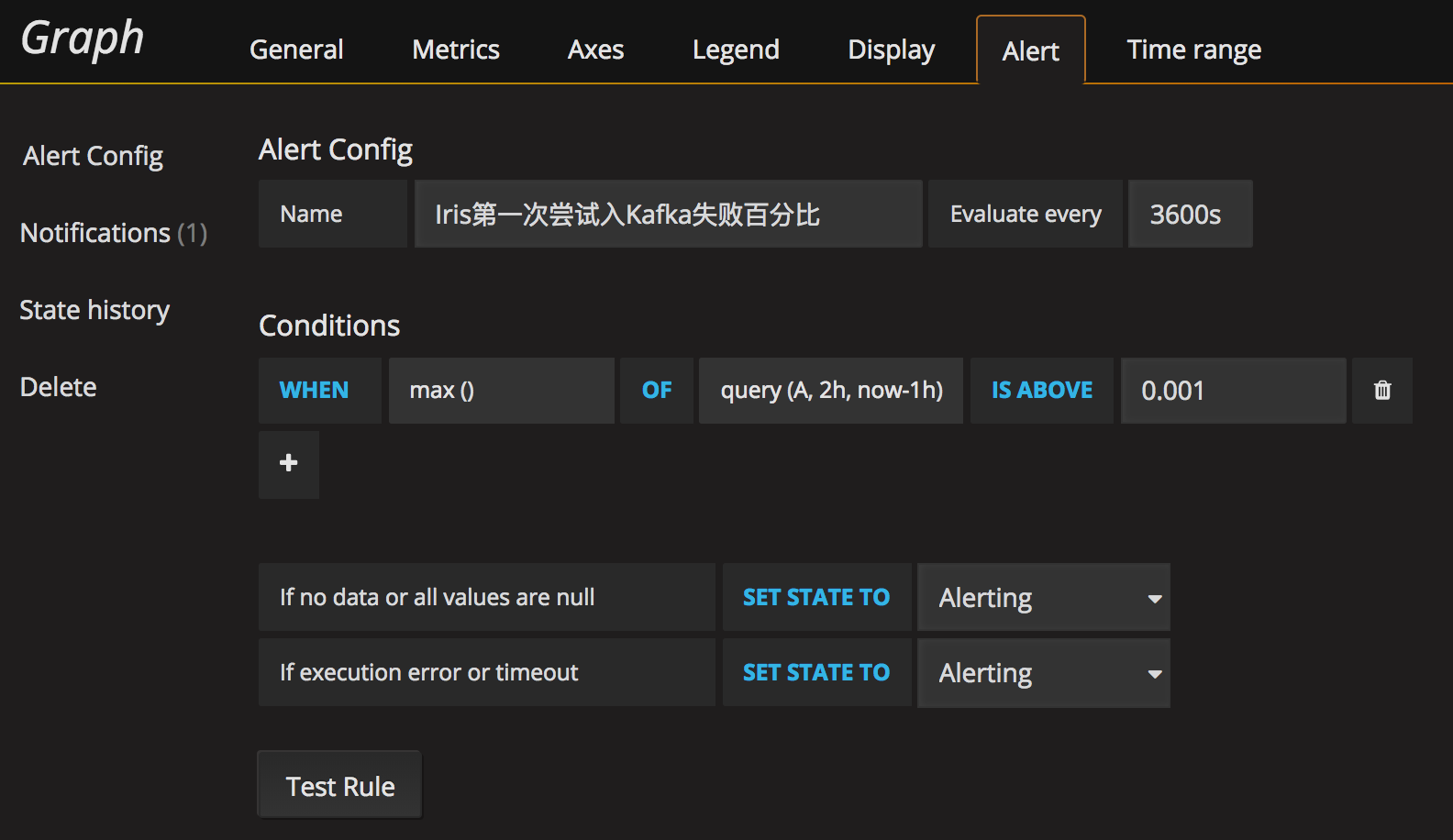
然后在alter标签中进行配置
9, 需要用到的sql保存
1), host_dict
CREATE TABLE `host_dict` (

  `id` bigint() NOT NULL AUTO_INCREMENT COMMENT '主键id',

  `classify` varchar() DEFAULT NULL COMMENT '类型',

  `model_name` varchar() DEFAULT NULL COMMENT '模块名',

  `innet_ip` varchar() DEFAULT NULL COMMENT '内网ip',

  `outnet_ip` varchar() DEFAULT NULL COMMENT '外网ip',

  `cpu_core` int() DEFAULT NULL COMMENT 'cpu核心',

  `memory_size` int() DEFAULT NULL COMMENT '内存',

  `address` varchar() DEFAULT NULL COMMENT '机房',

  `status` varchar() DEFAULT NULL COMMENT '状态',

  `plan` varchar() DEFAULT NULL COMMENT '规划',

  PRIMARY KEY (`id`),

  KEY `classify` (`classify`,`model_name`,`innet_ip`),

  KEY `idx_innet_ip` (`innet_ip`) USING BTREE

) ENGINE=InnoDB AUTO_INCREMENT= DEFAULT CHARSET=utf8
2), jmx_status
CREATE TABLE `jmx_status` (

  `host` varchar() NOT NULL DEFAULT '',

  `time` timestamp NOT NULL DEFAULT CURRENT_TIMESTAMP ON UPDATE CURRENT_TIMESTAMP,

  `report` timestamp NOT NULL DEFAULT '0000-00-00 00:00:00',

  `object` varchar() NOT NULL DEFAULT '',

  `attribute` varchar() NOT NULL DEFAULT '',

  `value` double DEFAULT NULL,

  PRIMARY KEY (`host`,`time`,`object`,`attribute`),

  KEY `idx_host_time_attribute_object` (`host`,`time`,`attribute`,`object`) USING BTREE,

  KEY `idx_time_attribute` (`time`,`attribute`) USING BTREE

) ENGINE=InnoDB DEFAULT CHARSET=utf8

/*!50100 PARTITION BY RANGE (unix_timestamp(time))

(PARTITION p20180811 VALUES LESS THAN (1534003199) ENGINE = InnoDB,

 PARTITION p20180812 VALUES LESS THAN (1534089599) ENGINE = InnoDB,

 PARTITION p20180813 VALUES LESS THAN (1534175999) ENGINE = InnoDB,

 PARTITION p20180814 VALUES LESS THAN (1534262399) ENGINE = InnoDB,

 PARTITION p20180815 VALUES LESS THAN (1534348799) ENGINE = InnoDB,

 PARTITION p20180816 VALUES LESS THAN (1534435199) ENGINE = InnoDB,

 PARTITION p20180817 VALUES LESS THAN (1534521599) ENGINE = InnoDB,

 PARTITION p20180818 VALUES LESS THAN (1534607999) ENGINE = InnoDB,

 PARTITION p20180819 VALUES LESS THAN (1534694399) ENGINE = InnoDB,

 PARTITION p20180820 VALUES LESS THAN (1534780799) ENGINE = InnoDB,

 PARTITION p20180821 VALUES LESS THAN (1534867199) ENGINE = InnoDB,

 PARTITION p20180822 VALUES LESS THAN (1534953599) ENGINE = InnoDB) */
3), topic_count
CREATE TABLE `topic_count` (

  `host` varchar() NOT NULL DEFAULT '',

  `time` timestamp NOT NULL DEFAULT CURRENT_TIMESTAMP ON UPDATE CURRENT_TIMESTAMP,

  `report` timestamp NOT NULL DEFAULT '0000-00-00 00:00:00',

  `component` varchar() NOT NULL DEFAULT '',

  `topic` varchar() NOT NULL DEFAULT '',

  `in_num` bigint() DEFAULT NULL,

  `out_num` bigint() DEFAULT NULL,

  PRIMARY KEY (`host`,`time`,`topic`,`component`),

  KEY `component` (`component`,`topic`,`time`),

  KEY `idx_topic` (`topic`) USING BTREE,

  KEY `idx_time_topic` (`time`,`topic`) USING BTREE,

  KEY `idx_compnent` (`component`) USING BTREE

) ENGINE=InnoDB DEFAULT CHARSET=utf8
4), topic_dict
CREATE TABLE `topic_dict` (

  `id` bigint() NOT NULL AUTO_INCREMENT COMMENT '主键id',

  `model` varchar() DEFAULT NULL COMMENT '模式',

  `component` varchar() DEFAULT NULL COMMENT '组件',

  `component_name` varchar() DEFAULT NULL COMMENT '组件名称',

  `component_type` varchar() DEFAULT NULL COMMENT '组件类型',

  `topic` varchar() DEFAULT NULL COMMENT 'topic',

  `topic_type` varchar() DEFAULT NULL COMMENT 'topic类型',

  `status` varchar() DEFAULT 'ON' COMMENT '状态',

  PRIMARY KEY (`id`),

  KEY `component` (`component`,`topic`),

  KEY `idx_topic` (`topic`) USING BTREE

) ENGINE=InnoDB AUTO_INCREMENT= DEFAULT CHARSET=utf8
1-监控界面sql保存的更多相关文章
- kafka-eagle监控界面搭建
kafka-eagle监控界面搭建 一.背景 二 .mac上安装kafka-eagle 1.安装JDK 2.安装eagle 1.下载eagle 2.解压并配置环境变量 3.启用kafka的JMX 4. ...
- PLSQL_监控有些SQL的执行次数和频率
原文:PLSQL_监控有些SQL的执行次数和频率 2014-12-25 Created By 鲍新建
- 【DB2】监控动态SQL语句
一.db2监控动态SQL(快照监控) db2示例用户登陆后,使用脚本语句db2 get snapshot for all on dbname>snap.out 也可以使用db2 get snap ...
- SpringBoot2.0 基础案例(07):集成Druid连接池,配置监控界面
一.Druid连接池 1.druid简介 Druid连接池是阿里巴巴开源的数据库连接池项目.Druid连接池为监控而生,内置强大的监控功能,监控特性不影响性能.功能强大,能防SQL注入,内置Login ...
- 通过本地Agent监控Azure sql database
背景: 虽然Azure sql database有DMVs可以查看DTU等使用情况,但记录有时间限制,不会一直保留.为了更好监控Azure_sql_database上各个库的DTU使用情况.数据库磁盘 ...
- 六:SpringBoot-集成Druid连接池,配置监控界面
SpringBoot-集成Druid连接池,配置监控界面 1.Druid连接池 1.1 Druid特点 2.SpringBoot整合Druid 2.1 引入核心依赖 2.2 数据源配置文件 2.3 核 ...
- C#使用Oxyplot绘制监控界面
C#中可选的绘图工具有很多,除了Oxyplot还有DynamicDataDisplay(已经改名为InteractiveDataDisplay)等等.不过由于笔者这里存在一些环境上的特殊要求,.Net ...
- 微服务监控druid sql
参考该文档 保存druid的监控记录 把日志保存的关系数据数据库(mysql,oracle等) 或者nosql数据库(redis,芒果db等) 保存的时候可以增加微服务名称标识好知道是哪个微服务的sq ...
- Unity 编辑器的 界面布局 保存方法
在软件界面的右上角(关闭按钮的下方),点击 layout (界面)的下拉箭头. 弹出选项中的 save layout....(保存界面选项),输入命名,就可以生成这个界面的布局. (软件本身也有 ...
随机推荐
- 《Java程序设计》第二周学习总结(一)
教材学习内容总结 标识符.关键字 基本数据类型 类型转换运算 输入.输出数据 数组 教材学习中的问题和解决过程 问题1:在创建vim并编写完成后出现以下情况 问题1解决方案:打开虚拟机的文件目录,发现 ...
- jfinal处理完html提交过来的数据,将处理信息返回给html页面。html根据返回值进行相应的处理
1.前台jQuery代码: $.ajax({ url: "/admin/jcsjpz/syxmdy/RemoveSyxm", data: {data: id}, success: ...
- adb、monkey常用命令
adb.monkey常用命令 1.查看连接设备 adb devices 2.连接android模拟器 adb connect 127.0.0.1:62001 3.安装软件 adb install 这个 ...
- 每月最后一周的周六晚上21:00执行任务-crontab
0 21 * * 6 /bin/sh /root/time.sh #“6”代表周六 时间判断脚本如下: #!/bin/bash if [ "$(date -d "+7 days&q ...
- Quartz.Net进阶之二:关于触发器的更多信息
与作业一样,触发器相对容易使用,但是在您可以充分利用Quartz.NET之前,确实需要了解和理解各种可自定义的选项. 此外,如前所述,您可以选择不同类型的触发器来满足不同的调度需求. 1.常见触发器属 ...
- 《笨方法学Python》加分题10
print(r"\n [换行]演示:", "\n第一行\n第二行") print("-" * 20) print(r"\\ [反斜 ...
- [Hadoop]Hadoop章1 Hadoop原理解析
Hadoop是Apache软件基金会所开发的并行计算框架与分布式文件系统.最核心的模块包括Hadoop Common.HDFS与MapReduce. HDFS HDFS是Hadoop分布式文件系统(H ...
- sleep() 和 wait() 区别
sleep()不释放同步锁,wait()释放同步锁 sleep()的作用是让线程休眠指定的时间,时间到后自动恢复线程执行.运行的主动权是由线程决定的. wait()可以用notify()直接唤起,运行 ...
- 《Linux就该这么学》第四天课程
秦时明月经典语录: 侠道:五步之内,百人不当.十年磨剑,一孤侠道——荆轲 我发了一些课堂笔记,供你们参考 原创地址:https://www.linuxprobe.com/chapter-03.htm ...
- jedis set 的四个重载方法(byte[]的四个自动忽略)
方法定义如下: 1.String set(String key, String value) 2.String set(String key, String value, String nxxx) 3 ...