
GoAccess日志分析工具
1.1 GoAccess简介
GoAccess是一个非常良心的开源软件,它的良心之处体现在如下方面:
1)安装简单;
2)操作容易;
3)界面酷炫;
GoAccess 官网 https://goaccess.io
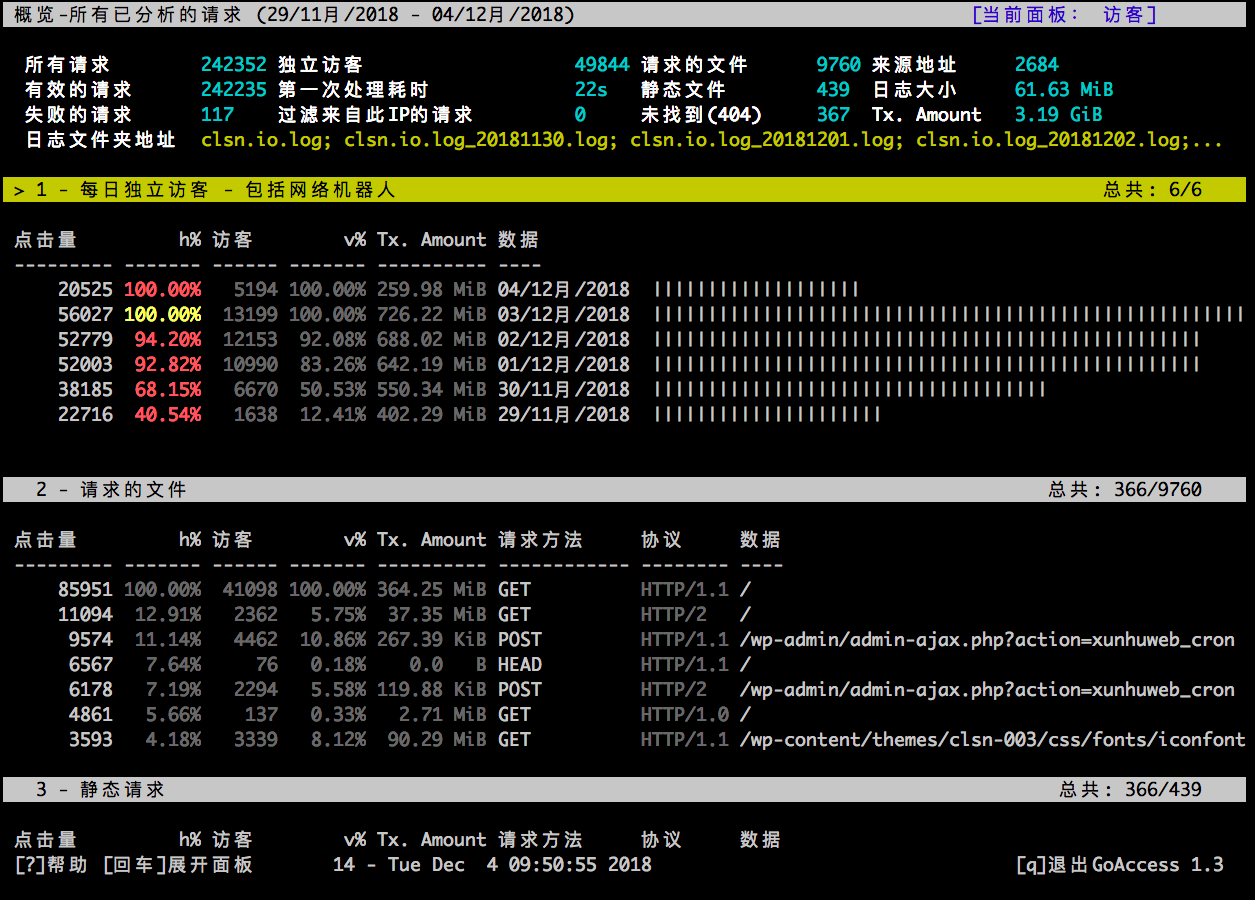
1.2 安装GoAccess
1.2.1 系统环境说明
[root@clsn.io /root]

#cat  /etc/redhat-release

CentOS release 6.8 (Final)

[root@clsn.io /root]

#uname  -a

Linux clsn.io 4.10.5-1.el6.elrepo.x86_64 #1 SMP Wed Mar 22 14:55:33 EDT 2017 x86_64 x86_64 x86_64 GNU/Linux

[root@clsn.io /root]

#sestatus

SELinux status:                 disabled
1.2.2 安装GoAccess
官网提供多种系统版本的安装方法: https://goaccess.io/download#installation
$ wget https://tar.goaccess.io/goaccess-1.3.tar.gz

$ tar -xzvf goaccess-1.3.tar.gz

$ cd goaccess-1.3/

$ ./configure --enable-utf8 --enable-geoip=legacy

$ make

# make install
配置完成的信息
Your build configuration:

  Prefix         : /usr/local

  Package        : goaccess

  Version        : 1.3

  Compiler flags :  -pthread

  Linker flags   : -lnsl -lncursesw -lGeoIP -lpthread

  Dynamic buffer : no

  Geolocation    : GeoIP Legacy

  Storage method : In-memory Hash Database (Default)

  TLS/SSL        : no

  Bugs           : goaccess@prosoftcorp.com
1.2.3 使用GoAccess分析日志
注:本次分析日志为 nignx 标准输出日志
[root@clsn.io /var/log/nginx] clsn.io Blog WebSite

#goaccess  -f  clsn.io.log
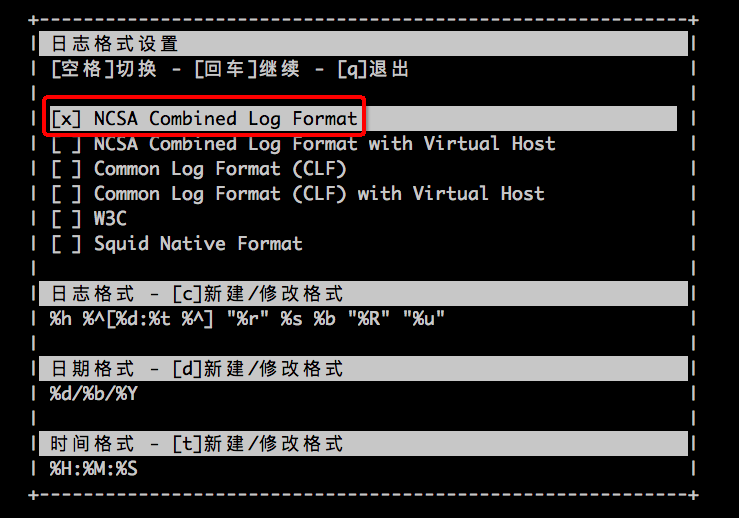
日志格式选为 NCSA Combined Log Format
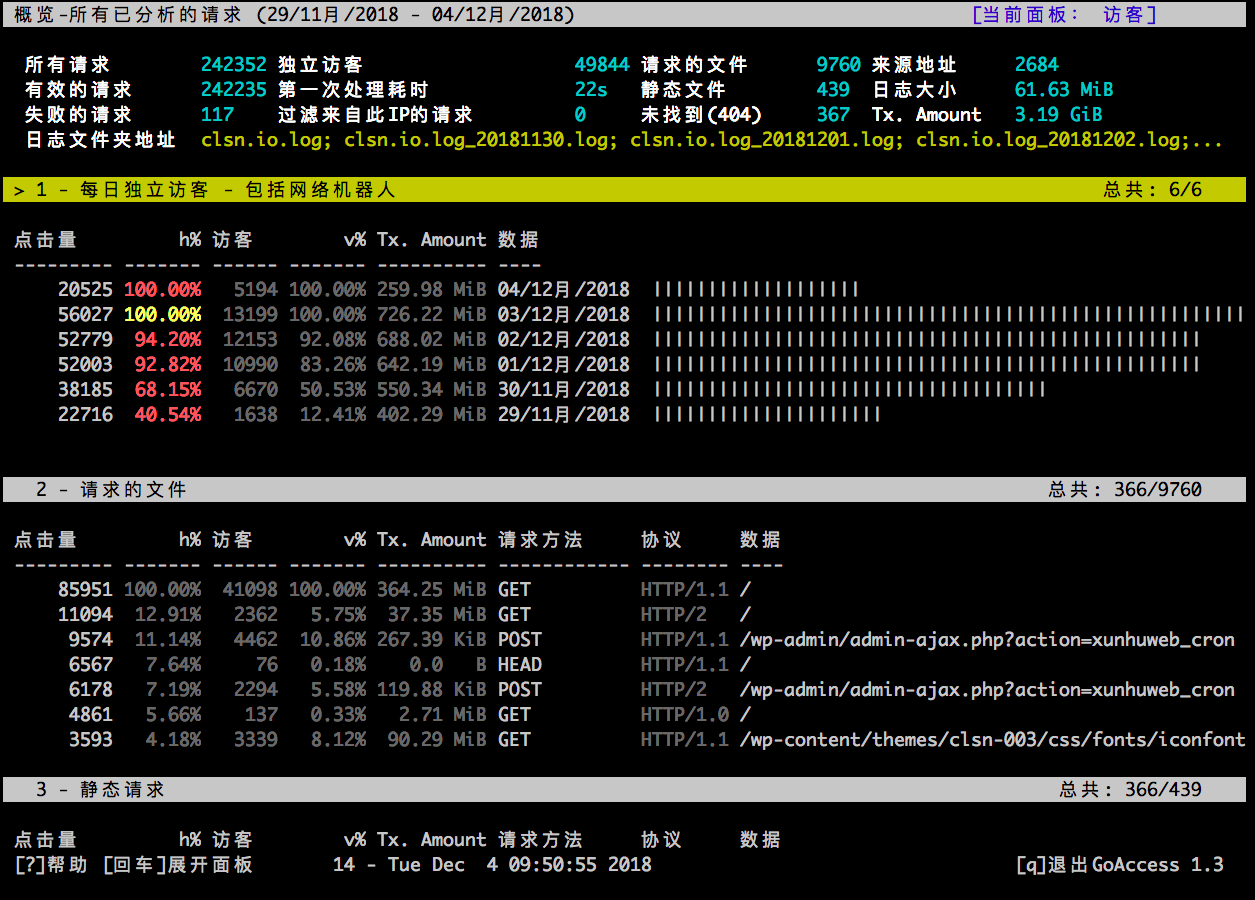
回车即可看到当前日志分析结果
1.3 生成HTML页面
1.3.1 修改配置
查看当前配置
[root@clsn.io /usr/local/etc/goaccess] clsn.io Blog WebSite

#egrep  -v "^#|^$" goaccess.conf

config-dialog false

hl-header true

json-pretty-print false

no-color false

no-column-names false

no-csv-summary false

no-progress false

no-tab-scroll false

with-mouse false

agent-list false

with-output-resolver false

http-method yes

http-protocol yes

no-query-string false

no-term-resolver false

444-as-404 false

4xx-to-unique-count false

all-static-files false

double-decode false

ignore-crawlers false

crawlers-only false

ignore-panel REFERRERS

ignore-panel KEYPHRASES

real-os true

static-file .css

static-file .js

static-file .jpg

static-file .png

static-file .gif

static-file .ico

static-file .jpeg

static-file .pdf

static-file .csv

static-file .mpeg

static-file .mpg

static-file .swf

static-file .woff

static-file .woff2

static-file .xls

static-file .xlsx

static-file .doc

static-file .docx

static-file .ppt

static-file .pptx

static-file .txt

static-file .zip

static-file .ogg

static-file .mp3

static-file .mp4

static-file .exe

static-file .iso

static-file .gz

static-file .rar

static-file .svg

static-file .bmp

static-file .tar

static-file .tgz

static-file .tiff

static-file .tif

static-file .ttf

static-file .flv
由上可见默认配置中并无时间参数,需要在配置中添加时间参数。
[root@clsn.io /usr/local/etc/goaccess] clsn.io Blog WebSite

#cat  >>goaccess.conf<<EOF

> time-format %H:%M:%S

> date-format %d/%b/%Y

> #NCSA Combined Log Format

> log-format %h %^[%d:%t %^] "%r" %s %b "%R" "%u"

> EOF

[root@clsn.io /usr/local/etc/goaccess] clsn.io Blog WebSite

#cp -a goaccess.conf ../
1.3.2 添加定时任务
30 * * * *  /usr/local/bin/goaccess  /var/log/nginx/clsn.io.log* -o /www/wwwroot/monitor/report.html -p /usr/

local/etc/goaccess/goaccess.conf
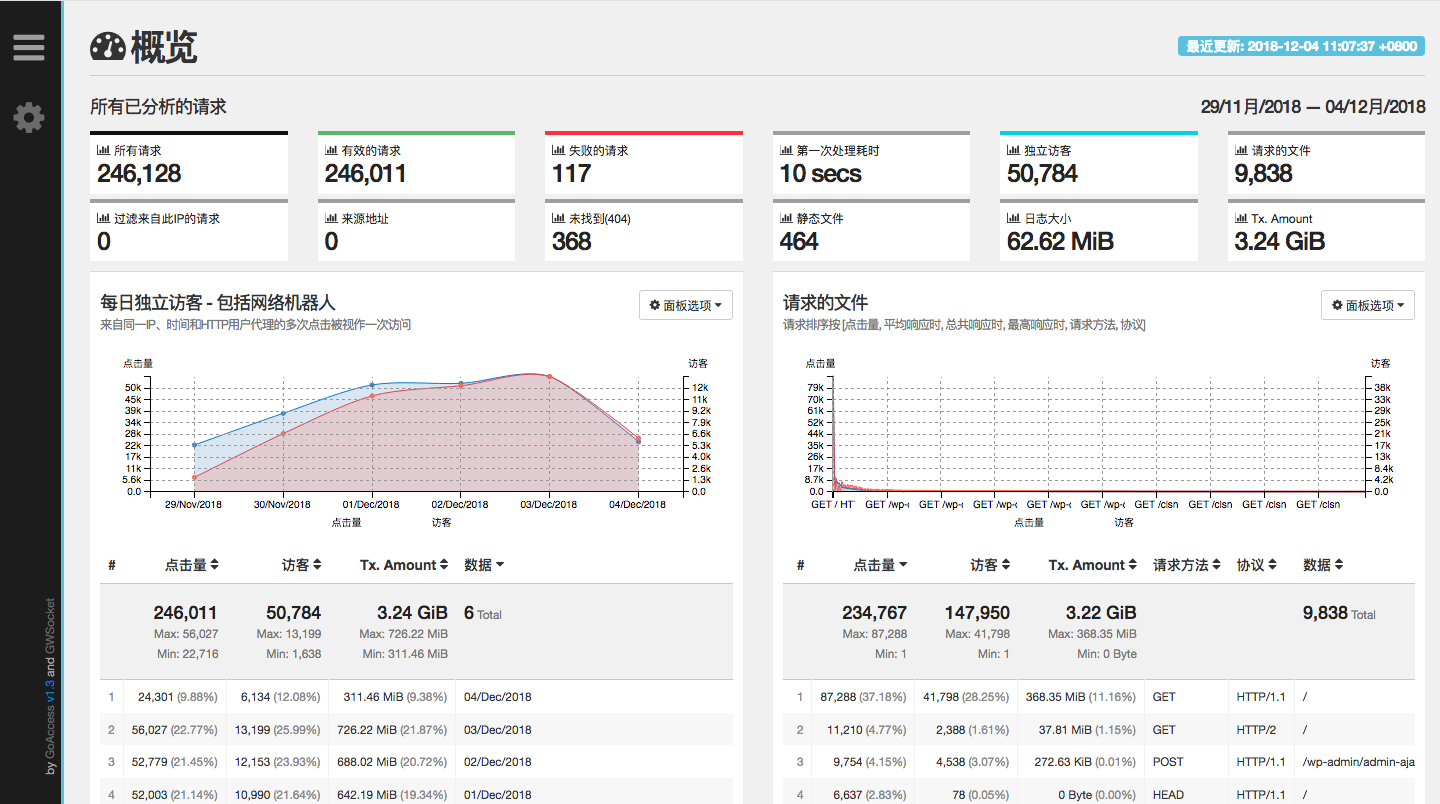
1.3.3 检查生产页面
https://monitor.clsn.io/report.html
1.4 参考文献
https://www.linuxidc.com/Linux/2016-12/138731.htm
https://goaccess.io/man
https://goaccess.io/
https://www.imydl.tech/lnmp/197.html
https://segmentfault.com/a/1190000011025155
GoAccess日志分析工具的更多相关文章
- GoAccess日志分析工具使用文档
----Sevck 2016/3/4 17:24:13 #1软件说明: GoAccess是一款开源.实时,运行在命令行终端下的web日志分析工具.该工具提供快速.多样的HTTP状态统计,可以令管理员不 ...
- 可视化实时Web日志分析工具-goaccess
说到web服务器就不得不说Nginx,目前已成为企业建站的首选.但由于种种历史原因,Nginx日志分析工具相较于传统的apache.lighthttp等还是少很多. 今天就和大家分享一个非常强大的实时 ...
- goaccess nginx日志分析工具简单使用
goaccess 是一个比较方便的支持实时的日志分析工具,比较方便,同时安装&&配置简单 安装 centos yum yum install -y goaccess 运行 我的ngin ...
- goaccess日志分析
对于nginx日志分析,有很多工具,衡量好坏的标准大概就是三快:安装快,解析快,上手快.满足这三点的goaccess确实是居家必备良药. 话说这个标题其实有点委屈GoAccess了,它是一个日志分析工 ...
- 【转】gc日志分析工具
性能测试排查定位问题,分析调优过程中,会遇到要分析gc日志,人肉分析gc日志有时比较困难,相关图形化或命令行工具可以有效地帮助辅助分析. Gc日志参数 通过在tomcat启动脚本中添加相关参数生成gc ...
- GC之七--gc日志分析工具
性能测试排查定位问题,分析调优过程中,会遇到要分析gc日志,人肉分析gc日志有时比较困难,相关图形化或命令行工具可以有效地帮助辅助分析. Gc日志参数 通过在tomcat启动脚本中添加相关参数生成gc ...
- 日志分析工具ELK配置详解
日志分析工具ELK配置详解 一.ELK介绍 1.1 elasticsearch 1.1.1 elasticsearch介绍 ElasticSearch是一个基于Lucene的搜索服务器.它提供了一个分 ...
- 可视化日志分析工具Gltail的安装与使用
可视化日志分析工具Gltail的安装与使用 GlTail.rb 是一款带有浓郁的 Geek 风格的可视化日志分析工具,它采用 Ruby 技术构建,并利用 OpenGL 图形技术进行渲染,呈现 ...
- 强大的日志分析工具 -- NSLogger
转:http://www.cnblogs.com/yingkong1987/p/3329945.html 强大的日志分析工具 -- NSLogger 源码:https://github.com/fpi ...
随机推荐
- 用greenlet实现协程消费者生产者
代码: from greenlet import greenlet import random def pro(): 生产者 while True: item = random.randint(0,9 ...
- centos6.9安装mysql5.7.18
详细记录在CentOS 6.9上安装MySQL 5.7.18 过程,希望对大家有所帮助. 下载地址:https://dev.mysql.com/get/Downloads/MySQL-5.7/mysq ...
- Elasticsearch 基于 URL 的搜索请求
背景 Elasticsearch 不像关系型数据库,没有简易的 SQL 用来查询数据,只能通过调用 RESTful API 实现查询.大体上查询分为两种,基于 URL 的和基于请求主体的.基于 URL ...
- 解决Windows 系统下Chrome中有多个音频界面时 无法静音单个Tab界面的问题
Open the browser and type this address into the URL bar: chrome://flags In the Search flags box at t ...
- XamarinSQLite教程Xamarin.Android项目添加引用
XamarinSQLite教程Xamarin.Android项目添加引用 在Xamarin.Android项目中,导入System.Data和Mono.Data.SQLite库的操作步骤如下: (1) ...
- c++ stod很慢
C++ Convert String to Double Speed (There is also a string-to-int performance test.) A performance b ...
- Book Sharing
到现在还不知道为什么我设置的背景图片为什么没有效果,明明是按照网上的教程来的,但...........好气哦,,,,,,,,,嗯哼嗯哼嗯哼 说实话:自己写的网页真丑 .....真丑 index.h ...
- mongoose+koa2 按照_id更新多条数据,删除数组中的字段,然后添加新的字段,$pull和$or结合使用
await model.photo.update({ _id: { $in: photoIdsParam } }, { $pull: { customerIds: { code: custCode, ...
- springboot2、mybatis-plus3 一行配置实现打印sql最终填充的参数值
在application.yml中添加: # 配置slq打印日志 mybatis-plus: configuration: log-impl: org.apache.ibatis.logging.st ...
- [P4994]终于结束的起点 (递推)
终于结束的起点 终于写下句点 终于我们告别 终于我们又回到原点 …… 一个个 OIer 的竞赛生涯总是从一场 NOIp 开始,大多也在一场 NOIp 中结束,好似一次次轮回在不断上演. 如果这次 NO ...