
jquery简易tab切换
切换tab
使用eq()函数
eq() 方法将匹配元素集缩减值指定 index 上的一个。
//为项目 3 设置红色背景

<ul>

  <li>list item 1</li>

  <li>list item 2</li>

  <li>list item 3</li>

  <li>list item 4</li>

  <li>list item 5</li>

</ul>

$('li').eq(2).css('background-color', 'red');
eq(index)中index可为正数,负数(倒序),超过已有length(不显示)
eg
<style>

        .container{

            width: 400px;

            margin: 40px auto

        }

        .title{

            width: 100%;

            border:1px solid black;

        }

        span{

            width: 49%;

            text-align: center;

            display: inline-block;

            cursor: pointer;

        }

        .current{

            color:red

        }

        .content{

            height: 200px;

            background-color: aliceblue;

        }

        .content>div:nth-child(2){

            display: none;

        }

    </style>

<body>

    <div class="container">

        <div class="title">

            <span class="current">tab1</span>

            <span>tab2</span>

        </div>

        <div class="content">

            <div>tab1内容</div>

            <div>tab2内容</div>

        <div>

    </div>

</body>

<script src="http://code.jquery.com/jquery-latest.js"></script>

<script>

 //点击切换登录方式

 $('.title').on('click','span',function () {

            $(this).addClass('current');

            $(this).siblings().removeClass('current');

            var i =$(this).index();

            $('.content>div').eq(i).show().siblings().hide();

        })

</script>
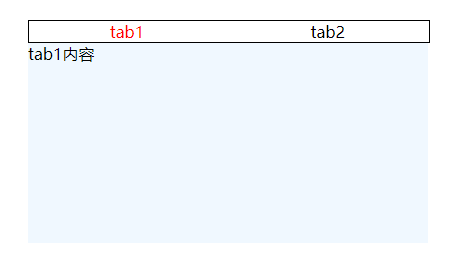
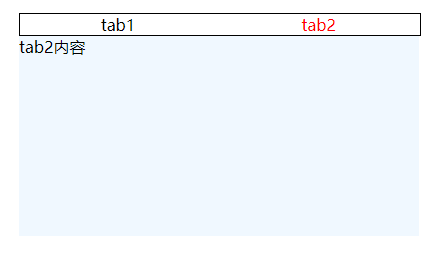
效果如下
tab1
tab2
jquery简易tab切换的更多相关文章
- jquery实现tab切换完整代码
代码如下,保存到html文件打开: <!DOCTYPE html PUBLIC "-//W3C//DTD XHTML 1.0 Transitional//EN" " ...
- JQuery实现tab切换
JQuery实现tab切换: (jquery需要自己添加) <!DOCTYPE html> <html lang="en"> <head> &l ...
- jquery中简易tab切换
<!doctype html> <html> <head> <title>test</title> <meta content=&qu ...
- jquery 实现tab切换
大家都知道 使用QQ的时候需要输入账号和密码 这个时候一个TAB键盘就可以实现切换到下一个输入框里 具体是怎么实现的呢 请看代码 <!DOCTYPE html> <html lang ...
- jQuery带tab切换搜索框样式代码
效果体验:http://hovertree.com/texiao/jquery/23/ 代码如下,保存到HTML文件也可以查看效果: <!DOCTYPE html> <html la ...
- 简单的jquery实现tab切换
$(document).ready(function(){ $(".nav-menu-ctn").find("a").click(function(){ $(t ...
- jquery版tab切换效果
<!DOCTYPE html> <html> <head lang="en"> <meta charset="UTF-8&quo ...
- 通过jquery实现tab切换
//css代码 *{ margin: 0; padding: 0; } #box{ margin: 0 auto; width: 800px; border: 5px solid #000000; o ...
- jquery写tab切换,三行代码搞定
<script type="text/javascript"> $("button").on("click",function( ...
随机推荐
- nuxt二级路由
耗费了大半天的时间,终于把页面的二级路由配置好了 先看我的目录 如果没有登陆页,根本就不用考虑嵌套路由的问题,主要的menu跳转和<nuxt />可以直接写到layouts/default ...
- ThinkPHP3.2.3中M()和D()的区别详解
在实例化的过程中,经常使用D方法和M方法, 区别在于:M方法实例化模型无需用户为每个数据表定义模型类,如果D方法没有找到定义的模型类,则会自动调用M方法. 通俗一点说:1.M实例化参数是数据库的表名, ...
- C++ Addon Async 异步机制
线程队列: libuv,window 可在libuv官网下载相应版本 opencv: 编译的时候opencv的位数要和 node的bit 一致 兼容electron : node-gyp rebu ...
- git 创建新分支并推送到远程分支
git branch test git checkout test git push origin test:test git branch --set-upstream-to origin/te ...
- H - Expedition 优先队列 贪心
来源poj2431 A group of cows grabbed a truck and ventured on an expedition deep into the jungle. Being ...
- IOS系统下虚拟键盘遮挡文本框问题的解决
最近在项目中发现同样的代码在Android端微信网页中点击文本框唤出的虚拟键盘不会遮挡文本框,但是在IOS端的微信网页中点击文本框唤出的键盘却在大部分情况下会遮挡文本框 经过高人指点,这个问题终于解决 ...
- eclipse哪个版本好
Eclipse IDE for Java EE Developers (企业级开发软件,干啥都足够了,300MB左右)
- iptables共享上网
1.1 流程大概如下: 1.环境准备 内部服务器B 内网172.16.1.12 ifdown eth0 #首先关闭外网网卡 route add default gw 172.16.1.11 #把上图中 ...
- export及export default的区别
在JavaScript ES6中,export与export default均可用于导出常量.函数.文件.模块等,你可以在其它文件或模块中通过import+(常量 | 函数 | 文件 | 模块)名的方 ...
- linux中几个热键
重要的几个热键[Tab],[ctrl]-c, [ctrl]-d [Tab]按键---具有『命令补全』不『档案补齐』的功能 [Ctrl]-c按键---让当前的程序『停掉』 [Ctrl]-d按键---通 ...