
python入门 -- 学习笔记2
习题11:提问
-- 接受键盘的输入 raw_input
input() 和 raw_input() 有何不同?
input() 函数会把你输入的东西当做 Python 代码进行处理,这么做会有安全问题,你应该避开
这个函数。
代码:
print "how old are you?",
age = raw_input()
print "How tail are you?",
height = raw_input()
print "how much do you weight?",
weight = raw_input()
print "So, you're %r old, %r tall and %r heavy." % (
age, height, weight)
结果:

习题12:提示别人
代码:
age = raw_input("How old are you? ")
height = raw_input("How tall are you? ")
weight = raw_input("How much do you weight? ")
print "So, you're %r old, %r tall and %r heavy." % (age, height, weight)
结果:

习题13:参数、解包、变量
-- 将变量传递给脚本的方法(所谓脚本,就是你写的 .py 程序),涉及“参数”
-- import 将python已有的功能引入脚本直接使用
-- argv:参数变量
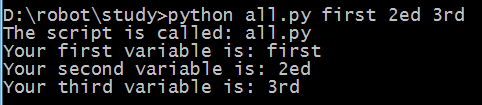
-- 解包:script, first, second, third = argv 把argv中的东西解包,将所有的参数一次赋予左边的变量名
-- argv 和 raw_input() 有什么不同?
不同点在于用户输入的时机。如果参数是在用户执行命令时就要输入,那就是 argv,如果是在脚本运行过程中需要用户输入,那就使用 raw_input()。
代码:
from sys import argv
script, first, second, third = argv
print "The script is called:", script
print "Your first variable is:", first
print "Your second variable is:", second
print "Your third variable is:", third
结果:
习题14:提示与传递
代码:
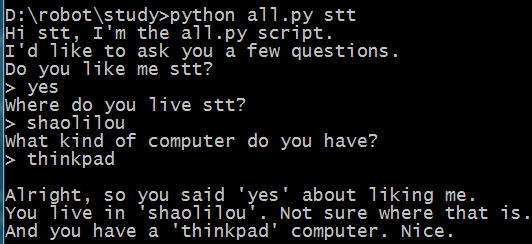
from sys import argv
script, user_name = argv
prompt = '> '
print "Hi %s, I'm the %s script." % (user_name, script)
print "I'd like to ask you a few questions."
print "Do you like me %s?" % user_name
likes = raw_input(prompt)
print "Where do you live %s?" % user_name
lives = raw_input(prompt)
print "What kind of computer do you have?"
computer = raw_input(prompt)
print '''
Alright, so you said %r about liking me.
You live in %r. Not sure where that is.
And you have a %r computer. Nice.
''' % (likes, lives, computer)
结果:
习题15:读取文件
-- 涉及两个文件,一个脚本文件.py文件,另一个是ex15_sample.txt
第二个文件内容:
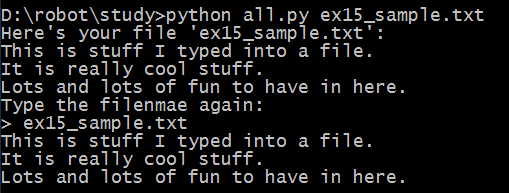
This is stuff I typed into a file.
It is really cool stuff.
Lots and lots of fun to have in here.
-- open() 打开文件 返回的是一个“file object”
-- read() 读取文件内容
代码:
from sys import argv
script, filename = argv
txt = open(filename)
print "Here's your file %r:" % filename
print txt.read()
print "Type the filenmae again:"
file_again = raw_input("> ")
txt_again = open(file_again)
print txt_again.read()
结果:
习题16:读写文件
-- close 关闭文件
-- read 读取文件内容
-- readline 读取文本文件中的一行
-- write(stuff) 将stuff写入文件
代码:
from sys import argv
script, filename = argv
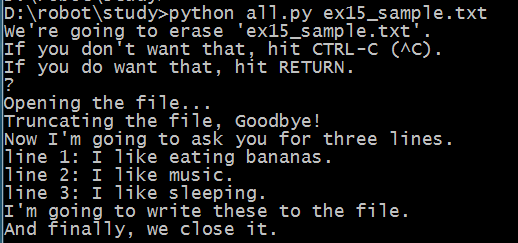
print "We're going to erase %r." % filename
print "If you don't want that, hit CTRL-C (^C)."
print "If you do want that, hit RETURN."
raw_input("?")
print "Opening the file..."
target = open(filename, 'w')
print "Truncating the file, Goodbye!"
target.truncate()
print "Now I'm going to ask you for three lines."
line1 = raw_input("line 1: ")
line2 = raw_input("line 2: ")
line3 = raw_input("line 3: ")
print "I'm going to write these to the file."
target.write(line1)
target.write('\n')
target.write(line2)
target.write('\n')
target.write(line3)
target.write('\n')
print "And finally, we close it."
target.close()
结果:
习题17:更多文件操作
-- exists() 判断文件是否存在,存在,继续执行;不存在,新建文件再继续执行
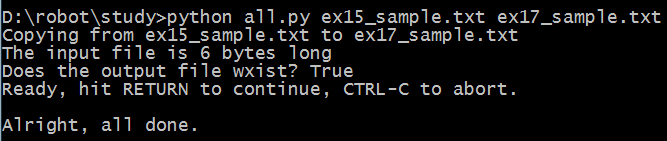
代码:
from sys import argv
from os.path import exists
script, from_file, to_file = argv
print "Copying from %s to %s" % (from_file, to_file)
#we could do these two on one line too, how?
in_file = open(from_file)
indata = in_file.read()
print "The input file is %d bytes long" % len(indata)
print "Does the output file wxist? %r" % exists(to_file)
print "Ready, hit RETURN to continue, CTRL-C to abort."
raw_input()
out_file = open(to_file, 'w')
out_file.write(indata)
print "Alright, all done."
out_file.close()
in_file.close()
结果:
习题18:命名、变量、代码、函数
函数可做三洋事情:
1、给代码片段命名,就跟“变量”给字符串和数字命名一样
2、可以接受参数,就跟脚本接受argv一样
3、通过使用#1和#2,可以创建“微型脚本”或者“小命令”
介绍:
def:定义
函数名:可以随意取,最好能体现出函数的功能来,注意命名规范!不可重复
参数:放在圆括号内
格式:def 函数名称 (参数-多个参数以“,”隔开):
函数内容 开始编写前缩进4个空格
函数可以接收参数,也可以不接收参数
运行/调用函数,函数名后紧跟(参数-可有可无,可多个)
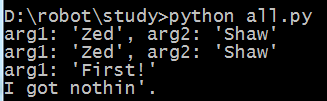
代码:
# this one is like your scripts with argv
def print_two(*args):
arg1, arg2 = args
print "arg1: %r, arg2: %r" % (arg1, arg2)
# ok, that *args is actually pointless, we can just do this
def print_two_again(arg1, arg2):
print "arg1: %r, arg2: %r" % (arg1, arg2)
# this just takes one argument
def print_one(arg1):
print "arg1: %r" % arg1
# this one takes no arguments
def print_none():
print "I got nothin'."
print_two("Zed", "Shaw")
print_two_again("Zed", "Shaw")
print_one("First!")
print_none()
结果:
习题19:函数和变量
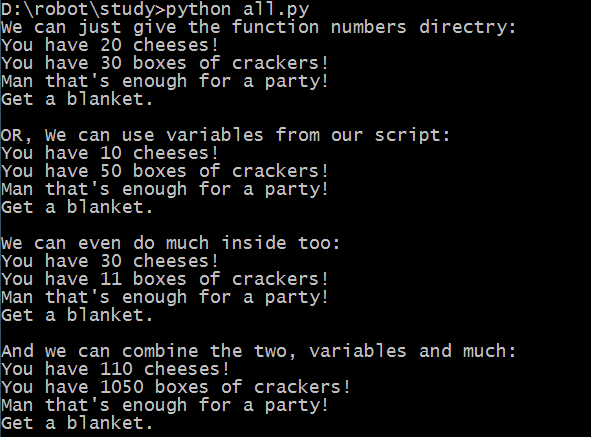
代码:
def cheese_and_crackers(cheese_count, boxes_of_crackers):
print "You have %d cheeses!" % cheese_count
print "You have %d boxes of crackers!" % boxes_of_crackers
print "Man that's enough for a party!"
print "Get a blanket.\n"
print "We can just give the function numbers directry:"
cheese_and_crackers(20, 30)
print "OR, We can use variables from our script:"
amount_of_cheese = 10
amount_of_crackers = 50
cheese_and_crackers(amount_of_cheese, amount_of_crackers)
print "We can even do much inside too:"
cheese_and_crackers(10 + 20, 5 + 6)
print "And we can combine the two, variables and much:"
cheese_and_crackers(amount_of_cheese + 100, amount_of_crackers + 1000)
结果:
习题20:函数和文件
-- 更多文件操作 seek() readline()
代码:
from sys import argv
script, input_file = argv
def print_all(f):
print f.read()
def rewind(f):
f.seek(0)
def print_a_line(line_count, f):
print line_count, f.readline()
current_file = open(input_file)
print "First let's print the whole file:\n"
print_all(current_file)
print "Now let's rewind, kind of like a tape."
rewind(current_file)
print "Let's print three lines:"
current_line = 1
print_a_line(current_line, current_file)
current_line = current_line + 1
print_a_line(current_line, current_file)
current_line = current_line + 1
print_a_line(current_line, current_file)
结果:

python入门 -- 学习笔记2的更多相关文章
- Python入门学习笔记4:他人的博客及他人的学习思路
看其他人的学习笔记,可以保证自己不走弯路.并且一举两得,即学知识又学方法! 廖雪峰:https://www.liaoxuefeng.com/wiki/0014316089557264a6b348958 ...
- Python入门学习笔记
了解 一下Python中的基本语法,发现挺不适应的,例如变量经常想去指定类型或者if加个括号之类的.这是在MOOC中学习到的知识中一点简单的笔记. Python的变量和数据类型: 1.Python这种 ...
- python入门学习笔记(三)
10.函数 求绝对值的函数 abs(x) 也可以在交互式命令行通过 help(abs) 查看abs函数的帮助信息.调用 abs 函数:>>> abs(100)100>>& ...
- Python入门 学习笔记 (二)
今天学习了一些简单的语法规则,话不多说,开始了: 二.数据类型 常用数据类型中的整形和浮点型就不多说了. 1.字符串 ...
- python入门 -- 学习笔记1
学习资料:笨方法学Python 准备: 安装环境----请自行网络搜索(Windows安装很简单,和其他安装程序一样) 找一个自己习惯的编辑器(比如:sublime text 3) 创建一个专门的目录 ...
- Python入门 学习笔记 (一)
原文地址:http://www.cnblogs.com/lujianwenance/p/5939786.html 说到学习一门语言第一步就是先选定使用的工具(环境).因为本人是个小白,所以征求了一下同 ...
- python入门学习笔记(二)
6.6替换元素 7.tuple类型 7.1创建tuple 7.2创建单元素tuple 7.3"可变"的tuple 8.条件判断和循环 8.1,if语句 8.2,if... ...
- python入门学习笔记(一)
写在开头: A:python的交互式环境 ...
- python入门 -- 学习笔记4
习题38:列表的操作 当你看到像 mystuff.append('hello') 这样的代码时,你事实上已经在 Python 内部激发了一个连锁反应.以下是它的工作原理: 1. Python 看到你用 ...
- python入门 -- 学习笔记3
习题21:函数可以返回东西 过程解析: 1.定义函数:如def add(形参)函数 2.调用函数: add(实参) 别忘记加() 3.在函数调用的时候将实参的值传给形参,代入到函数中进行计算,r ...
随机推荐
- System.IO.FileSystemWatcher
这个类功能很强.可以实时监测文件系统的变化. https://msdn.microsoft.com/zh-cn/library/system.io.filesystemwatcher.aspx 事件 ...
- Lua IDE工具-Intellij IDEA+lua插件配置教程(Chianr出品)
Lua 编译工具IDE-Intellij IDEA 本文提供全流程,中文翻译. Chinar 坚持将简单的生活方式,带给世人!(拥有更好的阅读体验 -- 高分辨率用户请根据需求调整网页缩放比例) Ch ...
- Json&xml分析~
1.什么是Json? JSON(JavaScript Object Notation) 是一种轻量级的数据交换格式. 易于人阅读和编写.同时也易于机器解析和生成. 它基于JavaScript Prog ...
- Linux 测试常用命令
ls :列出文件 ls -l ls -t 按时间排序 ls -rt 按时间倒序 ls -a 列出所有文件(包括隐藏的) ll : ll = ‘ls -l ’ cd: 进入文件目录 cd 不带目录名 ...
- 洛谷1101:单词方阵(DFS)
题目描述 给一n×nn \times nn×n的字母方阵,内可能蕴含多个"yizhong"单词.单词在方阵中是沿着同一方向连续摆放的.摆放可沿着888个方向的任一方向,同一单词摆放 ...
- Map集合、HashMap集合、LinkedHashMap集合、Hashtable集合、Collections工具类和模拟斗地主洗牌和发牌
1.Map集合概述和特点 * A:Map接口概述 * 查看API可以知道: * 将键映射到值的对象 * 一个映射不能包含重复的键 * 每个键最多 ...
- VS2010添加虚拟机发布的WebService引用
首先,WebServer已在虚拟机中完成发布.在网页中浏览可以看到如下所示内容 需要注意的是在发布时要给网站设置IP地址.如果在添加网站时没有设置,之后可以在网站绑定中进行修改.步骤如下: 1.选中网 ...
- 全志A33 lichee 搭建Qt App开发环境编写helloworld
开发平台 * 芯灵思SinlinxA33开发板 淘宝店铺: https://sinlinx.taobao.com/ 嵌入式linux 开发板交流 QQ:641395230 Step 1 在虚拟机(Ce ...
- <realsense D400>同步采集深度图和彩色图
利用深度相机采集深度图和彩色图会面临一个问题,如何实现同步采集数据? 以下是我搜集到的两点方法: 1)高翔博士提到他的orbslam2教程有这么一步工作,具体目录为 example/RGBD/. (等 ...
- Python程序打包之PyInstaller
1.背景说明 [Python版本]Python 2.7.14 [系统平台]Windows 7 [优缺点描述]据说PyInstaller 比较慢,但是PyInstaller打包出来的exe简洁(就一个文 ...