
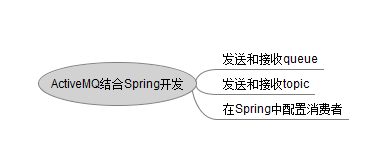
ActiveMQ结合Spring开发
----------------------------------------------------------------------------
Spring结合ActiveMQ开发 : 发送和接收queue
1.首先在pom.xml文件中添加activemq的依赖包
      <!-- Spring对JMS的支持 -->

       <dependency>

           <groupId>org.springframework</groupId>

           <artifactId>spring-jms</artifactId>

           <version>4.0.0.RELEASE</version>

       </dependency>

       <!-- 添加ActiveMQ的pool包 -->

       <dependency>

           <groupId>org.apache.activemq</groupId>

           <artifactId>activemq-pool</artifactId>

           <version>5.9.0</version>

       </dependency>
2.在Spring的配置文件applicationContext.xml中配置jmsTemplate
 <bean id="jmsFactory" class="org.apache.activemq.pool.PooledConnectionFactory"

         destroy-method="stop">

         <property name="connectionFactory">

             <bean class="org.apache.activemq.ActiveMQConnectionFactory">

                 <property name="brokerURL">

                     <value>tcp://192.168.1.81:61616</value>

                 </property>

             </bean>

         </property>

         <property name="maxConnections" value="100"></property>

     </bean>

     <bean id="jmsTemplate" class="org.springframework.jms.core.JmsTemplate">

         <property name="connectionFactory" ref="jmsFactory"></property>

         <property name="defaultDestination" ref="destination"></property>

         <property name="messageConverter">

             <bean class="org.springframework.jms.support.converter.SimpleMessageConverter"/>

         </property>

     </bean>

     <bean id="destination" class="org.apache.activemq.command.ActiveMQQueue">

         <constructor-arg index="0" value="spring-queue"/>

     </bean>
3.创建一个queue的消息发送者程序
 import javax.jms.JMSException;

 import javax.jms.Message;

 import javax.jms.Session;

 import javax.jms.TextMessage;

 import org.springframework.beans.factory.annotation.Autowired;

 import org.springframework.context.ApplicationContext;

 import org.springframework.context.support.ClassPathXmlApplicationContext;

 import org.springframework.jms.core.JmsTemplate;

 import org.springframework.jms.core.MessageCreator;

 import org.springframework.stereotype.Service;

 @Service

 public class SpringQueueSender {

     @Autowired

     private JmsTemplate jt = null;

     public static void main(String[] args) {

         ApplicationContext ctx = new ClassPathXmlApplicationContext("applicationContext.xml");

         SpringQueueSender sqs = (SpringQueueSender)ctx.getBean("springQueueSender");

         sqs.jt.send(new MessageCreator(){

             public Message createMessage(Session s) throws JMSException {

                 TextMessage msg = s.createTextMessage("Spring send msg ----> Hello activeMQ");

                 return msg;

             }

         });

     }

 }
4.创建一个queue的消息接收者程序
 import org.springframework.beans.factory.annotation.Autowired;

 import org.springframework.context.ApplicationContext;

 import org.springframework.context.support.ClassPathXmlApplicationContext;

 import org.springframework.jms.core.JmsTemplate;

 import org.springframework.stereotype.Service;

 @Service

 public class SpringQueueReceiver {

     @Autowired

     private JmsTemplate jt = null;

     public static void main(String[] args) {

         ApplicationContext ctx = new ClassPathXmlApplicationContext("applicationContext.xml");

         SpringQueueReceiver sqr = (SpringQueueReceiver)ctx.getBean("springQueueReceiver");

         String msg = (String)sqr.jt.receiveAndConvert();

         System.out.println("receive msg = " + msg);

     }

 }
运行结果:

Spring结合ActiveMQ开发 : 发送和接收topic
1.在Spring的配置文件applicationContext.xml中配置topic
 <bean id="jmsFactory" class="org.apache.activemq.pool.PooledConnectionFactory"

         destroy-method="stop">

         <property name="connectionFactory">

             <bean class="org.apache.activemq.ActiveMQConnectionFactory">

                 <property name="brokerURL">

                     <value>tcp://120.76.123.81:61616</value>

                 </property>

             </bean>

         </property>

         <property name="maxConnections" value="100"></property>

     </bean>

     <bean id="jmsTemplate" class="org.springframework.jms.core.JmsTemplate">

         <property name="connectionFactory" ref="jmsFactory"></property>

         <property name="defaultDestination" ref="destinationTopic"></property>

         <property name="messageConverter">

             <bean class="org.springframework.jms.support.converter.SimpleMessageConverter"/>

         </property>

     </bean>

     <bean id="destinationTopic" class="org.apache.activemq.command.ActiveMQTopic">

         <constructor-arg index="0" value="spring-topic"/>

     </bean>
topic消息发送者和接收者 程序和上面一样。
Spring结合ActiveMQ开发 : 在Spring中配置消费者
Spring的applicationContext.xml配置
     <bean id="jmsFactory" class="org.apache.activemq.pool.PooledConnectionFactory"

         destroy-method="stop">

         <property name="connectionFactory">

             <bean class="org.apache.activemq.ActiveMQConnectionFactory">

                 <property name="brokerURL">

                     <value>tcp://192.168.1.81:61616</value>

                 </property>

             </bean>

         </property>

         <property name="maxConnections" value="100"></property>

     </bean>

     <bean id="jmsTemplate" class="org.springframework.jms.core.JmsTemplate">

         <property name="connectionFactory" ref="jmsFactory"></property>

         <property name="defaultDestination" ref="destination"></property>

         <property name="messageConverter">

             <bean class="org.springframework.jms.support.converter.SimpleMessageConverter"/>

         </property>

     </bean>

     <bean id="destination" class="org.apache.activemq.command.ActiveMQQueue">

         <constructor-arg index="0" value="spring-queue"/>

     </bean>

     <bean id="jmsContainer" class="org.springframework.jms.listener.DefaultMessageListenerContainer">

         <property name="connectionFactory" ref="jmsFactory"/>

         <property name="destination" ref="destination"/>

         <property name="messageListener" ref="messageListener"/>

     </bean>

     <bean id="messageListener" class="com.test.spring.MyMessageListener">

     </bean>
消费发送者程序
 import javax.jms.JMSException;

 import javax.jms.Message;

 import javax.jms.Session;

 import javax.jms.TextMessage;

 import org.springframework.beans.factory.annotation.Autowired;

 import org.springframework.context.ApplicationContext;

 import org.springframework.context.support.ClassPathXmlApplicationContext;

 import org.springframework.jms.core.JmsTemplate;

 import org.springframework.jms.core.MessageCreator;

 import org.springframework.stereotype.Service;

 @Service

 public class SpringQueueSender {

     @Autowired

     private JmsTemplate jt = null;

     public static void main(String[] args) {

         ApplicationContext ctx = new ClassPathXmlApplicationContext("applicationContext.xml");

         SpringQueueSender sqs = (SpringQueueSender)ctx.getBean("springQueueSender");

         sqs.jt.send(new MessageCreator(){

             public Message createMessage(Session s) throws JMSException {

                 TextMessage msg = s.createTextMessage("在Spring中配置消息接收者 ----> Hello activeMQ");

                 return msg;

             }

         });

     }

 }
消息接受者程序
 import javax.jms.Message;

 import javax.jms.MessageListener;

 import javax.jms.TextMessage;

 public class MyMessageListener implements MessageListener{

     public void onMessage(Message msg) {

         TextMessage txtMsg = (TextMessage)msg;

         try{

             System.out.println("reveive txt msg = " + txtMsg);

         }catch(Exception e){

             e.printStackTrace();

         }

     }

 }
ActiveMQ结合Spring开发的更多相关文章
- ActiveMQ学习笔记(6)----ActiveMQ整合Spring开发
1. 添加依赖 spring 提供了对JMS的支持,需要添加Spring支持jms的包和Spring的核心包,如下: <dependency> <groupId>org.apa ...
- 分布式-信息方式-ActiveMQ结合Spring
ActiveMQ结合 Spring开发■ Spring提供了对JMS的支持,需要添加 Spring支持jms的包,如下: <dependency> <groupId>org.a ...
- e3mall商城的归纳总结9之activemq整合spring、redis的缓存
敬给读者 本节主要给大家说一下activemq整合spring,该如何进行配置,上一节我们说了activemq的搭建和测试(单独测试),想看的可以点击时空隧道前去查看.讲完了之后我们还说一说在项目中使 ...
- ActiveMQ整合spring结合项目开发流程(生产者和消费者)总结
一:生产者代码编写: 1.配置pom.xml引入相关坐标 <dependencies> <!-- spring开发测试 --> <dependency> <g ...
- 淘淘商城项目_同步索引库问题分析 + ActiveMQ介绍/安装/使用 + ActiveMQ整合spring + 使用ActiveMQ实现添加商品后同步索引库_匠心笔记
文章目录 1.同步索引库问题分析 2.ActiveM的介绍 2.1.什么是ActiveMQ 2.2.ActiveMQ的消息形式 3.ActiveMQ的安装 3.1.安装环境 3.2.安装步骤 4.Ac ...
- 【Spring学习笔记-0】Spring开发所需要的核心jar包
spring开发所需要的核心jar 1. libs目录下的核心jar包: 2. common-logging-xxx.jar 来自为知笔记(Wiz) 附件列表
- 使用Spring开发第一个HelloWorld应用
http://www.importnew.com/13246.html 让我们用Spring来写第一个应用程序吧. 完成这一章要求: 熟悉Java语言 设置好Spring的环境 熟悉简单的Eclips ...
- 【Spring开发】—— Spring Core
原文:[Spring开发]-- Spring Core 前言 最近由于一些工作的需要,还有自己知识的匮乏再次翻开spring.正好整理了一下相关的知识,弥补了之前对spring的一些错误认知.这一次学 ...
- Spring(一):eclipse上安装spring开发插件&下载Spring开发包
eclipse上安装spring开发插件 1)下载安装插件包:https://spring.io/tools/sts/all 由于我的eclipse版本是mars 4.5.2,因此我这里下载的插件包是 ...
随机推荐
- [Django]Django1.8修改MySQL已存在表的问题?
前言:django1.8版本出现这种问题,关于标题不好命令,直接看正文问题描述! 问题描述: 在已经生成了models.py中表的情况下,更改了modes.py中的表,但是syncdb不起作用报错.于 ...
- Linux 下系统调用的三种方法
系统调用(System Call)是操作系统为在用户态运行的进程与硬件设备(如CPU.磁盘.打印机等)进行交互提供的一组接口.当用户进程需要发生系统调用时,CPU 通过软中断切换到内核态开始执行内核系 ...
- NOIP2012 普及组 T3 摆花——S.B.S.
题目描述 小明的花店新开张,为了吸引顾客,他想在花店的门口摆上一排花,共m盆.通过调查顾客的喜好,小明列出了顾客最喜欢的n种花,从1到n标号.为了在门口展出更多种花,规定第i种花不能超过ai盆,摆花时 ...
- 俄罗斯方块(Win32实现,Codeblocks+GCC编译)
缘起: 在玩Codeblocks自带的俄罗斯方块时觉得不错,然而有时间限制.所以想自己再写一个. 程序效果: 主要内容: 程序中有一个board数组,其中有要显示的部分,也有不显示的部分,不显示的部分 ...
- JSP前三章测试改错
分析:文件.数据库都是持久化保存数据的,所以是正确的,而servletcontext是上下文对象当然也可以.所以正确答案为A 分析: A:判断学员是否手动安装过Tomcat(练习熟练度) B:使学员了 ...
- php-简单对称加密算法和字符串与十六进制之间的互转函数
/** * 简单对称加密算法之加密 * @param String $string 需要加密的字串 * @param String $skey 加密EKY * @return String */fun ...
- 【分享】国外后台界面HTML源码 [免费]
国外后台界面HTML模版下载,里面的文字是英文的,不过可以修改成中文,带有数据统计界面和曲线图,本套模板相对完整,在主界面上点击那些菜单,都可以点开二级页面,希望对搞代码的程序员,对不擅长美工的朋友提 ...
- 订餐系统之Excel批量导入
批量导入现在基本已经成为各类系统的标配了,当前,我们订餐系统也不例外,什么商家呀.商品呀.优惠码之类的,都少不了.毕竟嘛,对非开发人员来说,看到Excel肯定比看到很多管理系统还是要亲切很多的.这里, ...
- inline-block元素间距
做项目过程中发现元素设置为inline-block后,彼此之间会有间距,有时候不是我们想要的效果,这时候就需要将间距去除掉. 后来上网查了下,已有前人总结了不少好的方法.这里主要借鉴了张鑫旭博客中介绍 ...
- checking for fcc ....no checking for cc .. no
源码编译,提示缺少gcc cc cl.exe 解决方案: yum install -y gcc glibc