
git杂记-分支简介
- 分支创建
//只创建分支不切换;
$ git branch testing //创建并切换分支$ git checkout -b iss53 - 查看各个分支的指向对象
$ git log --oneline --decorate//当前 “master” 和 “testing” 分支均指向校验和以
f30ab (HEAD, master, testing) add feature #32 - ability to add new
34ac2 fixed bug #1328 - stack overflow under certain conditions
98ca9 initial commit of my projectf30ab开头的提交对象。 - 分支切换
$ git checkout testing
- 查看项目交叉历史
$ git log --oneline --decorate --graph --all

* c2b9e (HEAD, master) made other changes

| * 87ab2 (testing) made a change

|/

* f30ab add feature # - ability to add new formats to the

* 34ac2 fixed bug # - stack overflow under certain conditions

* 98ca9 initial commit of my project - 合并分支,在当前分支合并某某分支
1:如果当前分支是合并目标分支的直接祖先,就可以使用快速合并,当前分支的指针直接移动到目标分支; 例如:master分支合并hotfix分支
$ git checkout master
$ git merge hotfix
Updating f42c576..3a0874c
Fast-forward
index.html | ++
file changed, insertions(+) 2:如果当前分支并不是合并目标分支的直接祖先,Git不得不做一些额外的工作。出现这种情况的时候,Git会使用两个分支的末端所指的快照(C4和C5)以及这两个分支的工作祖先(C2),做一个简单的三方合并。 例如:master分支合并iss53分支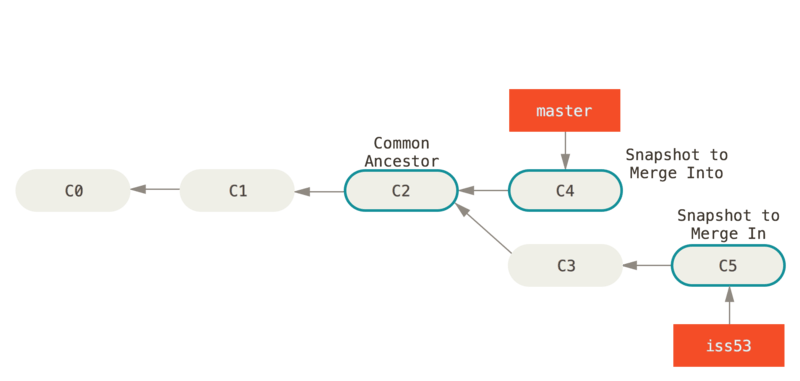

- 删除分支
//删除hotfix分支

$ git branch -d hotfix

Deleted branch hotfix (3a0874c). - 合并的冲突处理方案
//合并分支时产生冲突,指示index.html文件有冲突

$ git merge iss53

Auto-merging index.html

CONFLICT (content): Merge conflict in index.html

Automatic merge failed; fix conflicts and then commit the result.
//观察文件状态
$ git status
On branch master
You have unmerged paths.
(fix conflicts and run "git commit") Unmerged paths:
(use "git add <file>..." to mark resolution) both modified: index.html no changes added to commit (use "git add" and/or "git commit -a")//使用工具打开冲突的文件 <<<<<<< HEAD:index.html
<div id="footer">contact : email.support@github.com</div>
=======
<div id="footer">
please contact us at support@github.com
</div>
>>>>>>> iss53:index.html//把文件手工修改为我们想要的内容
<div id="footer">
please contact us at email.support@github.com
</div> //重新添加到暂存库
git add index.html //重新添加到版本库
git commit -m '解决冲突文件index.html' - 查看所有的分支列表
$ git branch
iss53
* master
testing *代表的是当前的分支 - 查看每个分支的最后一次提交
$ git branch -v

  iss53   93b412c fix javascript issue

* master  7a98805 Merge branch 'iss53'

testing 782fd34 add scott to the author list in the readmes - 筛选哪些分支已经合并到当前分支,哪些分支没有合并到当前分支
//查看哪些分支已经合并到当前分支;      使用git branch -d iss53可以正常删除已合并的分支;

$ git branch --merged

  iss53

* master

//查看哪些分支目前还没有合并到当前分支;使用git branch -d testing不能正常删除没有被合并的分支,需用git branch -D testing强制删除

$ git branch --no-merged

testing - 分支开发工作流
- 长期分支

- 特性分支

- 长期分支
- 远程分支
- 远程分支的存在方式
- 以
(remote)/(branch)形式命名,例如:origin/master
- 以
- 克隆之后的服务器与本地仓库
- 系统一个本地分支会对应一个远程分支,默认状况下会一一对应。
- 更新本地仓库的远程分支
//远程主机的所有更新全部拉取到本地中;只拉取,不会自动合并;相当于origin/master只读分支不断向前走动

$ git fetch <远程主机名>

//只拉取特定的分支

$ git fetch <远程主机名> <分支名>

//拉取并自动合并
$ git pull <远程主机名> - 推送分支
//推送serverfix分支

$ git push origin serverfix

Counting objects: , done.

Delta compression using up to  threads.

Compressing objects: % (/), done.

Writing objects: % (/), 1.91 KiB |  bytes/s, done.

Total  (delta ), reused  (delta )

To https://github.com/schacon/simplegit

* [new branch] serverfix -> serverfix - 在远程分支的基础上进行工作
- 合并远程分支
git merge origin/serverfix
- 在远程分支上创建一个分支
$ git checkout -b serverfix origin/serverfix

Branch serverfix set up to track remote branch serverfix from origin.

Switched to a new branch 'serverfix'
- 合并远程分支
- 跟踪分支
//当运行fetch的时候,本地分支
sf(新建)会自动从origin/serverfix拉取。
$ git checkout -b sf origin/serverfix
Branch sf set up to track remote branch serverfix from origin.
Switched to a new branch 'sf' //设置本地已有的分支(当前分支)跟踪刚刚拉取下来的一个分支$ git branch -u origin/serverfix - 列出所有的跟踪分支,并指出本地分支是否是领先、落后。
$ git branch -vv

  iss53     7e424c3 [origin/iss53: ahead ] forgot the brackets  //超前两个提交

  master    1ae2a45 [origin/master] deploying index fix          //与远程分支同步

* serverfix f8674d9 [teamone/server-fix-good: ahead , behind ] this should do it  //超前三个提交,落后一个提交

testing 5ea463a trying something new //没有跟踪任何远程分支; - 删除远程分支
$ git push origin --delete serverfix

To https://github.com/schacon/simplegit

 - [deleted]         serverfix
- 远程分支的存在方式
git杂记-分支简介的更多相关文章
- Git分支-分支简介
源地址:https://git-scm.com/book/zh/ch3-1.html 几乎所有的版本控制系统都以某种形式支持分支. 使用分支意味着你可以把你的工作从开发主线上分离开来,以免影响开发主线 ...
- 7.Git分支-分支简介、分支创建、分支切换
1.分支简介 几乎所有的版本控制系统都支持某种形式的分支.使用分支意味着可以把你的工作从开发主线上分离开来,以免影响开发主线.Git的分支是其必杀技,它相对于其它版本控制系统来说,具有难以置信的轻量性 ...
- Git(12)-- Git 分支 - 分支简介
@ 目录 1.分支简介 1.1.初始化并首次提交 首次提交对象及其树结构: git 的 cat-file 的命令用法: 1.2.修改并第二次提交 第二次提交对象及其树结构: 1.3.修改并第三次提交 ...
- git分支简介,理解HEAD,master
为了真正理解 Git 处理分支的方式,我们需要回顾一下 Git 是如何保存数据的. 或许你还记得 起步 的内容,Git 保存的不是文件的变化或者差异,而是一系列不同时刻的文件快照. 在进行提交操作时, ...
- Git 系列教程(11)- 分支简介
前言 很多版本控制系统都有分支这个概念 使用分支意味着可以将日常工作从主线上脱离,从而避免影响主线 Git 鼓励在工作流程中频繁使用分支和合并 Git 是如何保存数据的 Git 保存的不是文件的变化或 ...
- git入门-分支
1. git分支简介 使用分支可以让你从开发主线上分离开来,然后在新的分支上解决特定问题,同时不会影响主线.像其它的一些版本控制系统,创建分支需要创建整个源代码目录的副本.而Git 的分支是很轻量级的 ...
- 好代码是管出来的——Git的分支工作流与Pull Request
上一篇文章介绍了常用的版本控制工具以及git的基本用法,从基本用法来看git与其它的版本控制工具好像区别不大,都是对代码新增.提交进行管理,可以查看提交历史.代码差异等功能.但实际上git有一个重量级 ...
- git branch 分支
几乎所有的版本控制系统都以某种形式支持分支. 使用分支意味着你可以把你的工作从开发主线上分离开来,以免影响开发主线. 在很多版本控制系统中,这是一个略微低效的过程——常常需要完全创建一个源代码目录的副 ...
- Git Flow 分支管理简述
概述 Git 是什么 Git 是一个开源的分布式版本控制系统,用于敏捷高效地处理任何或小或大的项目. Git 是 Linus Torvalds 为了帮助管理 Linux 内核开发而开发的一个开放源码的 ...
随机推荐
- 2016级算法期末上机-G.中等·Bamboo's Fight with DDLs II
中等·Bamboo's Fight with DDLs II 分析 一句话:给定字符串,求最长回文子序列长度,动态规划LCS思想的进阶应用 具体思路如下: 对于任意字符串,如果头尾字符相同,那么字符串 ...
- SHELL脚本扩展
使用SED命令 sed称为流编辑器,命令格式如下: sed option script file -e script #指定多个命令 -f script_file #指定命令文件 -n #不需要为每个 ...
- 【转载】Analysis Service Tabular Model #003 Multidimensional Model VS Tabular Model 我们该如何选择?
由于Multidimensional Model 和 Tabular Model 并不能互相转换, 所以在项目之初就应该要考虑好选择哪一种模型进行开发. 以下只是一些建议: Licensing 许可和 ...
- Linux文件索引节点相关概念
一. 概念 1. inode(index node)表中包含文件系统所有文件列表 一个节点 (索引节点)是在一个表项,包含有关文件的信息( 元数据 ),包括: 文件类型,权限,UID,GID 链接 ...
- JS实现表格列宽拖动
在数据表格中,有时候需要拖动表格宽度,查看完整的数据,是很常用的功能. 1 效果 可以用纯JS就可以实现,如下,是正常情况下的表格: 拖动表格标题中间线,拖动后效果如下: 查看DEMO 2 代码 HT ...
- [转] Linux History(历史)命令用法 15 例
[From]https://linuxtoy.org/archives/history-command-usage-examples.html 如果你经常使用 Linux 命令行,那么使用 histo ...
- 查看APK包签名的方法。
1.查看 keystore $ keytool -list -keystore debug.keystore 结果: Keystore type: JKS Keystore provider: SUN ...
- 一段关于Unix、Linux和Windows的暗黑史
"SCO在言语上变得越来越好斗,而且还拒绝展示有关诉讼的任何证据,一切都似乎在表明,SCO只不过是在那里拉虎皮做大旗地狂言乱语.但是,微软 决不会轻易放弃这么可以一个利用这些狂言乱语的好机会 ...
- (转)CentOS 7 安装 Docker
原文:http://www.cnblogs.com/stulzq/p/7743073.html http://www.cnblogs.com/stulzq/p/8629165.html-------- ...
- WebStorm 快键键
ctrl+/ 单行注释ctrl+shift+/ 块注释ctrl+shift+ +/- 展开/折叠ctrl+alt+L 格式化代码ctrl+shift+ up/down 上下移动句子 Alt+回车 导入 ...