
Swift自定义头视图和尾视图

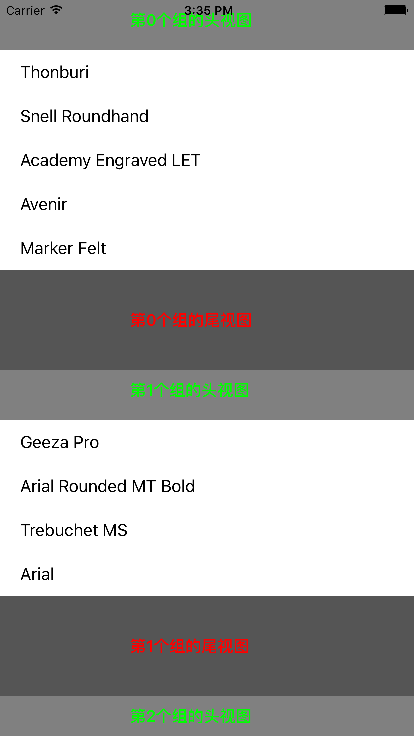
var data: [[String]]!
override func viewDidLoad() {
super.viewDidLoad()
// Do any additional setup after loading the view, typically from a nib.
let tableView = UITableView(frame: self.view.bounds, style: .Plain)
tableView.dataSource = self
tableView.delegate = self
self.view.addSubview(tableView)
//数据源
let resourcePath = NSBundle.mainBundle().pathForResource("font", ofType: "plist")
self.data = NSArray(contentsOfFile: resourcePath!)! as! [[String]]
}
func numberOfSectionsInTableView(tableView: UITableView) -> Int {
return self.data.count
}
func tableView(tableView: UITableView, numberOfRowsInSection section: Int) -> Int {
return self.data[section].count
}
func tableView(tableView: UITableView, cellForRowAtIndexPath indexPath: NSIndexPath) -> UITableViewCell {
let identifier = "cell"
var cell = tableView.dequeueReusableCellWithIdentifier(identifier)
if cell == nil {
cell = UITableViewCell(style: .Default, reuseIdentifier: identifier)
}
cell?.textLabel?.text = self.data[indexPath.section][indexPath.row]
return cell!
}
//section的头视图标题
// func tableView(tableView: UITableView, titleForHeaderInSection section: Int) -> String? {
// return "第\(section)个组的头视图"
// }
//
// //section的尾视图标题
// func tableView(tableView: UITableView, titleForFooterInSection section: Int) -> String? {
// return "第\(section)个组的尾视图"
// }
//自定义头视图
func tableView(tableView: UITableView, viewForHeaderInSection section: Int) -> UIView? {
//让headerView作为组的头视图,不需要设置headerView的frame,但是一定要指定高度
let headerView = UIView(frame: CGRectZero)
headerView.backgroundColor = UIColor.grayColor()
let titleLabel = UILabel(frame: CGRect(x: 130, y: 10, width: 150, height: 20))
titleLabel.font = UIFont.boldSystemFontOfSize(16)
titleLabel.textColor = UIColor.greenColor()
titleLabel.text = "第\(section)个组的头视图"
headerView.addSubview(titleLabel)
return headerView
}
//自定义尾部视图
func tableView(tableView: UITableView, viewForFooterInSection section: Int) -> UIView? {
let footerView = UIView(frame: CGRectZero)
footerView.backgroundColor = UIColor.darkGrayColor()
let titleLabel = UILabel(frame: CGRect(x: 130, y: 40, width: 150, height: 20))
titleLabel.font = UIFont.boldSystemFontOfSize(16)
titleLabel.textColor = UIColor.redColor()
titleLabel.text = "第\(section)个组的尾视图"
footerView.addSubview(titleLabel)
return footerView
}
//指定组的尾部视图的高度
func tableView(tableView: UITableView, heightForFooterInSection section: Int) -> CGFloat {
return 100
}
//指定组的头视图的高度
func tableView(tableView: UITableView, heightForHeaderInSection section: Int) -> CGFloat {
return 50
}
Swift自定义头视图和尾视图的更多相关文章
- UICollectionview的头视图和尾视图
UITableView有头视图和尾视图,那么UICollectionView有没有头视图和尾视图呢? 答案是有的. 1.新建一个类,必须继承自 UICollectionReusableView. 2. ...
- iOS TabeView 头视图和尾视图不滑动的实现
因项目有需求不能让section中的头尾视图滑动,顾根据网上的一些资料和自己整理的思路,已实现了不滑动效果,上代码,啥都说了,搞了2个小时都是泪.... 1.创建一个tableview _mainTa ...
- iOS之UITableView组头组尾视图/标题悬停
最近笔者在公司的iOS开发中,有一个iOS开发同事跑来问了两个问题:1.给UITableView设置了组头和组尾视图,但是一直显示不出来?2.UITableView的section的header和fo ...
- ##DAY3 自定义视图、视图控制器、视图控制器指定视图、loadView、 viewDidLoad、MVC、屏幕旋转、内存警告
##DAY3 自定义视图.视图控制器.视图控制器指定视图.loadView. viewDidLoad.MVC.屏幕旋转.内存警告 #pragma mark ———————自定义视图的步骤 —————— ...
- 隐藏自定义的tabbar之后,push到B视图,B视图的键盘工具条无法响应点击事件
我的情况如下: 在TabbarViewController中隐藏了系统的tabbar,然后自定义tabbar,A B C D 4个视图都有UINavigationController,A视图 使用的是 ...
- SpringMVC自定义视图Excel视图和PDF视图
SpringMVC自定义视图 Excel视图和PDF视图 SpringMVC杂记(十一) 使用Excel视图 Spring MVC 视图解析器(ViewResolver ) java实现导出excel ...
- ShareSDK(iOS版)开发实践:自定义授权视图和分享视图导航栏
最近很多人问ShareSDK的授权视图和分享视图的导航栏样式与应用风格不一致,能否修改导航栏的样式?那么这里我就2.6.1版本进行说明(还在使用1.x版本的朋友建议升级到2.x版本,在新版本中可定制的 ...
- IOS中在自定义控件(非视图控制器)的视图跳转中 代理方法与代码块的比较
//代码块与代替代理的设计方法 我就以在自定义视图中(非视图控制器,不能实现视图控制功能),通过代理和代码块两种方法分别实现视图的跳转,进行对比 首先自定义了一个视图,上面有一个已经注册了得BUtto ...
- iOS10 UI教程视图的绘制与视图控制器和视图
iOS10 UI教程视图的绘制与视图控制器和视图 iOS10 UI视图的绘制 iOS10 UI教程视图的绘制与视图控制器和视图,在iOS中,有很多的绘图应用.这些应用大多是在UIView上进行绘制的. ...
随机推荐
- [svc]堡垒机模型设计初步
models from django.contrib.auth.models import AbstractUser from django.db import models # Create you ...
- Spring中基于Java的配置@Configuration和@Bean用法
spring中为了减少xml中配置,可以声明一个配置类(例如SpringConfig)来对bean进行配置. 一.首先,需要xml中进行少量的配置来启动Java配置: <?xml version ...
- 感知机PLA算法实现[转载]
转自:https://blog.csdn.net/u010626937/article/details/72896144#commentBox 1.实现原始形式 import numpy as np ...
- 01 - spring mvc 概述及配置DispatcherServlet
1.Spring mvc 基于model2实现,整体框架流程如(图片来自百度): ①web容器接收到http请求,若匹配DispatcherServlet的请求映射路径(web.xml),则容器会交给 ...
- C# 多线程编程第一步——理解多线程
一.进程.线程及多线程的概念 什么是多线程呢?不理解. 那什么是线程呢?说到线程就不得不说说进程.我在网上搜索也搜索了一些资料,大部分所说的进程其实是很抽象的东西.通俗的来讲,进程就是一个应用程序开始 ...
- zw版【转发·台湾nvp系列Delphi例程】HALCON SetIcon1
zw版[转发·台湾nvp系列Delphi例程]HALCON SetIcon1 procedure TForm1.Button1Click(Sender: TObject);var img : HIma ...
- linux 异常
1. NoRouteToHostException异常问题的原因及解决 (转自:http://performtest163.blog.163.com/blog/static/1400769642011 ...
- Web安全之BurpSuite抓取HTTPS请求
出现了问题,第一步要干什么呢? 当然是要去官方网站去找FAQ和help,先来练习一下英语 https://portswigger.net/burp/help/proxy_options_install ...
- 20145315 《Java程序设计》第九周学习总结
20145315 <Java程序设计>第九周学习总结 教材学习内容总结 第16章--整合数据库 16.1.1JDBC简介 应用程序通过通信协议对数据库进行指令交换,以进行对数据的的增删查找 ...
- OpenCV_火焰检测——完整代码
转:http://blog.csdn.net/xiao_lxl/article/details/43307993 火焰检测小程序 前几天,偶然看到了An Early Fire-Detection Me ...