
Attribute基本介绍
一、基础知识点
1、什么是Attribute?
MSDN:公共语言运行时允许你添加类似关键字的说明,叫做Attribute,它可以对程序中的元素进行标注,如类型、字段、方法和属性等.Attributes和Microsoft .NET Framework文件的元数据保存在一起,可以用来向运行时描述你的代码,或者在程序运行的时候影响应用程序的行为。在.NET中,Attribute被用来处理多种问题,比如序列化、程序的安全特征、防止即时编译器对程序代码进行优化从而代码容易调试等等.
2、Attribute作为编译器的指令
Attribute作为编译器的指令数量不受限制,大致有以下三个Attribute:
(1)、Conditional:起条件编译的作用,只有满足条件,才允许编译器对它描述的代码进行编译。一般在程序调试时使用。
static void Main(string[] args)

{

    DisplayRunningMessage();

    Console.ReadKey();

}

[Conditional("DEBUG")]

static void DisplayRunningMessage()

{

    Console.WriteLine("开始运行Main子程序。当前时间是"+DateTime.Now);

}
Conditional对满足参数的定义条件的代码进行编译,如果没有定义DEBUG,那么该方法将不被编译,读者可以把#define DEBUG一行注释掉看看输出的结果(release版本,在Debug版本中Conditional的debug总是成立的)
(2)、DllImport:用来标记非.Net的函数,表明该方法在一个外部的Dll中定义
static void Main(string[] args)

{

    int result=Test(, );

    Console.WriteLine("Result is {0}", result);

    Console.ReadKey();

}

[DllImport("ClassLibrary1.dll")]

public static extern int Test(int a,int b);
DllImport用于调用C或者C++等外部的dll程序集,其修饰的方法必须是外部程序集的主入口。
(3)、Obsolete:这个属性用来标记当前的方法已经被弃用,不再使用了。
static void Main(string[] args)

{

     OldMethod();

     NewMethod();

     Console.ReadKey();

}

static void NewMethod()

{

     Console.WriteLine("I'am new Method");

}

[Obsolete]

static void OldMethod()

{

     Console.WriteLine("I'am old Method");

}


3、自定义Attribute类
除了.NET提供的那些Attribute派生类之外,我们可以自定义我们自己的Attribute,所有自定义的Attribute必须从Attribute类派生。下面来简单说明下Attribute类:
(1)、Attribute类基本知识点
protected Attribute(): 保护的构造器,只能被Attribute的派生类调用。
static Attribute GetCustomAttribute():这个方法有8种重载的版本,它被用来取出施加在类成员上指定类型的Attribute。
static Attribute[] GetCustomAttributes(): 这个方法有16种重载版本,用来取出施加在类成员上指定类型的Attribute数组。
static bool IsDefined():由八种重载版本,看是否指定类型的定制attribute被施加到类的成员上面。
bool IsDefaultAttribute(): 如果Attribute的值是默认的值,那么返回true。
bool Match():表明这个Attribute实例是否等于一个指定的对象。
公共属性: TypeId: 得到一个唯一的标识,这个标识被用来区分同一个Attribute的不同实例。
上面是Attribute的基本知识点,想要了解详细的信息,请使用Reflector查看源代码;
(2)、自定义Attribute类命名规则
命名规则:Attribute的类名+"Attribute",当你的Attribute施加到一个程序的元素上的时候,编译器先查找你的Attribute的定义,如果没有找到,那么它就会查找“Attribute名称"+Attribute的定义。如果都没有找到,那么编译器就报错。 ---如TestAttribute
(3)、给自定义Attribute限定施加的元素的类型 ---AttributeUsage
通过AttributeUsage来给我们自定义的Attribute限定施加元素的类型,代码形式如下:
[AttributeUsage(参数设置)]

public class TestAttribute:Attribute

{

    //方法体

}
非常有意思的是AttributeUsage也是一个Attribute,这个是专门施加在Attribute上的Attribute,AttributeUsage自然也是从Attribute派生而来的,它有一个带参数的构造器,这个参数是AttributeTargets的枚举类型

[Serializable, ComVisible(true), Flags, __DynamicallyInvokable]

public enum AttributeTargets

{

   All=,

   Assembly=,

   Module=,

   Class=,

   Struct=,

   Enum=,

   Constructor=,

   Method=,

   Property=,

   Field=,

   Event=,

   Interface=,

   Parameter=,

   Delegate=,

   ReturnValue=

}
注意:Flags特性,说明作为参数的AttributeTarges的值允许通过“|”操作来进行多个值得组合。如果你没有指定参数,那么默认参数就是All
除了AttributeTarges参数外,AttributeTarges还允许传入另外两个参数:
AllowMultiple: 读取或者设置这个属性,表示是否可以对一个程序元素施加多个Attribute 。
Inherited:读取或者设置这个属性,表示是否施加的Attribute 可以被派生类继承或者重载。
(4)、AttributeUsage的使用例子
    class Program

    {

        static void Main(string[] args)

        {

        }

        [Test]

        static void TestMethod()

        { }

    }

    /// <summary>

    /// 通过AttributeUsage设置Test属性只对类有效

    /// </summary>

    [AttributeUsage(AttributeTargets.Class)]

    public class TestAttribute:Attribute

    {

    }
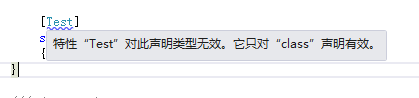
上面定义了一个Test属性,并通过AttributeUsage设置该属性只对类有效,但是Program类中却用它修饰方法,所以程序报错,抱错信息如下:
二、Attribute高级应用
1、描述一个单元类的检查信息
通过Attribute描述一个类的检查信息
using System;

using System.Collections.Generic;

using System.Diagnostics;

using System.Linq;

using System.Runtime.InteropServices;

using System.Text;

using System.Threading.Tasks;

namespace ConsoleApplication1

{

    class Program

    {

        static void Main(string[] args)

        {

            System.Reflection.MemberInfo info = typeof(BeCheckedClass);//通过反射获取BeCheckedClass类

            //根据反射获取BeCheckedClass类通过Attribute.GetCustomAttribute来获取描述它的特性

            CodeReviewAttribute attri = (CodeReviewAttribute)Attribute.GetCustomAttribute(info, typeof(CodeReviewAttribute));

            if(!object.ReferenceEquals(attri,null))

            {

                Console.WriteLine("代码检查人:{0}", attri.Reviewer);

                Console.WriteLine("检查时间:{0}", attri.Date);

                Console.WriteLine("备注:{0}", attri.Comment);

                Console.ReadKey();

            }

        }

    }

    [CodeReviewAttribute("小超", "2017-6-12", Comment = "检查通过")]

    public class BeCheckedClass

    {

    }

    /// <summary>

    /// 代码检查属性

    /// </summary>

    [AttributeUsage(AttributeTargets.Class)]

    public class CodeReviewAttribute: Attribute

    {

        private string _reviewer;  //代码检查人

        private string _date;      //检查日期

        private string _comment;   //检查结果信息

        public CodeReviewAttribute(string reviewer,string date)

        {

            this._reviewer = reviewer;

            this._date = date;

        }

        public string Reviewer

        {

            get

            {

                return _reviewer;

            }

        }

        public string Date

        {

            get

            {

                return _date;

            }

        }

        public string Comment

        {

            get

            {

                return _comment;

            }

            set

            {

                _comment = value;

            }

        }

    }

}
通过反射获取BeCheckedClass类,在通过Attribute.GetCustomAttribute获取BeCheckedClass类的描述特性值,从而实现这个功能!
Attribute基本介绍的更多相关文章
- [C#]Attribute特性(2)——方法的特性及特性参数
上篇博文[C#]Attribute特性介绍了特性的定义,类的特性,字段的特性,这篇博文将介绍方法的特性及特性参数相关概念. 3.方法的特性 之所以将这部分单列出来进行讨论,是因为对方法的特性查询的反射 ...
- CallerInformation
http://www.cnblogs.com/henryzhu/archive/2013/01/27/csharp-5-new-callerinformation.html 去年8月,Visual S ...
- Object C学习笔记3-对象的使用和定义
1. 如何定义一个对象 在面向对象的语言中,定义一个对象是使用Class关键字,而在Object-C中则是使用@interface,@interface用于定义对象的属性和方法,@implementa ...
- crmsh语法
.查看配置信息 crm(live)# configure crm(live)configure# show node node1 node node2 property cib-bootstrap-o ...
- OAF_开发系列06_实现OAF属性集的介绍和开发Attribute Set(案例)
20150705 Created By BaoXinjian
- C# 特性(Attribute)详细介绍
1.什么是Atrribute 首先,我们肯定Attribute是一个类,下面是msdn文档对它的描述:公共语言运行时允许你添加类似关键字的描述声明,叫做attributes, 它对程序中的元素进行标注 ...
- (转)C# 特性(Attribute)详细介绍
本文转载自:http://www.cnblogs.com/luckdv/articles/1682488.html 1.什么是Atrribute 首先,我们肯定Attribute是一个类,下面是msd ...
- .Net内置特性Attribute介绍
特性Attribute概述 特性(Attribute)是一种特殊的类型,可以加载到程序集或者程序集的类型上,这些类型包括模块.类.接口.结构.构造函数.方法.字段等,加载了特性的类型称之为特性的目标. ...
- C#中Attribute介绍
什么是特性? MSDN中定义为:公共语言运行时运行添加类似关键字的描述声明,叫做Attribute,它对程序中的元素进行标注,如类型.方法.字段和属性等.attribute和Microsoft.Net ...
随机推荐
- 续安装好composer和workerman之后;TP5运行workerman的操作
TP5想要实现时时通讯:首先先安装好composer和workerman,我之前有写一篇安装的方法,在cmd里面安装:tp5手册上面有写cmd命令的代码:接下来是安装好后如何运行的: 首先在项目中建立 ...
- Zend_Controller_Front 研究
如果你裸写php,一个项目就会出现很多的页面控制器(Page Controller),如果项目很大,重复代码就很多,越来越变得很难维护.有了问题,自然就有解决方案!于是前端设计模式 闪亮登场! 前端 ...
- Oracle EBS学习网站列表
Oracle官方文档库http://tahiti.oracle.com/http://www.oracle.com/technetwork/documentation/index.html#apps其 ...
- AndroidStudio-Error Loading Project: Cannot load 3 facets
Error Loading Project: Cannot load 3 facets 解决方法,在 File-->Settings-->Plugins-----> 勾选 Andro ...
- MVC v5.1 Preview 包含 web api 2.1 web pages 3.1
Includes ASP.NET MVC 5.1, Web API 2.1, and Web Pages 3.1 preview release. This was released marked a ...
- Android实现表单提交,webapi接收
1.服务端采用的是.net的WEBAPI接口. 2.android多文件上传. 以下为核心代码: package com.example.my.androidupload; import androi ...
- SQL去除重复记录
SQL去除重复记录 if not object_id('Tempdb..#T') is null drop table #T Go Create table #T([ID] int,[Name ...
- Winform嵌入其它应用程序
Options: using CommandLine; using System; using System.Collections.Generic; using System.Linq; using ...
- 【cocos2d-x 手游研发----博彩大转盘】
博彩大转盘,转盘抽奖的小系统,这是一个很有意思的游戏模块,游戏中增加这样一些趣味的小模块,我会附上源码: 会增进玩家的粘性,每天都想来抽两把试试手气: 我做的这个是个矩形风格的转盘,不是那种圆形的转盘 ...
- Syncthing源码解析
Gogland编译Syncthing 源码目录说明 Syncthing启动过程分析 在Gogland中对Syncthing的各个模块进行调试 第三方库