
eclipse中AXIS2发布过程
Axis2服务端研究好几个小时,终于解决了
需要下载:
地址1:
可以从镜像站下载: 上海大学开源镜像站
地址2:
链接:从百度网盘下载;
密码:8nwu
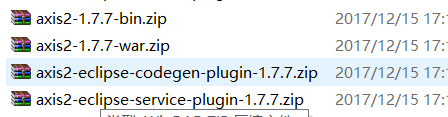
其中第二个可以不用下;
解压后
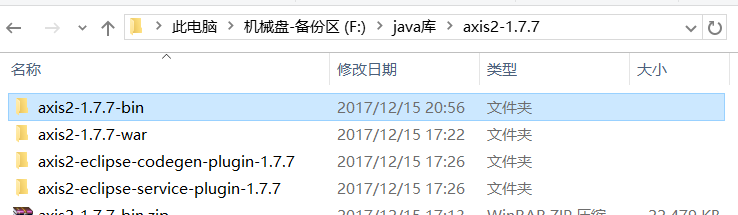
将3,4解压后的jar放到D:\eclipse\plugins,也就是安装目录的PLUGINS文件夹下;
在eclipse里面设置axis2运行时环境:
Windows-preferences-web services-axis2 preferences-axis2 runtime:
选择路径后确定

然后在eclipse里面新建一个dynamic web project;(我这里是XA)写你的用于服务的java类,如图:
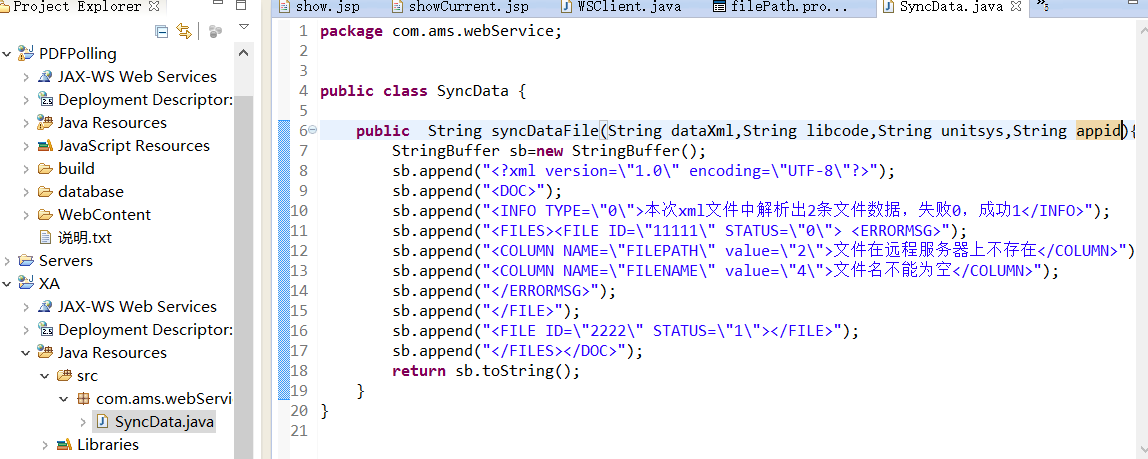
此方法就是传4个参数,然后返回一个xml格式字符串;
然后建立webservice:
右键左边项目资源浏览器里面的刚才新建的服务类:SyncData.java,-web service-create webservice;
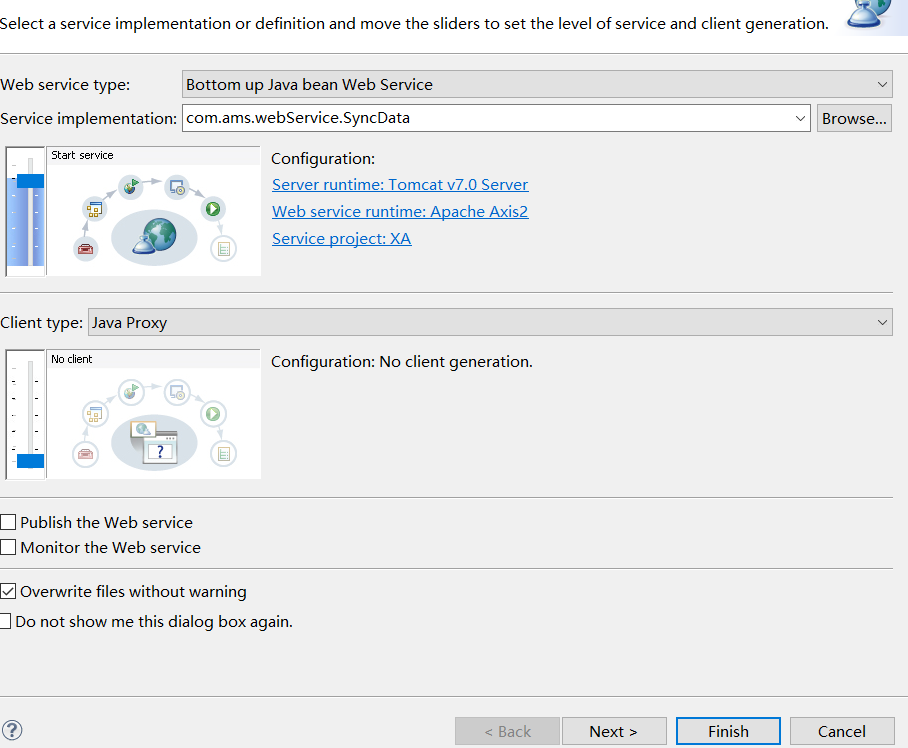
注意将configuration中第二项改成 axis2;然后一路下去生成webservice;
此时左侧项目自动生成相应文件如下图:
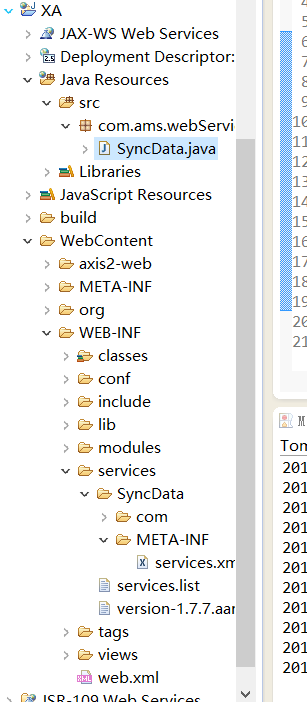
可以看到生成了很多新的文件;
打开WEB-INF的lib,发现里面自动导入了很多jar包,但这里缺少一个(可能是eclipse版本的问题)需要手动导入;
打开F:\java库\axis2-1.7.7\axis2-1.7.7-bin\axis2-1.7.7(文章开头下载后的解压路径),
打开lib,复制里面的xmlschema-core-2.2.1.jar这个jar包到eclipse里面左侧XA项目中的WEB-INF/lib;(重要);
并且删除项目lib中的XmlSchema-1.4.7.jar(相当于用xmlschema-core-2.2.1.jar替换掉XmlSchema-1.4.7.jar)
Jar包导入后,现在修改:

双击项目中的services.xml:
<service name="SyncData" >
<Description>
Please Type your service description here
</Description>
<messageReceivers>
<messageReceiver mep="http://www.w3.org/2004/08/wsdl/in-only" class="org.apache.axis2.rpc.receivers.RPCInOnlyMessageReceiver" />
<messageReceiver mep="http://www.w3.org/2004/08/wsdl/in-out" class="org.apache.axis2.rpc.receivers.RPCMessageReceiver"/>
</messageReceivers>
<parameter name="ServiceClass" locked="false">com.ams.webService.SyncData</parameter>
</service>
上方是原内容,注意红色字,现在修改为:
<service name="SyncData" >
<Description>
Please Type your service description here
</Description>
<messageReceivers>
<messageReceiver mep="http://www.w3.org/ns/wsdl/in-only" class="org.apache.axis2.rpc.receivers.RPCInOnlyMessageReceiver" />
<messageReceiver mep="http://www.w3.org/ns/wsdl/in-out" class="org.apache.axis2.rpc.receivers.RPCMessageReceiver"/>
</messageReceivers>
<parameter name="ServiceClass" locked="false">com.ams.webService.SyncData</parameter>
</service>
至此,修改完毕;webservice服务端可正确发布;
通过spring配置数据源时必看:
如果提示报错找不到javax/ws/rs/Produces ;
复制F:\java库\axis2-1.7.7\axis2-1.7.7-bin\axis2-1.7.7中的jsr311-api-1.1.1.jar到项目lib中;
在webservice的类中取得spring的bean:
此方法并没有将AXIAS2集成到spring中,在webservice服务类中无法通过Autowired来装载spring的bean,必须通过spring的xml配置文件来查找自动状态的bean;
public static ApplicationContext ac=new ClassPathXmlApplicationContext(new String[]{"/applicationContext.xml"});
public ABSDao absDao = (ABSDao) ac.getBean(ABSDao.class);
第一行取得ApplicationContext,第二行通过ApplicationContext来取得需要的bean,注意,这个bean没有直接配置在xml文件中,而是通过自动扫描对应包的方式配置到xml中的,因此,这个bean没有name,id等属性,所以这里只能通过xxx.class的方式来getbean
eclipse中AXIS2发布过程的更多相关文章
- Eclipse中Axis2发布WebService
介绍:Axis是apache下一个开源的webservice开发组件. l 开发工具下载: 1. eclipse的Java EE版本.下载地址:http://www.eclipse.org/dow ...
- eclipse中tomcat发布失败(Could not delete May be locked by another process)原因及解决办法
在eclipse中tomcat发布项目时,偶尔出现了以下情况: publishing to tomcat v7.0 services at localhost has encountered a pr ...
- 在eclipse中部署发布web项目 和 更改eclipseweb项目发布的路径
我的工作空间:d:workspaceweb项目名称:xxx在eclipse配置完tomcat后,发布到的路径是 d:\workspace\.metadata\.plugins\org.eclipse. ...
- Eclipse + Apache Axis2 发布RESTful WebService(二)配置开发环境
1. 下载axis2相关软件地址:http://axis.apache.org/axis2/java/core/download.html 2. 安装插件:将axis2-eclipse-codegen ...
- Eclipse + Apache Axis2 发布RESTful WebService(三)第一个程序Hello Axis2 !(未成功)
此路不通 Axis2发布SOAP WebService非常简单,建一个Dynamic Web Project,然后为它建一个Axis的Web Service(Tomcat7+JDK),就会生成Clas ...
- Eclipse + Apache Axis2 发布SOAP WebService(三)第一个程序Hello Axis2 SOAP!
因为Axis2同时支持SOAP和RESTful的WebService开发. 我的目标主要是RESTful,这里简单记录一个SOAP的小例子: 原文地址:https://jingyan.baidu.co ...
- Eclipse + Apache Axis2 发布RESTful WebService(一)基础知识
1.什么是WebService 学习 WebService 第一步:体系结构.三元素SOAP/WSDL/UDDI 2.什么是Axis2 Axis2是Apache一套崭新的WebService引擎(框架 ...
- 在eclipse中maven web项目部署到tomcat,访问不了
修改eclipse中tomcat发布路径后,能正常访问
- eclipse中build path与Web Deployment Assembly的作用,区别
转自:https://blog.csdn.net/heart_mine/article/details/79402792 以下内容只为做个笔记记录已下,有问题可以留言,欢迎补充. 今天在eclipse ...
随机推荐
- iis的网站发布
1.打开IIS服务器,添加“新网站”,命名网站的名称.物理路径(存放index.aspx的文件路径).ip地址和端口:2.在已经添加的网站,启用“目录浏览”,“默认文档”设置将要打开的网页 注:(1) ...
- 基于BranchTraceStore机制的CPU执行分支追踪工具 —— CpuWhere [修正版 仅驱动]
[前言] 在张银奎老师的<软件调试>一书中,详细地讲解了使用内存的分支记录机制——BTS机制(5.3),并且给出了示例工具CpuWhere及其源代码.但实际运行(VMware XP_SP3 ...
- POJ 1655 Balancing Act (树的重心,常规)
题意:求树的重心,若有多个重心,则输出编号较小者,及其子树中节点最多的数量. 思路: 树的重心:指的是一个点v,在删除点v后,其子树的节点数分别为:u1,u2....,设max(u)为其中的最大值,点 ...
- python中的循环语句-01
接触python已经一周时间,下面针对这一周python学习的情况做一梳理: 1)单行注释,使用一个#:多行注释,使用三个单引号(或者三个双引号)如: name = input("name: ...
- Java的jdbc调用SQL Server存储过程Bug201906131120
如果要查询结果,第一行使用set nocount on;可能可以解决问题.
- JS中鼠标左右键以及中键的事件
在三维场景中有时候需要判断鼠标的事件,除了使用的click事件,只有鼠标左键有效,而右键无效.而对于onmousedown.onmouseup的时候鼠标的事件左键/右键有效.详细请看w3c上的资料. ...
- Bootstrap历练实例:基本按钮群组
<!DOCTYPE html><html><head><meta http-equiv="Content-Type" content=&q ...
- shell脚本,按行读取文件的几种方法。
第一种方法用while实现按读取文件.[root@localhost wyb]# cat a.txt 第一行 aaaaaa 第二行 bbbbbb 第三行 cccccc 第四行 dddddd 第五行 e ...
- java在线聊天项目0.2版本 制作客户端窗体,使用swing(用户界面开发工具包)和awt(抽象窗口工具包) BorderLayout布局与GridLayout布局不同之处 JPanel设置大小
代码如下: package com.swift; import java.awt.BorderLayout; import java.awt.Color; import javax.swing.JBu ...
- 变色龙启动MAC时,错误信息“ntfs_fixup: magic doesn't match:”的解决办法
如下是变色龙启动的bdmesg,解决办法就是用mac的磁盘管理器,对ntfs分区进行检验修复.需要安装ntfs的驱动支持. 实在不行,就删除调整过大小的分区,重新用Windows的磁盘管理器重新分区. ...