
saving snaps iteratively with for loop in Paraview
Goal:
read data 1 and slice, then save pressure, velocity contours, close data, then do loop for the aforementioned steps.
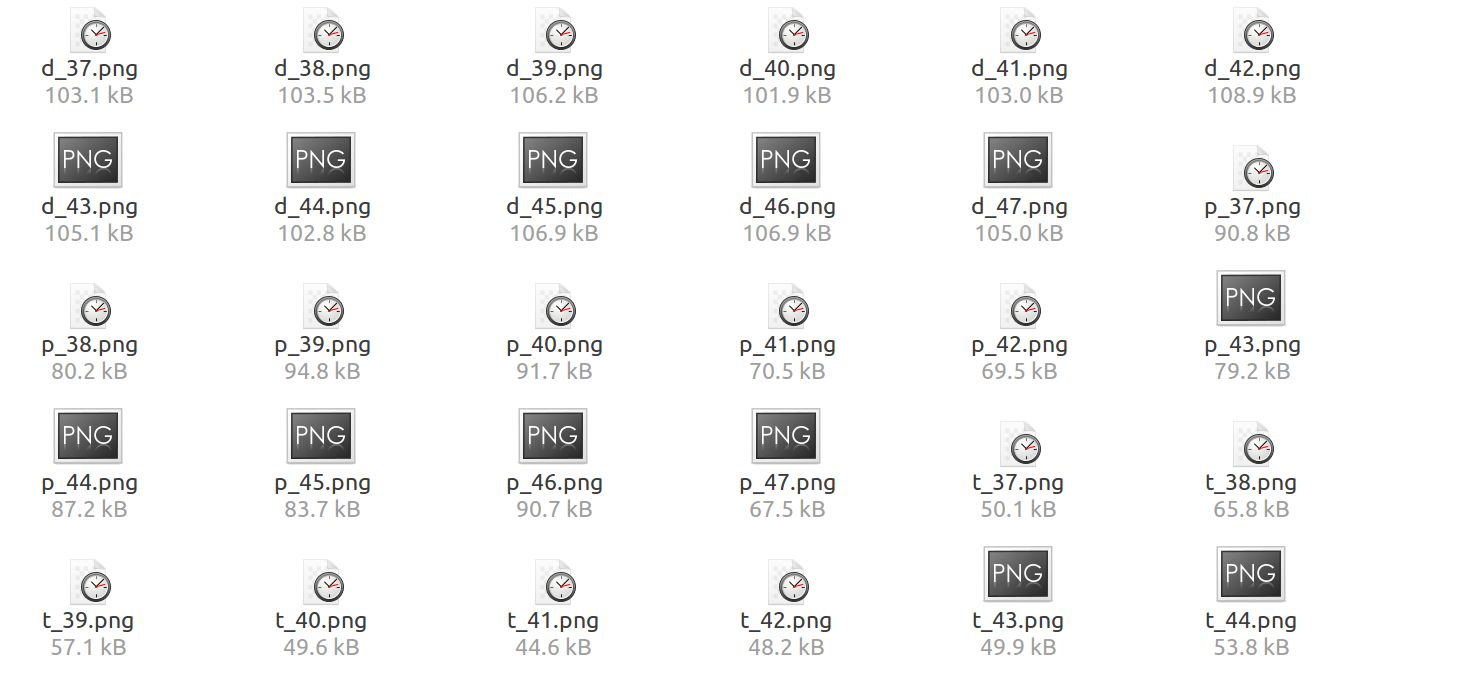
****************************************************************
#### import the simple module from the paraview
from paraview.simple import *
#### disable automatic camera reset on 'Show'
paraview.simple._DisableFirstRenderCameraReset()
for Num in range(36,47):
# create a new 'EnSight Reader' and assign it to a variable, 'transientcase'
transientcase = EnSightReader(CaseFileName='/home/kaiming/Documents/ZJU_Projects/Jet/data/transient_%i.case' %(Num+1))
transientcase.PointArrays = [ 'density','v', 'pressure', 'temperature']
# get active view
renderView1 = GetActiveViewOrCreate('RenderView')
# set a specific view size
renderView1.ViewSize = [1022, 837]
# get color transfer function/color map for 'density'
densityLUT = GetColorTransferFunction('density')
densityLUT.LockDataRange = 1
# get opacity transfer function/opacity map for 'density'
densityPWF = GetOpacityTransferFunction('density')
# show data in view
transientcaseDisplay = Show(transientcase, renderView1)
# trace defaults for the display properties.
transientcaseDisplay.ColorArrayName = ['POINTS', 'density']
transientcaseDisplay.LookupTable = densityLUT
transientcaseDisplay.GlyphType = 'Arrow'
transientcaseDisplay.ScalarOpacityUnitDistance = 0.0016420380639339577
# reset view to fit data
renderView1.ResetCamera()
# show color bar/color legend
transientcaseDisplay.SetScalarBarVisibility(renderView1, False)
# get opacity transfer function/opacity map for 'density'
densityPWF = GetOpacityTransferFunction('density')
# reset view to fit data
renderView1.ResetCamera()
#################
## slice
################
# create a new 'Slice'
slice1 = Slice(Input=transientcase)
slice1.SliceType = 'Plane'
slice1.SliceOffsetValues = [0.0]
# init the 'Plane' selected for 'SliceType'
slice1.SliceType.Origin = [-0.21849990739250558, 0.0, 0.0]
# Properties modified on slice1.SliceType
slice1.SliceType.Origin = [0.0, 0.0, 0.0]
slice1.SliceType.Normal = [0.0, 0.0, 1.0]
# show data in view
slice1Display = Show(slice1, renderView1)
# trace defaults for the display properties.
slice1Display.ColorArrayName = ['POINTS', 'density']
slice1Display.LookupTable = densityLUT
slice1Display.GlyphType = 'Arrow'
# hide data in view
Hide(transientcase, renderView1)
# show color bar/color legend
slice1Display.SetScalarBarVisibility(renderView1, True)
# set active source
SetActiveSource(transientcase)
# reset view to fit data
renderView1.ResetCamera()
# current camera placement for renderView1
renderView1.CameraPosition = [-0.3656950276430585, -0.000908563692513454, 0.21027127790890924]
renderView1.CameraFocalPoint = [-0.3656950276430585, -0.000908563692513454, 0.0]
renderView1.CameraParallelScale = 0.25006857916835856
# *****************
# change legend layout, and its font color, position
# *****************
# get color legend for 'densityLUT' in view 'renderView1'
densityLUTColorBar = GetScalarBar(densityLUT, renderView1)
# Properties modified on densityLUTColorBar
densityLUTColorBar.AutoOrient = 0
densityLUTColorBar.RangeLabelFormat = '%.2f'
## legend orientation
densityLUTColorBar.Orientation = 'Horizontal'
## legend normalized position
densityLUTColorBar.Position = [0.3, 0.2]
# change label color to 'black'
densityLUTColorBar.LabelColor = [1.0, 1.0, 1.0]
# change titile color to 'black'
densityLUTColorBar.TitleColor = [1.0, 1.0, 1.0]
# ***************
# set Background color as 'White'
renderView1.Background =[1,1,1]
# get layout
viewLayout1 = GetLayout()
# set a specific view size
renderView1.ViewSize = [1022, 837]
# current camera placement for renderView1
renderView1.CameraPosition = [-0.3656950276430585, -0.000908563692513454, 0.21027127790890924]
renderView1.CameraFocalPoint = [-0.3656950276430585, -0.000908563692513454, 0.0]
renderView1.CameraParallelScale = 0.25006857916835856
# save screenshot
SaveScreenshot('/home/kaiming/Documents/ZJU_Projects/Jet/paraview/tem/d_%s.png' %(Num+1), layout=viewLayout1, magnification=1, quality=100)
#################
# pressure contour
##################
# show color bar/color legend
slice1Display.SetScalarBarVisibility(renderView1, False)
# set active source
SetActiveSource(slice1)
# set scalar coloring
ColorBy(slice1Display, ('POINTS', 'pressure'))
# rescale color and/or opacity maps used to include current data range
slice1Display.RescaleTransferFunctionToDataRange(True)
# show color bar/color legend
slice1Display.SetScalarBarVisibility(renderView1, True)
# get color transfer function/color map for 'pressure'
pressureLUT = GetColorTransferFunction('pressure')
pressureLUT.LockDataRange = 1
# get opacity transfer function/opacity map for 'pressure'
pressurePWF = GetOpacityTransferFunction('pressure')
# set active source
SetActiveSource(transientcase)
# *****************
# change legend layout, and its font color, position
# *****************
# get color legend for 'pressureLUT' in view 'renderView1'
pressureLUTColorBar = GetScalarBar(pressureLUT, renderView1)
# Properties modified on vLUTColorBar
pressureLUTColorBar.AutoOrient = 0
pressureLUTColorBar.RangeLabelFormat = '%.2f'
## legend orientation
pressureLUTColorBar.Orientation = 'Horizontal'
## legend normalized position
pressureLUTColorBar.Position = [0.3, 0.2]
# change label color to 'black'
pressureLUTColorBar.LabelColor = [1.0, 1.0, 1.0]
# change titile color to 'black'
pressureLUTColorBar.TitleColor = [1.0, 1.0, 1.0]
# ***************
# current camera placement for renderView1
# current camera placement for renderView1
renderView1.CameraPosition = [-0.3656950276430585, -0.000908563692513454, 0.21027125790890924]
renderView1.CameraFocalPoint = [-0.3656950276430585, -0.000908563692513454, 0.0]
renderView1.CameraParallelScale = 0.25006857916835856
# save screenshot
SaveScreenshot('/home/kaiming/Documents/ZJU_Projects/Jet/paraview/tem/p_%s.png' %(Num+1), layout=viewLayout1, magnification=1, quality=100)
######################
# #temperature contour
######################
# show color bar/color legend
slice1Display.SetScalarBarVisibility(renderView1, False)
# set active source
SetActiveSource(slice1)
# set scalar coloring
ColorBy(slice1Display, ('POINTS', 'temperature'))
# rescale color and/or opacity maps used to include current data range
slice1Display.RescaleTransferFunctionToDataRange(True)
# show color bar/color legend
slice1Display.SetScalarBarVisibility(renderView1, True)
# get color transfer function/color map for 'termperature'
temperatureLUT = GetColorTransferFunction('temperature')
temperatureLUT.LockDataRange = 1
# get opacity transfer function/opacity map for 'temperature'
temperaturePWF = GetOpacityTransferFunction('temperature')
# ******
# legend layout, and its font color, position
# *****
temperatureLUTColorBar = GetScalarBar(temperatureLUT, renderView1)
# Properties modified on vLUTColorBar
temperatureLUTColorBar.AutoOrient = 0
temperatureLUTColorBar.RangeLabelFormat = '%.2f'
## legend orientation
temperatureLUTColorBar.Orientation = 'Horizontal'
## legend normalized position
temperatureLUTColorBar.Position = [0.3, 0.2]
# label color to 'black'
temperatureLUTColorBar.LabelColor = [1.0, 1.0, 1.0]
# change 'titile' color to 'black'
temperatureLUTColorBar.TitleColor = [1.0, 1.0, 1.0]
# *****************
# set active source
SetActiveSource(transientcase)
# current camera placement for renderView1
# current camera placement for renderView1
renderView1.CameraPosition = [-0.3656950276430585, -0.000908563692513454, 0.21027127790890924]
renderView1.CameraFocalPoint = [-0.3656950276430585, -0.000908563692513454, 0.0]
renderView1.CameraParallelScale = 0.25006857917835856
# save screenshot
SaveScreenshot('/home/kaiming/Documents/ZJU_Projects/Jet/paraview/tem/t_%s.png' %(Num+1), layout=viewLayout1, magnification=1, quality=100)
# *****************
# Velocity
# ****************
# show color legend
slice1Display.SetScalarBarVisibility(renderView1, False)
# set active source
SetActiveSource(slice1)
# set scalar coloring
ColorBy(slice1Display, ('POINTS', 'v'))
# rescale color and/or opacity maps used to include current data range
slice1Display.RescaleTransferFunctionToDataRange(True)
# show color bar/color legend
slice1Display.SetScalarBarVisibility(renderView1, True)
# get color transfer function/color map for 'v'
vLUT = GetColorTransferFunction('v')
vLUT.LockDataRange = 1
# get opacity transfer function/opacity map for 'v'
vPWF = GetOpacityTransferFunction('v')
# *****************
# change legend layout, and its font color, position
# *****************
# get color legend for 'densityLUT' in view 'renderView1'
vLUTColorBar = GetScalarBar(vLUT, renderView1)
# Properties modified on vLUTColorBar
vLUTColorBar.AutoOrient = 0
vLUTColorBar.RangeLabelFormat = '%.2f'
## legend orientation
vLUTColorBar.Orientation = 'Horizontal'
## legend normalized position
vLUTColorBar.Position = [0.3, 0.2]
# change label color to 'black'
vLUTColorBar.LabelColor = [1.0, 1.0, 1.0]
# change titile color to 'black'
vLUTColorBar.TitleColor = [1.0, 1.0, 1.0]
# ***************
# set active source
SetActiveSource(transientcase)
# current camera placement for renderView1
# current camera placement for renderView1
renderView1.CameraPosition = [-0.3656950276430585, -0.000908563692513454, 0.21027125790890924]
renderView1.CameraFocalPoint = [-0.3656950276430585, -0.000908563692513454, 0.0]
renderView1.CameraParallelScale = 0.25006857916835856
# save screenshot
SaveScreenshot('/home/kaiming/Documents/ZJU_Projects/Jet/paraview/tem/v_%s.png' %(Num+1), layout=viewLayout1, magnification=1, quality=100)
#### saving camera placements for all active views
# show color bar/color legend
slice1Display.SetScalarBarVisibility(renderView1, False)
# current camera placement for renderView1
renderView1.CameraPosition = [-0.3656950276430585, -0.000908563692513454, 0.21027127790890924]
renderView1.CameraFocalPoint = [-0.3656950276430585, -0.000908563692513454, 0.0]
renderView1.CameraParallelScale = 0.25006857916835856
Disconnect()
Connect()
#### uncomment the following to render all views
# RenderAllViews()
# alternatively, if you want to write images, you can use SaveScreenshot(...).
saving snaps iteratively with for loop in Paraview的更多相关文章
- plotting and saving over line in paraView
probe -- provides the field values in a particular location in space To save plotoverline to csv fil ...
- paraview显示指定时间段的时均图(两种方法)
方法一: 首先计算以后会得到每个时刻的网格数据,如下图: 但是我们只想要比如最后2s的数据,如果直接导入,paraview会把从0s时刻的数据全部加载,做时均图的时候也就是对整个时间段做时均,不是我们 ...
- Multi-tasking RTOS for microprocessors with limited memory by saving only a single return address per task during context switching
A real-time operating system (RTOS) for use with minimal-memory controllers has a kernel for managin ...
- CPU C-States Power Saving Modes
http://www.hardwaresecrets.com/article/611 Everything You Need to Know About the CPU C-States Power ...
- Atitit 解决Unhandled event loop exception错误的办法
Atitit 解决Unhandled event loop exception错误的办法 查看workspace/.metadata/.log org.eclipse.swt.SWTError: No ...
- Looper.prepare()和Looper.loop()
什么时候需要 Looper Looper用于封装了android线程中的消息循环,默认情况下一个线程是不存在消息循环(message loop)的,需要调用Looper.prepare()来给线程创建 ...
- PostgreSQL-PL/pgSQL-cursor,loop
将spam_keyword表word字段的字符全部拆分,只是利用过程语言完成循环的操作而已. create or replace function proc1() returns setof text ...
- archlinux 加载loop模块,且设定loop设备个数
如果loop模块没有编译进内核就要先加载loop模块 modprobe loop 然后更改/etc/modprobe.d/modprobe.conf(有些文章写是在/etc/modprobe.conf ...
- HDOJ 2111. Saving HDU 贪心 结构体排序
Saving HDU Time Limit: 3000/1000 MS (Java/Others) Memory Limit: 32768/32768 K (Java/Others) Total ...
随机推荐
- JavaScript Patterns 2.6 switch Pattern
Principle • Aligning each case with switch(an exception to the curly braces indentation rule). • Ind ...
- HTML5浏览器嵌入窗口程序解决方案
浏览器嵌入窗口程序一直以来就是WEB应用程序的首选方案,这种方案只需要实现一个主窗口,并提供一些接口供脚本调用,内部的界面和逻辑处理全部用html,css,javascript去实现.我最早看到的相关 ...
- 洛谷 P3806 点分治模板
题目:https://www.luogu.org/problemnew/show/P3806 就是点分治~ 每次暴力枚举询问即可,复杂度是 nmlogn: 注意 tmp[0]=1 ! 代码如下: #i ...
- 8.3 TCPIP协议族
接下来我们要学习的内容是TCP/IP协议族.TCP/IP协议族在网络系统中是非常重要的.这一个协议族当中牵涉到许许多多的我们平常所用到的协议.TCP/IP呢它也有分层模型.然后我们讲到的就是三方面的内 ...
- [Apple开发者帐户帮助]九、参考(5)支持的功能(tvOS)
tvOS应用程序可用的功能取决于您的程序成员身份. 能力 ADP 企业 Apple开发者 应用程序组 相关域名 背景模式 数据保护 游戏中心 游戏控制器 HomeKit iCloud:Cl ...
- Java中static方法
今天学习到了并且应用到了java中的静态方法,并且了解到它的好处与缺点. ● 生命周期(Lifecycle): 静态方法(Static Method)与静态成员变量一样,属于类本身,在类装载的时候被装 ...
- Codeforces 612D 前缀和处理区间问题
传送门:http://codeforces.com/problemset/problem/612/D (转载请注明出处谢谢) 题意: 给出数字n和k,n表示接下来将输入n个在x轴上的闭区间[li,ri ...
- Elasticsearch之sense插件的安装(图文详解)
sense插件可以方便的执行rest请求,但是中文输入的体验不是很好. 安装sense只需要在Kibana端安装插件即可,插件会自动安装到kibana的应用菜单中. [hadoop@master ki ...
- Java系列学习(四)-运算计算
1.运算符 (1)算术运算符 A:+,-,*,/,%,++,-- B:+的用法 [a.加法] [b.正号] [c.字符串连接付] C:/和%的区别 [数据做除法的时候,/取的是商,%取的是余数] D: ...
- 一键生成Spring MVC + MyBatis + maven项目
首先创建一个新的maven项目,在src/main/java创建一个类Test 然后在Test复制以下代码: import java.io.*; import java.sql.Connection; ...