
phonegap在eclipse上的安装
1.首先安装好eclipse
2.下载安装好sdk
3.下载安装好adt
4.在这个地方下载好phonegap的包,https://codeload.github.com/phonegap/phonegap/legacy.zip/1.0.0
5.接下来就是如下:
- 打开 Eclipse,在文件菜单下面点击 New > Android Project

- 在项目的根目录, 创建两个目录:
- /libs
- /assets/www
- 从刚才下载的PhoneGap中复制phonegap.js 到/assets/www目录
- 从刚才下载的PhoneGap中复制phonegap.jar 到/libs目录
- 从刚才下载的PhoneGap中复制xml文到夹到/res 目录
- M对Eclipse的src文件夹中的主Java文件进行少量调整:(如下图)
- 将class的继承类由 Activity改为DroidGap
- 将setContentView() 这一行替换为super.loadUrl("file:///android_asset/www/index.html");
- 添加import com.phonegap.*;
- 移除 import android.app.Activity;
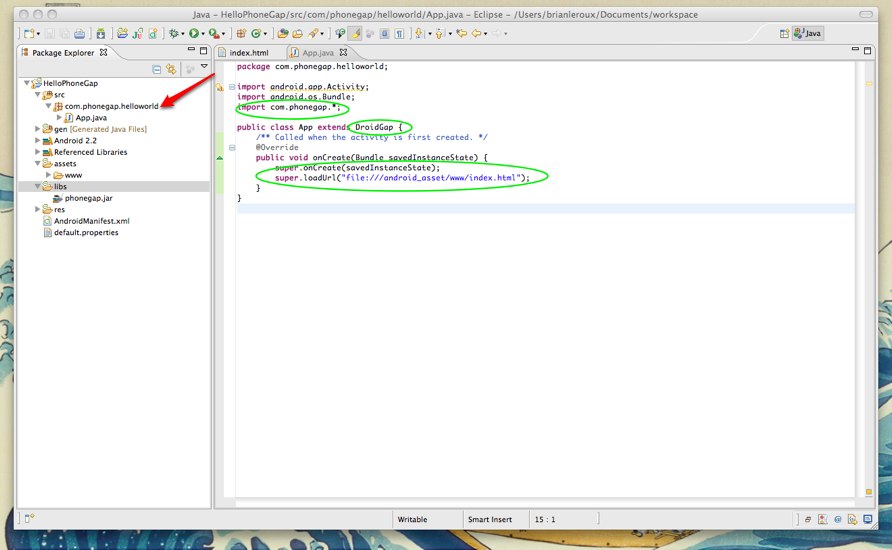
- 在这里你可能会遇到Eclipse找不到phonegap-1.0.0.jar的错误。在这种情况下,右键单击/libs文件夹找到Build Paths/ > Configure Build Paths。然后在Libraries标签页中添加phonegap-1.0.0.jar到项目中。如果Eclipse不是很稳定,你需要点击F5刷新一次项目。
- 右键单击AndroidManifest.xml并选择Open With > Text Editor。
- 将下面的权限设置拷贝到versionName之后:(如下图)
<supports-screens
android:largeScreens="true"
android:normalScreens="true"
android:smallScreens="true"
android:resizeable="true"
android:anyDensity="true"
/>
<uses-permission android:name="android.permission.CAMERA" />
<uses-permission android:name="android.permission.VIBRATE" />
<uses-permission android:name="android.permission.ACCESS_COARSE_LOCATION" />
<uses-permission android:name="android.permission.ACCESS_FINE_LOCATION" />
<uses-permission android:name="android.permission.ACCESS_LOCATION_EXTRA_COMMANDS" />
<uses-permission android:name="android.permission.READ_PHONE_STATE" />
<uses-permission android:name="android.permission.INTERNET" />
<uses-permission android:name="android.permission.RECEIVE_SMS" />
<uses-permission android:name="android.permission.RECORD_AUDIO" />
<uses-permission android:name="android.permission.MODIFY_AUDIO_SETTINGS" />
<uses-permission android:name="android.permission.READ_CONTACTS" />
<uses-permission android:name="android.permission.WRITE_CONTACTS" />
<uses-permission android:name="android.permission.WRITE_EXTERNAL_STORAGE" />
<uses-permission android:name="android.permission.ACCESS_NETWORK_STATE" /> <uses-permission android:name="android.permission.GET_ACCOUNTS" />- Add
android:configChanges="orientation|keyboardHidden"to the activity tag in AndroidManifest. (view image below) - Add a second activity under you appliction tag in AndroidManifest. (view image below)
<activity android:name="com.phonegap.DroidGap" android:label="@string/app_name" android:configChanges="orientation|keyboardHidden"> <intent-filter> </intent-filter> </activity>
4. Hello World
在 “/assets/www”目录中新建文件index.html ,并粘贴如下代码:
<!DOCTYPE HTML>
<html>
<head>
<title>PhoneGap</title>
<script type="text/javascript" charset="utf-8" src="phonegap.js"></script>
</head>
<body>
<h1>Hello World</h1>
</body>
</html>
- 最后运行这个安卓程序就可以了!!!!
phonegap在eclipse上的安装的更多相关文章
- 在eclipse上集成安装阿里巴巴代码规约P3C插件
在eclipse上集成安装阿里巴巴代码规约P3C插件 参照网址: https://jingyan.baidu.com/article/2d5afd6923e78b85a3e28e5e.html 首先进 ...
- PhoneGap 在eclipse上开发Android程序
本文将记录在Eclipes上开发Android App,在使用的方法是Hybrid App(混合模式移动应用), 由于本人的工作需要,将要开发在车间使用的数据录入程序,但是其中有非常多的逻辑验证和判断 ...
- Spring Tool Suit 在Eclipse上的安装
登录http://spring.io/tools/sts/all 下载所需的Spring Tool Suit安装包 我用的是springsource-tool-suite-3.6.1.RELEASE- ...
- Eclipse Mars 2安装Drools6.4插件(Drools and jBPM tools)时无法安装JBoss Runtime Drools Detector
在eclipse上本地安装Drools6.4Final的时候出现两个组件无法正常安装的情况,具体组件如下: 具体的提示信息为: Cannot complete the install because ...
- Eclipse上安装GIT插件EGit及使用
一.Eclipse上安装GIT插件EGit Eclipse的版本eclipse-java-helios-SR2-win32.zip(在Eclipse3.3版本找不到对应的 EGit插件,无法安装) E ...
- eclipse上安装abator插件
下面是我看了网上的有一点需要强调:网址 http://ibatis.apache.org/tools/abator然后全选,然后是==>重启就好了 eclipse上安装abator插件参考:ht ...
- [Eclipse][SVN] 在eclipse上安装SVN
以前装过好多次SVN,始终没有一次把安装过程记录下来,这次新装机器,安装SVN插件时一波三折,记录下来免得以后又忘记了. 方法一: 1. 直接通过后台添加URL通过互联网进行安装,直接上图: 2. ...
- Ubuntu上如何安装Java,Eclipse,Pydev,Python(自带,不用装),BeautifulSoup
如何安装Java,如果出于编程的需要安装Java,需要安装的是JDK,而不仅仅是JRE,下面说说如何在Ubuntu下如何安装JDK:只有两步,1.下载并解压,2.配置环境变量1.下载并解压:下载地址: ...
- Eclipse上安装GIT插件EGit
一.Eclipse上安装GIT插件EGit Eclipse的版本eclipse-java-helios-SR2-win32.zip(在Eclipse3.3版本找不到对应的 EGit插件,无法安装) E ...
随机推荐
- Jenkins 的插件AnsiColor 多颜色
- js 防止重复提交表单
var addFlag = true; function addQuestion(){ if(!addFlag){ return; } addFlag = false; //执行更新操作 jQuery ...
- 54. spring boot日志升级篇—logback【从零开始学Spring Boot】
在<44. Spring Boot日志记录SLF4J>章节中有关相关的介绍,这里我们在深入的了解下logback框架. 为什么要使用logback ? --在开发中不建议使用System. ...
- 如何用Bugzilla系统管理产品研发过中相关需求和bug
目 录 1.Bug处理流程及状态说明 2.bugs字段说明 3.查询报表的使用 4.bug系统与需求系统的整合 5.流程和用户权限 1. Bug处理流程及状态说明(1) BUG状态流程图 BUG的状态 ...
- 如何用js往html页面拼接一个div包括div的各种常用属性
$("#div").append("<table><tr align='center'>" +"<td >&quo ...
- Cocoa -- 添加和移除开机启动项
一 写plist到~/Library/LaunchAgents/ 目录下 // 配置开机默认启动 -(void)installDaemon{ NSString* launchFolder = [NSS ...
- CentOS设置程序开机启动程序/服务的方法(转)
注意:CentOS 6下基本没什么问题,CentOS 7估计不一定能行. 在CentOS系统下,主要有两种方法设置自己安装的程序开机启动. 1.把启动程序的命令添加到/etc/rc.d/rc.loca ...
- 使用 IAsyncResult 调用异步方法
.NET Framework 和第三方类库中的类型可以提供允许应用程序在主应用程序线程之外的线程中执行异步操作的同时继续执行的方法.下面几部分介绍了在调用使用 IAsyncResult 设计模式的异步 ...
- TDSTCPServerTransport 的Filters
TDSTCPServerTransport 的Filters TDSTCPServerTransport 的 Filter 属性,可以对传递的数据进行加密,压缩,再修改等,有 点注入的概念.默认情况下 ...
- Redhat 6.1安装ArcGIS Server10.1
http://blog.csdn.net/linghe301/article/details/7762985 操作环境:Redhat 6.1 Linux 安装ArcGIS Server10.1之前,还 ...