
java线程池 多线程 搜索包含关键字的文件路径
package org.jimmy.searchfile20180807.main;

public class ThreadMain implements Runnable{

    private int taskNum;

    private String searchDirPath;

    private String keyWords;

    public ThreadMain(int taskNum, String searchDirPath, String keyWords){

        this.taskNum = taskNum;

        this.searchDirPath = searchDirPath;

        this.keyWords = keyWords;

    }

    @Override

    public void run() {

        System.out.println("正在执行task " + taskNum);

        System.out.println("当前关键字:" + keyWords);

        SearchMain searchMain = new SearchMain(searchDirPath, keyWords);

        searchMain.search();

        System.out.println("task " + taskNum + "执行完毕");

    }

}
package org.jimmy.searchfile20180807.main;

import java.io.File;

import java.io.FileInputStream;

import java.io.FileOutputStream;

public class SearchMain {

    private String searchDirPath;

    private String keyWords;

    public SearchMain(String searchDirPath, String keyWords){

        this.searchDirPath = searchDirPath;

        this.keyWords = keyWords;

    }

    //计算文件数量

    public static int count = 0;

    public static FileOutputStream fos = null;

    /**

     * Author: Yuxin.Yang(Jimmy)

     * Time: 2018年8月7日 上午9:02:45

     * Detail: 查询包含关键字的文件的路径

     */

    public void search(){

        File file = new File(searchDirPath);

        File[] files = file.listFiles();

        getFiles(files);

        System.out.println("count:" + count);

    }

    //递归搜索文件并写入搜索到的路径到文件

    public void getFiles(File[] files){

        FileInputStream fis = null;

        try{

            for(File file : files){

                count++;

                if(file.isDirectory()){

                    getFiles(file.listFiles());

                }else{

                    StringBuffer sb = new StringBuffer();

                    byte[] bytes = new byte[1024];

                    fis = new FileInputStream(file);

                    int len = 0;

                    while((len = fis.read(bytes)) != -1){

                        sb.append(new String(bytes, 0, len, "utf-8"));

                    }

                    fis.close();

                    if(sb.indexOf(keyWords) >= 0){

                        System.out.println("包含关键字(" + keyWords + ")的文件路径:" + file.getAbsolutePath());

                        fos.write(("包含关键字(" + keyWords + ")的文件路径:" + file.getAbsolutePath() + System.lineSeparator()).getBytes());

                        fos.flush();

                    }

                }

            }

        }catch(Exception e){

            e.printStackTrace();

        }

    }

}
package org.jimmy.searchfile20180807.ui;

import java.awt.Dimension;

import java.awt.Toolkit;

import java.awt.event.ActionEvent;

import java.awt.event.ActionListener;

import java.io.File;

import java.io.FileOutputStream;

import java.io.IOException;

import java.util.concurrent.LinkedBlockingQueue;

import java.util.concurrent.ThreadPoolExecutor;

import java.util.concurrent.TimeUnit;

import javax.swing.JButton;

import javax.swing.JFrame;

import javax.swing.JLabel;

import javax.swing.JPanel;

import javax.swing.JScrollPane;

import javax.swing.JTextArea;

import javax.swing.SwingUtilities;

import org.jimmy.searchfile20180807.main.SearchMain;

import org.jimmy.searchfile20180807.main.ThreadMain;

public class SearchUi {

    public static void main(String[] args){

        SwingUtilities.invokeLater(new Runnable() {

            @Override

            public void run() {

                SearchUi searchUi = new SearchUi();

                searchUi.init();

            }

        });

    }

    public void init(){

        JFrame.setDefaultLookAndFeelDecorated(true);

        JFrame frame = new JFrame("搜索文件路径");

        Dimension dimension = Toolkit.getDefaultToolkit().getScreenSize();

        frame.setBounds(0, 0, (int) dimension.getWidth(), (int) dimension.getHeight());

        frame.setLayout(null);

        frame.setDefaultCloseOperation(JFrame.EXIT_ON_CLOSE);

        int scrollPaneWidth = (int) dimension.getWidth() - 15;

        int scrollPaneHeight = (int) dimension.getHeight() - 35;

        JPanel panel = new JPanel();

        panel.setLayout(null);

        panel.setBounds(0, 0, (int) dimension.getWidth(), (int) dimension.getHeight());

        //添加滚动条

        JScrollPane scrollPane = new JScrollPane(panel);

        scrollPane.setBounds(0, 0, scrollPaneWidth, scrollPaneHeight);

        scrollPane.setHorizontalScrollBarPolicy(JScrollPane.HORIZONTAL_SCROLLBAR_ALWAYS);

        scrollPane.setVerticalScrollBarPolicy(JScrollPane.VERTICAL_SCROLLBAR_ALWAYS);

        frame.add(scrollPane);

        //初始坐标

        int x = 0;

        int y = 0;

        //加上输入要搜索的文件夹路径的提示文本

        int height = 30;

        JLabel searchDirPathLabel = new JLabel("请输入要搜索的文件夹的路径:");

        searchDirPathLabel.setBounds(x, y, scrollPaneWidth, height);

        searchDirPathLabel.setHorizontalAlignment(JLabel.CENTER);

        panel.add(searchDirPathLabel);

        //加上输入要搜索的文件夹路径的文本框

        y += height + 20;

        height = 100;

        final JTextArea searchDirPathText = new JTextArea();

        searchDirPathText.setBounds(x, y, scrollPaneWidth, height);

        panel.add(searchDirPathText);

        //加上输入路径的文本框的提示文本

        y += height + 20;

        height = 30;

        JLabel searchedFilePathLabel = new JLabel("请输入生成的搜索结果文件的路径:");

        searchedFilePathLabel.setBounds(x, y, scrollPaneWidth, height);

        searchedFilePathLabel.setHorizontalAlignment(JLabel.CENTER);

        panel.add(searchedFilePathLabel);

        //加上输入路径的文本框

        y += height + 20;

        height = 100;

        final JTextArea searchedFilePathText = new JTextArea();

        searchedFilePathText.setBounds(x, y, scrollPaneWidth, height);

        panel.add(searchedFilePathText);

        //加上输入关键字的文本框的提示文本

        y += height + 20;

        height = 30;

        JLabel keyWordsLabel = new JLabel("请输入需要搜索的关键字(如果有多个,用英文半角逗号隔开):");

        keyWordsLabel.setBounds(x, y, scrollPaneWidth, height);

        keyWordsLabel.setHorizontalAlignment(JLabel.CENTER);

        panel.add(keyWordsLabel);

        //加上输入关键字的文本框

        y += height + 20;

        height = 100;

        final JTextArea keyWordsText = new JTextArea();

        keyWordsText.setBounds(x, y, scrollPaneWidth, height);

        panel.add(keyWordsText);

        //加上搜索按钮

        y += height + 20;

        height = 30;

        int searchBtnWidth = 100;

        JButton searchBtn = new JButton("搜索");

        searchBtn.setBounds((scrollPaneWidth - searchBtnWidth) / 2, y, searchBtnWidth, height);

        searchBtn.setHorizontalAlignment(JButton.CENTER);

        searchBtn.addActionListener(new ActionListener() {

            @Override

            public void actionPerformed(ActionEvent e) {

                String searchDirPath = searchDirPathText.getText().replaceAll(" ", "");

                String searchedFilePath = searchedFilePathText.getText().replaceAll(" ", "");

                File searchedFile = new File(searchedFilePath);

                FileOutputStream fos = null;

                try{

                    fos = new FileOutputStream(searchedFile);

                    if(!searchedFile.exists()){

                        searchedFile.createNewFile();

                    }

                    SearchMain.fos = fos;

                }catch(Exception ex){

                    ex.printStackTrace();

                }

                String keyWordsStr = keyWordsText.getText();

                String[] keyWordsArr = null;

                if(keyWordsStr.indexOf(",") > 0){

                    keyWordsArr = keyWordsStr.split(",");

                }else{

                    keyWordsArr = new String[]{ keyWordsStr };

                }

                LinkedBlockingQueue<Runnable> workQueue = new LinkedBlockingQueue<Runnable>();

                ThreadPoolExecutor executor = new ThreadPoolExecutor(3, 100, 3600, TimeUnit.SECONDS, workQueue);

                for(int i = 0; i < keyWordsArr.length; i++){

                    String keyWords = keyWordsArr[i];

                    ThreadMain threadMain = new ThreadMain(i, searchDirPath, keyWords);

                    executor.execute(threadMain);

                }

                if(executor.isTerminated() && SearchMain.fos != null){

                    try {

                        SearchMain.fos.close();

                    } catch (IOException ex) {

                        ex.printStackTrace();

                    }

                }

            }

        });

        panel.add(searchBtn);

        //需要手动设置宽度高度(鼠标操作)

        //frame.pack();

        frame.setVisible(true);

    }

}
这次改了一个很关键的参数.
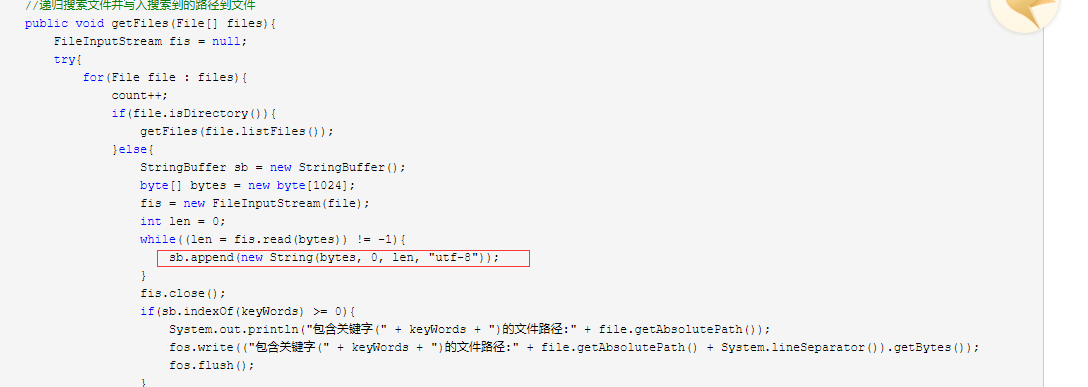
之前这里没加编码格式,结果用中文搜索在MyEclipse中可以搜索出来,打成jar包或exe之后搜索不出来.
原因:
因为MyEclipse我设置了默认的编码格式是utf-8.
java线程池 多线程 搜索包含关键字的文件路径的更多相关文章
- java线程池 多线程搜索文件包含关键字所在的文件路径
文件读取和操作类 import java.io.File; import java.io.FileInputStream; import java.io.FileOutputStream; publi ...
- Ubuntu 查找文件夹中内容包含关键字的文件,路径为当前文件夹
From CSDN http://blog.csdn.net/lizhenmingdirk/article/details/44834997 grep -rl "keyword" ...
- Java线程和多线程(十二)——线程池基础
Java 线程池管理多个工作线程,其中包含了一个队列,包含着所有等待被执行的任务.开发者可以通过使用ThreadPoolExecutor来在Java中创建线程池. 线程池是Java中多线程的一个重要概 ...
- Java线程状态、线程start方法源码、多线程、Java线程池、如何停止一个线程
下面将依次介绍: 1. 线程状态.Java线程状态和线程池状态 2. start方法源码 3. 什么是线程池? 4. 线程池的工作原理和使用线程池的好处 5. ThreadPoolExecutor中的 ...
- Java多线程和并发(十二),Java线程池
目录 1.利用Executors创建线程的五种不同方式 2.为什么要使用线程池 3.Executor的框架 4.J.U.C的三个Executor接口 5.ThreadPoolExecutor 6.线程 ...
- 【Java 多线程】Java线程池类ThreadPoolExecutor、ScheduledThreadPoolExecutor及Executors工厂类
Java中的线程池类有两个,分别是:ThreadPoolExecutor和ScheduledThreadPoolExecutor,这两个类都继承自ExecutorService.利用这两个类,可以创建 ...
- Java线程池的几种实现 及 常见问题讲解
工作中,经常会涉及到线程.比如有些任务,经常会交与线程去异步执行.抑或服务端程序为每个请求单独建立一个线程处理任务.线程之外的,比如我们用的数据库连接.这些创建销毁或者打开关闭的操作,非常影响系统性能 ...
- Java线程池的原理及几类线程池的介绍
刚刚研究了一下线程池,如果有不足之处,请大家不吝赐教,大家共同学习.共同交流. 在什么情况下使用线程池? 单个任务处理的时间比较短 将需处理的任务的数量大 使用线程池的好处: 减少在创建和销毁线程上所 ...
- Java线程与多线程教程
本文由 ImportNew - liken 翻译自 Journaldev. Java线程是执行某些任务的轻量级进程.Java通过Thread类提供多线程支持,应用可以创建并发执行的多个线程. 应用 ...
随机推荐
- I.MX6 su.c 测试
/************************************************************************* * I.MX6 su.c 测试 * 说明: * 今 ...
- bzoj 2169 连边 —— DP+容斥
题目:https://www.lydsy.com/JudgeOnline/problem.php?id=2169 就和这篇博客说的一样:https://blog.csdn.net/WerKeyTom_ ...
- 【182】SeaDAS 相关处理
load:Command mode procedure for reading data and data attributes into memory and making it available ...
- java笔记之IO4文本复制
* 复制文本文件. * * 数据源:从哪里来 * a.txt -- 读取数据 -- FileInputStream * * 目的地:到哪里去 * b.txt -- 写数据 -- FileOut ...
- 在Visual studio 中解除 TFS 的账号绑定
在Visual Studio中, 只要使用了TFS, 就会要求输入用户名密码验证 . 但是一旦点击验证对话框下部的:记住用户名密码 以后都不能再修改用户名了. 而且重装Visual Studio 听说 ...
- [App Store Connect帮助]七、在 App Store 上发行(3.2)提交至“App 审核”:查看 App 状态历史记录
您可以查看您 App 的某一版本的 App 状态历史记录.在历史记录表中的每一行都包含 App 状态.App 状态更改时间,以及更改的发起人.使用此信息追踪“App 审核”流程中的 App. 若想在 ...
- nc的基本用法
nc(netcat) 被誉为网络安全界的‘瑞士军刀’,可以用于完成几乎涉及TCP.UDP或者Unix域套接字的任何事.它可以打开TCP连接,发送UDP报文,在任意的TCP和UDP端口监听,进行端口扫描 ...
- Canvas 入门案例
五. Canvas 入门案例 1. canvas 圆形绘制 <!DOCTYPE html> <html lang="en"> <head> ...
- 【SpringCloud构建微服务系列】微服务网关Zuul
一.为什么要用微服务网关 在微服务架构中,一般不同的微服务有不同的网络地址,而外部客户端(如手机APP)可能需要调用多个接口才能完成一次业务需求.例如一个电影购票的手机APP,可能会调用多个微服务的接 ...
- iOS 计算字符串显示宽高度
ObjC(Category of NSString): - (CGSize)getSizeWithFont:(UIFont *)font constrainedToSize:(CGSize)size{ ...