
UIAlertController的使用,代替UIAlertView和UIActionSheet
在iOS8以后,UIAlertView就开始被抛弃了。
取而代之是UIAlertController
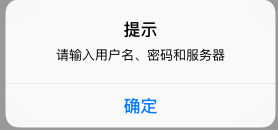
以前是警示框这样写:
UIAlertView *alert = [[UIAlertView alloc] initWithTitle:@"提示" message:@"请输入用户名、密码和服务器" delegate:nil cancelButtonTitle:@"确定" otherButtonTitles:nil, nil];

        [alert show];
效果如图:
现在是这样写:
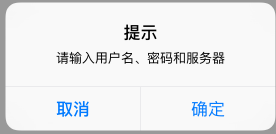
        UIAlertController *alertController = [UIAlertController alertControllerWithTitle:@"提示" message:@"请输入用户名、密码和服务器" preferredStyle:UIAlertControllerStyleAlert];

        UIAlertAction *cancelAction = [UIAlertAction actionWithTitle:@"取消" style:UIAlertActionStyleCancel handler:^(UIAlertAction * _Nonnull action) {

            NSLog(@"点击了取消按钮");

        }];

        UIAlertAction *OKAction = [UIAlertAction actionWithTitle:@"确定" style:UIAlertActionStyleDefault handler:^(UIAlertAction * _Nonnull action) {

            NSLog(@"点击了确定按钮");

        }];

        [alertController addAction:cancelAction];

        [alertController addAction:OKAction];

        [self presentViewController:alertController animated:YES completion:nil];
效果如图:
添加多个Action会自动向下排列
上面代码中再添加一个
UIAlertAction *DesAction = [UIAlertAction actionWithTitle:@"Destory" style:UIAlertActionStyleDestructive handler:^(UIAlertAction * _Nonnull action) {

            NSLog(@"点击了Destory按钮");

        }];

[alertController addAction:DesAction];
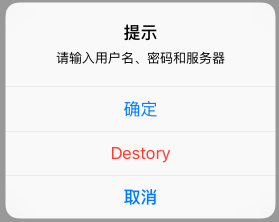
如果提示菜单中有“取消”按钮的话,那么它永远都会出现在菜单的底部
//冻结确定按钮

        OKAction.enabled = NO;
添加文本框
[alertController addTextFieldWithConfigurationHandler:^(UITextField * _Nonnull textField) {

            textField.placeholder = @"Email";

            textField.keyboardType = UIKeyboardTypeEmailAddress;

        }];

[alertController addTextFieldWithConfigurationHandler:^(UITextField * _Nonnull textField) {

            textField.placeholder = @"Password";

            textField.secureTextEntry = YES;

        }];
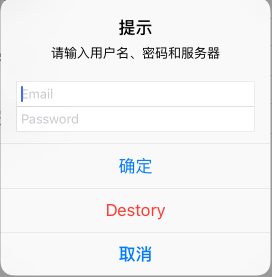
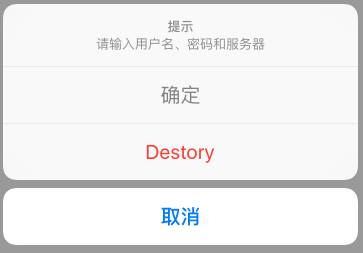
UIActionSheet也用这个取代了。。方法是在初始化的时候把类型改一下就OK。但是UIActionSheet是不能加文本框的!!
UIAlertController *alertController = [UIAlertController alertControllerWithTitle:@"提示" message:@"请输入用户名、密码和服务器" preferredStyle:UIAlertControllerStyleActionSheet];
P.S 用通知监听用户名和密码输入, 这里有篇介绍得很好的文章:
http://blog.csdn.net/lengshengren/article/details/39896037
UIAlertController的使用,代替UIAlertView和UIActionSheet的更多相关文章
- iOS8以后UIAlertView和UIActionSheet两种alert页面都将通过UIAlertController来创建
1. Important: UIAlertView is deprecated in iOS 8. (Note that UIAlertViewDelegate is also deprecated. ...
- UIAlertView、UIActionSheet兼容iOS8
链接地址:http://blog.csdn.net/nextstudio/article/details/39959895?utm_source=tuicool 1.前言 iOS8新增了UIAlert ...
- UIAlertView及UIActionSheet 在ios8极其以下版本的兼容问题解决方案
本文转载至 http://www.aichengxu.com/view/35326 UIAlertView及UIActionSheet在ios8中被放弃,其功能将完全由UIAlertControlle ...
- iOS 8 中 UIAlertView 和 UIActionSheet 河里去了?
iOS 8 中 UIAlertView 和 UIActionSheet 河里去了? 太阳火神的漂亮人生 (http://blog.csdn.net/opengl_es) 本文遵循"署名-非商 ...
- UIAlertView、 UIActionSheet
一.UIAlertView. UIActionSheet都是ios系统自带的弹出式对话框,当UIAlertView或UIActionSheet弹出来时用户无法与应用界面中的其它控件交互,UIAlert ...
- iOS开发——UI篇Swift篇&UIAlertView/UIActionSheet
UIAlertView/UIActionSheet UIAlertView //一个按钮的提醒 @IBAction func oneButtonAler() { //创建单一按钮提醒视图 let on ...
- 用block将UIAlertView与UIActionSheet统一起来
用block将UIAlertView与UIActionSheet统一起来 效果 1. 将代理方法的实例对象方法转换成了类方法使用 2. 要注意单例block不要长期持有,用完就释放掉 源码 https ...
- iOS:简单使用UIAlertVIew和UIActionSheet
做iOS开发的同学想必都用过UIAlertVIew或者UIActionSheet.UIAlertVIew 可以弹出一个出现在屏幕中间的提示视图,给用户展示信息,并让用户自己选择操作,UIActionS ...
- iOS - 提示信息 - UIAlertView、UIActionSheet、UIAlertController的实际应用
1.UIAlertView(屏幕中央弹出框)(不需要服从代理) UIAlertView * alertView = [[UIAlertView alloc] initWithTitle:@" ...
随机推荐
- Linux下进程信息的深入分析
这里我们主要介绍进程的状态,进程的状态可以通过/proc/PID/status来查看,也可以通过/proc/PID/stat来查看. 如果说到工具大家用的最多的ps也可以看到进程的信息.这里我们通过/ ...
- protobuf 一个c++示例
http://wangjunle23.blog.163.com/blog/static/11783817120126155282640/ 1.在.proto文件中定义消息格式 2.使用prot ...
- 使用 maskView 设计动画
1.maskView(maskLayer) 基本原理 :可类比于多张png图片叠加遮罩 2.maskView配合CAGradientLayer,alpha通道图片的使用.maskView是iOS8以上 ...
- Python爬虫开发【第1篇】【爬虫案例】
案例一:网站模拟登录 # douban.py from selenium import webdriver from selenium.webdriver.common.keys import Key ...
- 10601 - Cubes(Ploya)
UVA 10601 - Cubes 题目链接 题意:给定正方体12条棱的颜色,要求用这些棱能组成多少不同的正方体 思路:利用ploya定理去求解,分类讨论,正方体一共24种旋转.相应的旋转方式有4种: ...
- [IT学习]阿铭Linux 微信公众号 每日一题 解析
1.shell习题171020公布的昨日答案 习题171019 - 打印正方形 #!/bin/bash read -p "please input a number:" sum a ...
- Educational Codeforces Round 17 D. Maximum path DP
题目链接:http://codeforces.com/contest/762/problem/D 多多分析状态:这个很明了 #include<bits/stdc++.h> using na ...
- Win7下安装iMac系统
首先是灰常激动啊,一下午的努力最终在自己华硕的笔记本上安装了mac系统. 先上一个成果截图 watermark/2/text/aHR0cDovL2Jsb2cuY3Nkbi5uZXQveXl4aGh4/ ...
- XMU 1612 刘备闯三国之桃园结义 【二分】
1612: 刘备闯三国之桃园结义 Time Limit: 1000 MS Memory Limit: 128 MBSubmit: 181 Solved: 12[Submit][Status][We ...
- ubuntu切换中英文通用方法,ubuntu中文语言
1:点击桌面右上角的齿轮,选择“system settings”进入系统设置界面