
[翻译] FreeStreamer 在线流媒体播放

FreeStreamer
https://github.com/muhku/FreeStreamer
Introduction
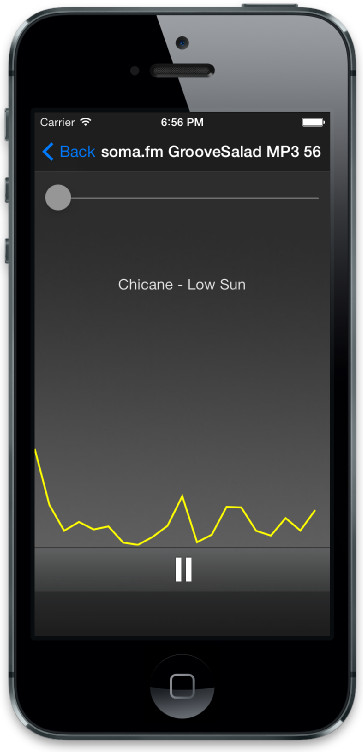
FreeStreamer is an audio player engine for iOS and OS X, designed for playing audio streams. The engine has a minimal UI for demonstration. Respectfully, see the FreeStreamerDesktop directory for OS X, and,FreeStreamerMobile for the iOS UI.
FreeStreamer 是一个为 iOS 和 OS X 编写的音频播放引擎,用来播放音频流的。这个引擎有一个极简单的 UI 用来示范。你直接查看为 OS X 编写的 FreeStreamerDesktop ,以及为 iOS 编写的 FreeStreamerMobile 。
The engine is written in C++ and the FSAudioController Objective-C class wraps the implementation.
这是用 C++ 写的引擎,用 FSAudioController 类来封装了实现。
FreeStreamer has the following features:
FreeStreamer 有着如下的一些特性:
- Fast and low memory footprint (no overhead of Objective-C method calls)
- Supports ShoutCast and IceCast audio streams + standard HTTP
- Can detect the stream type based on the content type
- Supports ShoutCast metadata
- Supports interruptions (for example a phone call during playing the stream)
- Supports backgrounding
- Supports a subset of the ID3v2 tag specification
- Supports Podcast RSS feeds
- The stream contents can be stored in a file (see the OS X application for an example)
- It is possible to access the PCM audio samples (useful if you want your own audio analyzer, for instance)
- Includes a frequency analyzer and visualization, see Additions and the iOS application
- 快速低耗的打印信息(不是 OC 上层方法的调用)
- 支持 ShoutCast 和 IceCast 音频流 + 标准 HTTP
- 能检测流类型,基于包的内容
- 支持 ShoutCast 元数据
- 支持中断(例如,播放音频流的时候打进来了一个电话)
- 支持后台
- 支持 ID3v2 标签子集说明
- 支持广播 RSS feed
- 流内容可以保存到文件中(看看 OS X 应用的例子)
- 他可以处理 PCM 音频
- 包含一个频率分析器并可视化,可以参考 Additions 的例子
API documentation
See here.
Using the player in your own project
Please follow the following steps to use the player in your own project:
请按照以下的步骤来把它添加到你的工程当中:
Make sure you have the following frameworks linked to your project:(包含如下的框架)
- CFNetwork.framework
- AudioToolbox.framework
- AVFoundation.framework
- libxml2.dylib (add
$(SDKROOT)/usr/include/libxml2to the header search path, if not found) - MediaPlayer.framework (iOS only)
Add the Common and astreamer directories to your project. Try building the project now and it should compile successfully.(把文件夹 Common 和 astreamer)添加到你的工程当中,试着编译一下看会不会出错。
iOS only: If you want to support background audio, add App plays audio to the target's Required background modes. You can find the property by clicking on the target on Xcode and opening the Info tab.仅支持 iOS :如果你想支持后台音乐,你可以在 Xcode 的 info tab 中找到相关信息。
You can now stream an audio file like this. Declare the stream in your header file:
你可以这么使用,在你的头文件中声明一下:
@class FSAudioStream;

@interface MyClass : NSObject {

    FSAudioStream *_audioStream;

}
Initialize and use the stream in your implementation:
在你的实现文件中初始化:
#import "FSAudioStream.h"

_audioStream = [[FSAudioStream alloc] init];

[_audioStream playFromURL:[NSURL URLWithString:@"http://www.example.com/audio_file.mp3"]];
Note that FSAudioStream must exist during the playback of the stream. Do not declare the class as a local variable of a method or the stream will be deallocated and will not play.
注意,FSAudioStream 必须在播放音频的期间一直存在。不要把它定义成一个实例变量,一个 alloc init 只能播放一个流媒体。
Some servers may send an incorrect MIME type. In this case, FreeStreamer may not be able to play the stream. If you want to avoid the content-type checks (that the stream actually is an audio file), you can set the following property:
许多服务器也许会给你发送错误的 MIME 类型。这种情况下,FreeStreamer 也许就不能播放这个音频了。如果你想避免 content-type 检查(但是这个 steam 依然是音频文件),你可以设置如下的属性:
audioStream.strictContentTypeChecking = NO;

// Optionally, set the content-type where to fallback to

audioStream.defaultContentType = "audio/mpeg";
For streaming playlists, you need to use the FSAudioController.h class. The class has some additional logic to resolve the playback URLs. Again, declare the class:
为了设置播放列表,你可以使用 FSAudioController.h 类。这个类有着一些额外的逻辑来解决回放问题,声明使用与上面的类似:
@class FSAudioController;

@interface MyClass : NSObject {

    FSAudioController *_audioController;

}
And use it:
这么使用:
#import "FSAudioStream.h"

_audioController = [[FSAudioController alloc] init];

_audioController.url = @"http://www.example.com/my_playlist.pls";

[_audioController play];
It is also possible to check the exact content of the stream by using the FSCheckContentTypeRequest.h andFSParsePlaylistRequest.h classes:
你也可以精确的检查包的内容,使用 FSCheckContentTypeRequest.h 和 FSParsePlaylistRequest.h 这两个类:
FSCheckContentTypeRequest *request = [[FSCheckContentTypeRequest alloc] init];

request.url = @"http://www.example.com/not-sure-about-the-type-of-this-file";

request.onCompletion = ^() {

    if (self.request.playlist) {

        // The URL is a playlist; now do something with it...

    }

};

request.onFailure = ^() {

};

[request start];
That's it! For more examples, please take a look at the example project. For instance, you may want to observe notifications on the audio stream state.
就这些了!更多例子,请参考示例工程。例如,你也许需要监测视频流的状态。
FAQ
See here.
Debugging
To enable debug logging, enable the following line in astreamer/audio_stream.cpp:
#define AS_DEBUG 1
After enabling the line, compile the code and run it.
It is also possible to check the lastError property in the FSAudioStream class:
NSLog(@"Last error code: %i", audioStream.lastError);
Or if you are using the FSAudioController class, then:
NSLog(@"Last error code: %i", audioController.stream.lastError);
Reporting bugs and contributing
For code contributions, please create a pull request in Github.
For bugs, please create a Github issue. I don't have time for private email support, so usually the best way to get help is to interact in Github.
[翻译] FreeStreamer 在线流媒体播放的更多相关文章
- iOS中 流媒体播放和下载 韩俊强的博客
每日更新关注:http://weibo.com/hanjunqiang 新浪微博 iOS中关于流媒体的简介:介于下载本地播放与实时流媒体之间的一种播放形式,下载本地播放必须全部将文件下载完成后才能播 ...
- python制作查找单词翻译的脚本
本人由于英语渣,在linux底下经常看文档,但是有没有想有道词典这种软件,所以遇到不懂的单词只能手动复制粘贴在网上查找,这样就很不方便,学了python之后,就试着自己尝试下个在命令行下查找单词翻译的 ...
- ios流媒体
http://my.oschina.net/CgShare/blog/302303 渐进式下载(伪流媒体) 介于下载本地播放与实时流媒体之间的一种播放形式,下载本地播放必须全部将文件下载完成后才能播放 ...
- Python中urlopen()介绍
#以下介绍是基于Python3.4.3 一. 简介 urllib.request.urlopen()函数用于实现对目标url的访问. 函数原型如下:urllib.request.urlopen( ...
- 树莓派 (Raspberry Pi) 是什么?普通人怎么玩?(私有云NAS也会有;上传到百度盘的功能nas也有)
作者:王震宇链接:https://www.zhihu.com/question/20859055/answer/54734499来源:知乎著作权归作者所有,转载请联系作者获得授权. 我两年前买的(约2 ...
- 实用chrome插件
2015年最实用的9款chrome插件 随着14年chrome浏览器的市场超过IE浏览器,chrome凭借它强劲性能和出色的使用体验真正的登上了平民级的殿堂.今天小编就为大家推荐9款自己常用的chro ...
- MHA官方文档翻译
英文官方文档 http://code.google.com/p/mysql-master-ha/wiki/TableOfContents?tm=6 转载请注明出处 Overview MHA能够在较短的 ...
- 使用HttpClient进行Post通信
---------------siwuxie095 首先到 Apache官网 下载相关的库文件 Apache官网:http://www.apac ...
- iOS 7系列译文:认识 TextKit
OS 7:终于来了,TextKit. 功能 所以咱们到了.iOS7 带着 TextKit 登陆了.咱们看看它可以做什么!深入之前,我还想提一下,严格来说,这些事情中的大部分以前都可以做.如果你 ...
随机推荐
- python连接hbase
安装HBase HBase是一个构建在HDFS上的分布式列存储系统,主要用于海量结构化数据存储.这里,我们的目标只是为Python访问HBase提供一个基本的环境,故直接下载二进制包,采用单机安装.下 ...
- require demo 记录备份
预览地址 http://127.0.0.1:8020/requireDemo/myNEW/index.html 注意 远程的 非模块的 empty: demo2
- Rookey.Frame之实体FluentValidation验证
昨天给大家介绍了Rookey.Frame框架的实体设计,今天继续跟大家分享实体的FluentValidation验证,在Rookey.Frame框架中可以设置多种验证方式:FluentValidati ...
- 跟我一起学WPF(0):初识WPF
WPF是什么 WPF是微软的新一代图形引擎系统,全称为Windows Presentation Foundation,从.NET3.0版本开始引入,为用户界面.2D/3D 图形.文档和媒体提供了统一的 ...
- CentOS 7.2 下 PXE+kickstart 自动安装系统
一.简单概述 1.1 Kickstart 概述 对于网络安装系统,在linux 下面最熟悉的应该就是 Kickstart 以及 cobbler.写这篇文章的目的在于我公司目前使用的就是 Kicksta ...
- Wannafly挑战赛9 B - 数一数
链接:https://www.nowcoder.com/acm/contest/71/B来源:牛客网 题目描述 设s,t为两个字符串,定义f(s,t) = t的子串中,与s相等的串的个数.如f(&qu ...
- rabbitmq学习(二) —— helloword!
rabbitmq学习当然是跟着官网走最好了,官网的教程写的很好,跟着官网教程走一遍就会有个初步了解了 下面的教程转自http://cmsblogs.com/?p=2768,该博客对官网的翻译还不错 介 ...
- 推荐:这才是你寻寻觅觅想要的 Python 可视化神器
Plotly Express 是一个新的高级 Python 可视化库:它是 Plotly.py 的高级封装,它为复杂的图表提供了一个简单的语法. 受 Seaborn 和 ggplot2 的启发,它专门 ...
- 常见的Javascript报错及解决方案
一.堆栈溢出不顾堆栈中分配的局部数据块大小,向该数据块写入了过多的数据,导致数据越界,以至于覆盖了别的数据.1.哪些操作会引起堆栈溢出?比如递归2.如何解决堆栈溢出?闭包,setTimeout,优化调 ...
- 深入理解ajax系列第三篇
前面的话 我们接收到的响应主体类型可以是多种形式的,包括字符串String.ArrayBuffer对象.二进制Blob对象.JSON对象.javascirpt文件及表示XML文档的Document对象 ...